Please put me out of my misery :-)


 Freshman Member
Hello- new to the forums.
I am currently trying to test a couple of mobile broadband solutions.
We live in a very rural area in the U.K. but have 95% line of sight to a mast with 5g.
It is about 5 miles way
I am trialing a FWA710 outdoor router and a NR510 5g router (used for its modem and 4 x 4 ability )with a Quad Pro external antenna.
Currently, we get about 26mb/s from an FTTP connection, which is degrading every year.
I found the FWA 710 surprisingly easy to -roughly-set up using the Air app.
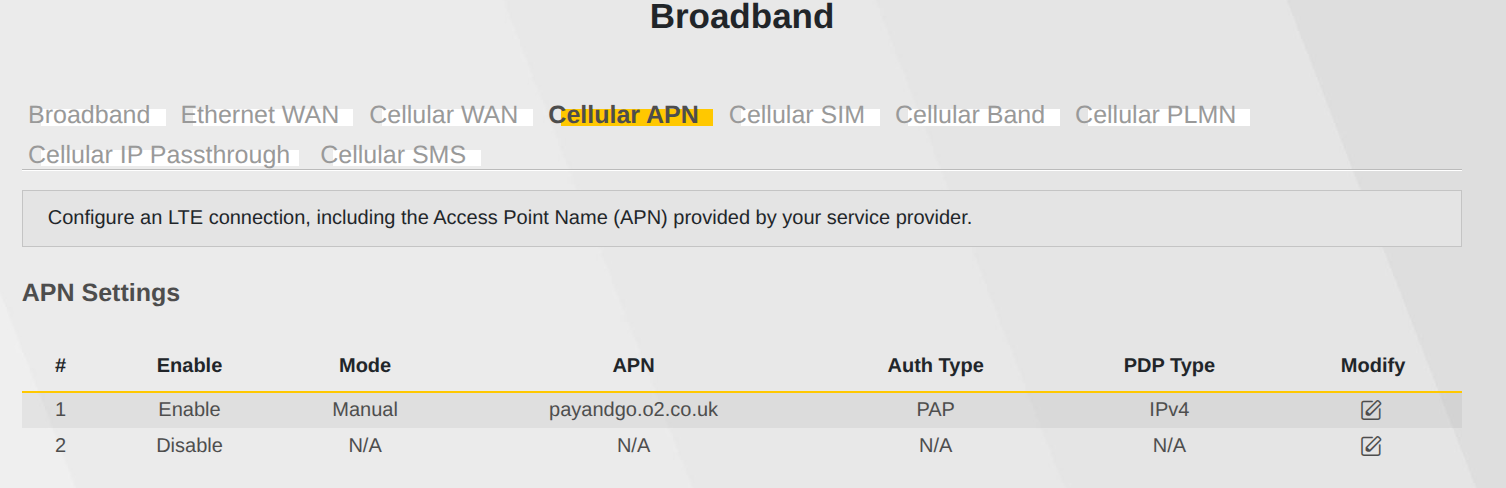
The web configuration worked pretty easily, as long as I added the APN manually.
Placed on the gable wall of the house I can get 3bars 5G, which equates to frankly amazing 200mb/s !!
Because the position seemed good, I placed the Quadpro antenna a foot below the 710 pointing in the same direction
So now to the current bain of my life, the Zyxel NR510.
At first I tried an unlocked EE nr510E.
No matter what I did, I could not get internet access.
So much so, I assumed it was faulty, and ordered another version, the Zyxel NR510.
But I find no difference :-(
So the problem is, using the same sim as the FWA710, I can access the web admin pages, and according to that, I am getting 4 bars 4g, and 3 bars 5g.
Everything looks fine, but when I connect to the wifi of the router- or use a cable - there is no internet access.
On my PC ( ubuntu) webpages just time out or complain of a dns problem
On my Android phone, it just says ''device connected/no internet access''
Now I have trawled through forums , I have reset, rebooted multiple times, disabled IPv6,added manual APN settings,disabled the firewall,updated the firmware, and other things I will remember later:-)
BUT- no matter what, I cannot get internet access.
Is there ANYONE who can relieve me of this pain:-)
Many Thanks for any help
All Replies
-
Hi @riccy,
I understand you're experiencing internet connectivity issues with your Zyxel NR510 despite showing good 5G signal strength, especially after a successful setup with the FWA710. This can be frustrating, and I'll do my best to help you troubleshoot.
Here's a step-by-step guide to help diagnose and potentially resolve the issue:
- Verify APN Settings: Even though you mentioned adding the APN manually, double-check that the APN settings on the NR510 are precisely correct for your UK mobile provider. Incorrect or missing APN parameters are a common cause for no internet access despite a strong signal.
- Check DNS Settings: You mentioned DNS problems on your PC. Ensure the NR510 is configured to use reliable DNS servers. You can try setting the DNS server directly on your connected devices (PC, Android phone) to a public DNS like Google DNS (8.8.8.8 and 8.8.4.4) to see if that bypasses the issue.
- Firmware Version: Confirm that your NR510 has the latest available firmware. Outdated firmware can sometimes lead to unexpected connectivity issues. You can usually find the latest firmware on the Zyxel support website for your specific model.
- Test with IP Passthrough: Consider configuring the NR510 in IP Passthrough mode, similar to how an outdoor router like the FWA710 might be used with an indoor gateway. This allows the cellular IP to be passed directly to a connected device, which can sometimes resolve routing issues.
- Isolate the Issue (LAN vs. Wi-Fi): Since you're experiencing no internet via both Wi-Fi and cable, this suggests the problem is with the router's connection to the internet rather than a local network issue.
To help us further investigate, please provide the following information:
- Device Model: Confirm the exact model of your Zyxel NR510 (e.g., NR510, NR510E).
- Firmware Version: The full firmware version currently installed on your NR510.
- Screenshot of Cellular Information: A screenshot of the "Cellular Info" page from the NR510's web interface, showing signal strength and other connection details.
- Network Topology: A simple diagram or description of how your NR510 is connected in your network (e.g., directly to PC, connected to another router, etc.).
- Zyxel Support Access (Nebula): If your NR510 is managed by Nebula, please enable Zyxel Support Access via
Help > Support Requestin the Nebula console and provide your Organization and Site name. This will allow our support team to directly view your cloud environment configuration, significantly shortening troubleshooting time.
This AI response aims to provide initial troubleshooting steps and identify information needed for further diagnosis. Feel free to share additional details based on the suggestions above — this will help community members offer more targeted assistance.
If you have feedback or idea about this AI assistant, share them in Community Feedback.0 -
Hi @riccy
May I know which model you encountered the issue with? I can't find NR510 in our device list. Please share the correct model's name so we can better provide you with the correct configuration/troubleshooting instructions. Please also check the device's LED info to verify if it has Internet access ability.
Zyxel Melen0 -
Hi
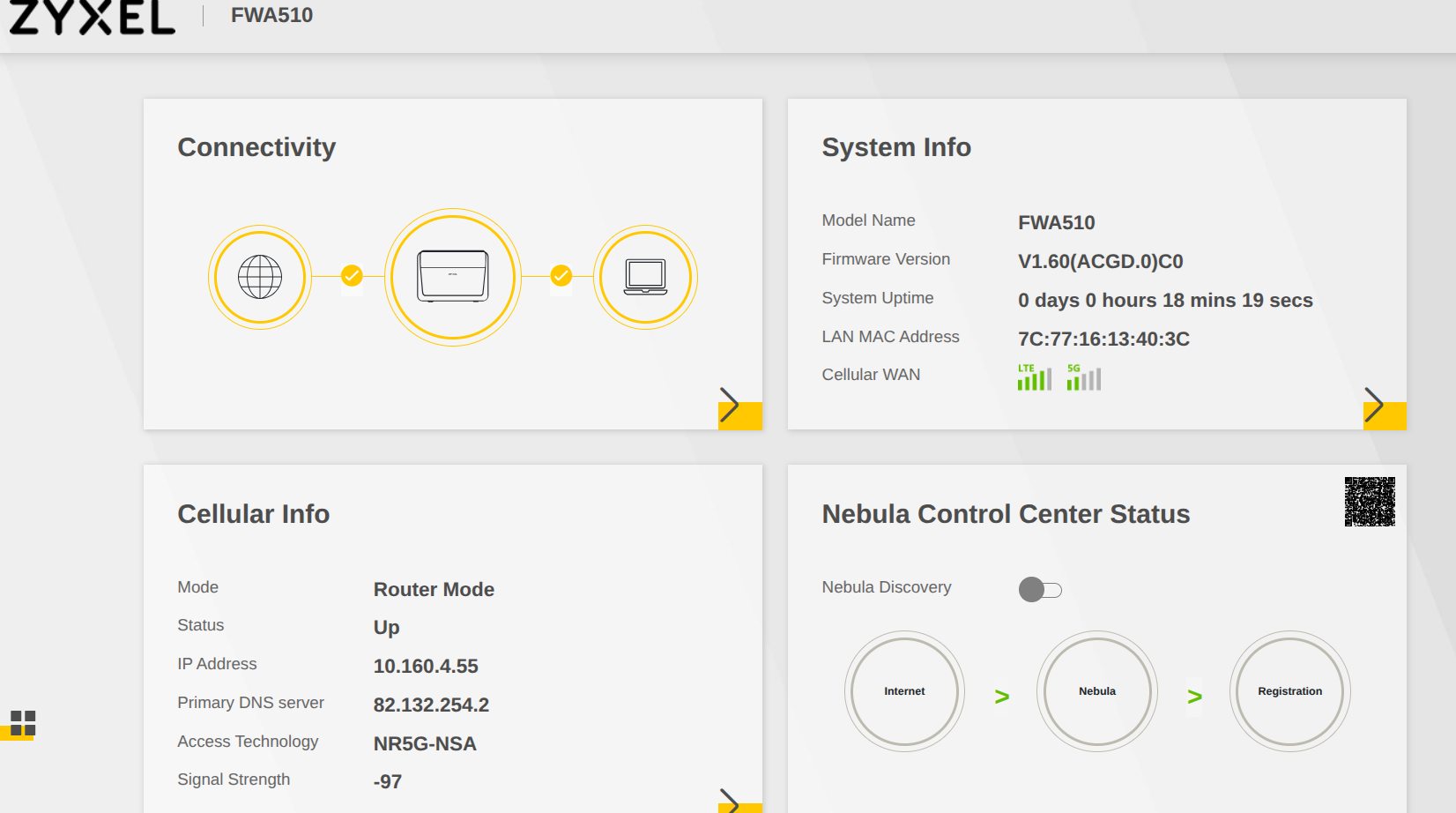
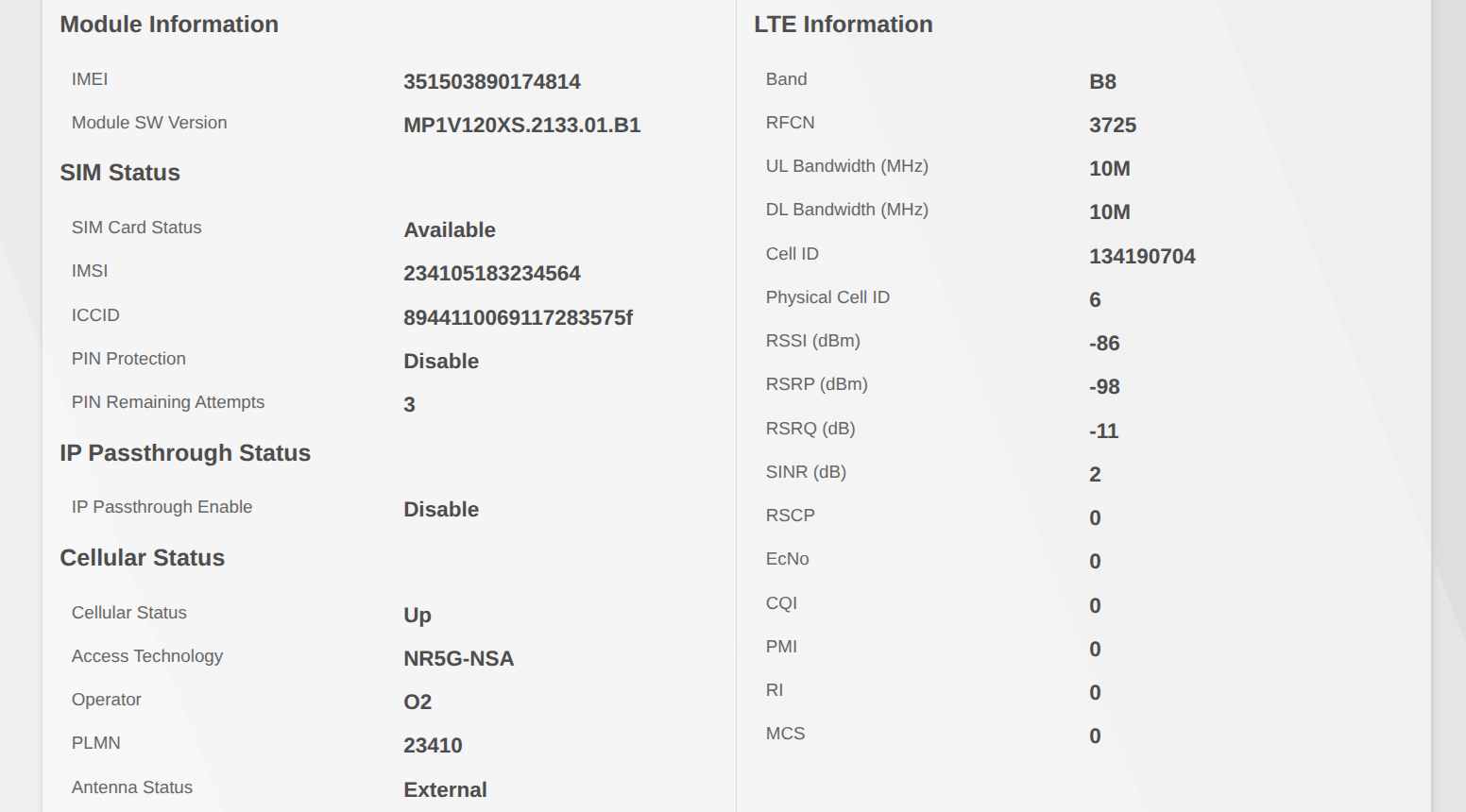
Enclosed is three screenshots
Sorry- product is FWA510.
It is not nebula managed.
It is being tested standalone at the moment, connected to an external antenna.
I have tried all as described..
 0
0 -
Any ideas?
0 -
reset to defaults change only whats needed even Antenna internal
I have EE with Unlimited Essentials with my FWA510 and works well the pay as you go by O2 you list might be a problem
0 -
HI peter,
Many thanks for the reply
We are in the middle of the countryside in Norfolk.
Mobile signal is bad , but I recently discovered o2 says there is ''patchy'' 5g.
I have bought another GIffGaff sim to start fresh.
Connecting the new sim to the outdoor 710 is getting me an average of 200mb/s.
That is with the 710 being fully reset , and setting manual APN settings.
As default is is set to ip passthrough, so it is going to another router.
Later today, I will remove the same sim and put it into the FWA510, after fully resetting it, and changing APN setting manually.
The FW510 defaults to router mode. so I will first try to connect to it, then will set ip passthrough, and try via the other router.
Any reception inside is very poor, so the external antenna is a must.
Will let you know how it goes
Cheers
Keith
0 -
Hi @riccy
Based on the Cellular info you shared, it seems your FWA510 was running LTE/4G and the signal is not that bad (between good and mid cell level), but the UL/DL bandwidth are 10M, which is not a good value.
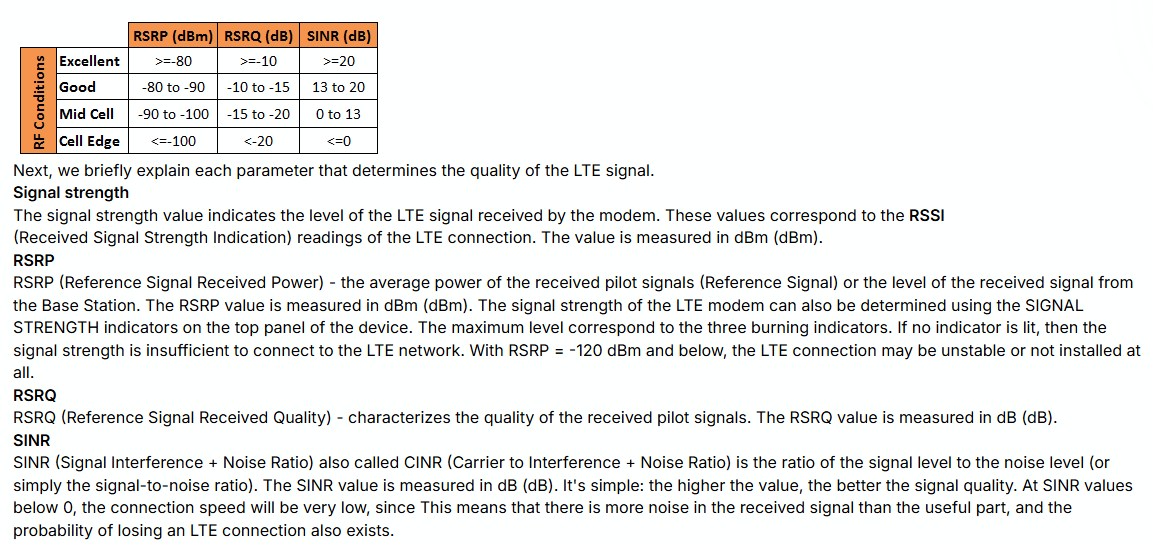
Because you mentioned the Quadpro antenna is pointing in the same direction as the FWA710, but the ISPs are different. You might need to change the direction since the current direction is good for new ISP's cellular, but not for O2.
In addition, you can try using this SIM in your smartphone to see if they're still experiencing an Internet access issue. If both return the same result, changing ISPs could be the best option.
Zyxel Melen0 -
HI Melen + Peter,
Really appreciate the reply.
Using their coverage checkers, o2, is the only provider for any 5G in my area of the U.K.
I am using the same o2 sim swapped between the 710 and the 510.
I finally managed to get the 510 working.
It seems the o2 sim was faulty and I ordered another.
The new o2 sim works as expected ( 200mb/s) on the 710, but now provides the same speed with the 510 and quadpro combination.
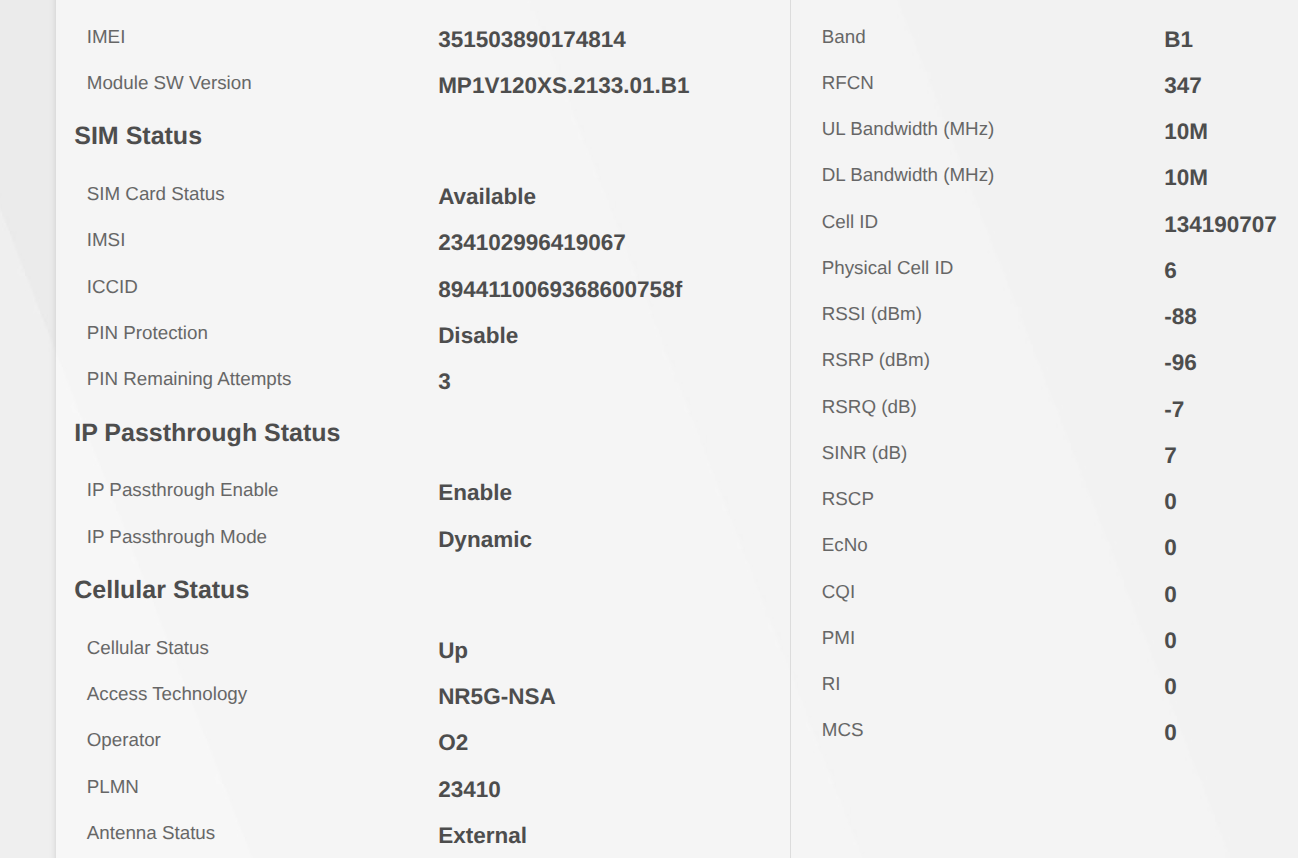
Find enclosed screen shot of the 510/quadpro combination - does that not suggest a 5G connection?, or am I reading it wrongly?
Now need to decide which is the best combination .
Agree with Cecil that my extension cables were poor for the quadpro, so have ordered low loss cables of only 3m length.
That way I can try the quadpro antenna in slightly different positions.
Cheers all
Keith
 0
0 -
HI
Just for confirmation, I do understand that this is 5G NSA-so it relies on the 4g network as well
There is never a chance in hell we will get 5G SA here :-)
Keith
0 -
Hi @riccy
I mentioned 4G is because from the cellular info, I only see the LTE info and miss the Access technology part. Your understanding is correct. You can ignore the incorrect part I mentioned.
Zyxel Melen0



 Zyxel Community Virtual Assistant







 Guru Member
Categories
- All Categories
- 442 Beta Program
- 3.1K Nebula
- 243 Nebula Ideas
- 6.8K Security
- 781 USG FLEX H Series
- 387 Security Ideas
- 1.8K Switch
- 87 Switch Ideas
- 1.5K Wireless
- 58 Wireless Ideas
- 7.2K Consumer Product
- 324 Service & License
- 527 News and Release
- 101 Security Advisories
- 31 Education Center
- 10 [Campaign] Zyxel Network Detective
- 5.3K FAQ
- 34 Documents
- 91 About Community
- 121 Security Highlight
