Devices in mgmt VLAN reachable by VPN and local Clients

 Freshman Member


I have configured a mgmt VLAN in my test network, ID 168

I have USG Lite 60AX, GS1920-24HP and NWA1123.
I followed the procedures described in the FAQ, and everything seems fine.
Switch:
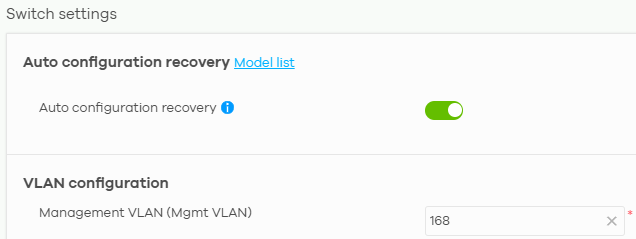
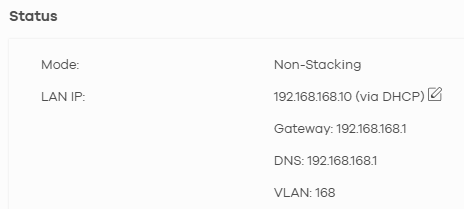
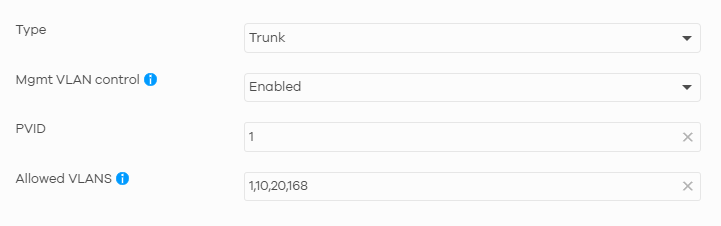
This is the trunk port profile, for USG and AP:
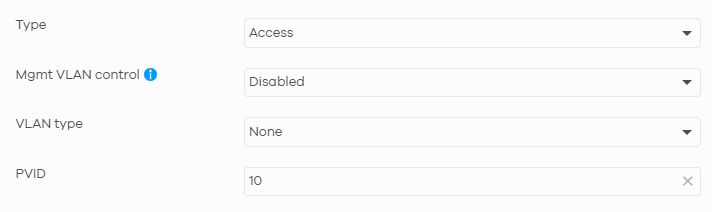
This is the trunk port profile, for client (VLAN 10)
And this is the AP configuration:
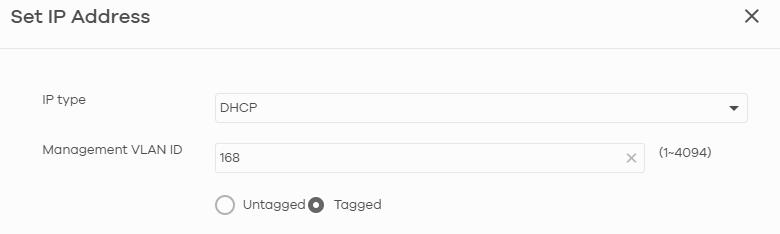
However, when I connect to the AP (correctly in a VLAN with ID 10) or a client port or from a remote access VPN (with another subnet, the default 192.168.50.xxx) I can access in the switch gui by entering the switch's IP address.
Must there be a rule I need to set up, or did I enter something incorrectly in the settings? In the firewall I only have the basic rules that NCC automatically generates.
Best Answers
-
Hi @Sergi330,
Regarding the security policy settings not applying properly, we now have datecode firmware that addresses this issue. Could you please confirm when we can push the firmware? We will deploy it to your site.
In addition, please slightly adjust the policies you've configured by changing the numbers to 0:
- Source: 192.168.10.1/24 → 192.168.10.0/24
- Source: 192.168.50.1/24 → 192.168.50.0/24
- Destination: 192.168.168.1/24 → 192.168.168.0/24
Zyxel Tina
0 -
Hi @Sergi330,
The problem you're seeing is due to how the device handles traffic blocking: traffic between segments is blocked by one rule, but traffic to the device itself requires a separate "to device" rule. For example:

Please note that for this rule, it is important to specify the correct port since selecting "Any" will block all traffic from that segment to the device. As shown in the image above for Protocol 443 (USG LITE 60AX web GUI port), this blocks segment IPs from accessing the web interface.
We appreciate your patience and understanding!
Zyxel Tina
0 -
Hi @Sergi330,
After testing on our side, we found that when clients access the AP's GUI, the packets only reach the AP directly and do not go upstream to the router. As a result, the security policy rule (Deny: 192.168.10.0/24 → 192.168.168.0/24) configured on your LITE 60AX router cannot block or act on this traffic.
If your scenario allows VLAN 10 clients to be isolated from each other and blocked from the internal network, we recommend enabling the Guest Network option.
Alternatively, since the NWA1123ACv3 AP does not support Permit access to Nebula devices exclusively from designated IP addresses functionality, consider upgrading to a newer AP with the Administrative Access feature if feasible.
We appreciate your understanding!
Zyxel Tina
0

 Zyxel Employee



All Replies
-
Hi @Sergi330,
You're encountering a common scenario when configuring management VLANs, where devices in other VLANs or connected via VPN can still access the management interface of your switch. This is often due to the default behavior of how management VLAN control operates, especially in Nebula, and how inter-VLAN routing is handled by your firewall.
Here's a breakdown of the issue and the recommended steps to enhance the isolation of your management VLAN:
Understanding Management VLAN Control: In Zyxel Nebula switches, "Management VLAN Control" determines where management VLAN traffic can exit. By default, the management VLAN is often enabled on all ports to ensure devices remain accessible during initial setup or configuration changes. It operates independently of the "Allowed VLANs" list on trunk ports.
Inter-VLAN Routing: Your USG LITE 60AX, as a router, facilitates communication between different VLANs. If there are no specific firewall rules to block traffic between your client VLAN (VLAN 10), VPN subnet, and the management VLAN (VLAN 168), then devices in these subnets will be able to reach each other.
Here are the steps to address this:
Configure Management VLAN Control on Switch Ports:
- Navigate to your switch settings in Nebula.
- For switch ports connected to client devices or APs that should not have access to the management VLAN, ensure that "Management VLAN Control" is disabled. This prevents the switch from assigning these ports as members of the management VLAN.
- For trunk ports connecting to your USG LITE 60AX and APs that do need to carry management VLAN traffic, "Management VLAN Control" should remain enabled.
Implement Firewall Rules on USG LITE 60AX:
- Since your USG LITE 60AX handles inter-VLAN routing, you need to create explicit firewall rules to restrict access to the management VLAN (VLAN 168) from your client VLAN (VLAN 10) and your VPN subnet.
- These rules should be configured to deny traffic from the source (VLAN 10 subnet and VPN subnet) to the destination (VLAN 168 subnet) on the relevant ports and protocols (e.g., HTTP, HTTPS for GUI access).
- Nebula's automatic firewall rules might not include these specific isolation policies, so manual configuration will likely be necessary.
To help us investigate further and provide more specific guidance, please provide the following information:
- Network Topology Map: A simple diagram showing how your USG LITE 60AX, GS1920-24HP, NWA1123, and client devices are physically connected, including which ports are used.
- Screenshots of Firewall Rules: Please provide screenshots of the current firewall rules configured on your USG LITE 60AX in Nebula.
- Enable Zyxel Support Access: Go to Help > Support Request in your Nebula console and enable Zyxel Support Access. Please provide the Organization Name and Site Name. This will allow our support team to view your cloud configuration directly for more efficient troubleshooting.
This AI response aims to provide initial troubleshooting steps and identify information needed for further diagnosis. Feel free to share additional details based on the suggestions above — this will help community members offer more targeted assistance.
If you have feedback or idea about this AI assistant, share them in Community Feedback.0 -
Topology:
USG LITE 60 AX
— port 4 -> GS1920-24HP port 25
GS1920-24HP
— port 1-3 -> trunk ports for Access Point (actually used only port 1 for test)
— port 4 -> PC admin access (VLAN 168)
— port 10-20 -> clients ports (VLAN 10)
— port 25 -> trunk port for USG lite 60 AX port 4
— port 26-28 -> trunk port for other futures switchesThis his the screenshots of Firewall Rules:
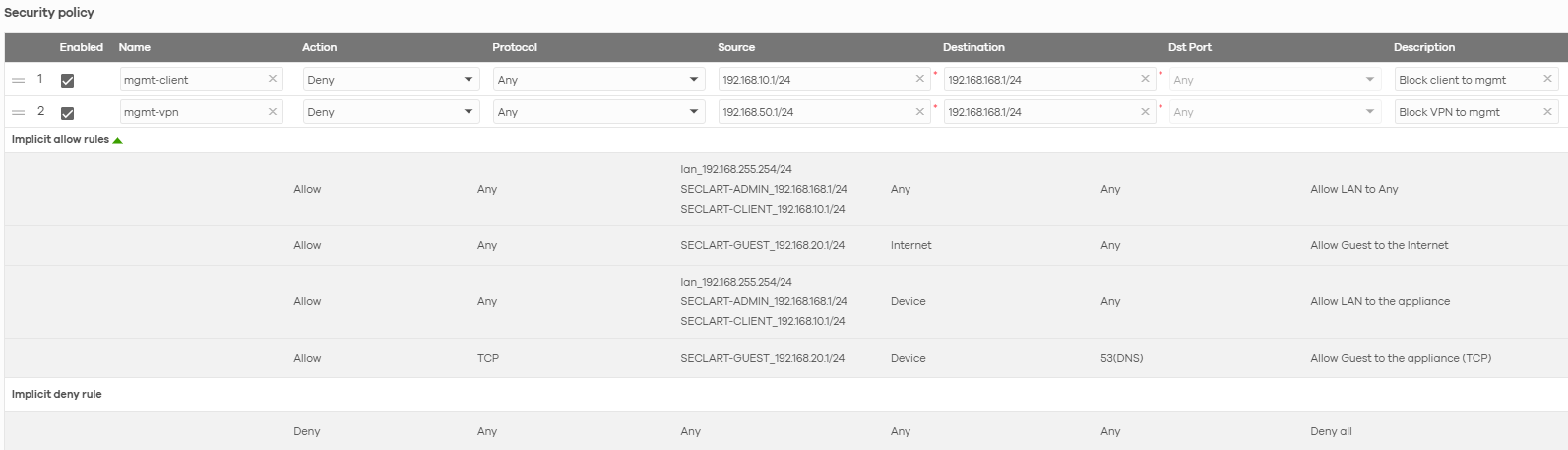
I have enabled Zyxel support access.
There is only one organization, the site in question is "Plane"
0 -
Hi @Sergi330,
After reviewing, the switch configuration appears correct with no issues found there.
Additionally, we noticed your USG Lite 60AX configuration is not up to date.
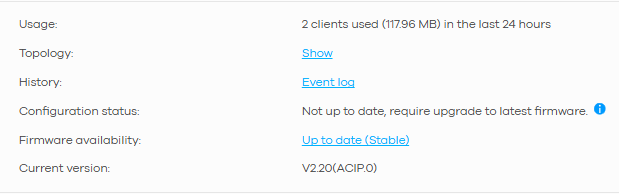
This prevents your security policy settings from taking effect properly, which could be affecting the management VLAN. Please update the USG Lite 60AX to the latest firmware version first, ensure the configuration status is up to date, and then check if the management VLAN issue still persists.
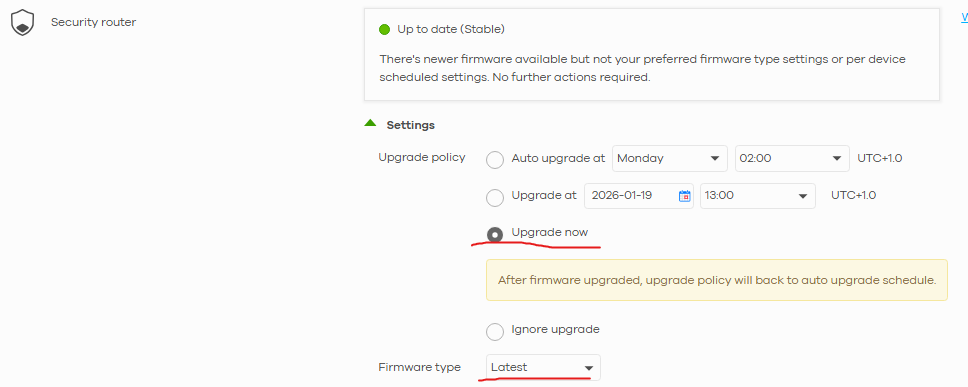
(Site-wide > Configure > Firmware management)
Zyxel Tina
0 -
Hi Tina,
I updated the firmware from stable to latest.
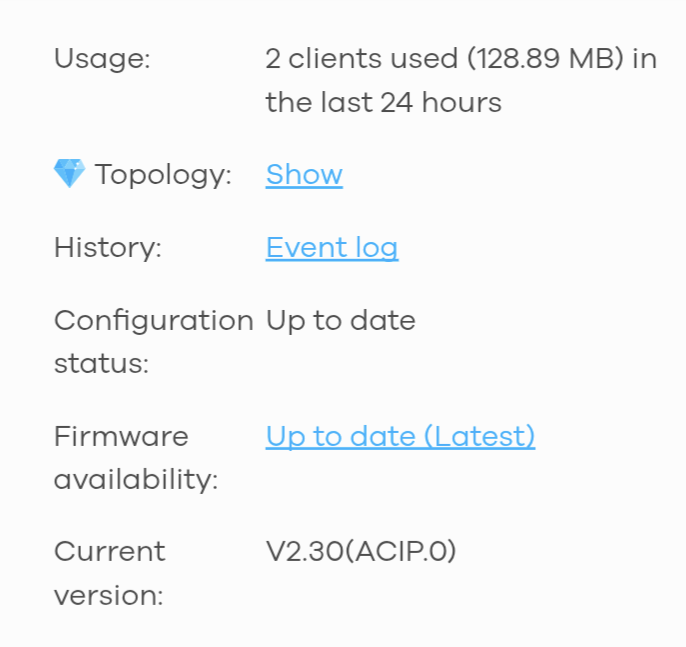
I tried with VPN but I can still reach the devices on the mgmt VLAN.
The firewall rules are correct?
0 -
I confirm that clients always see devices in the mgmt VLAN after firmware update.
Not only VPN users (192.168.50.xx) but also those on the 192.168.10.xxx network.This is my phone which opens the home page GUI of the switch and USG LITE, it's a Wifi Client, in the correct network:
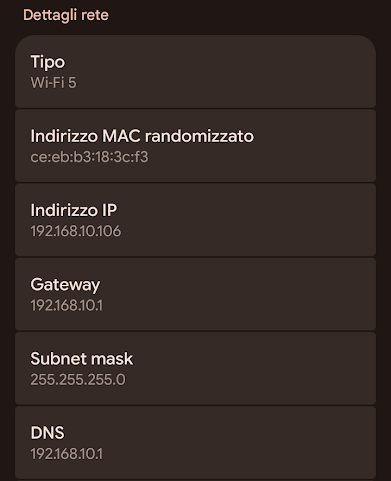
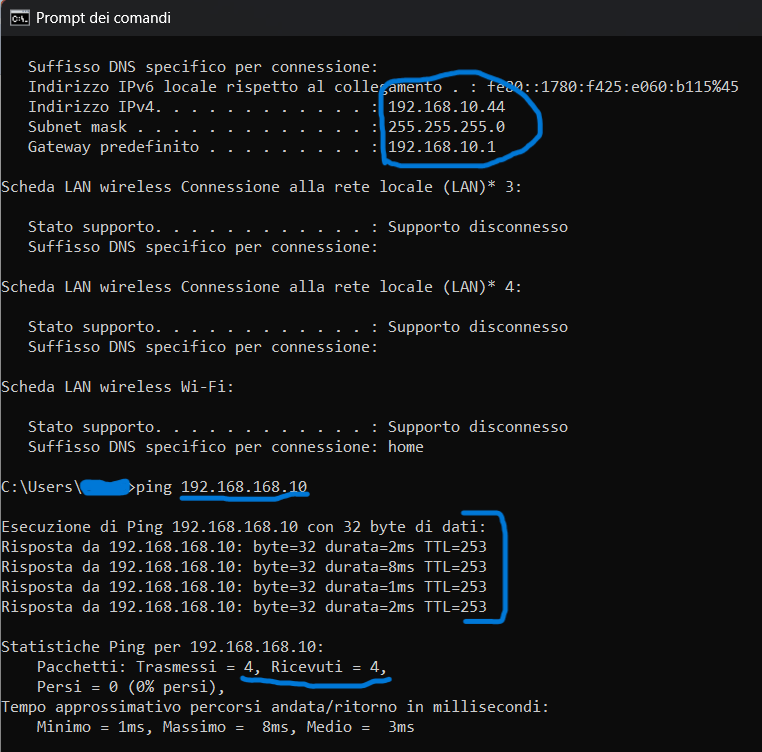
and also the clients connected directly to the switch ports with the client profile. The PC also correctly acquired the DHCP data in the correct client network. This is demonstrated by the ipconfig which, unfortunately, also shows that it can reach the switch without problems at the address 192.168.168.10
 0
0 -
Hi @Sergi330,
Thank you for providing the details. We have received your information and are reviewing it to identify the issue. If we need any further details during our investigation, we will reach out to you.
Also, we'll inform you of any updates after our investigation. We appreciate your cooperation and patience.
Zyxel Tina
0 -
Hi @Sergi330,
Regarding the security policy settings not applying properly, we now have datecode firmware that addresses this issue. Could you please confirm when we can push the firmware? We will deploy it to your site.
In addition, please slightly adjust the policies you've configured by changing the numbers to 0:
- Source: 192.168.10.1/24 → 192.168.10.0/24
- Source: 192.168.50.1/24 → 192.168.50.0/24
- Destination: 192.168.168.1/24 → 192.168.168.0/24
Zyxel Tina
0 -
Hi @Zyxel_Tina,
I've changed the policy rules and you can update the firmware at any time.
The network is still being configured, I was waiting for this issue to be resolved!
I'm waiting for notification of the firmware update, to run the tests.
thanks!
0 -
Hi @Zyxel_Tina
I saw that a firmware update was made on my site router and I tested it.
Clients on VLAN 10 and the VPN clients now no longer reach the switch 192.168.168.10, but they can still reach the USG lite router 192.168.168.1.
0 -
Hi @Sergi330,
Thank you for your feedback!
We've replicated the same issue you are encountering, where clients can reach the USG LITE 60AX. We are investigating and will update you once we have more information.
Zyxel Tina
0


Categories
- All Categories
- 442 Beta Program
- 3K Nebula
- 232 Nebula Ideas
- 132 Nebula Status and Incidents
- 6.7K Security
- 691 USG FLEX H Series
- 365 Security Ideas
- 1.8K Switch
- 87 Switch Ideas
- 1.4K Wireless
- 56 Wireless Ideas
- 7.1K Consumer Product
- 312 Service & License
- 505 News and Release
- 97 Security Advisories
- 31 Education Center
- 10 [Campaign] Zyxel Network Detective
- 5.1K FAQ
- 34 Documents
- 89 About Community
- 112 Security Highlight


