Topology error when calculating LACP speed





 Guru Member
Hello everyone,
inside an ORG I used 3x gigabit RJ45 to link 2x switches, but the LACP settings on both sides are related to 4x ports.
The issue is the fact that the Topology shows me the link at 4 Gbps also when I use only 3x cables:
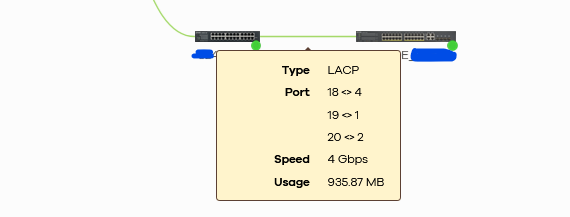
How can I fix that?
All Replies
-
Hi @GiuseppeR,
To help us reproduce the issue locally, could you please clarify the following:
- The models of the two switches
- Their firmware versions
Additionally, please enable Zyxel Support Access and share the org/site name with us.
Thank you for your cooperation!
Zyxel Tina
0 -
Hi @Zyxel_Tina
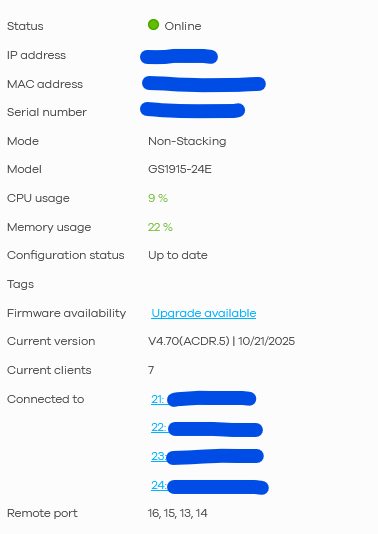
model on the left GS1915-24E:
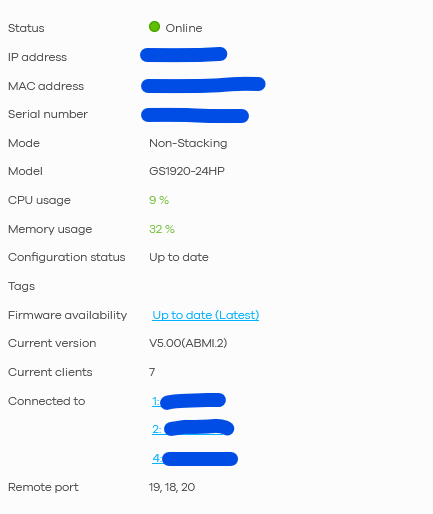
model on the right GS1920-24HP:
Sent you a PM with remote access.
0 -
Hi @GiuseppeR,
After confirming, the LACP speed shown in NCC topology is based on configured port count × individual port speed (e.g., 4×1G = 4Gbps), regardless of actual link-up status. This is the current spec design.
We understand this behavior can be confusing, so our team is actively discussing enhancements for better user experience.
We've also created an ideas post. We encourage you and other users who are interested to show your support by commenting on or voting for it.
Thank you for your patience and understanding!
Zyxel Tina
0 -
Hi @Zyxel_Tina
thanks for the update.
It should be great also considering that other links inside the Topology have the ability to show degraded performances.
0




 Zyxel Employee
Categories
- All Categories
- 442 Beta Program
- 3.1K Nebula
- 242 Nebula Ideas
- 6.8K Security
- 777 USG FLEX H Series
- 387 Security Ideas
- 1.8K Switch
- 87 Switch Ideas
- 1.5K Wireless
- 58 Wireless Ideas
- 7.2K Consumer Product
- 324 Service & License
- 526 News and Release
- 101 Security Advisories
- 31 Education Center
- 10 [Campaign] Zyxel Network Detective
- 5.3K FAQ
- 34 Documents
- 91 About Community
- 121 Security Highlight


