Nebula App - Missing WPA3 Security Options





 Guru Member
Hello everyone,
I see that via Nebula App I cannot create a WiFi with WPA3 password also when having WiFi 7 APs on site:
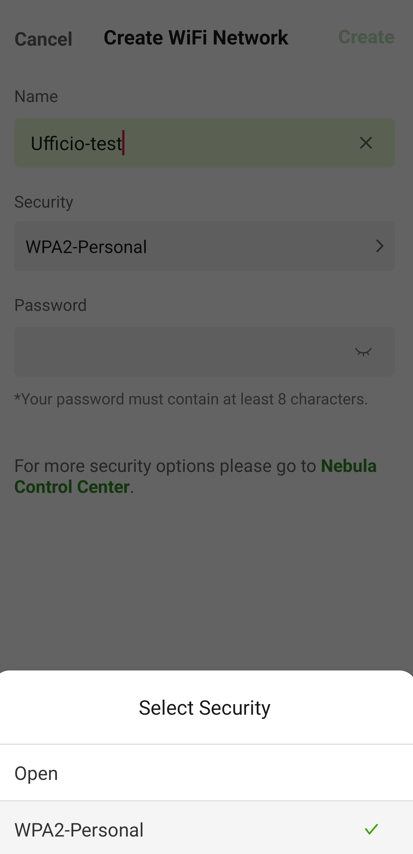
How can I solve this issue?
Accepted Solution
-
Hi @GiuseppeR,
Please allow me to clarify that the Nebula app focuses on quick, basic onboarding to keep the mobile experience simple, supporting Open and WPA2 for simplicity. For advanced security settings, the Nebula Web Configurator interface remains the primary platform.
We understand your need for WPA3 options in the app and appreciate your feedback as we continue evaluating future updates.
Zyxel Tina
0




 Zyxel Employee
All Replies
-
Hi @GiuseppeR,
You're encountering this issue because the Nebula mobile app offers simplified SSID management, and advanced security options like WPA3 are configured through the Nebula Control Center (web interface).
To configure WPA3 for your WiFi network, please follow these steps:
- Access Nebula Control Center: Go to https://nebula.zyxel.com/ and log in with your account.
- Navigate to SSID Settings: Once logged in, go to
Configure > Access points > SSID settings. - Enable Advanced Mode: Toggle on the "Advanced mode" switch to reveal advanced settings.
- Edit SSID Profile: Click the "Edit" button for the SSID you wish to configure.
- Select Security Option: In the security options, choose "WPA Personal With WPA3" or "WPA3-Enterprise" depending on your requirements.
- Disable Transition Mode (Optional): If you want to strictly enforce WPA3 and only allow WPA3-capable devices to connect, toggle off the "transition mode" button. By default, transition mode is enabled to allow WPA2 clients to connect to a WPA3 SSID.
- Save Changes: Remember to save your configurations.
For further assistance, please provide the following information:
- Device Model(s) of your WiFi 7 APs: This helps us verify compatibility and firmware.
- Firmware Version of your APs:
- Organization and Site Name in Nebula: This will allow us to investigate your cloud environment configuration more efficiently.
- Enable Zyxel Support Access: Please enable Zyxel Support Access via
Help > Support Requestin your Nebula console. This authorizes the Zyxel support team to directly view your cloud environment configuration, significantly shortening troubleshooting time.
This AI response aims to provide initial troubleshooting steps and identify information needed for further diagnosis. Feel free to share additional details based on the suggestions above — this will help community members offer more targeted assistance.
If you have feedback or idea about this AI assistant, share them in Community Feedback.0 -
I think that WPA3 in a site with WiFi 7 APs should be considered a standard security protocol.
I am not asking something special via RADIUS server, just a basic WPA3 password setup to use MLO with full features.
0 -
Hi @GiuseppeR,
Please allow me to clarify that the Nebula app focuses on quick, basic onboarding to keep the mobile experience simple, supporting Open and WPA2 for simplicity. For advanced security settings, the Nebula Web Configurator interface remains the primary platform.
We understand your need for WPA3 options in the app and appreciate your feedback as we continue evaluating future updates.
Zyxel Tina
0



Categories
- All Categories
- 442 Beta Program
- 3.1K Nebula
- 242 Nebula Ideas
- 6.8K Security
- 779 USG FLEX H Series
- 387 Security Ideas
- 1.8K Switch
- 87 Switch Ideas
- 1.5K Wireless
- 58 Wireless Ideas
- 7.2K Consumer Product
- 324 Service & License
- 526 News and Release
- 101 Security Advisories
- 31 Education Center
- 10 [Campaign] Zyxel Network Detective
- 5.3K FAQ
- 34 Documents
- 91 About Community
- 121 Security Highlight


