XGS1930 and MAC filtering on a port




 Freshman Member
All Replies
-
Hi @Venta
MAC filter is a list of MAC that been blocked. It is not an allowed list for switch.
May you share your scenario so we can help to find a solution?
Zyxel Melen0 -
My idea: I have a port configured for a special VLAN which have a lot of rights assigned on the firewall based on the VLAN.
So the idea was to restrict access on this special port to only some MAC-Addresses.Any idea how to do this?
0 -
Hi @Venta
For this purpose, you need to configure via device's local GUI since it is not supported on Nebula control center.
Here are the steps:
- Upgrade your XGS1930 to V5.00 firmware version.
- Finish other configurations on Nebula first.
- Access device local GUI to configure port security & Static MAC Forwarding.
- Set port security:
Path: Menu > Security > port security.
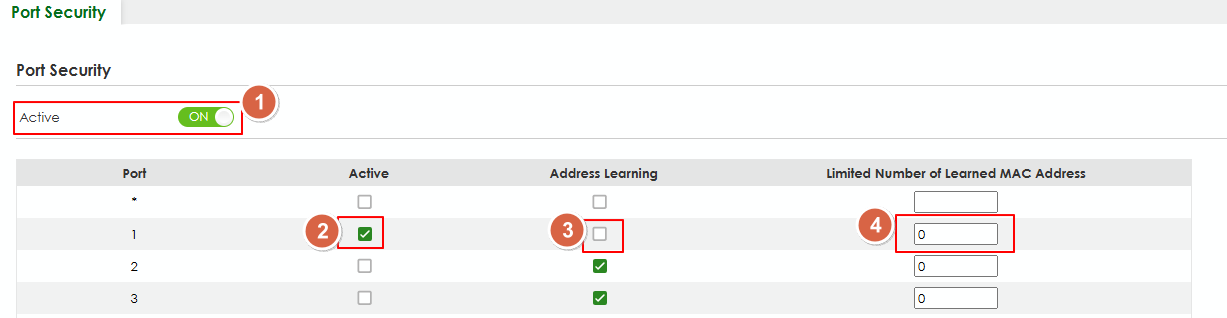
- Activate port security.
- Activate port security for specific port(s).
- Inactivate address learning.
- Limited number of learned MAC address needs to be 0.
- Set static MAC forwarding:
Path: Menu > Switching > Static MAC Forwarding.
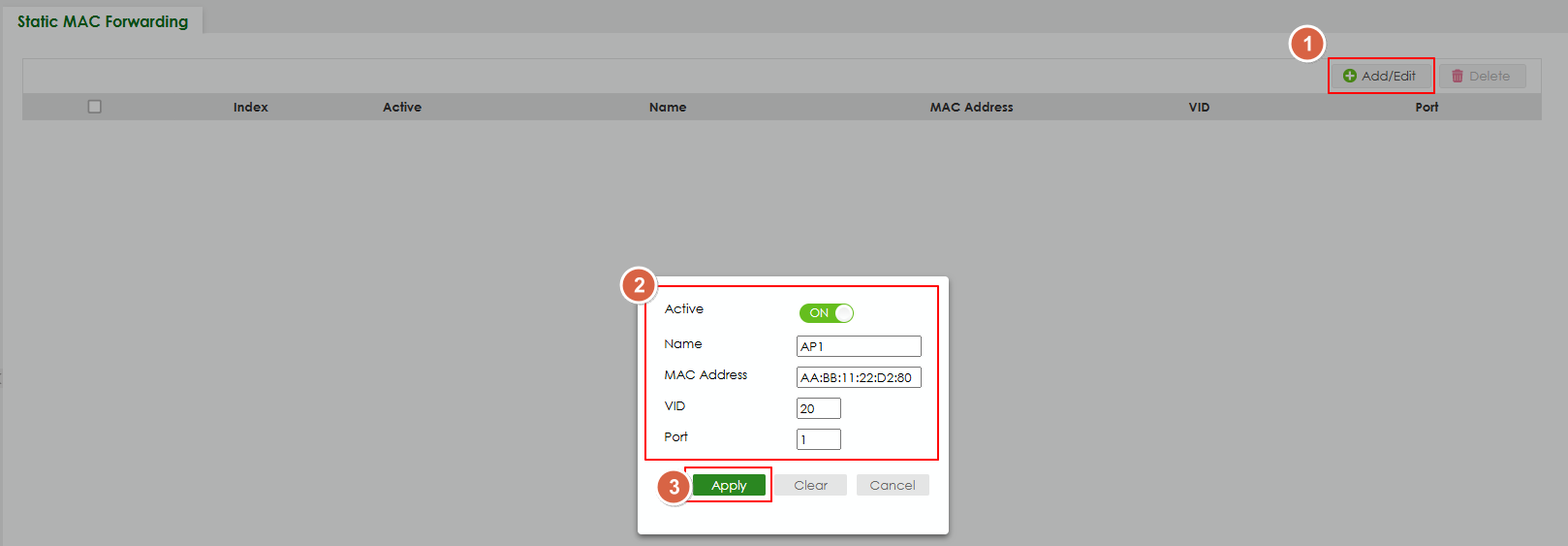
- Click Add/Edit button to add the MAC address.
- Enter the MAC address and other value.
- Click apply button.
- Set port security:
Note:
- The configuration that edited/configured from device's local GUI will not sync to Nebula.
- Change configuration on Nebula might cause these configurations been overwritten.
- Local device's local GUI requires to use your site's local credential. Please reference this FAQ to find it.
Hope this helps.
Zyxel Melen1 -
Thank you so much.
Is there any plan when this option is also available via Nebula?
0 -
Hi @Venta
We do have a topic for this, but we currently don't have an ETA.
Additionally, I have created an idea post to monitor the requirements on this function:
Restrict access on this special switch port to only some MAC-Addresses on Nebula — Zyxel Community
We will monitor the comments and votes of this link the evaluate it.
Zyxel Melen1





 Zyxel Employee
Categories
- All Categories
- 442 Beta Program
- 3.1K Nebula
- 242 Nebula Ideas
- 6.8K Security
- 777 USG FLEX H Series
- 387 Security Ideas
- 1.8K Switch
- 87 Switch Ideas
- 1.5K Wireless
- 58 Wireless Ideas
- 7.2K Consumer Product
- 324 Service & License
- 526 News and Release
- 101 Security Advisories
- 31 Education Center
- 10 [Campaign] Zyxel Network Detective
- 5.3K FAQ
- 34 Documents
- 91 About Community
- 121 Security Highlight


