my USG Lite 60AX is flashing orange and green
Options

 Freshman Member
I purchased the unit and connected to my network, it was visible on nebula and was asking for an upgrade, since that started it has dropped off and now is flashing orange and green, I have tried doing a factory default to no avail. Should my next thing to try is to go in with a console cable?
0
Accepted Solution
-
Hi @JohnngG,
Welcome to the Zyxel Community!
To help us better identify the issue and investigate further, could you confirm a few details?
- Please refer to the following table and let us know which specific "flashing orange and green" pattern matches what you're seeing.
- If it's flashing fast (300ms interval): The device is still in the process of booting up when applying the firmware upgrade.
- If it's flashing slow (1-second interval): The device is trying to connect to Nebula. Please check your WAN connection and ensure it has a valid IP and internet access.
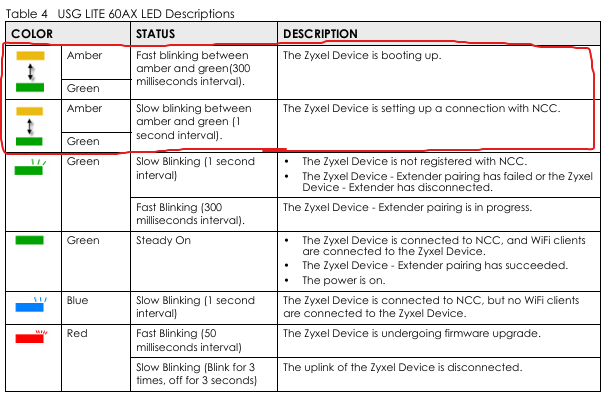
- For the factory reset, please ensure you press the RESET button for at least 8 seconds.
- Additionally, set your WAN DNS server to 8.8.8.8 and confirm if TCP ports 4335 & 6667 are open.
Zyxel Tina
0 - Please refer to the following table and let us know which specific "flashing orange and green" pattern matches what you're seeing.

 Zyxel Employee



All Replies
-
Hi @JohnngG,
Welcome to the Zyxel Community!
To help us better identify the issue and investigate further, could you confirm a few details?
- Please refer to the following table and let us know which specific "flashing orange and green" pattern matches what you're seeing.
- If it's flashing fast (300ms interval): The device is still in the process of booting up when applying the firmware upgrade.
- If it's flashing slow (1-second interval): The device is trying to connect to Nebula. Please check your WAN connection and ensure it has a valid IP and internet access.
- For the factory reset, please ensure you press the RESET button for at least 8 seconds.
- Additionally, set your WAN DNS server to 8.8.8.8 and confirm if TCP ports 4335 & 6667 are open.
Zyxel Tina
0 - Please refer to the following table and let us know which specific "flashing orange and green" pattern matches what you're seeing.
Categories
- All Categories
- 442 Beta Program
- 3K Nebula
- 232 Nebula Ideas
- 132 Nebula Status and Incidents
- 6.7K Security
- 691 USG FLEX H Series
- 365 Security Ideas
- 1.8K Switch
- 87 Switch Ideas
- 1.4K Wireless
- 56 Wireless Ideas
- 7.1K Consumer Product
- 312 Service & License
- 505 News and Release
- 97 Security Advisories
- 31 Education Center
- 10 [Campaign] Zyxel Network Detective
- 5.1K FAQ
- 34 Documents
- 89 About Community
- 112 Security Highlight


