FWA505 firmware update stuck
Options

WinterEFG
Posts: 2  Freshman Member
Freshman Member
My firmware update has been going for nearly 30 mins now, the web GUI still has the spinning icon but it just won't end.
All I could find was a 5 year old thread about a manual reboot but I don't want to risk bricking the device.
I don't have ages and I really do need it online asap.
0
All Replies
-
Hi @WinterEFG,
Welcome to the Zyxel Community!
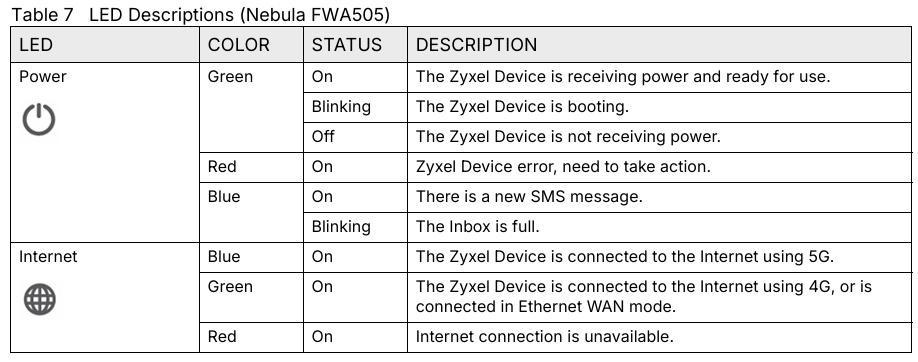
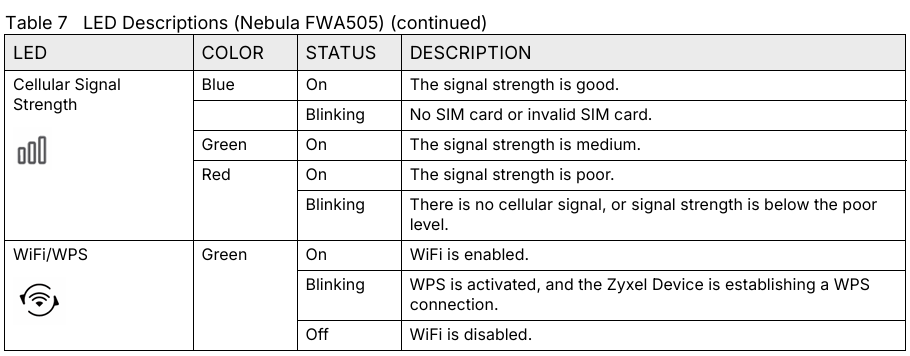
Could you please check the current LED status on your FWA505?
- First, please try to ping the device’s IP address from your computer.
- If the ping fails, it is possible that the device has obtained a different IP address after the firmware upgrade. In this case, please run
ipconfig /allon your computer to check your current network details and confirm which IP address the device might be using. - If the ping is successful, please try reconnecting to the web GUI by refreshing the page or re-entering the device’s URL in your browser to see whether you can access it normally.
- If the ping fails, it is possible that the device has obtained a different IP address after the firmware upgrade. In this case, please run
- If the LED indicators show anything unusual, please describe all LED indicators in detail so we can assist further.
Zyxel Tina
0 - First, please try to ping the device’s IP address from your computer.

 Zyxel Employee



Categories
- All Categories
- 442 Beta Program
- 3.1K Nebula
- 234 Nebula Ideas
- 6.7K Security
- 706 USG FLEX H Series
- 369 Security Ideas
- 1.8K Switch
- 87 Switch Ideas
- 1.4K Wireless
- 56 Wireless Ideas
- 7.1K Consumer Product
- 313 Service & License
- 512 News and Release
- 99 Security Advisories
- 31 Education Center
- 10 [Campaign] Zyxel Network Detective
- 5.2K FAQ
- 34 Documents
- 89 About Community
- 116 Security Highlight
