About WAN DNS on USG LITE 60AX

 Freshman Member
In the monitor section of Nebula, for my USG LITE 60AX router, I see the WAN status showing the IP address from my ISP, the connection type (PPoE), a gateway IP address, and two DNS server IPs. But the latter two differ from what I set in the LAN settings, namely 8.8.8.8 and 8.8.4.4. It seems to me these DNS IP addresses are ISP DNS servers, but shouldn't these be overridden by the Google ones?
And if so, how do I do that? I cannot find any settings. In the community, I found information on setting the FQDN, but it lacks details, so I have no idea what the whole point is, even though it refers to WAN DNS.
All Replies
-
On my Lite 60s the WAN interface does not let you declare the DNS from PPPoE connection (only VLAN and connectivity check):
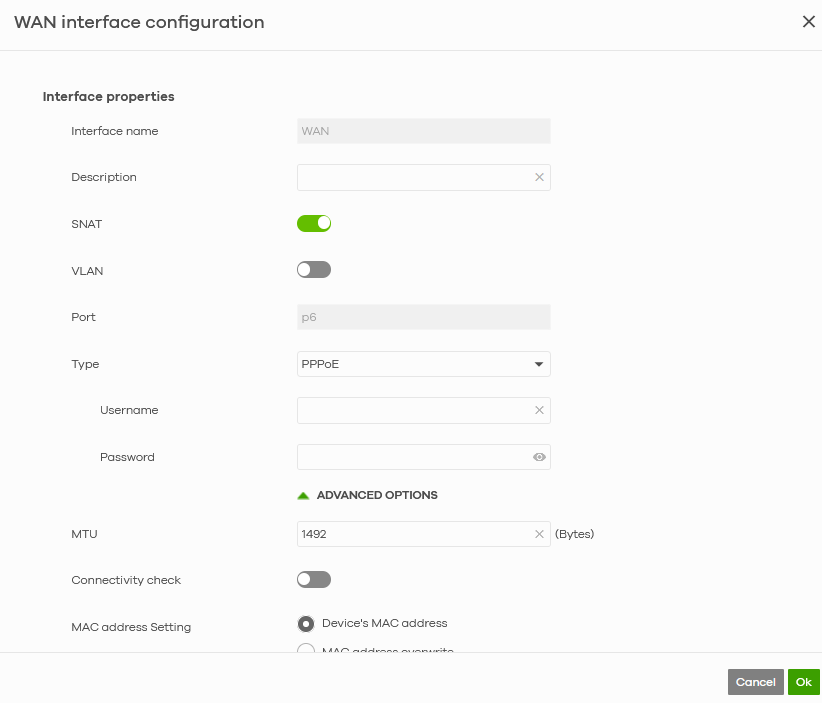
For this reason I use to declare custom DNS via LAN, to let that specific LAN/VLAN to know where to resolve DNS addresses
0 -
Hi @Arthur,
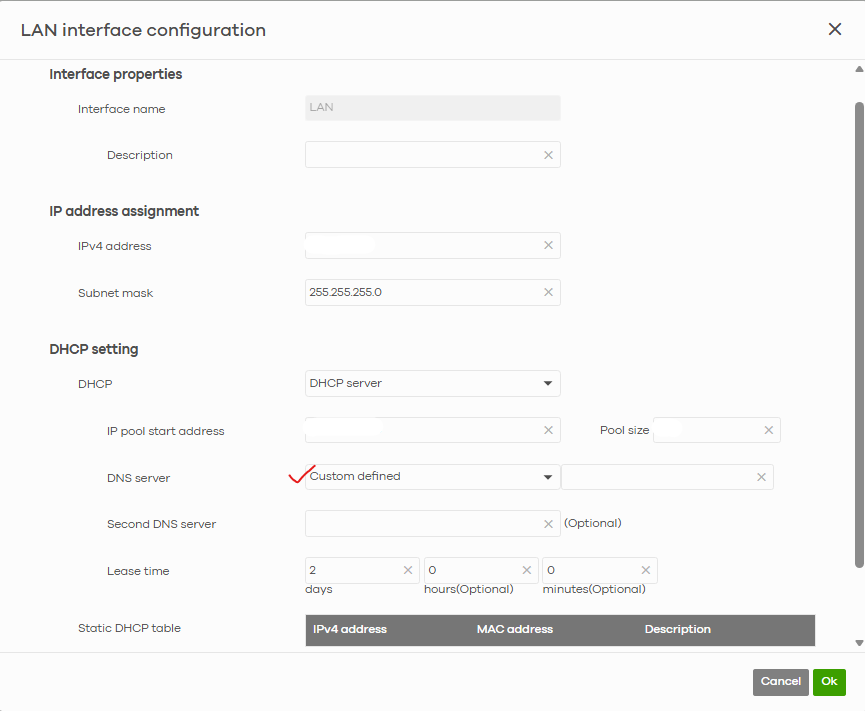
As GiuseppeR mentioned and recommended, the USG LITE 60AX does not support manually setting up WAN DNS. The DNS servers shown in the WAN status are typically assigned by your ISP.If you would like to manage DNS settings for your LAN clients, please navigate to:
- Site-wide > Configure > Security router > Interface
- Click "Edit" on your LAN interface.
- Set your desired DNS servers (e.g., 8.8.8.8 and 8.8.4.4) for the LAN interface.
This will ensure that devices connected to your LAN use these DNS servers.
Zyxel Tina
0





 Guru Member



 Zyxel Employee
Categories
- All Categories
- 442 Beta Program
- 3.1K Nebula
- 242 Nebula Ideas
- 6.8K Security
- 779 USG FLEX H Series
- 387 Security Ideas
- 1.8K Switch
- 87 Switch Ideas
- 1.5K Wireless
- 58 Wireless Ideas
- 7.2K Consumer Product
- 324 Service & License
- 527 News and Release
- 101 Security Advisories
- 31 Education Center
- 10 [Campaign] Zyxel Network Detective
- 5.3K FAQ
- 34 Documents
- 91 About Community
- 121 Security Highlight


