FWA515 does not reconnect to N78 automatically after temporary band loss



 Freshman Member
Hello,
I am experiencing an issue with the Zyxel FWA515 router.
The device randomly loses access (often during the night) to the N78 band and switches to the much slower N1 band. This might happen because the carrier temporarily disables N78.
However, when N78 becomes available again, the router does not reconnect to it automatically. In many cases the band is not even detected on the CellWanStatus page. The connection remains on N1 until the router is rebooted.
After rebooting the router, it immediately reconnects to fast N78 and the connection returns to normal.
I have observed this issue with both firmware versions available on the website:
- V1.60(ACPZ.0)C0
- V1.50(ACPZ.0)C0
Steps to reproduce
- Router connects normally using NR5G-NSA with N78 band.
- The network appears to temporarily disable N78 (this is my hypothesis).
- The router falls back to N1.
- When N78 becomes available again, the router does not reconnect to N78 automatically.
- In some cases, N78 is not even shown in the CellWanStatus page.
- After rebooting the router, it reconnects to N78 immediately.
Expected behavior
The router should automatically reconnect to N78 when the band becomes available again.
Actual behavior
The router remains connected to N1 until the device is rebooted.
Additional information
Operator: Swisscom
Country: Switzerland
Access Technology: NR5G-NSA
The issue typically appears during the night (approximately 00:00–06:00) when N78 seems to disappear temporarily.
I also tried enabling the Network Monitoring feature on the router to see if it would recover the connection automatically when N78 becomes available again, but this did not resolve the issue. The router still remains connected to N1 until it is rebooted.
Manual band selection and disabling N1 is not an acceptable workaround for me, because it reduces bandwidth. Carrier aggregation between N78 and N1 would no longer be possible.
For comparison, as I am evaluating 5G modems for my home network (FWA515 is one of the candidates), I tested the same SIM card in a Mercusys MB520-5G router placed in the same physical location. That device maintains a stable connection with N78 band.
Connection details (when the device works normally)
Module Information
IMEI 3569929********
Module SW Version QuectelT830R22A02_OWT2305_BETA20250527_xx.001.xx.001
SIM Status
SIM Card Status Available
IMSI 2280159********
ICCID 894101**************
PIN Protection Disable
PIN Remaining Attempts 3
IP Passthrough Status
IP Passthrough Enable Enable
IP Passthrough Mode Dynamic
Cellular Status
Cellular Status Up
Access Technology NR5G-NSA
Operator Swisscom
PLMN 22801
Data Roaming Disable
TAC 1112
NR5G-NSA Information
Band N78
RFCN 640704
UL Bandwidth (MHz) 100
DL Bandwidth (MHz) 100
RSSI (dBm) -96
RSRP (dBm) -108
RSRQ (dB) -11
SINR (dB) 9
Service Information
Band B20
RFCN 6300
UL Bandwidth (MHz) 10
DL Bandwidth (MHz) 10
Cell ID 17890818
Physical Cell ID 227
RSSI (dBm) -93
RSRP (dBm) -104
RSRQ (dB) -11
SINR (dB) 1
SCC Information #1
Band B3
RFCN 1301
DL Bandwidth (MHz) 20
RSSI (dBm) -100
RSRP (dBm) -119
RSRQ (dB) -17
SINR (dB) -12
SCC Information #2
Band B7
RFCN 3100
DL Bandwidth (MHz) 20
RSSI (dBm) -108
RSRP (dBm) -125
RSRQ (dB) -18
SINR (dB) -2
NR5G SCC Information #1
Band N1
RFCN 425310
DL Bandwidth (MHz) 20
RSSI (dBm) -94
RSRP (dBm) -117
RSRQ (dB) -22
SINR (dB) -11
If needed, I can also provide logs or additional diagnostics.
All Replies
-
Hi @adrianf0
This issue needs to setup schedule reboot since network monitoring function only retry/reconnect the cellular connection when it is disconnected.
(Schedule Reboot path: "Maintenance > Reboot > Schedule Reboot")
Hope this workaround helps.
Zyxel Melen0 -
@Zyxel_Melen Thank you for your suggestion.
The option you are referring to (Maintenance > Reboot > Schedule Reboot) is not available on my device:
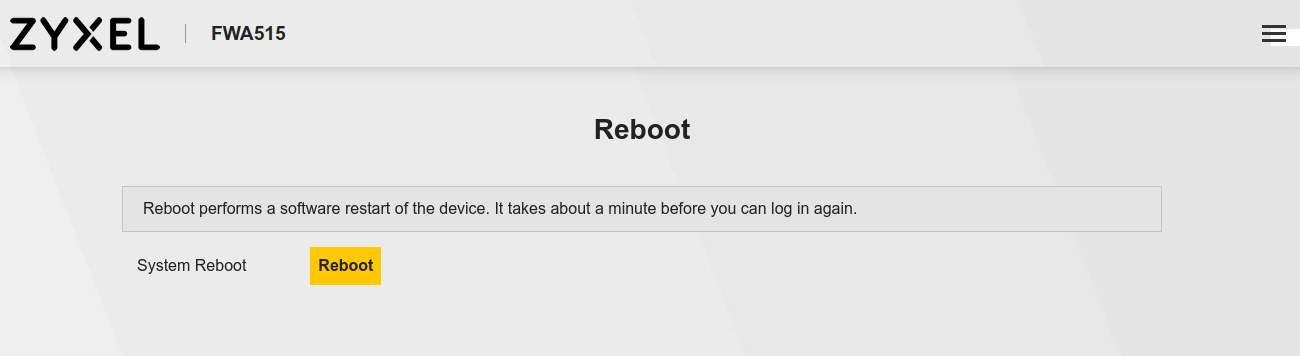
Additionally, a scheduled reboot would only act as a workaround. The issue appears to be that the router does not properly reselect the N78 band after it becomes available again, even though the cellular connection itself remains active.
Since this behavior occurs consistently and has been observed across multiple firmware versions, it seems to be a potential firmware issue rather than a configuration problem.
Could you please confirm whether this behavior is expected, or if it could be addressed in a future firmware update?
0 -
Hi @adrianf0
Thanks for your input. I checked with our team about this issue when I provided the workaround. I will update once I have further information.
Additionally, the schedule reboot for FWA515 can be set on Nebula.
How to Enable Scheduled Reboot for a Mobile Router on Nebula? — Zyxel Community
Zyxel Melen0 -
Hi @adrianf0
For this case, we need to look at the ENDC combinations. It is possible that the specific carrier aggregation combination used by the base station for N78 is different from what the FWA515.
Could you help to provide the status screenshots specifically when the device works as expected and has "lost" N78 when stuck on N1. I will send you a private message and you can share the info in there.
Zyxel Melen0 -
Hi @Zyxel_Melen,
Thank you for your reply.
As suggested, I have shared the requested details with you via private message.I am looking forward to the results of your engineers’ analysis and any updates regarding a possible fix.
Thank you.
0 -
Any news on that?
I have the same Problem in Germany with Telekom as Provider with the same Router.
0





 Zyxel Employee
Categories
- All Categories
- 442 Beta Program
- 3.1K Nebula
- 243 Nebula Ideas
- 6.8K Security
- 783 USG FLEX H Series
- 389 Security Ideas
- 1.8K Switch
- 87 Switch Ideas
- 1.5K Wireless
- 58 Wireless Ideas
- 7.2K Consumer Product
- 325 Service & License
- 527 News and Release
- 101 Security Advisories
- 31 Education Center
- 10 [Campaign] Zyxel Network Detective
- 5.3K FAQ
- 34 Documents
- 91 About Community
- 122 Security Highlight
