Nebula Policy Route malfunction with VPN Orchestrator





 Guru Member
Hello everyone,
I went to this section:
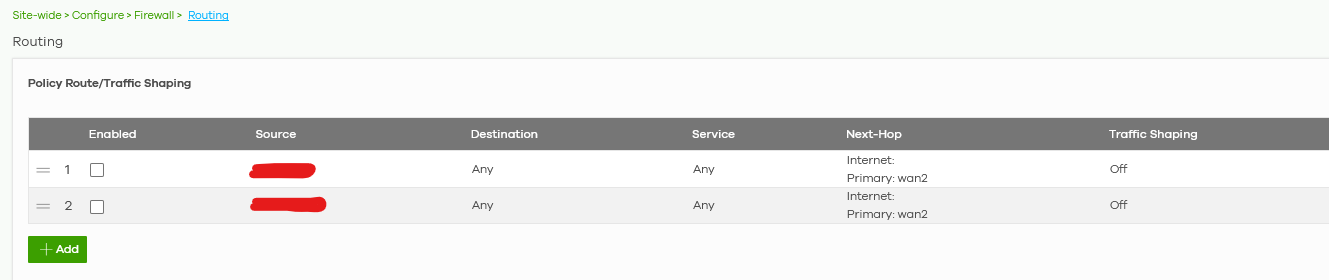
to route a pair of specific LAN devices via wan2 internet connection.
I have 2x wans on that site but I need that both of those LAN devices go on the internet ONLY via wan2. No backup via wan1.
The problem is that I have also a VPN (VPN that is working via wan2 only too) on that ORG:
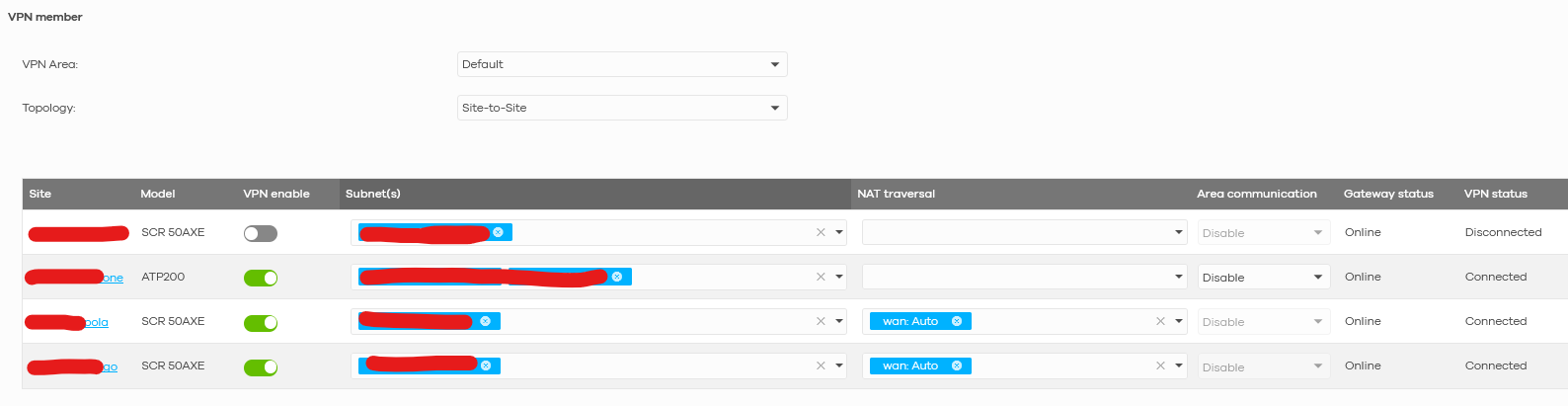
So when those rules are enabled I am NOT able to use internal VPN to reach those devices. Neither ping or smb connection.
In my opinion VPN is an internal LANs connection, so routing policies via wan2 should NOT affect LAN traffic.
How can I solve that?
Accepted Solution
-
Hi @GiuseppeR
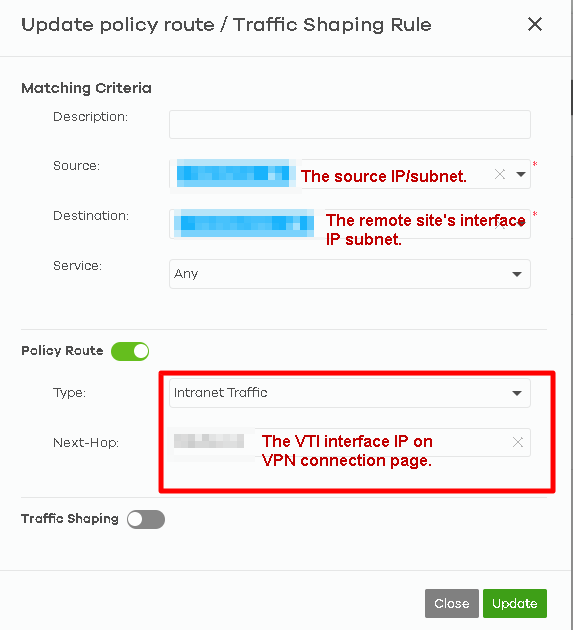
Thanks for the privilege. Update a short conclusion in here:
The VPN tunnel are route-based VPN, so we can reference the VPN information on VPN connections page to set the policy route rule.
 Zyxel Melen0



 Zyxel Employee
All Replies
-
Hi @GiuseppeR ,
The issue occurs because your current Policy Routes use "Any" as the destination and the policy route has higher priority than site-to-site VPN in routing flow. Since the VPN subnets are technically "Any" destination, the firewall prioritizes the Policy Route and pushes that traffic out through WAN2 instead of routing it through the VPN tunnel.
Please allow me to take some time to find the solution for you.
Zyxel Melen0 -
Hi @GiuseppeR
I checked the priority of routing flow can't be modified. It seems like you have some reason for using policy route rather than setup the WAN Load Balancing? May you share the reason and your scenario's detail? With these information, we can help to figure the solution.
Zyxel Melen0 -
Hi @Zyxel_Melen
I need to use wan2 for redundant backup and VoIP purposes.
VoIP PBX is set to be aligned to a specific IP that is working only via wan2, a part from this wan1 is made on a radio ISP connection so it has more latency and instability with bad weather.
Redundant backup has to go via wan2 because it has to avoid any conflict with traffic usage via wan1. In this scenario I’m sure that wan1 is used for the rest of the ORG traffic, avoiding the backup to use that bandwith too. Using only wan2 could lead to a little bit longer backup, but a smoother working time for the rest of the ORG
0 -
Hi @GiuseppeR
Here is the solution:
Please help to add a new policy route at the first priority. Below is the example:
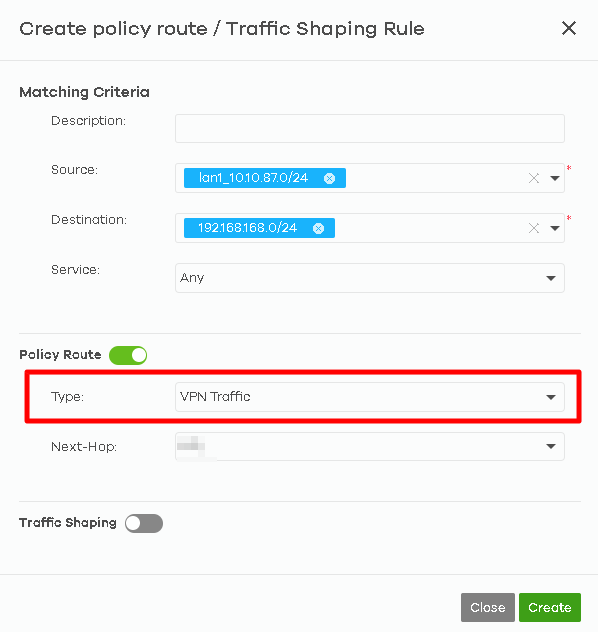
With specific scr and dst lan IP range, the firewall will direct the matched traffic to VPN tunnel. The other traffics will follow the rest of routing rules.
Zyxel Melen0 -
Hi @Zyxel_Melen
Nebula did not let me use VPN tunnel for a specific IP:
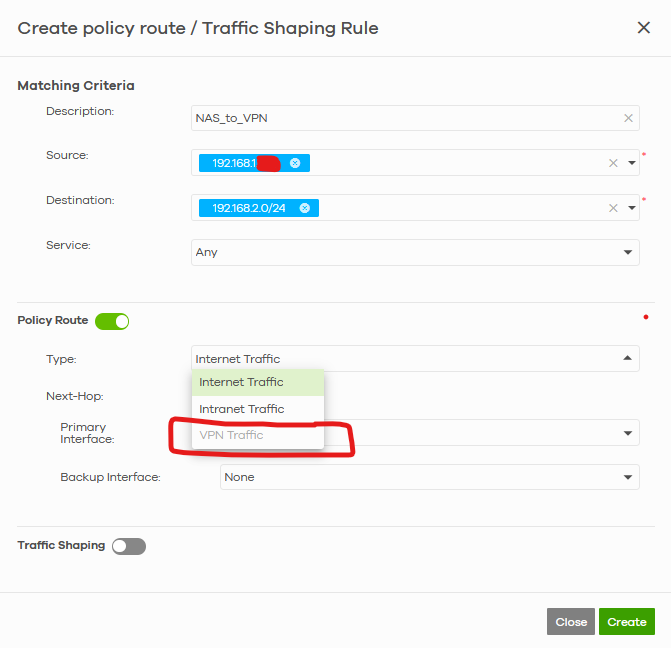
As you can see I wanted to send the traffic from NAS IP to all the LAN2 subnet (on a remote Zyxel device linked in VPN) but it is grey.
Neither via entire subnet:
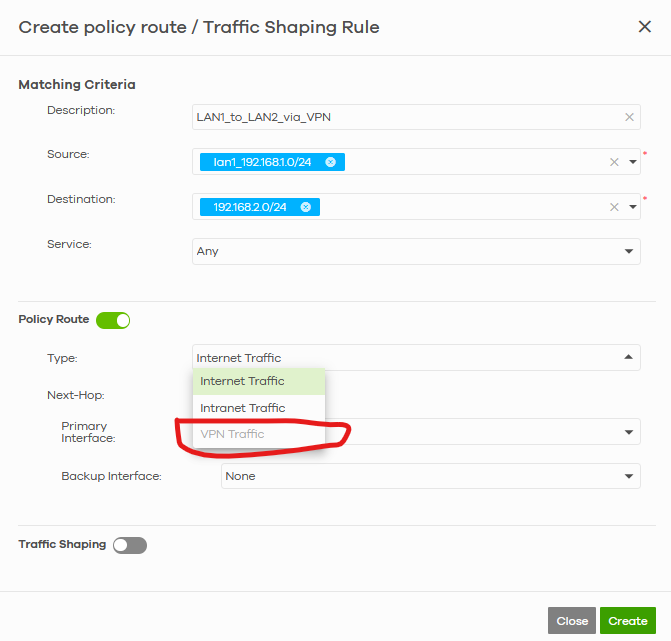 0
0 -
-
Hi @Zyxel_Melen
sure it is, sent a PM with the access to that ORG
0 -
Hi @GiuseppeR
Thanks for the privilege. Update a short conclusion in here:
The VPN tunnel are route-based VPN, so we can reference the VPN information on VPN connections page to set the policy route rule.
Zyxel Melen0 -
Hi @Zyxel_Melen
your solution is great. 😎
For the newbie I would like to add suggestions about how to compile the values.
Let's make an example.
You want to route an IP like 192.168.1.10 (or a subnet 192.168.1.0/24) to 192.168.2.0/24 via VPN tunnel made by Nebula VPN Orchestrator.
So you have to go to this page:
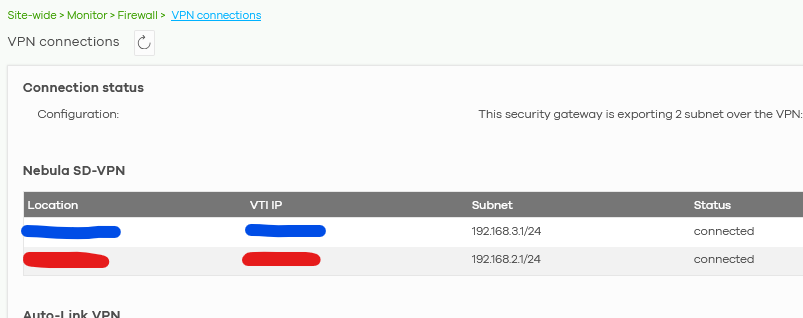
Take note about YOUR values under VTI IP and place them here (Melen reference guide in the post above):

I have 2 locations, so blue VTI IP is needed to reach 192.168.3.1/24 subnet and the red one accordingly to reach 192.168.2.1/24 subnet
0
Categories
- All Categories
- 442 Beta Program
- 3.1K Nebula
- 241 Nebula Ideas
- 6.8K Security
- 755 USG FLEX H Series
- 379 Security Ideas
- 1.8K Switch
- 87 Switch Ideas
- 1.5K Wireless
- 58 Wireless Ideas
- 7.2K Consumer Product
- 320 Service & License
- 512 News and Release
- 99 Security Advisories
- 31 Education Center
- 10 [Campaign] Zyxel Network Detective
- 5.3K FAQ
- 34 Documents
- 90 About Community
- 119 Security Highlight


