Flex200 V5.42(ABUI.1) crashed this morning: after reset is back online but no WiFi clients





 Guru Member
Hello everyone,
this morning a USG FLEX 200 with latest V5.42(ABUI.1) onboard crashed and it was unable to come back online with its entire network (7x Zyxel appliances):

As you can see it crashed multiple times:
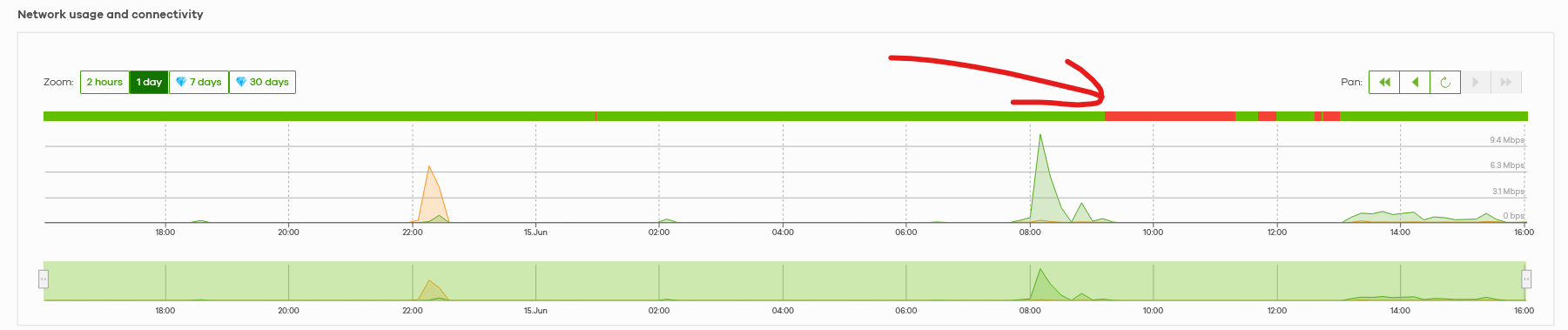
I was just able to see it online but not the rest of the network (switches, APs, servers and so on…) because the firewall was unable to serve the DHCP server. It was able only to reboot itself via Nebula. Nothing else.
As you can see the offline issue was for the entire network:
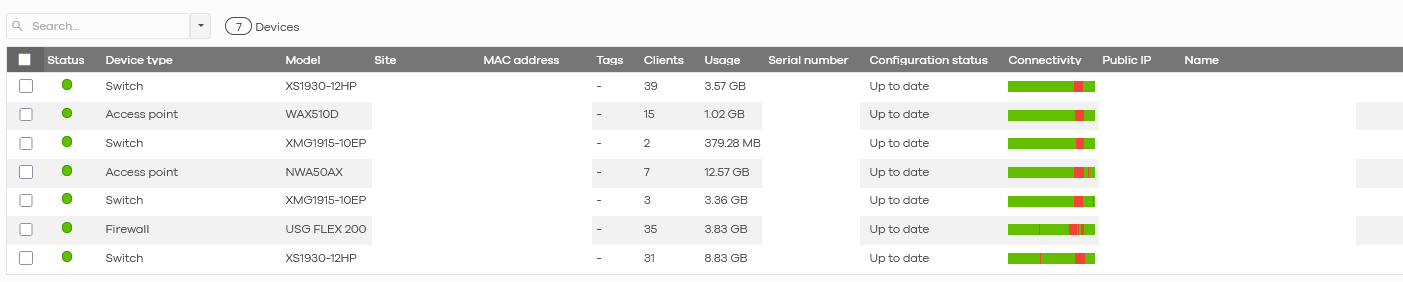
So I had to go on site.
I tried to plug in a WAN2 to check if it was something related to the ISP connection, but the firewall was unable to get the WAN2 also when unplugging WAN1.
So I had to reset it.
After I reset it, it went online automatically (I set nothing, neither the ISP connection parameters and that is strange…) letting the rest of the network go online so the customer was able to work again.
The problem is that I cannot see the exact list of devices, linked to it, for example it does not show anything on WiFi while I'm sure that there are devices that goes wireless there (e.g. printers, a pair of tablets…):
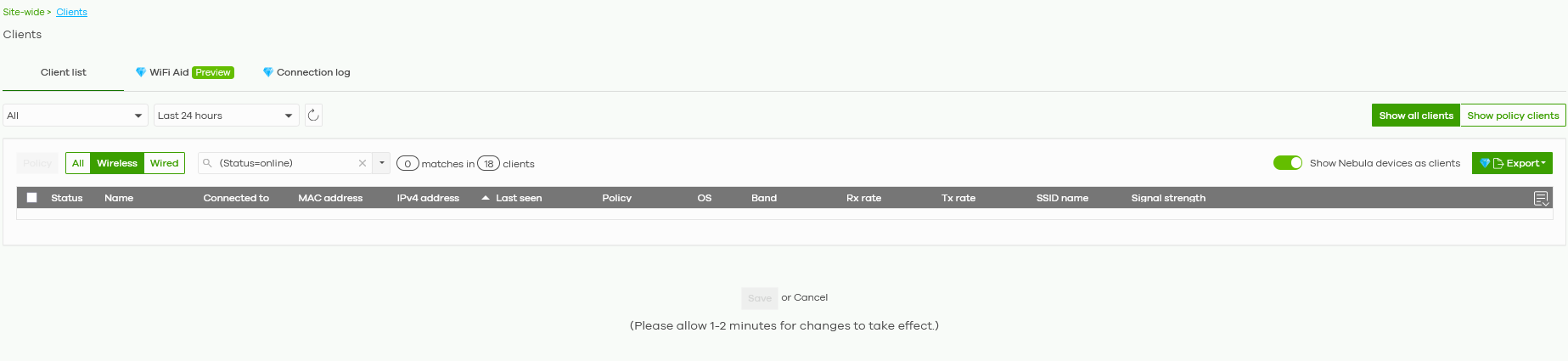
As you can see here:
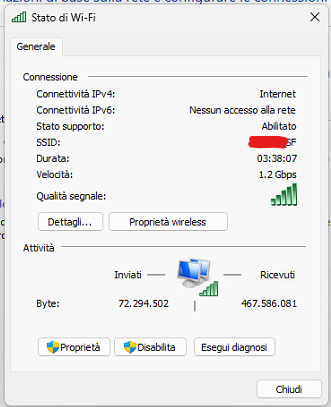
I have a PC too that is linked to that site WiFi, but zero devices on Nebula.
How can I understand what happened?
Someone else saw a similar behaviour?
All Replies
-
EDIT.
After almost half a day I start seeing again WiFi devices in my list:

Please compare this to my previous screenshot 😎
0 -
Hi @GiuseppeR
The device offline timestamp seems match the Nebula incident period.
Nebula Cloud Service Incident 2026-06-15 09:52 - 17:53 (UTC+0) — Zyxel Community
About the wireless client counts, I'm checking on it.
Zyxel Melen0 -
Hi @Zyxel_Melen
I understand the fact that this issue seems to match the Incident period, but it is strange that the firewall took down the entire network: it was unable to release a dynamic IP also for my laptop when I went on site (the reason why I had to reset the firewall).
The reality was that the client was NOT able to go online until I went there.
When there is a Nebula Incident the difference is that you cannot reach Nebula services, but I was able to see that specific ORG down and on site they were unable to go outbound.
0 -
Hi @GiuseppeR
May I know some details when the issue happened?
- All clients can't access Internet or new connected clients? Are they wireless client or wired client?
- Does this site set any authentication/Captive portal with Nebula cloud authentication?
If your network uses Nebula cloud authentication, that outage affecting the Nebula authentication server may prevent you from accessing the Internet, as the default captive portal policy blocks all traffic until sign-on is completed.
If this is not your case, we might not check further since the issue was resolved by factory default.
Zyxel Melen0 -
Hi @Zyxel_Melen
here the answers:
1- everything went down. No internet connection for wired and wireless devices. You can see my screenshots above but also the logs on Nebula, that is a Pro licensed ORG.
I was unable to connect to internet too (when using my laptop linked to the front ports on the firewall itself, neither on the rest of the network using random ports).
2- no captive portal, only Cloud authenticaton for a VPN user. I can understand that VPN could be a no go for the external user, but the rest of the network should stay alive without issues.
It is also more strange the behaviour when I had to reset the firewall with a clip.
0 -
Hi @GiuseppeR
Thanks for the update. Could you help to enable Zyxel support access? I would like to ask our team to have further checks.
Zyxel Melen0 -
Hi @Zyxel_Melen
done, sent a PM with screenshots and infos
0 -
Hi @GiuseppeR
About the crash/no Internet issue, I found the possible evidence for this issue and have a further investigation. I will update once I get further information.
About the no WiFi clients on client page or dashboard, this is confirmed due to the 6/15 incident.
- Monitoring information abnormal on NCC
Sorry for delayed update in the incident post.
Zyxel Melen0 -
Hi @GiuseppeR
Please allow me to update the firewall issue part. The firewall stuck in "ZySH daemon is busy" and "Core dump generation zip failed.(15) Process zysh". These cause the LAN devices can't access the Internet. But the diagnostic file we collect after second reboot could find the root cause that cause "ZySH daemon is busy". If this issue happens again, we need your help to connect the console cable to collect the console log (firewall should print the error automatically) and the diagnostic file.
Collect diagnostic file command:
- Collect the diagnostic file with this command and let it collect for up to 10 minutes
diaginfo collect ac
- if you want to see the status of the diagnostic file collection, write this command
show diag-info
- or this command
show diag-info status
And download the diagnostic file via local web GUI after reboot the firewall.
Zyxel Melen0



 Zyxel Employee
Categories
- All Categories
- 442 Beta Program
- 3.1K Nebula
- 243 Nebula Ideas
- 6.8K Security
- 783 USG FLEX H Series
- 389 Security Ideas
- 1.8K Switch
- 87 Switch Ideas
- 1.5K Wireless
- 58 Wireless Ideas
- 7.2K Consumer Product
- 325 Service & License
- 527 News and Release
- 101 Security Advisories
- 31 Education Center
- 10 [Campaign] Zyxel Network Detective
- 5.3K FAQ
- 34 Documents
- 91 About Community
- 122 Security Highlight


