Nebula Deployment Experience – Practical Feedback from Real-World Implementations

 Freshman Member
I would like to use this thread as an open discussion based on practical experience from several real-world Zyxel Nebula deployments.
Overall, Nebula provides many useful features and some genuinely good ideas. During implementation and daily administration, however, I came across several smaller details that made certain tasks less intuitive, required additional workarounds or simply extended the deployment time.
I am not presenting these points as complaints or as a formal product review. Some of them may be feature limitations, some may result from unclear behaviour or documentation, and some may simply require a better understanding of the intended workflow.
The goal is to share practical field observations, compare experiences with other administrators and discuss possible improvements that could make configuration, troubleshooting and daily operations smoother.
I will add the examples step by step, together with the deployment context, operational impact and a possible improvement.
1. More flexible licensing for mixed-device sites
In one of my Nebula deployments, the site consists of:
- USG FLEX 700H
- XS3800-28
- 2 × XGS2220-54
- XS1930-12F
The firewall and the main switches have active Security or Nebula Professional licenses. The XS1930-12F is used only as a basic Layer 2 switch for connecting storage, so VLAN configuration and basic monitoring are sufficient for this device.
However, leaving this single switch without a Professional license appears to limit selected Professional functionality for the entire site. For example, extended log retention is no longer available for the licensed XS3800 core switch.
I understand that some Nebula features operate at the site level and may require a consistent license tier. However, for mixed environments, it could be useful to provide an option to exclude selected basic devices from site-wide Professional features.
An unlicensed device could, for example:
- remain available for basic configuration and monitoring,
- have reduced reporting and analytics,
- appear as limited or greyed out in Professional topology views.
At the same time, devices with active Professional licenses could continue to provide their licensed functionality.
This could make the licensing model more flexible for sites where not every device requires the same level of cloud functionality.
2. A more operational site-wide dashboard
Even with all available widgets enabled, the site-wide dashboard could provide more operational context for day-to-day administration of a firewall-centric deployment.
The current view gives a useful overview of device availability, clients, application traffic and selected alerts. However, it could also provide a concise summary of the most important events from the last hour or another configurable period.
Examples could include:
- recent UTM detections and blocked threats,
- unavailable or degraded VPN tunnels,
- WAN connectivity or performance problems,
- interfaces with errors, drops or abnormal utilisation,
- broadcast or multicast anomalies,
- hosts repeatedly generating blocked or suspicious traffic.
The intention would not be to replace the dedicated monitoring and security pages. Nebula already provides useful detailed views in many of these areas.
The dashboard could instead show a site-wide total, warning status or list of the most relevant incidents, with a direct link to the appropriate detailed page.
Where appropriate, simple actions could also be available directly from the dashboard. For example, if a host repeatedly attempts to access a blocked website, the administrator could quickly open the event details or create an exception without navigating through several separate sections.
This would make the dashboard a more useful starting point for daily operational work.
3. Better support for multi-tab workflows
Nebula could benefit from more consistent support for working in multiple browser tabs.
During troubleshooting, inventory cleanup or larger configuration tasks, administrators often need to compare several views at the same time. For example:
- the client list,
- switch port configuration,
- the MAC address or forwarding table,
- firewall policies,
- event logs.
When reviewing a site with around 100 hosts, moving repeatedly between these views can become time-consuming, especially when additional tabs require repeating the organization, site or device navigation process.
It would be useful if Nebula consistently supported:
- middle-click and
Ctrl+Click, - an explicit Open in new tab option,
- deep links to specific devices and configuration pages,
- preservation of the selected organization and site context,
- preservation of filters and search results where possible.
Multi-tab operation is a normal administrative workflow, particularly during troubleshooting and network cleanup.
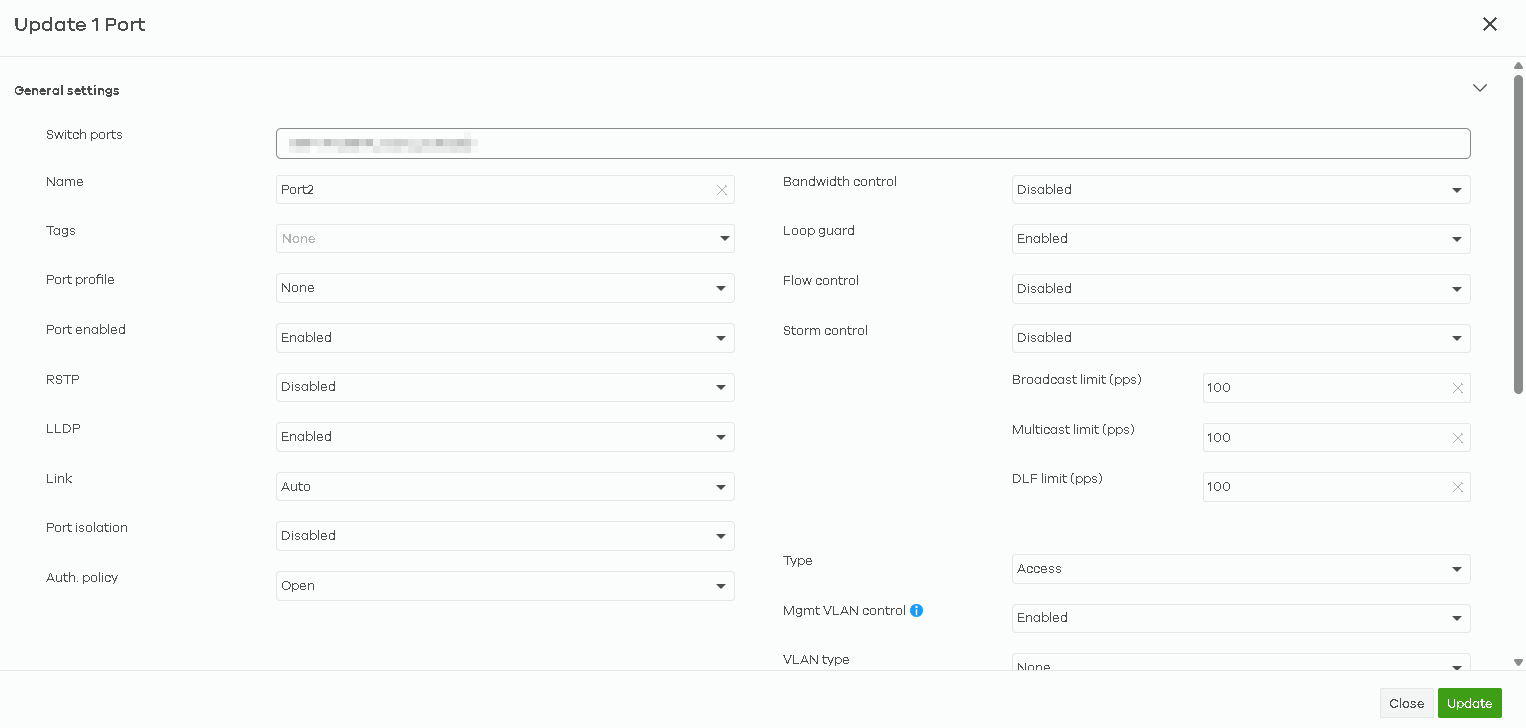
4. Inline editing for simple switch port changes
This is a relatively small usability improvement, but it could noticeably speed up switch configuration and documentation work.
Currently, even simple port changes require opening a separate edit window. This is appropriate for advanced or potentially disruptive settings, but it may be unnecessary for basic changes such as:
- port name,
- description,
- tag,
- port profile,
- basic enable or disable state.
For these fields, inline editing directly in the switch port table could be more efficient.
For example, double-clicking a field or selecting a small edit icon could allow the administrator to update the value without leaving the table.
The full configuration dialog could still be used for advanced options and changes requiring additional validation or confirmation.
This would be particularly useful when documenting or cleaning up switches with a large number of ports.
5. Broader WAN trunk and connectivity-check management
WAN trunk and connectivity-check configuration is directly related to Internet availability and business continuity, so it would be useful to manage the complete workflow from Nebula.
A broader configuration scope could include:
- creating and editing WAN trunks,
- defining active and passive members,
- selecting failover or load-balancing behaviour,
- configuring priority, weight and thresholds,
- selecting the default WAN trunk,
- displaying the current trunk state,
- showing the reason for the latest failover.
Connectivity Check should also be fully configurable from Nebula.
One possible implementation could be reusable WAN Connectivity Check profiles, defining:
- multiple probe targets,
- ICMP, DNS, TCP or HTTP/HTTPS checks,
- check interval and timeout,
- failure and recovery thresholds,
- whether one or all targets must respond,
- source interface or source address.
Such a profile could then be assigned to one or more WAN interfaces.
This would avoid duplicating the same configuration and would make WAN health checks easier to standardize across multiple sites.
A physical WAN link may remain up even when connectivity beyond the ISP device is unavailable, so clear cloud-side configuration and diagnostics are important for reliable failover.
6. More flexible DHCP pool configuration
The current Start IP + Pool size model works well for straightforward configurations, but it is less convenient during migrations, existing network cleanups or live deployment work.
It would be useful to support additional methods of defining DHCP pools, such as:
- direct
Start IP – End IPconfiguration, - multiple address ranges,
- exclusion ranges,
- bulk import or paste of static reservations,
- an advanced text-based or CLI-style input mode.
Sometimes the complete addressing plan is available before deployment. In other cases, the administrator must adjust the pool while discovering existing devices and reservations.
Supporting both structured forms and a faster advanced input method would reduce manual calculation and make DHCP configuration more practical in larger environments.
7. Creating a security zone during VLAN configuration
When creating a new VLAN interface, the default zone is LAN.
This is convenient for simple deployments, but in segmented networks the purpose of creating separate VLANs is often to place systems in separate security domains.
It would therefore be useful to provide a Create new zone option directly in the VLAN interface configuration.
Nebula could:
- suggest a zone name based on the interface name or VLAN ID,
- create the zone,
- assign the new VLAN interface to it,
- optionally suggest creating the required firewall policies.
This would allow the administrator to complete the segmentation workflow without leaving the interface configuration, creating the zone elsewhere and returning to finish the interface.
The existing LAN zone could remain the default, but a direct zone-creation option would make security-oriented deployments faster and more consistent.
8. Better filtering and searching on the firewall policy page
The firewall policy page works well when the rule base is relatively small. As the number of policies grows, locating and reviewing the relevant rules becomes more difficult.
It would be useful to provide filters for:
- source interface or zone,
- destination interface or zone,
- source subnet, IP or address object,
- destination subnet, IP or address object,
- service,
- action,
- enabled or disabled state,
- assigned security profiles.
A particularly useful troubleshooting option would be to enter an IP address and display all policies that may apply to that host.
During live troubleshooting, the administrator often needs to answer questions such as:
- which policies allow this host,
- which rule blocks the traffic,
- which security profile is being applied,
- whether another broader rule also matches.
Filtering the existing table would be much faster than repeatedly reviewing the complete rule base.
9. More granular session limits and exceptions
Session control in Nebula is currently difficult to use in networks containing different types of workloads.
A single global sessions-per-host limit may work well for ordinary users and endpoint devices. However, servers, storage systems and infrastructure services may require significantly different limits.
In one deployment involving iSCSI storage, the global session limit affected communication with the storage system. The practical workaround was to raise the value significantly or effectively disable the control, which also reduced its protective value for standard client devices.
It would be useful to configure session limits with greater granularity, for example:
- per host,
- per IP address or address object,
- per subnet,
- per VLAN,
- per zone.
Example:
- client VLAN: standard session limit,
- server VLAN: higher session limit,
- selected storage hosts: dedicated higher limit or exception.
A security control is most useful when legitimate infrastructure traffic can be excluded without weakening the protection for the rest of the network.
10. Clearer visibility of effective Syslog configuration
After configuring a Syslog server in Nebula, I could not clearly confirm how the configuration was reflected on the USG FLEX H firewall.
At this stage, I am not sure whether this is:
- expected Nebula-managed behaviour,
- a limitation of the local interface,
- incomplete synchronization,
- a device-specific limitation,
- or simply insufficient status information.
The main issue is the lack of a clear view showing the effective configuration and its current operational state.
It would be useful for Nebula to display:
- configuration status per device,
- selected log categories,
- source interface or source IP,
- last successful Syslog transmission,
- last delivery error,
- a Send test message option.
If the configuration is intentionally hidden from the local firewall interface because it is controlled by Nebula, the local GUI could show a read-only Managed by Nebula status together with the effective settings.
At the moment, verification requires checking the external Syslog server or performing a packet capture. Clearer status information would make it easier to distinguish between configuration, connectivity and feature-support issues.
.
Comments
-
Thanks for sharing your experience and suggestion with us.
About the firewall part, we would like to remind that these are supported on device local GUI. We will monitor the comment and votes to evaluate this part.
About the switch part "For example, double-clicking a field or selecting a small edit icon could allow the administrator to update the value without leaving the table." May you share your example with us? Additionally, if you click the details button, Nebula will take you to detail page. But if you click the <switch name>/<port number> (like core switch 01/1), Nebula will pop out a configuration window.
About Nebula part, we will monitor the comment and votes to evaluate this part.Zyxel Melen0





 Zyxel Employee
Categories
- All Categories
- 442 Beta Program
- 3.1K Nebula
- 242 Nebula Ideas
- 6.8K Security
- 777 USG FLEX H Series
- 387 Security Ideas
- 1.8K Switch
- 87 Switch Ideas
- 1.5K Wireless
- 58 Wireless Ideas
- 7.2K Consumer Product
- 324 Service & License
- 526 News and Release
- 101 Security Advisories
- 31 Education Center
- 10 [Campaign] Zyxel Network Detective
- 5.3K FAQ
- 34 Documents
- 91 About Community
- 121 Security Highlight


