GS1920-48HPv2 Nebula port configuration overwrites Static VLAN memberships



 Freshman Member
I am new to Zyxel and network configuration overall so hope these aren't stupid questions.
I am configuring multiple GS1920-48HPv2 switches through a combination of the local web interface and Nebula.
I first created VLANs 10, 20, and 30 and manually configured their memberships under Static VLAN in the local web interface. I then configured individual ports through Nebula using settings such as:
- Port Type: Access or Trunk
- PVID
- Allowed VLANs
- Management VLAN Control
After the Nebula configuration synchronized, the previously configured Static VLAN memberships changed automatically.
I have confirmed this behavior with a controlled test on an unused port:
- Recorded the existing VLAN 10, 20, and 30 memberships for Port 49.
- Changed Port 49 through Nebula.
- Allowed the switch to synchronize.
- Rechecked the Static VLAN pages locally.
- Port 49’s membership changed on all three VLANs.
I have also observed broader membership changes:
- Switch C: VLANs 10, 20, and 30 changed.
- Switch B: VLANs 10 and 20 changed; VLAN 30 remained correct.
Questions:
- Is Nebula expected to overwrite or regenerate the local Static VLAN membership tables when port settings are changed?
- Can Static VLAN memberships be locked or preserved while continuing to manage the switch through Nebula?
- Should VLAN membership be configured exclusively through Nebula on a Nebula-managed GS1920?
- What is the recommended workflow for configuring access ports, trunk ports, PVIDs, tagged VLANs, and forbidden VLANs without later synchronization changing the intended memberships?
- Is there a way in Nebula to explicitly define Normal, Fixed, Forbidden, and Tx Tagging for each VLAN and port?
- If the local and Nebula configurations conflict, which configuration is authoritative?
My goal is to maintain explicit VLAN separation for a multicast AV-over-IP system while keeping the switches managed in Nebula.
Thank you for your assistance.
Accepted Solution
-
Hi @Mark_KC ,
For your goal of maintaining explicit VLAN separation for a multicast AV-over-IP system on a Nebula-managed GS1920-48HPv2, you can still achieve this — but the port/VLAN configuration should be done through Nebula, not the local GUI, once the switch is Nebula-managed.
As an example, using VLAN 10/20/30 tagged for your multicast AV-over-IP system, you would configure it as below (note that VLAN 1 remains untagged):
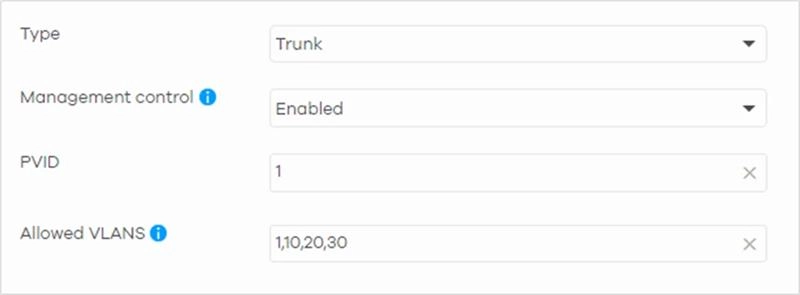
For more detail about setup Nebula Switch VLAN configuration, please refer to this FAQ
How to setup Nebula Switch VLAN configuration? — Zyxel Community
Regarding whether configuration should be done on both Nebula and the local GUI: here's the general behavior:
- If you change a setting on the local GUI, the new configuration is not pushed up to Nebula — the switch will continue operating on the local GUI's setting until Nebula pushes a new configuration.
- If you change a setting in Nebula, that change is pushed down and will overwrite the corresponding local GUI (switch) setting.
So, Nebula is effectively the authoritative source once the switch is under Nebula management — any local Static VLAN changes made directly on the switch can be overwritten the next time Nebula push configuration. For a Nebula-managed switch, we'd recommend configuring VLAN membership (Access/Trunk, PVID, Allowed VLANs) exclusively through Nebula to avoid the conflicts you're seeing.
Regarding "Normal, Fixed, Forbidden, and Tx Tagging" definition in Nebula, Nebula simplifies these traditional command-line/GUI concepts into a cleaner, state-based UI:
- Tx Tagging (Tagged): On a Trunk port, any VLAN listed in the Allowed VLANs field (excluding the PVID) is configured as a Tagged member (equivalent to Fixed + Tx Tagging).
- Tx Untagging (Untagged): The VLAN ID defined in the PVID field is always untagged on egress.
- Forbidden: Any VLAN that is not entered in the Allowed VLANs list on a Trunk port or is not the designated PVID on an Access port, is automatically excluded from that port’s membership.
Zyxel_Judy
0





 Zyxel Employee
All Replies
-
Hi @Mark_KC ,
For your goal of maintaining explicit VLAN separation for a multicast AV-over-IP system on a Nebula-managed GS1920-48HPv2, you can still achieve this — but the port/VLAN configuration should be done through Nebula, not the local GUI, once the switch is Nebula-managed.
As an example, using VLAN 10/20/30 tagged for your multicast AV-over-IP system, you would configure it as below (note that VLAN 1 remains untagged):
For more detail about setup Nebula Switch VLAN configuration, please refer to this FAQ
How to setup Nebula Switch VLAN configuration? — Zyxel Community
Regarding whether configuration should be done on both Nebula and the local GUI: here's the general behavior:
- If you change a setting on the local GUI, the new configuration is not pushed up to Nebula — the switch will continue operating on the local GUI's setting until Nebula pushes a new configuration.
- If you change a setting in Nebula, that change is pushed down and will overwrite the corresponding local GUI (switch) setting.
So, Nebula is effectively the authoritative source once the switch is under Nebula management — any local Static VLAN changes made directly on the switch can be overwritten the next time Nebula push configuration. For a Nebula-managed switch, we'd recommend configuring VLAN membership (Access/Trunk, PVID, Allowed VLANs) exclusively through Nebula to avoid the conflicts you're seeing.
Regarding "Normal, Fixed, Forbidden, and Tx Tagging" definition in Nebula, Nebula simplifies these traditional command-line/GUI concepts into a cleaner, state-based UI:
- Tx Tagging (Tagged): On a Trunk port, any VLAN listed in the Allowed VLANs field (excluding the PVID) is configured as a Tagged member (equivalent to Fixed + Tx Tagging).
- Tx Untagging (Untagged): The VLAN ID defined in the PVID field is always untagged on egress.
- Forbidden: Any VLAN that is not entered in the Allowed VLANs list on a Trunk port or is not the designated PVID on an Access port, is automatically excluded from that port’s membership.
Zyxel_Judy
0 -
Thank you very much Zyxel_Judy for the clarification and the link to the FAQ. That really clears things up and simplifies what I doing. Overall I have been extremely happy with our move to the Zyxel products and this support just instills that.
Thanks,
Mark0
Categories
- All Categories
- 442 Beta Program
- 3.1K Nebula
- 243 Nebula Ideas
- 6.8K Security
- 783 USG FLEX H Series
- 389 Security Ideas
- 1.8K Switch
- 87 Switch Ideas
- 1.5K Wireless
- 58 Wireless Ideas
- 7.2K Consumer Product
- 325 Service & License
- 527 News and Release
- 101 Security Advisories
- 31 Education Center
- 10 [Campaign] Zyxel Network Detective
- 5.3K FAQ
- 34 Documents
- 91 About Community
- 122 Security Highlight


