ge4 interface intermittently responds to ARP with physical port MAC instead of configured MAC — USG



 Freshman Member
Device: USG FLEX 100H
Firmware: V1.38 (auto-update enabled, confirmed no newer version available)
Topology: Interface ge4 (LAN, static IP 192.168.1.1/24) was originally a bridge of two physical ports: p7 (active, trunk port also carrying VLAN 20 for VoIP phones) and p8 (confirmed unused — no cable connected, verified both in Port Status page and physically). Default/configured MAC for ge4 is f4:4d:5c:6a:ca:bd.
Symptom: Intermittently (roughly a few times per day, no fixed pattern), ge4 answers ARP requests for 192.168.1.1 using a different MAC address — f4:4d:5c:6a:ca:b7 — instead of its configured ...ca:bd. This causes LAN clients that cache the wrong MAC to lose all traffic routed through the gateway (i.e. internet access), while direct LAN-to-LAN traffic between clients is unaffected (doesn't need to traverse the gateway). Confirmed twice via arp -a on a Windows client, captured live during an active outage both times, showing ...ca:b7; after the client forced a DHCP release/renew (or after some time passed), the entry corrected itself to ...ca:bd and connectivity resumed.
Troubleshooting already done, neither resolved it:
- Removed
p8fromge4's port members (confirmed saved — onlyp7remains). Issue recurred afterward with the same MAC flip. - Set
ge4→ MAC Address → "Overwrite Default MAC Address" → explicitlyf4:4d:5c:6a:ca:bd. Issue still recurred —arp -aon the client showed...ca:b7again during a live outage, despite the override being active. (Side note: after this change,ge4's IPv6 link-local address stopped showing up in the interface list — possibly related, possibly cosmetic.)
Possibly related community threads:
- — Zyxel-confirmed MAC table corruption bug on FLEX 200H, FW V1.37 ("We have confirmed this scenario is an issue and will be enhanced in the future firmware")
- — very similar scenario involving reassigning port P8 between interfaces, stale/wrong MAC stuck until manual DHCP release
I noticed V1.39 Patch 0 (Latest channel) release notes mention "MAC addresses now consistent across LAG member ports" and "Interface IP display corrected when VLAN/LAG configured with down underlying ports" — both sound like they could address this exact issue. Can you confirm whether this fix covers the scenario described above, and whether/when it will be promoted to the Stable channel?
All Replies
-
Your issue seems to do with the LAN interface Gateway vs what I was seeing.
Depending on your setup and what its for I would guess something it impersonating 192.168.1.1 to test this on a PC with Wireshark use filter ARP at the start then do in cmd as admin arp -d then watch is PC arp to 192.168.1.1 to see if you get two reply for different MAC for 192.168.1.1
or a misconfigure switch?
0 -
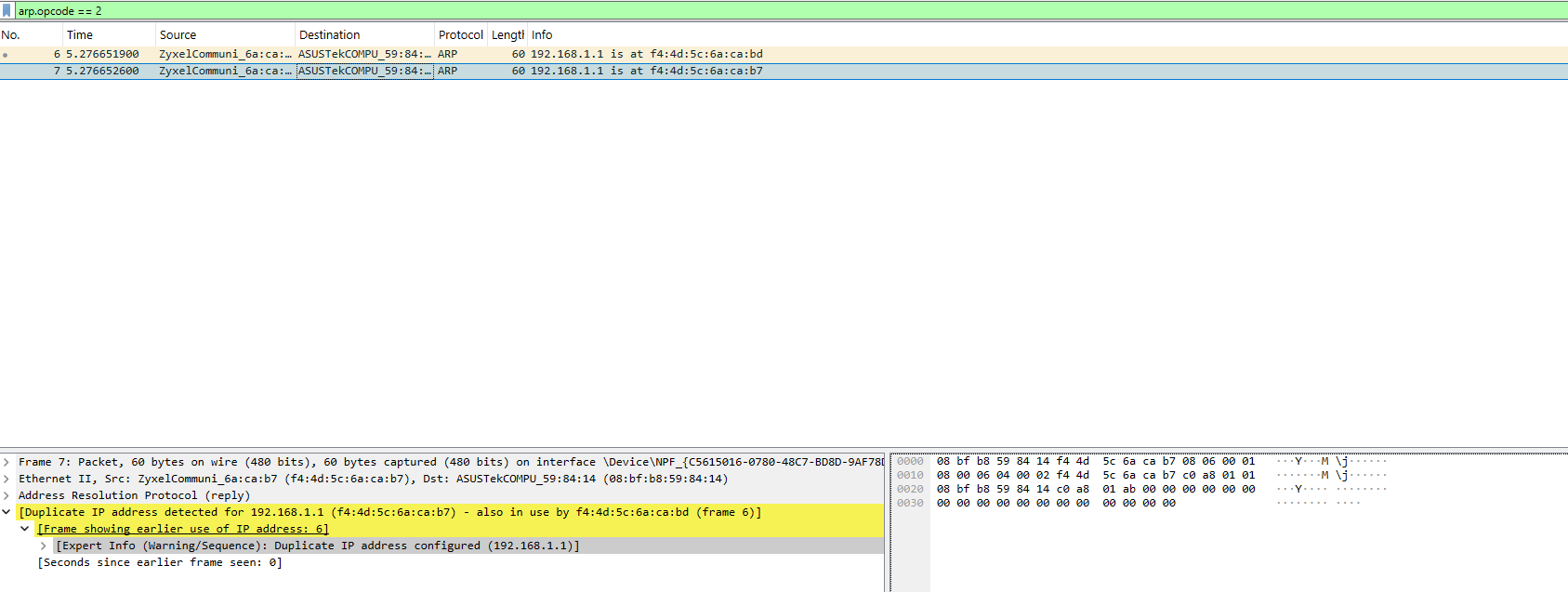
Following the suggestion above, I ran: Wireshark filter arp.opcode == 2, then cleared the ARP cache with arp -d * (admin cmd) — I didn't manually generate any traffic (no ping); this came from normal background traffic alone.
Result: as soon as I do "arp -d *" (tried many times) two ARP replies arrived 0.7ms apart, both claiming to be 192.168.1.1, with two different MACs — f4:4d:5c:6a:ca:bd and f4:4d:5c:6a:ca:b7 — both resolving to the same "ZyxelCommuni" OUI. Wireshark's own expert analysis flagged it directly: "Duplicate IP address detected for 192.168.1.1 (f4:4d:5c:6a:ca:b7) - also in use by f4:4d:5c:6a:ca:bd". I checked the Ethernet II source field vs. the ARP sender MAC field on both frames — they match in each case, so these are two genuine, independent replies, not a payload/frame mismatch.
The fact that this happened within milliseconds of clearing the cache, without any deliberate probe, suggests it's very easy to reproduce — likely happens continuously/very frequently in the background, not just during the visible outages. Since both MACs share the same Zyxel OUI and one of them (...ca:bd) is literally what my USG FLEX 100H's GUI reports as ge4's configured "Default MAC Address," this looks like the router itself answering with two different identities almost simultaneously for the same interface — not external spoofing or a rogue device. Screenshot of the capture attached.
This seems to line up with the "MAC addresses now consistent across LAG member ports" fix mentioned in the V1.39 Patch 0 release notes. Still hoping for confirmation on whether that fix covers this exact scenario, and its Stable-channel timeline.
 0
0 -
Ok so next test do the same test but with just the PC directly to FLEX
0 -
Hi @alessandropironi ,
To investigate the symptom you faced, please share the Nebula organization & site name, and enable Zyxel support.
Zyxel_Judy
0 -
Update — ran the direct-connection test you suggested.
Connected the PC directly to the FLEX's port
p7(physically unplugged the switch, plugged the PC in there instead), bypassing the switch and any VLAN 20/phone traffic entirely. Repeated the same test (arp.opcode==2filter,arp -d *to clear cache) several times — each trial came back clean, single correct reply (...ca:bd), no duplicate...ca:b7.Worth noting: port
p7's trunk configuration on the router itself didn't change between the two tests — it's stillge4(untagged) +TELEFONIVLAN 20 (tagged) on the same physical port. So I don't think this rules out the port-sharing setup as relevant; what actually changed is the absence of concurrent traffic from other devices (especially the phones on VLAN 20) that normally flows through the switch.My current working theory: this looks like a race condition triggered when there's simultaneous/concurrent traffic across the two logical interfaces sharing the same physical port (
ge4andTELEFONI) — e.g. a phone doing something on VLAN 20 at the same moment a LAN client ARPs for the gateway. With only the PC connected directly and nothing else active, that concurrency never happens, so the bug doesn't trigger. Still looks router-side to me (consistent with the "MAC addresses now consistent across LAG member ports" fix in V1.39, and the two related threads linked above) — just with a more specific trigger condition than plain LAG membership.0 -
Same user as before, I've just switched account using the one I'm registered on Nebula.
Update — additional data point from Nebula (switch is a GS1920-48, managed via Nebula).
Checked Site-wide → Clients in Nebula, filtering by MAC address:
- Filtering
f4:4d:5c:6a:ca:b7: all 22 wired clients (out of 31 total on the site) showF4:4D:5C:6A:CA:B7as their "Connected to" value. - Filtering
f4:4d:5c:6a:ca:bd: 0 matches — no client shows this MAC as "Connected to".
My interpretation: this "Connected to" field is likely populated via LLDP neighbor discovery, which reports the physical port's own hardware MAC (
...ca:b7) — a constant/stable identity from the switch's point of view, distinct from the router's logical/administratively-configured interface MAC (...ca:bd) used for IP/ARP onge4.If that's right, it suggests a concrete mechanism for why this bug causes a total outage rather than degraded/partial connectivity: the switch happily forwards frames addressed to
...ca:b7to the correct physical port (it's a real, known hardware address there) — but the router'sge4interface, whose IP/ARP stack is presumably bound to listen only for its configured logical MAC...ca:bd, likely silently drops frames arriving addressed to the raw physical port MAC instead. So when a client's ARP cache gets the wrong MAC (...ca:b7) from the router's intermittent bad reply, the switch delivers those frames to the right place, but the router itself discards them on arrival — hence full internet loss for that client, while LAN-to-LAN traffic (which never needs to reach the gateway) is unaffected.0 - Filtering
-
@Zyxel_Judy Nebula organization is SER.CHIM, site SEDE CENTRALE
0 -
Hi @AlePironiSerchim ,
We suspect there may be an incorrect physical connection between your GS1920-48 and the USG FLEX 100H.
It looks like both Port 45 and Port 46 on your GS1920-48 are connected to the USG FLEX 100H — however, only one LAN port on the USG FLEX 100H is currently showing as active. This suggests the other cable is actually connected to the USG FLEX 100H's WAN port, not a LAN port.
F4:4D:5C:6A:CA:B7corresponds to the USG FLEX 100H's ge1 (WAN) interface MAC address, which would explain why this MAC address is intermittently appearing where it shouldn't.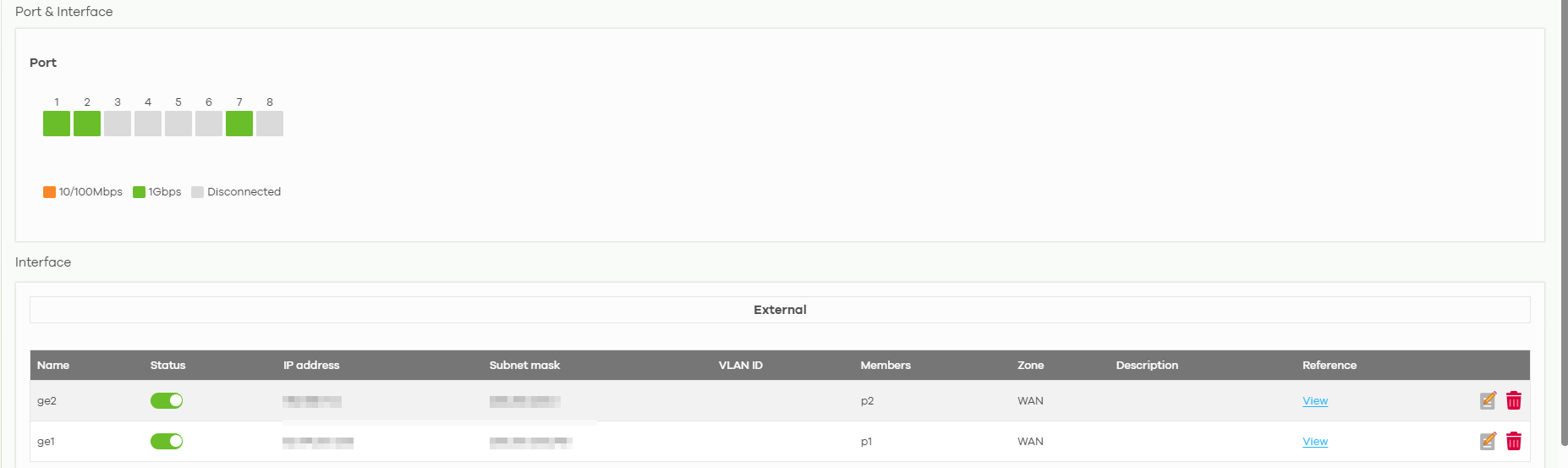
Zyxel_Judy
0 -
Thanks @Zyxel_Judy for checking! That's a useful data point — good to know
...ca:b7is genuinelyge1's own MAC.However, I don't think this is a cabling mix-up. I verified the mapping two ways:
- Since LLDP reflects the router's own per-port hardware identity as transmitted from that specific interface, a swapped cable shouldn't be able to fool this mapping.
p1 ↔ ge1 ↔ switch Port46p7 ↔ ge4 ↔ switch Port45
- Physical inspection: I also traced the cables by hand at the router — confirmed
p7(LAN) goes to switch Port45, andp1(WAN1) goes to switch Port46. No mismatch, matches the LLDP data exactly.
So the wiring is correct and verified on both fronts, not a physical cabling issue.
What still points to a firmware-level cause: I captured the duplicate ARP replies (
...ca:bdand...ca:b7) arriving as close as 1.7 microseconds apart, both answering the exact same single ARP request for 192.168.1.1. That timing seems far too tight to be explained by a cabling/physical issue — it looks like the router's firmware occasionally usesge1's own MAC when composing an ARP reply that should belong toge4, i.e. an internal MAC-selection mix-up between interfaces rather than a wiring problem. Possibly related to concurrent traffic onge1(which is almost always active, being the live WAN uplink) at the momentge4processes an ARP request.Could this be a known internal MAC/interface-identity bug rather than a cabling scenario?
Moreover, could it be related to the "Different device/same Mac Address after change interface to port" topic above?
Last question: any hint on when the new firmware version will be in stable release so that I can check if it resolves the issue?Thanks
0 - Since LLDP reflects the router's own per-port hardware identity as transmitted from that specific interface, a swapped cable shouldn't be able to fool this mapping.
-
Hi @AlePironiSerchim ,
Could you share more about your network setup — is there a specific reason Port 46 of the switch is connected to Port 1 (ge1, the WAN port) of the firewall?
Zyxel_Judy
0



 Guru Member




 Zyxel Employee
Categories
- All Categories
- 442 Beta Program
- 3.1K Nebula
- 243 Nebula Ideas
- 6.8K Security
- 783 USG FLEX H Series
- 389 Security Ideas
- 1.8K Switch
- 87 Switch Ideas
- 1.5K Wireless
- 58 Wireless Ideas
- 7.2K Consumer Product
- 325 Service & License
- 527 News and Release
- 101 Security Advisories
- 31 Education Center
- 10 [Campaign] Zyxel Network Detective
- 5.3K FAQ
- 34 Documents
- 91 About Community
- 122 Security Highlight


