GS1900-24 Firmware Upgrade Guide_Upgrading from v2.20 directly to Latest v2.90
Options

Zyxel_Luna
Posts: 113



 Zyxel Employee
Zyxel Employee
Direct Upgrade Supported: The GS1900-24 switch running the older firmware version 2.20 can be updated directly to the latest version 2.90.
Web UI Compatibility Issue: Due to the age of version 2.20, compatibility issues may occur with modern web browsers, causing the Web UI under [Maintenance] -> [Firmware] to render improperly or incompletely.
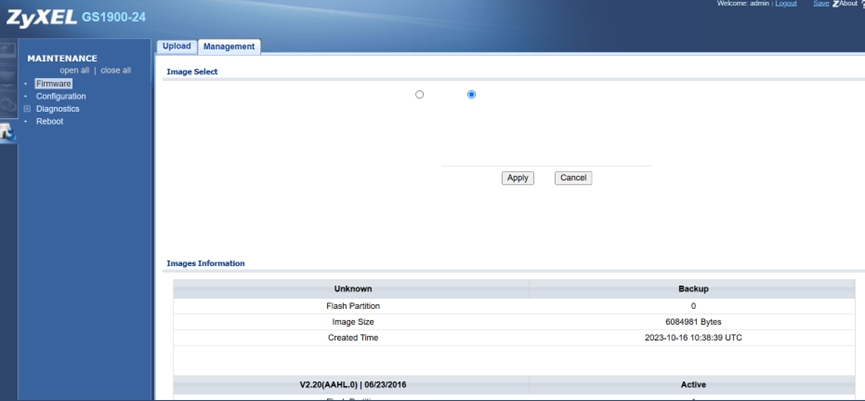
Recommended Action: It is recommended to use Zyxel ONE Network Utility (ZON) to perform the firmware upgrade safely.
Below are the FAQs regarding the download link and user guide for Zyxel ONE Network Utility (ZON):
Where can I download the ZON utility?
Pre-Upgrade Precautions
- Backup Configuration: Always save and back up your current configuration file to your local computer before starting any upgrade process.
- Do Not Power Off: Once the firmware transfer begins, do not turn off or interrupt power to the switch. The process can take between 5 to 15 minutes, and the device will automatically reboot once completed.
Tagged:
0
Categories
- All Categories
- 442 Beta Program
- 3.1K Nebula
- 243 Nebula Ideas
- 6.8K Security
- 783 USG FLEX H Series
- 389 Security Ideas
- 1.8K Switch
- 87 Switch Ideas
- 1.5K Wireless
- 58 Wireless Ideas
- 7.2K Consumer Product
- 325 Service & License
- 527 News and Release
- 101 Security Advisories
- 31 Education Center
- 10 [Campaign] Zyxel Network Detective
- 5.3K FAQ
- 34 Documents
- 91 About Community
- 122 Security Highlight