Why is my USG FLEX H not upgrading firmware automatically?





 Zyxel Employee
Question:
Why is my Zyxel USG FLEX H Series Firewall not upgrading firmware automatically, and what does the "ITS installed" message mean?
Answer:
The message "Please note that your new firmware download feature is disabled due to ITS installed." indicates that the automatic firmware download feature is unavailable because the USG FLEX H is using a date firmware.
To resolve this and ensure your USG FLEX H Series firewall is running the latest firmware, a manual firmware upgrade is typically required. Follow these steps:
Download the Latest Firmware:
Visit myZyxel.com.
Navigate to Device Management > Firmware Download.
Select your specific USG FLEX H Series model (e.g., USG FLEX 100H) and download the latest official firmware version.

Manually Upload the Firmware:
Access your USG FLEX H Series firewall via its web GUI.
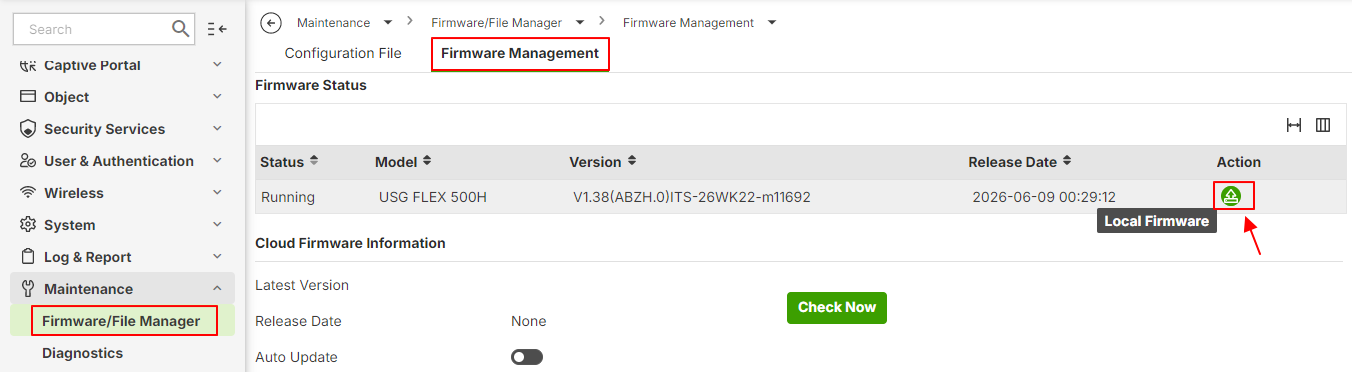
Go to Maintenance > Firmware/File Manager > Firmware Management.
Upload the downloaded firmware file to your USG FLEX H Series device.
Categories
- All Categories
- 442 Beta Program
- 3.1K Nebula
- 243 Nebula Ideas
- 6.8K Security
- 783 USG FLEX H Series
- 389 Security Ideas
- 1.8K Switch
- 87 Switch Ideas
- 1.5K Wireless
- 58 Wireless Ideas
- 7.2K Consumer Product
- 325 Service & License
- 527 News and Release
- 101 Security Advisories
- 31 Education Center
- 10 [Campaign] Zyxel Network Detective
- 5.3K FAQ
- 34 Documents
- 91 About Community
- 122 Security Highlight