The Standard NTP Synchronization Flow of Nebula and Standalone AP
Options

Zyxel_JoyLee
Posts: 220


 Zyxel Employee
Zyxel Employee
The NTP behavior for :
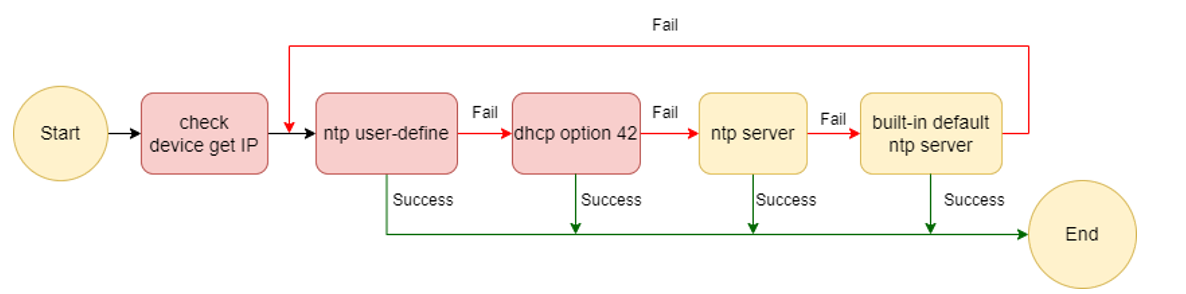
1. Cloud managed AP
- Initial sync occurs upon bootup.
- Once successfully synchronized, the AP will synchronize again every 6 hours.
- If any Nebula device fails to perform its NTP synchronization , it will automatically retry the sync path again until successfully synchronized.
- NTP user-define > NTP by customer defined
- NTP server > Push by NCC
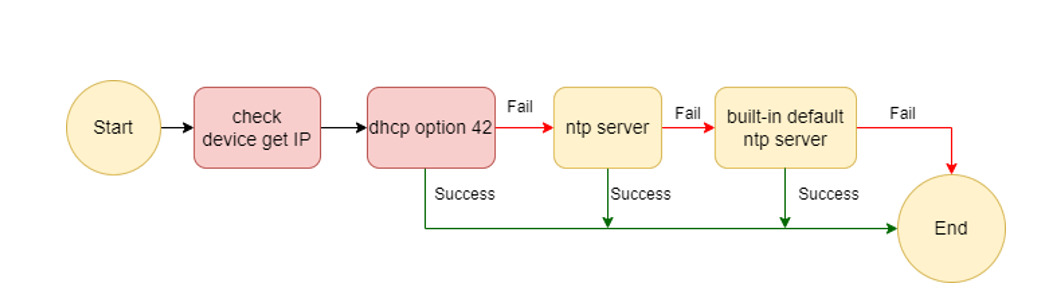
2. Standalone AP
- Initial sync occurs upon bootup.
- Once successfully synchronized, the AP will synchronize again every 6 hours.
- If device fails to perform its NTP synchronization , it will automatically retry the sync path again every 6 hours.
- NTP server > NTP by customer defined
0
Categories
- All Categories
- 442 Beta Program
- 3.1K Nebula
- 243 Nebula Ideas
- 6.8K Security
- 783 USG FLEX H Series
- 389 Security Ideas
- 1.8K Switch
- 87 Switch Ideas
- 1.5K Wireless
- 58 Wireless Ideas
- 7.2K Consumer Product
- 325 Service & License
- 527 News and Release
- 101 Security Advisories
- 31 Education Center
- 10 [Campaign] Zyxel Network Detective
- 5.3K FAQ
- 34 Documents
- 91 About Community
- 122 Security Highlight