[FWA515] - WAN PPPoE Passthrough seems not working





 Guru Member
Hello,
I've an FWA515 configured for using the LAN2 as WAN and a PPPoE over VLAN (VLAN ID 835) for the internet connection.
I've enabled the PPPoE Passthrough functionality, but seems not working.
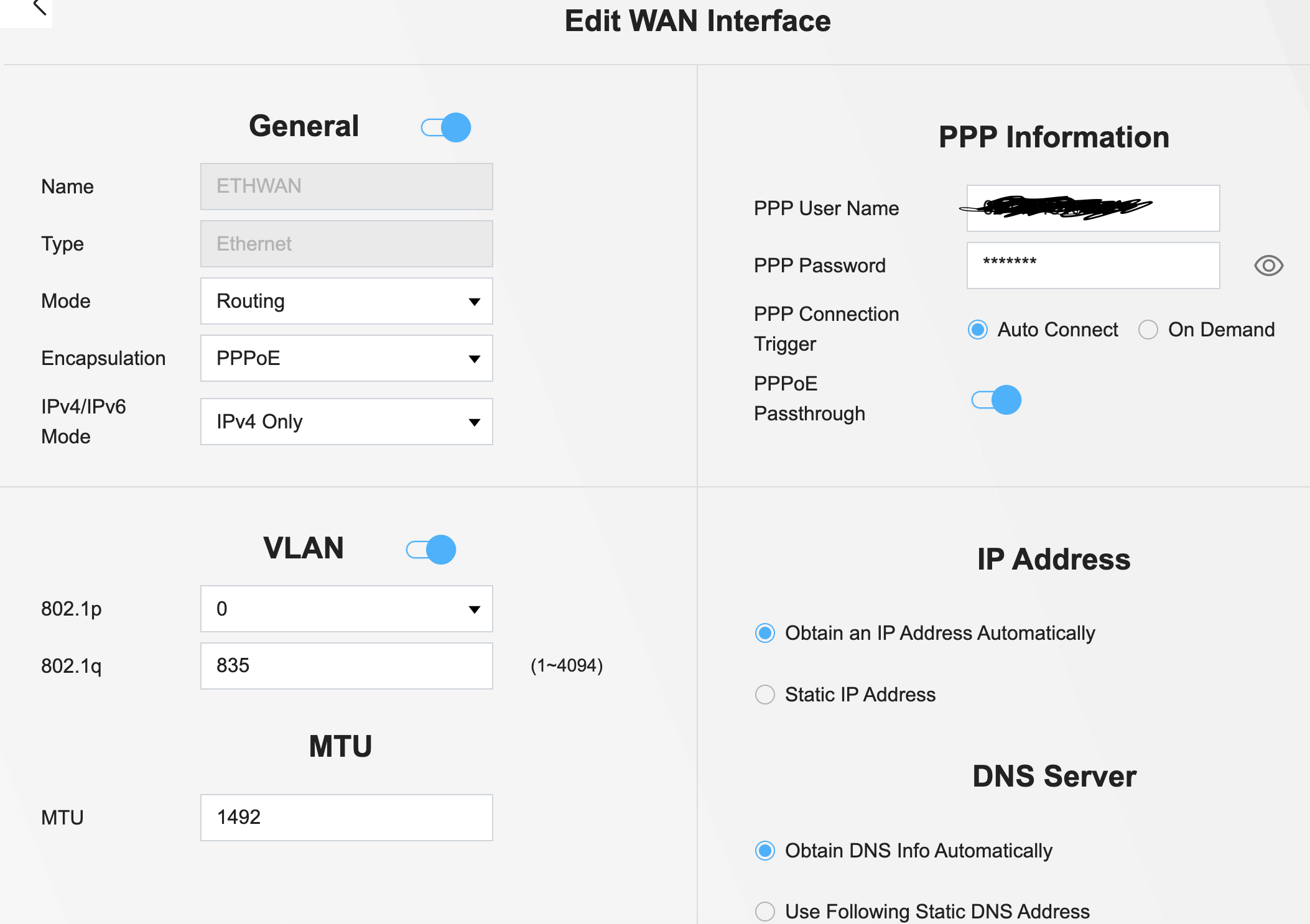
I've set the VLAN ID 835 into the ethernet adapter in a Windows machine and then configured a PPPoE Broadband connection.
If I disconnect the RJ45 cable from the LAN2 of the FWA, and connect it to the ethernet adapter, the PPPoE works correctly and the internet connection was estrablished. If I reconnect this cable to the FWA and try to establish a PPPoE connection via LAN1, it fails.
So:
Fiber ONT → FWA LAN2 as WAN (Configured in PPPoE Routing with VLAN 835) → the FWA is connected successfully to internet
PC → FWA LAN1 as ETH
In this way the PC don't establish the PPPoE with the PPPoE Passthrough enabled on FWA
Fiber ONT → PC
In this way the PC can establish the PPPoE on VLAN ID 835
I've tried also to establish a PPPoE connection without set the VLAN ID on the ethernet adapter (thinking the VLAN is passed from the FWA) but is failing again.
I've checked with my residential ISP and it permit to establish up to 3 PPPoE together over the same connection, with a ".1" or ".2" into the PPP username
Accepted Solution
-
Hi @Maverick87 ,
Thank you for the detailed testing on this.
WAN PPPoE Passthrough is not currently a supported function — the option appearing in the GUI was an error, not a working feature. We'll remove it from the GUI in the next firmware release, so the interface matches what the device actually supports.
We're separately evaluating whether this function can be properly implemented and reintroduced in a future release.
Zyxel_Judy
1





 Zyxel Employee
All Replies
-
Well how many WAN IP's are you allowed from PPPoE ? I'm guessing one which the FWA has so you connect PC as Ethernet to the other LAN port and it will SNAT out your WAN IP
are you sure you can get 3? can you test with a switch?
0 -
Hi @PeterUK,
Yes I can try it, but seems is possible to use up to 3, but I need to try.
Anyway, seems also the FWA cannot pass the WAN IP to the LAN; instead of configure another WAN connection, if the FWA can pass directly the WAN IP to the ETH, is more simple.
0 -
Hi @PeterUK,
I've tried with an external switch that support VLAN tagging.I've configured the VLAN ID 835 into the switch and then tag the ID to the port 1, 2, 3.
The port 1, 2, 3 are also configured to Tag and Untag the VLAN ID 1 for management (after configure the switch for using the VLAN, the switch uses the VLAN 1 as management)Then:
- ONT on port 1;
- FWA on port 2;
- My Windows PC on port 3.
I configure the ethernet of the PC with VLAN ID 835, and then I've started the PPP connection.
This is the result: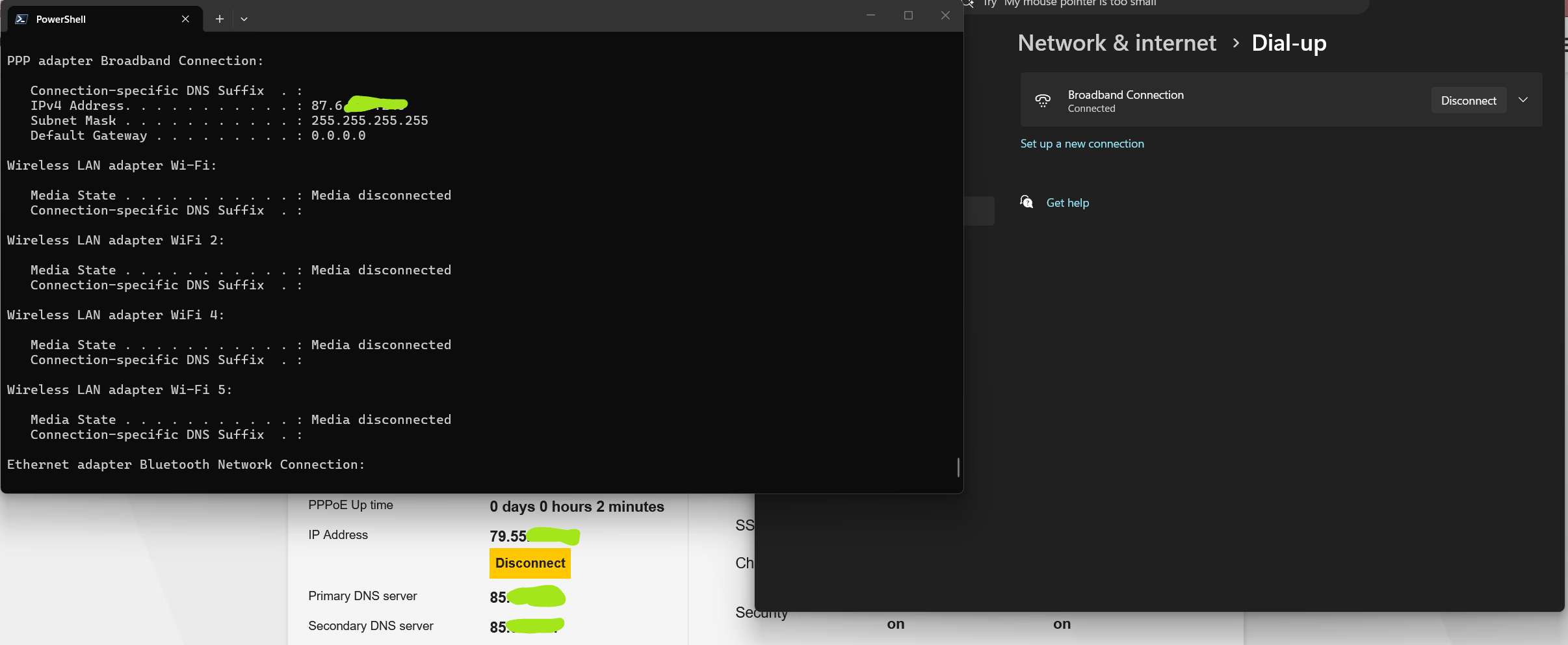
As you can see, the FWA taken 79.55.x.x IP and the PC, after successfully established the PPPoE dial-up, taken 87.6.x.x IP
So, my ISP support multi-ppp.
I've disconnected the cable from the switch, and I've reconnected it to the LAN1 of the FWA.
The PPPoE dial-up, without touching any configuration (so remain the VLAN ID 835 configured to the PC ethernet adapter), fails.
Fails also, without any VLAN ID attached to the PC Ethernet adapter.
—— Obviously the FWA was remained connected to the WAN ———So seems not working the PPPoE Passthrough flag.
0 -
Cant imagine you get to keep many IP's for long given the IPv4 shortage
so you may have to rethink how you can use all them IP's the problem is they are on VLAN835 and the FLEX H only allows one per VLAN tag for the PPPoE
what you can do or at least should work is have the switch at your first entry then config two ports with VLAN835 tag uplink and the other untagged PVID then four ports that are untagged by other VLAN with PVID and loop the untagged VLAN835 to the four ports this should now give you three port for your PPPoE that are all untagged to then use as you wish.
0 -
But I don't have completely agreeded with the PPPoE Passthrough…
I mean, that the Passthrough should pass the PPP IP on the "second" level… what is the sense of establish 2 redundant PPP sessions, one of this not used because it's managed by the FWA that is not used in this case?
In any case, if should work with 2 sessions, are perfectly agreeded with the ISP that release up 3 sessions.
So one session from the FWA, never utilized, and one from the 500H used by others clients.
Otherwise I need to configure all for a double NAT
0 -
maybe the PPPoE Passthrough only works if PPPoE is not tagged?
0 -
I don't know… maybe someone in Zyxel can help to understand the use of Passthrough function
0 -
Hi @Maverick87 ,
Thank you for the detailed testing on this.
WAN PPPoE Passthrough is not currently a supported function — the option appearing in the GUI was an error, not a working feature. We'll remove it from the GUI in the next firmware release, so the interface matches what the device actually supports.
We're separately evaluating whether this function can be properly implemented and reintroduced in a future release.
Zyxel_Judy
1 -
Hi @Zyxel_Judy,
thank you… I've also evaluate an interesting fuction (IPCP that seems appear into the configuration file), but also this seems not working.I speak about this function here:
0




Categories
- All Categories
- 442 Beta Program
- 3.1K Nebula
- 243 Nebula Ideas
- 6.9K Security
- 790 USG FLEX H Series
- 391 Security Ideas
- 1.8K Switch
- 88 Switch Ideas
- 1.5K Wireless
- 59 Wireless Ideas
- 7.3K Consumer Product
- 326 Service & License
- 530 News and Release
- 104 Security Advisories
- 31 Education Center
- 10 [Campaign] Zyxel Network Detective
- 5.4K FAQ
- 34 Documents
- 91 About Community
- 122 Security Highlight
