Edit name button on Client and Switch Port pages





 Freshman Member
Several Nebula releases ago an Edit button
 was added to quickly rename a Switch or Access Point.
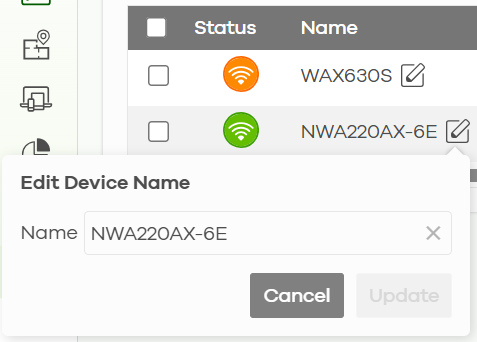
It would save time if an Edit button could also be added to several other parts of the interface, namely
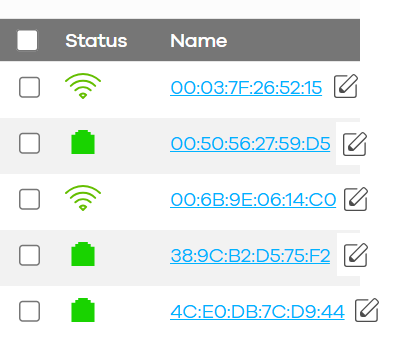
- Add an Edit name button beside each device the Client list. Currently to rename several clients you have to click the first one > wait for page to load > click edit button > rename > save > click back > wait for client list to reload > filter client list again > repeat for each client. This can be time consuming if there is several to rename. If each client had an Edit button it would be a lot faster.
Current
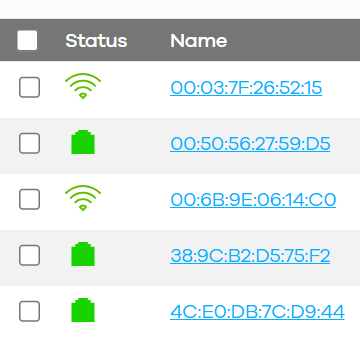
Proposed
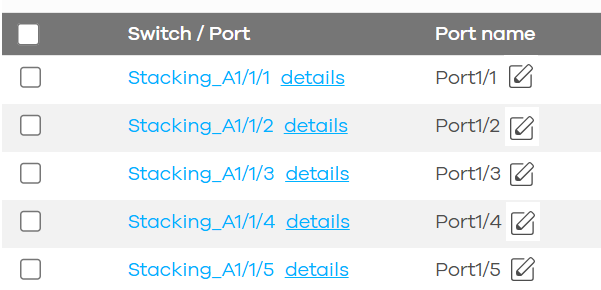
2. The Switch Ports page.
Current
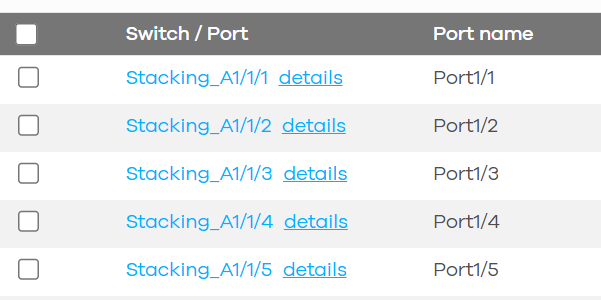
Proposed
Comments
-
Hi @SkyGoat ,
Thanks for your input and the detailed screenshots!
We'll be monitoring the votes and comments as part of our evaluation process. If anyone likes this idea, please show your support by leaving a comment or voting for it.In the meantime, if your organization has a Nebula Plus or Pro Pack license, renaming clients on the Topology page may be faster. Please refer to the following FAQ:
Changing device names efficiently in NCCThank you for your support of Zyxel, and have a great day.
0


 Zyxel Employee
Categories
- All Categories
- 442 Beta Program
- 3.1K Nebula
- 242 Nebula Ideas
- 6.8K Security
- 777 USG FLEX H Series
- 387 Security Ideas
- 1.8K Switch
- 87 Switch Ideas
- 1.5K Wireless
- 58 Wireless Ideas
- 7.2K Consumer Product
- 324 Service & License
- 526 News and Release
- 101 Security Advisories
- 31 Education Center
- 10 [Campaign] Zyxel Network Detective
- 5.3K FAQ
- 34 Documents
- 91 About Community
- 121 Security Highlight


