How do I restore the configuration file when moving a firewall from Site A to Site B on USG FLEX H ?





 Zyxel Employee
Question:
How do I restore the configuration file when moving a firewall from Site A to Site B on USG FLEX H Series
Answer:
Step 1:
Backup the startup configuration file by navigating to Maintenance > Firmware / File Manager > Configuration File, and save this configuration file locally.
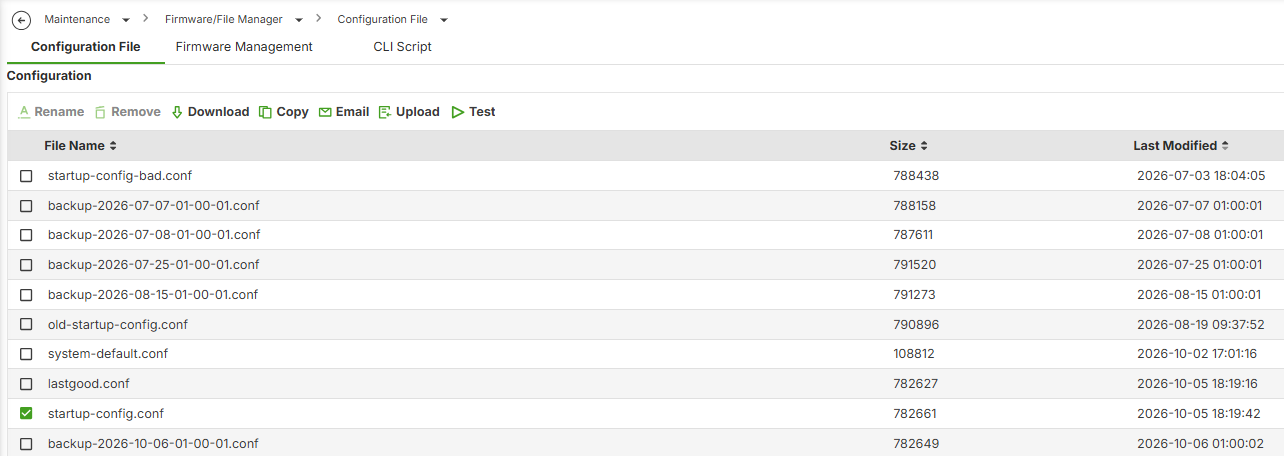
Please refer to below steps:
Step 2:
Navigate to Organization-wide > License & inventory > Actions > Choose the Nebula firewall that you want to remove> Change site assignment

Step 3:
Choose "Remove select device(s) from their current site." and save it.
Once successfully removed from the site, the Nebula firewall will be reset but will retain the current WAN settings.

Step 4:
Navigate to Organization-wide > License & inventory > Actions > Change site assignment. Add the firewall to the desired site and wait for the firewall to reconnect to the Nebula Control Center successfully.

The Nebula firewall is online.

Step 5:
Restore the backuped startup configuration file by navigating to Maintenance > Firmware / File Manager > Configuration File, and save this configuration file locally.
Categories
- All Categories
- 442 Beta Program
- 3.1K Nebula
- 243 Nebula Ideas
- 6.8K Security
- 783 USG FLEX H Series
- 389 Security Ideas
- 1.8K Switch
- 87 Switch Ideas
- 1.5K Wireless
- 58 Wireless Ideas
- 7.2K Consumer Product
- 325 Service & License
- 527 News and Release
- 101 Security Advisories
- 31 Education Center
- 10 [Campaign] Zyxel Network Detective
- 5.3K FAQ
- 34 Documents
- 91 About Community
- 122 Security Highlight