QoS on Nebula FWA510

 Freshman Member

All Replies
-
Hi @zgluca,
Welcome to the Zyxel Community!
1.QoS voice
You can enable WMM QoS (WiFi MultiMedia Quality of Service) in Network Setting > Wireless > WMM. Set WMM of SSID to On, and the FWA510 will automatically assign a priority level to WiFi traffic based on the ToS value in the IP header of packets, so that time-sensitive traffic such as voice and video runs more smoothly.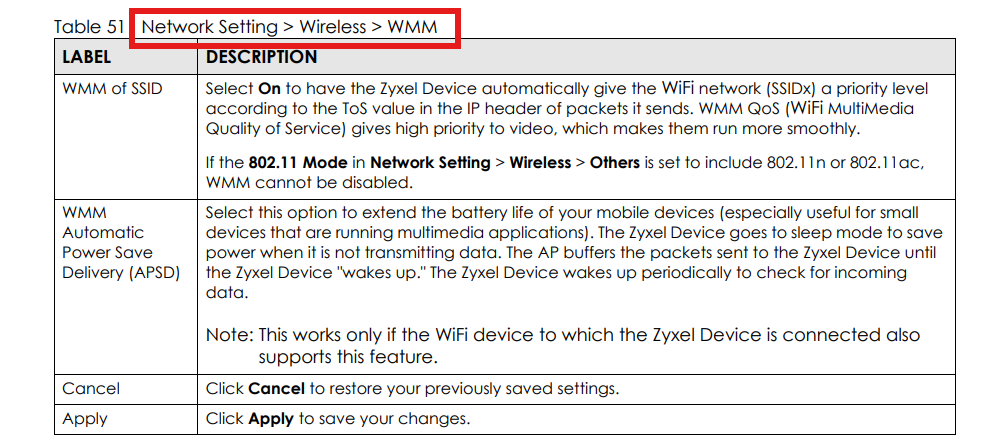
Note: If the 802.11 Mode in Network Setting > Wireless > Others is set to include 802.11n or 802.11ac, WMM is always enabled and cannot be disabled.
If you need stricter prioritization for VoIP traffic, we also recommend configuring QoS on a downstream switch.
2.LAN port showing 1000M
Both LAN ports support 100/1000/2500 Mbps, and the link speed is auto-negotiated with the connected device. If the connected device (PC NIC, switch, etc.) only supports 1 Gbps, the port will show 1000M. Please also make sure you are using a Cat5e or higher cable.If you have any further questions, please feel free to let us know. To help us assist you further, could you please provide the following information:
- Is your FWA510 currently registered to Nebula (cloud management mode)?
- What devices are connected to LAN ports, and do they support 2.5 Gbps?
Thanks, have a wonderful day!
0




 Zyxel Employee
Categories
- All Categories
- 442 Beta Program
- 3.1K Nebula
- 243 Nebula Ideas
- 6.8K Security
- 783 USG FLEX H Series
- 389 Security Ideas
- 1.8K Switch
- 87 Switch Ideas
- 1.5K Wireless
- 58 Wireless Ideas
- 7.2K Consumer Product
- 325 Service & License
- 527 News and Release
- 101 Security Advisories
- 31 Education Center
- 10 [Campaign] Zyxel Network Detective
- 5.3K FAQ
- 34 Documents
- 91 About Community
- 122 Security Highlight


