VPN tunnel uptime problem

 Guru Member



USG FLEX 700H V1.36(ABZI.0)
So I don't normally look at Nebula but now and then I log in to view some things like the VPN usage and connectivity and I'm sure the last time I looked when I had three tunnels that are local it showed solid green for all of them but I added a 4th and check over some days and some red was showing I through what was the cause was incorrect local/remote ID but no was not that. I then disabled the 4th tunnel and still there was a drop and all at the same time for the three tunnels.
So now I have enabled the 4th and added a 5th to do a ping to see if the ping drop or does not drop when Nebula show red as a drop.
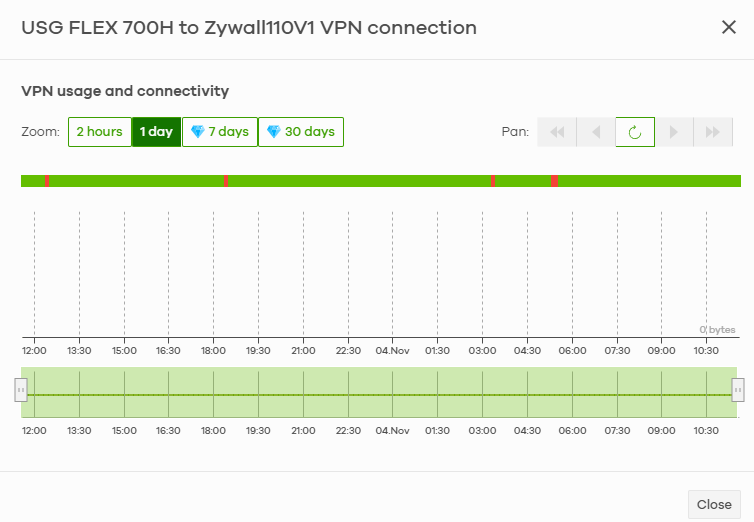
The link from/to FLEX700H and Zyxell 110 gone through three switches and I have checked port up and down logs all showed clear.
Best Answers
-
Hi @PeterUK
We noticed that there has some error logs related with netconf, the protocol for Zyxel devices communicate with Nebula, which could cause some device's data can't be sent to Nebula server. To fix it, could you help to reboot the firewall? We will access to check further after rebooting.
Zyxel Melen0 -
Hi @PeterUK
About the Zywall110V3 VPN tunnel, I noticed a behavior when monitoring:
There are four VPN tunnel status:
Zywall110V3: #751, ESTABLISHED, IKEv2, a40e9b04a0e3df15_i a88116f67011ede5_r
  local  '***' @ 192.168.*.*[500]
  remote '***' @ [P]192.168.*.*[500]
  aes256-cbc/hmac-sha1/hmac-sha1/modp1024
  established 47s ago, rekeying in 81679s
  sec_policy1_Zywall110V3: #759, reqid 5, INSTALLED, TUNNEL, esp:aes128-cbc/hmac-sha1
    installed 47s ago, rekeying in 26963s, expires in 31633s
    in  c6cf2771, 0 bytes, 0 packets
    out 26df4d24, 0 bytes, 0 packets
    local  192.168.*.*
    remote 192.168.*.*
Zywall110V3: #750, ESTABLISHED, IKEv2, 59f8ba6b24ca8584_i 2fc4b78c10f70906_r
  local  '***' @ 192.168.*.*[500]
  remote '***' @ [P]192.168.*.*[500]
  aes256-cbc/hmac-sha1/hmac-sha1/modp1024
  established 133s ago, rekeying in 85260s
  sec_policy1_Zywall110V3: #758, reqid 5, INSTALLED, TUNNEL, esp:aes128-cbc/hmac-sha1
    installed 133s ago, rekeying in 26152s, expires in 31547s
    in  c55c7d7f, 0 bytes, 0 packets
    out c0ab9a59, 0 bytes, 0 packets
    local  192.168.*.*
    remote 192.168.*.*
Or
0> show ike ike-sa details
Zywall110V3: #752, DELETING, IKEv2, d32f5d35987acfd2_i ca9c597facaeaa2c_r
  local  '***' @ 192.168.*.*[500]
  remote '*' @ [P]192.168.*.*[500]
  aes256-cbc/hmac-sha1/hmac-sha1/modp1024
  sec_policy1_Zywall110V3: #760, reqid 5, INSTALLED, TUNNEL, esp:aes128-cbc/hmac-sha1
    installed 2s ago, rekeying in 27385s, expires in 31678s
    in  c6feda26, 0 bytes, 0 packets
    out 0d6007ed, 0 bytes, 0 packets
    local  192.168.*.*
    remote 192.168.*.*
Zywall110V3: #751, ESTABLISHED, IKEv2, a40e9b04a0e3df15_i a88116f67011ede5_r
  local  '***' @ 192.168.*.*[500]
  remote '***' @ [P]192.168.*.*[500]
  aes256-cbc/hmac-sha1/hmac-sha1/modp1024
  established 87s ago, rekeying in 81639s
  sec_policy1_Zywall110V3: #759, reqid 5, INSTALLED, TUNNEL, esp:aes128-cbc/hmac-sha1
    installed 87s ago, rekeying in 26923s, expires in 31593s
    in  c6cf2771, 0 bytes, 0 packets
    out 26df4d24, 0 bytes, 0 packets
    local  192.168.*.*
    remote 192.168.*.*
Or sometimes only one Zywall110v3 tunnel and other four VPN tunnels up
Or Zywall110v3 tunnel doesn't established, only other four VPN tunnels up.
It seems like the Zywall110 did reconnect the VPN tunnel, but somehow the firewall continuously initiates the new VPN tunnel. Because of that, there has a period that Zywall110v3 tunnel is not up on the USG FLEX 700H side.
But at the same time FLEX700H should not of shown it was connected when not.
From the USG FLEX 700H side, the VPN tunnel status might be still established when ZyWALL110 shows disconnect. It seems like the USG FLEX 700H didn't receive the tunnel disconnect info from ZyWALL110, which needs to wait USG FLEX 700H detect the disconnect. However, I couldn't identify why ZyWALL110 disconnect the VPN tunnel, since I can only access the USG FLEX 700H and check at that time.
Zyxel Melen0

 Zyxel Employee



All Replies
-
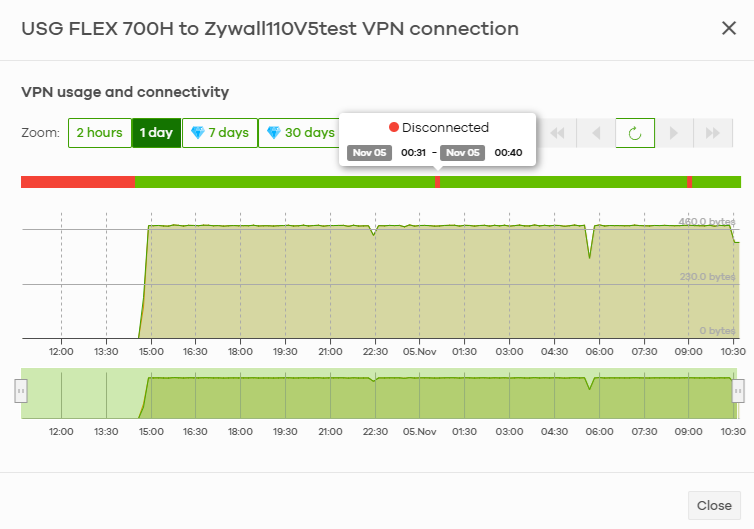
Caught it in the ack!
So this looks to be a Nebula problem because my ping test was running fine down test tunnel all other tunnels were fine but Nebula says they are all disconnected when not.

There might be two random problems at play because the above show disconnected so you would that think that would show in connectivity but not this time? maybe the next time it happens it will show?
0 -
Hi @PeterUK
The discrepancy you're seeing (where your ping test is successful but the Nebula dashboard shows "disconnected") is due to the fact that the VPN status on the Nebula Control Center (NCC) is not displayed in real-time.
Zyxel Melen0 -
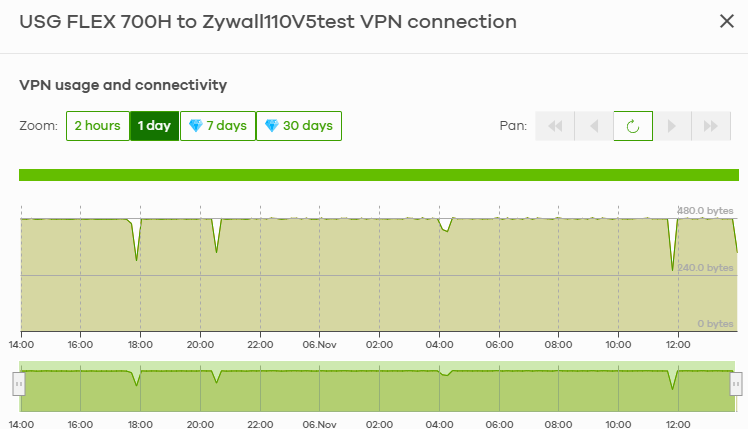
Hmm… its now been 24hr and the connectivity is solid green along with the other tunnels
 0
0 -
Hi @PeterUK
Have you disable/enable the VPN tunnel for last 24 hr? If not, the issue could relate to the VPN status report during disable/enable the VPN tunnel. Could we have a remote replicate for this issue? During the replicate, we will also collect the needed logs to investigate this issue.
Zyxel Melen0 -
No I have not disabled or enable the tunnel for the last 24hr, could someone your end of fixed something?
Zyxel Support Access is enabled on Nebula for Organization _ Site USG FLEX 700H
0 -
This is because the disconnect period has passed over the last 24 hours. For the past 24 hours, there's been no disconnect issue; the VPN status displays all green.
Therefore, I assume this issue could relate to the VPN status report during/after disabling/enabling the VPN tunnel. Please let us know if you allow us to have a remote replication, thanks.
Zyxel Melen0 -
Ok sure you can remote replication the issue if needed.
Thanks
0 -
Hi @PeterUK
We noticed that there has some error logs related with netconf, the protocol for Zyxel devices communicate with Nebula, which could cause some device's data can't be sent to Nebula server. To fix it, could you help to reboot the firewall? We will access to check further after rebooting.
Zyxel Melen0 -
Ok its been rebooted
0
Categories
- All Categories
- 442 Beta Program
- 3K Nebula
- 222 Nebula Ideas
- 129 Nebula Status and Incidents
- 6.5K Security
- 619 USG FLEX H Series
- 348 Security Ideas
- 1.7K Switch
- 84 Switch Ideas
- 1.4K Wireless
- 53 Wireless Ideas
- 7K Consumer Product
- 298 Service & License
- 485 News and Release
- 92 Security Advisories
- 31 Education Center
- 10 [Campaign] Zyxel Network Detective
- 4.8K FAQ
- 34 Documents
- 88 About Community
- 105 Security Highlight


