Connect via SSL VPN as a user from the AD group (USG FLEX 700)

 Freshman Member
Can't connect via SSL VPN as a user from AD
A local user is connecting via SSL VPN (userl).
notice SSL VPN Failed login attempt to SSLVPN from http/https (incorrect password or inexistent username) [count=2]
Testing user userp in:
aaa group server ad dc01 - OK
username sslVPN - OK
My settings:
! model: USG FLEX 700
! firmware version: 5.41(ABWD.0)
aaa group server ad dc01
server port 389
server basedn DC=office,DC=shcrb,DC=kz
server search-time-limit 5
server binddn CN=userldap,OU=SpecialUsers,OU=OU,DC=office,DC=shcrb,DC=kz
server password-encrypted $4$4gnTprhE$83C+VR+vgOLStngdwdc
server cn-identifier sAMAccountName
server group-attribute memberOf
server host 192.168.1.32
server host 192.168.1.33
username sslVPN user-type ext-group-user associated-aaa-server dc01 group-id CN=sslVPN,OU=AccessGroup,OU=OU,DC=office,DC=shcrb,DC=kz
username sslVPN logon-time-setting default
username sslVPN vlan id 1
sslvpn policy SSL_SHCRB
network-extension activate
network-extension network NET_Office
network-extension ip-pool SSL_POOL
network-extension 1st-dns IP_DC01
network-extension 2nd-dns IP_DC02
user userl
user sslVPN
How do I correctly connect a group from AD to connect via SSL VPN?
Accepted Solution
-
Hi @RPasha
Thanks for the info.
Let me share my test user and ext-group-user setting with you. I can use this setting to login SSL VPN.

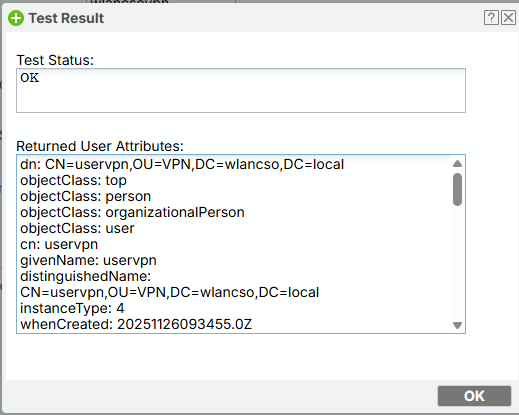
Check the AD user, if it is in this user group, the test status will display "OK".
If not, it will display this user does not belong to this group.
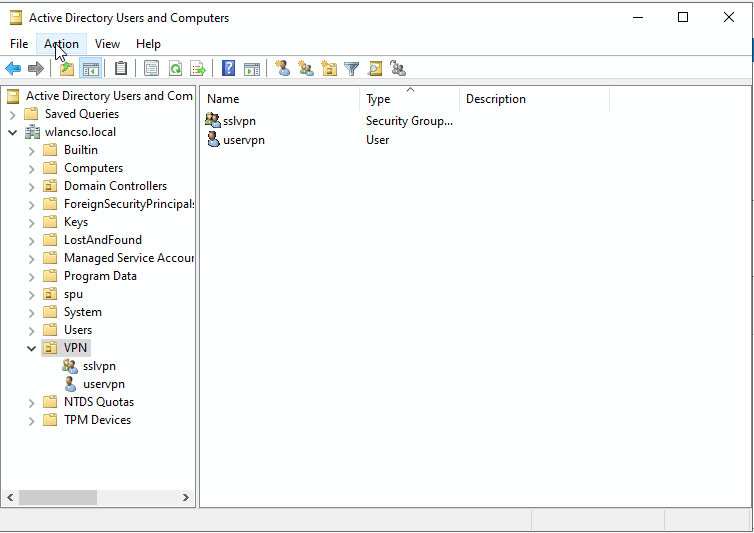
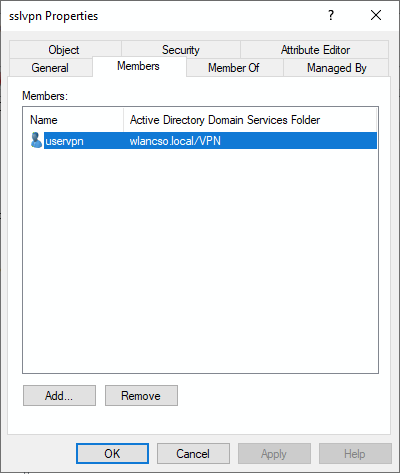
My User list.

AD user setting:
In addition, the user account "userl" seems duplicated. Could you remove it from the SSL VPN > Selected User/Group Objects list? For example:

The duplicate user might cause problem. The firewall will check the account/password by the order of authentication method. If local is first priority, the firewall will check the local user account and its password first, which might encounter wrong password if the local user account's password is different with AD server.
Zyxel Melen0

 Zyxel Employee



All Replies
-
Hi @RPasha
May I know if you have added the AD server to the authentication method?
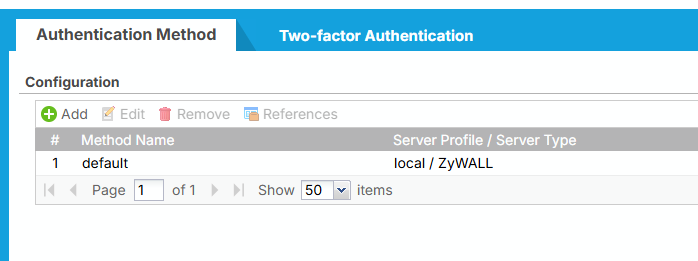
From the config you post, I can't find related config. Please help to check this first. If you haven't, please add it first.
Zyxel Melen0 -
Hi, Zyxel_Melen
I have:
Was:
aaa authentication AD group dc01
add
aaa authentication authSSLvpn group dc01 local
But I couldn't find it for use anywhere in the SSL VPN settings (not SSL portal).0 -
Hi @RPasha
Thanks for the info.
Let me share my test user and ext-group-user setting with you. I can use this setting to login SSL VPN.
Check the AD user, if it is in this user group, the test status will display "OK".
If not, it will display this user does not belong to this group.
My User list.
AD user setting:
In addition, the user account "userl" seems duplicated. Could you remove it from the SSL VPN > Selected User/Group Objects list? For example:
The duplicate user might cause problem. The firewall will check the account/password by the order of authentication method. If local is first priority, the firewall will check the local user account and its password first, which might encounter wrong password if the local user account's password is different with AD server.
Zyxel Melen0 -
Hi, Zyxel_Melen
I have the same set up.
Can you tell me which firmware version you are running?
Maybe I should downgrade the version.0 -
Hi @RPasha
My firmware version is V5.41(ABUH.0) / 2025-09-26 02:48:39.
Could you help to check if the client's password is correct? I want to check this is because I also forget my test user's password and get the same logs as yours. And this fixed after I changed the user's password on AD.
Zyxel Melen0
Categories
- All Categories
- 442 Beta Program
- 3K Nebula
- 222 Nebula Ideas
- 129 Nebula Status and Incidents
- 6.5K Security
- 619 USG FLEX H Series
- 348 Security Ideas
- 1.7K Switch
- 84 Switch Ideas
- 1.4K Wireless
- 53 Wireless Ideas
- 7K Consumer Product
- 298 Service & License
- 485 News and Release
- 92 Security Advisories
- 31 Education Center
- 10 [Campaign] Zyxel Network Detective
- 4.8K FAQ
- 34 Documents
- 88 About Community
- 105 Security Highlight


