MSP Pack: warning indicators

 Ally Member


Can it be that something has changed? I think we used to be able to see on 1 page for all our customers if a device is in warning status. Now I see only red lights for offline and green for online. But I used to see orange lights also if for example an AP is connected to 10/100 speed. I can still see it if I click on detail on my client, but not in MSP Portal, only green and red lights.
All Replies
-
I checked the spec. About the page with warning/alert status is on the organization portal > device tab. The MSP portal > device tab only displays online/offline status.
 Zyxel Melen0
 -
Ok, but this doesn't seem to work fine then.
One of my clients has an AP running at 10/100 Mbps so it's orange if I look in detail
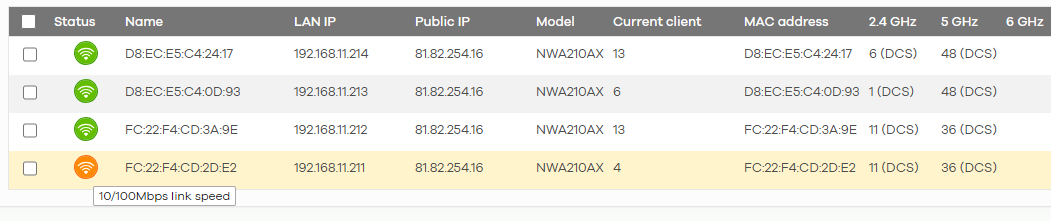
This is how it looks in MSP Portal:

Normally the third one (FC:22:F4:CD:2D:E) should be orange?
In Status I can only filter on Online / Offline. I'm pretty sure that in the past in the MSP Portal devices would also show orange. Also I think even if it was not, that it should be a main feature for MSP Console.
0 -
Thanks for your input. I have created the idea and will raise to our product team. We will monitor the comment and vote of this idea to evaluate it.
Zyxel Melen0
 Zyxel Employee



Categories
- All Categories
- 442 Beta Program
- 2.9K Nebula
- 221 Nebula Ideas
- 128 Nebula Status and Incidents
- 6.5K Security
- 610 USG FLEX H Series
- 347 Security Ideas
- 1.7K Switch
- 84 Switch Ideas
- 1.4K Wireless
- 53 Wireless Ideas
- 7K Consumer Product
- 299 Service & License
- 483 News and Release
- 92 Security Advisories
- 31 Education Center
- 10 [Campaign] Zyxel Network Detective
- 4.8K FAQ
- 34 Documents
- 88 About Community
- 105 Security Highlight


