Mark device/interface as "child" of other device/interface

 Ally Member

Hello everyone,
I've a USG Flex 200HP firewall, and use:
- An external switch (not Zyxel) for extend network topology
- A NWA130BE for Wireless devices
The NWA130BE is not configured for join to NCC and is not managed by the firewall.
Entering to the NCC portal, under the network topology I see this:

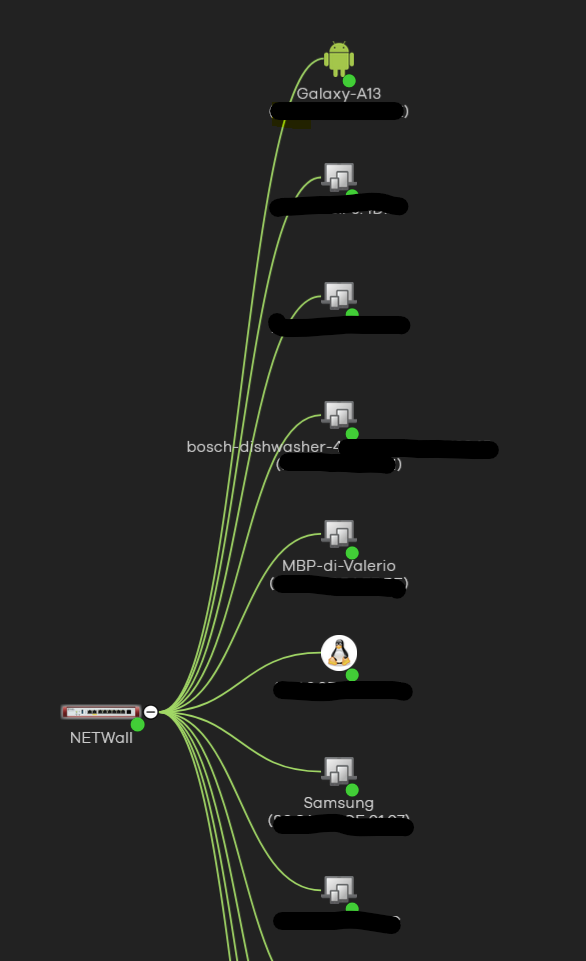
As you can see, all the devices (also an Android phone, the dishwasher, etc etc) are all part of the NETWall (the firewall).
Obviously all these devices, are attached to a single "physical port" as per native device.
For example, the switch are attached to the port 2 (is a 2.5Gbit switch) and the NWA130BE Access Point are attached to an port of the switch.
Example:
FW —> Switch 2.5Gbit (on port 2 of the FW) —> NWA130BE (on port 2 of the switch)
FW —> Switch 2.5Gbit (on port 2 of the FW) —> MBP-di-Valerio (Macbook)
FW —> Switch 2.5Gbit (on port 2 of the FW) —> My work PC
FW —> Raspberry PI (on port 3 of the FW)
In my strict case, I also have some VNET that is "translated" into a VLAN interfaces.
But all of these devices are recognized as "child" of the FW.
My idea is to "mark" a devices or an interface as a child/sub-child and in this case, the network topology follow the child/sub-child assigments, can be also interesting mark the devices as wired or wireless devices can be usefull.
Comments
-
Hi @Maverick87 ,
Thank you for sharing this idea. The key point here is that Nebula can only display topology information based on LLDP information it receives from Nebula managed devices. Since Nebula cannot retrieve data from third-party vendor devices or standalone-mode Zyxel devices, the topology view is limited to showing all clients as directly connected to the firewall—unless LLDP is enabled to provide additional neighbor information.
This is indeed a current limitation of the platform.
From your topology, it seems like your USG FLEX H is disable LLDP in System > Advanced > Additional Features. If LLDP is enabled on your firewall, you will see the topology like below (the real topology for this lab is USG FLEX 200H — GS1920(standalone mode) — PC). If the device is from third-party vendor, Nebula will display other icon.
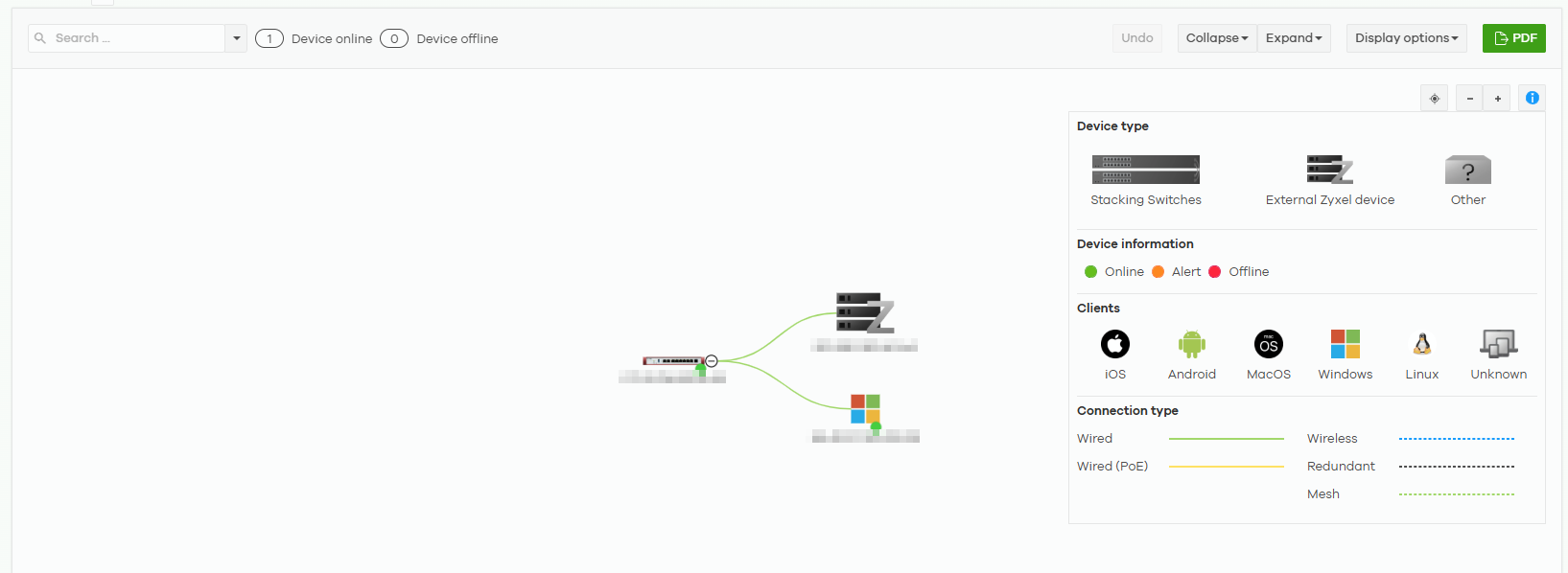
Unfortunately, due to this platform limitation, we are unable to implement the manual device hierarchy marking feature you've suggested. Without the underlying connectivity data from those unmanaged devices, any manually assigned parent-child relationships would not reflect the actual network state and could lead to inaccurate or misleading topology views.
Zyxel Melen0 -
Hi @Zyxel_Melen
I've already enabled the LLDP flag, seems that is enabled by default, so I don't touch it from the beginning.
0 -
Hi @Maverick87
It seems like your switch doesn't support LLDP which cause the USG FLEX H can't learn its info. Could you help to enable your organization for me to take a look?
Zyxel Melen0

 Zyxel Employee



Categories
- All Categories
- 442 Beta Program
- 2.9K Nebula
- 219 Nebula Ideas
- 127 Nebula Status and Incidents
- 6.5K Security
- 603 USG FLEX H Series
- 344 Security Ideas
- 1.7K Switch
- 84 Switch Ideas
- 1.4K Wireless
- 52 Wireless Ideas
- 7K Consumer Product
- 298 Service & License
- 481 News and Release
- 92 Security Advisories
- 31 Education Center
- 10 [Campaign] Zyxel Network Detective
- 4.8K FAQ
- 34 Documents
- 87 About Community
- 105 Security Highlight


