6GHz WiFi not available for SCR 50AXE

 Freshman Member

Hi Zyxel Support,
Model: SCR 50AXE
Firmware: V1.20(ACGN.0)
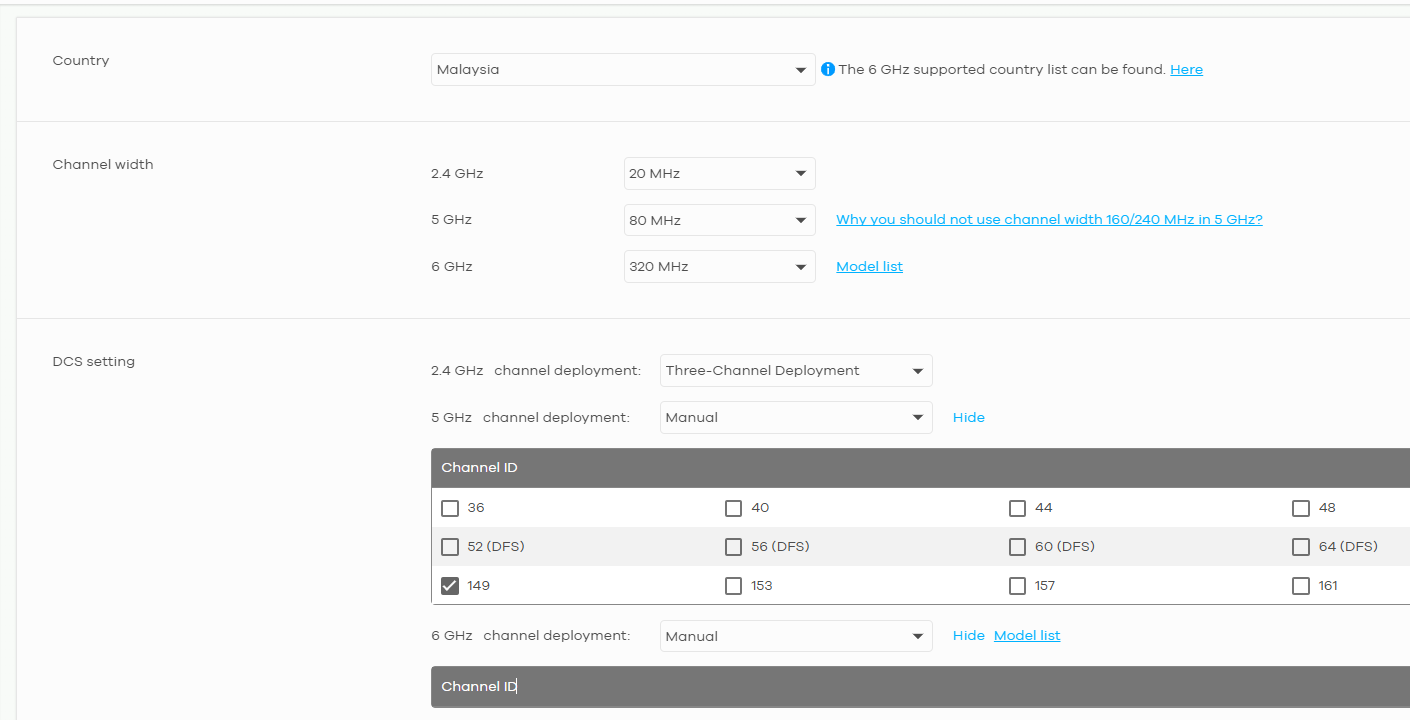
I am currently live in Vietnam and the device comes from a local distributor. Can you advise how to enable 6GHz on the SCR 50AXE? I've checked the SSID setting and Radio setting in Nebula but it is not available (no channel available when changing the Channel to Manual).
FYI, Vietnam's Ministry of Information and Communications (MIC) is enabling 6 GHz WiFi (WiFi 6E/7) with Circular 01/2025/TT-BKHCN (amended from Circular 02/2024/TT-BTTTT), effective May 15, 2025.
More info: https://www.tuvsud.com/en-us/e-ssentials-newsletter/consumer-products-and-retail-essentials/e-ssentials-3-2025/vietnam-circular-no-012025tt-bkhcn-updates-regulations
To test it further, I have set the ORG country, Radio country to Malaysia but 6GHz is also not available.
Thank you!
Accepted Solution
-
Hi @vantc,
From the information you provided, we can see that the SSID supports 6GHz capability. After conducting the same tests on our end with the following configuration, our client (Intel BE200 on Windows 11 Pro) successfully detected and connected to the SCR50AXE's broadcasted SSIDs:
Test Configuration:
- SSID1: All bands enabled (2.4GHz/5GHz/6GHz)
- LAB_6GHz: 6GHz band only
- Radio Settings: Taiwan region, 160MHz channel width, 2.4GHz & 5GHz channels on default deployment, 6GHz channel specifically set to Channel 37
Interface name: Wi-Fi
Driver                    : Intel(R) Wi-Fi 7 BE200 320MHz
Vendor                    : Intel Corporation
Provider                  : Intel
Date                      : 9/9/2025
Version                   : 23.170.0.1
INF file                  : oem98.inf
Type                      : Native Wi-Fi Driver
Radio types supported     : 802.11b 802.11g 802.11n 802.11a 802.11ac 802.11ax 802.11be
(When connected to SSID1)
There is 1 interface on the system:
Name                   : Wi-Fi
Description            : Intel(R) Wi-Fi 7 BE200 320MHz
GUID                   : fb69ef54-1cf8-492e-9e87-15a4c58a11d4
Physical address       : e0:8f:4c:95:bc:a8
Interface type         : Primary
State                  : connected
SSID                   : SSID1
AP BSSID               : f6:4d:5c:3d:2c:c0
Colocated APs:    : 2
BSSID: f4:4d:5c:3d:2c:be,  Band: 2.4 GHz,  Channel: 6
BSSID: f4:4d:5c:3d:2c:bf,  Band: 5 GHz,  Channel: 36
Band                   : 6 GHz
Channel                : 37
Network type           : Infrastructure
Radio type             : 802.11ax
Authentication         : WPA3-Personal  (H2E)
Cipher                 : CCMP
Connection mode        : Profile
Receive rate (Mbps)    : 2162
Transmit rate (Mbps)   : 1922
Signal                 : 99%
Profile                : SSID1
QoS MSCS Configured         : 0
QoS Map Configured          : 0
QoS Map Allowed by Policy   : 0
Hosted network status  : Not available
(When connected to LAB_6GHz)
There is 1 interface on the system:
Name                   : Wi-Fi
Description            : Intel(R) Wi-Fi 7 BE200 320MHz
GUID                   : fb69ef54-1cf8-492e-9e87-15a4c58a11d4
Physical address       : e0:8f:4c:95:bc:a8
Interface type         : Primary
State                  : connected
SSID                   : LAB_6GHz
AP BSSID               : f6:4d:5c:3d:2c:c1
Colocated APs:    : 2
BSSID: f4:4d:5c:3d:2c:be,  Band: 2.4 GHz,  Channel: 6
BSSID: f4:4d:5c:3d:2c:bf,  Band: 5 GHz,  Channel: 36
Band                   : 6 GHz
Channel                : 37
Network type           : Infrastructure
Radio type             : 802.11ax
Authentication         : WPA3-Personal  (H2E)
Cipher                 : CCMP
Connection mode        : Profile
Receive rate (Mbps)    : 2402
Transmit rate (Mbps)   : 1838
Signal                 : 99%
Profile                : LAB_6GHz
QoS MSCS Configured         : 0
QoS Map Configured          : 0
QoS Map Allowed by Policy   : 0
Hosted network status  : Not available
Regarding your information (logs and screenshots) and our tests, these confirm that the SCR50AXE's 6GHz WiFi functionality is broadcasting and working as expected.
If this issue is consistent and isolated to your Intel BE200 on your computer, you may need to reach out to Intel or the computer manufacturer for assistance.
Zyxel Tina
0

 Zyxel Employee



All Replies
-
Hi @vantc,
According to the screenshot you provided, please note that for SCR 50AXE, the 6 GHz band only supports 160 MHz channel width.
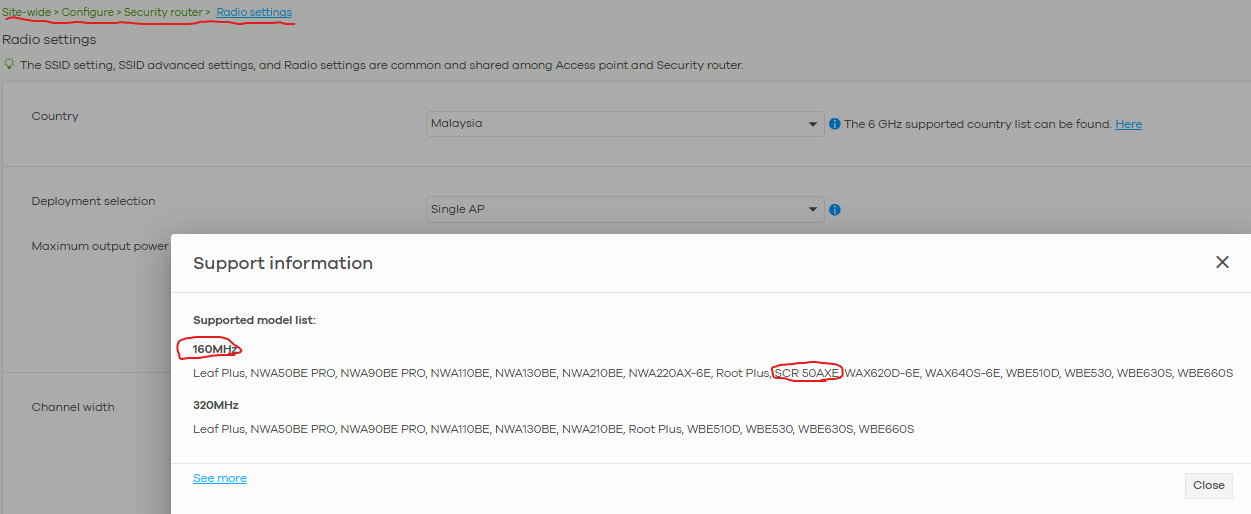
If the issue still persists after the adjustment, please enable Zyxel Support Access and provide us with your org and site name so we can help check the configuration.
Zyxel Tina
0 -
Hi Tina,
Organization: Van Tech Corner
Site: LabCan you help to check? Thank you.
0 -
Hi @vantc,
Thank you for providing the information!
To help us clarify the behavior, could you please confirm one more detail on your side?
Are you able to see the SSID being broadcast on the 6 GHz band from the SCR 50AXE after setting the 6 GHz band to a 160 MHz channel width?
Zyxel Tina
0 -
Hi Tina,
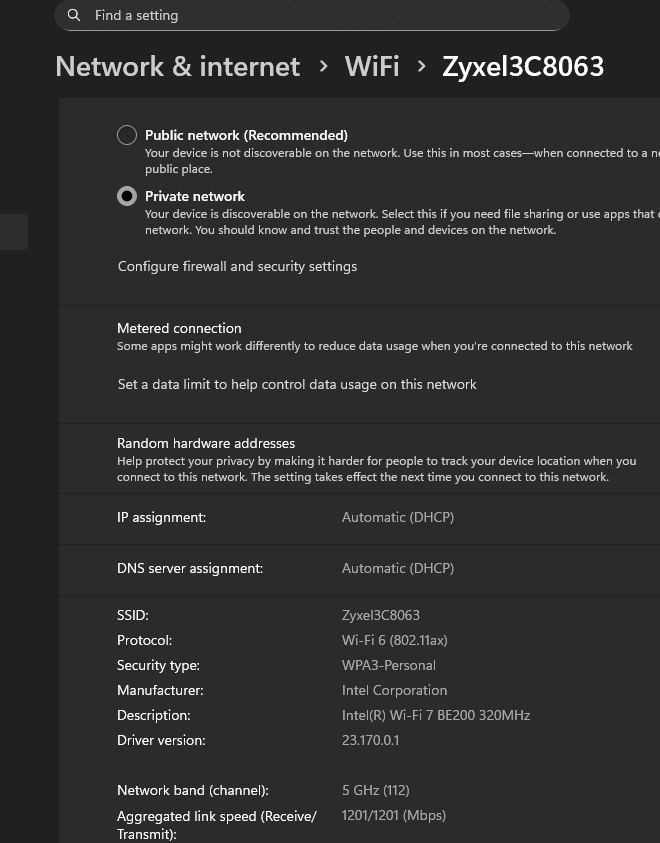
I am currently using the Intel BE200. After connected, it is still on 5GHz.
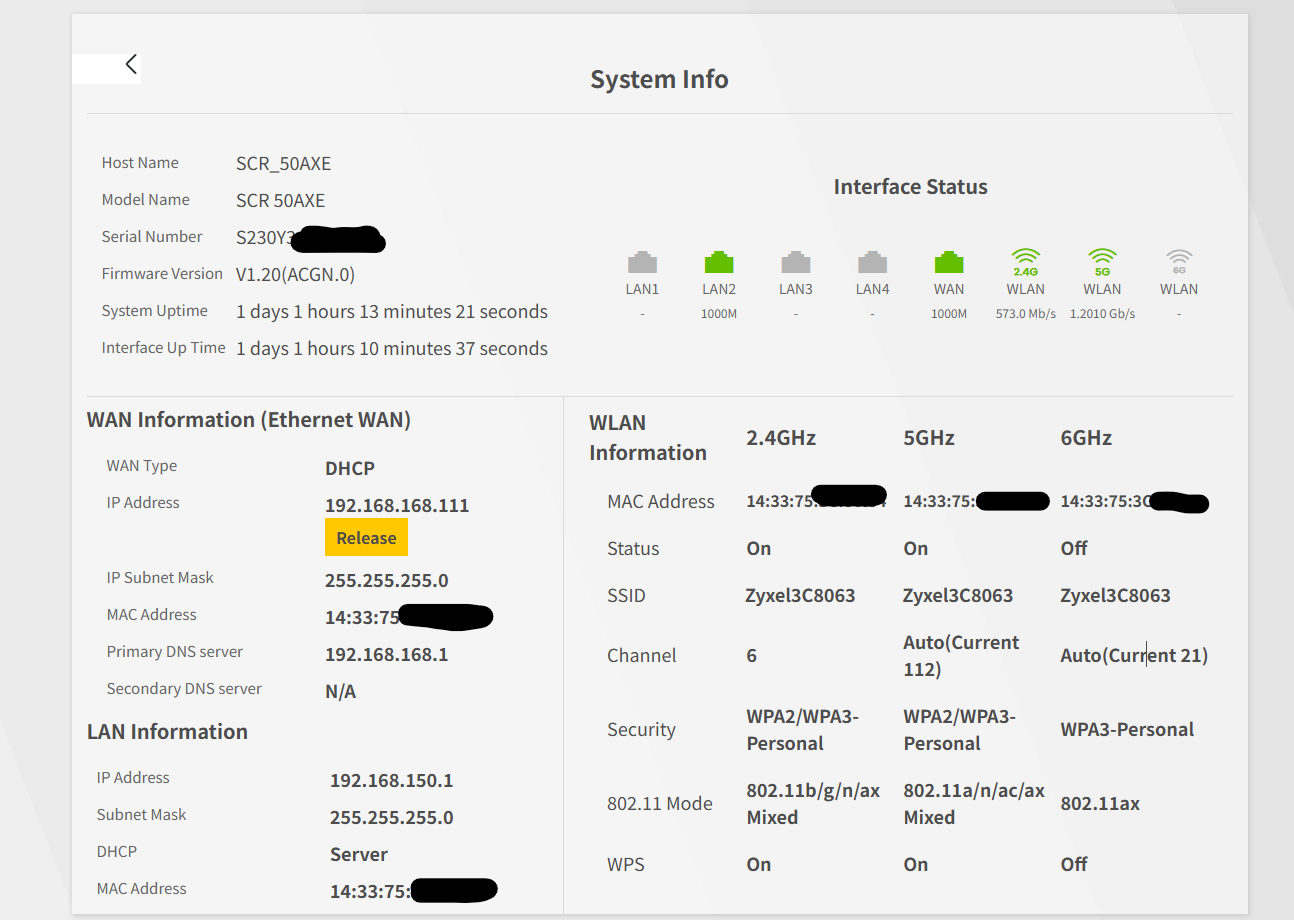
On the SCR50AXE, I can see channel 21 on 6GHz, but the status is OFF.
 0
0 -
Hi @vantc,
After verification, we would like to clarify the behavior you are seeing. The radio settings page in Nebula is shared between APs and SCR 50AXE devices, but the supported country list corresponds to AP regulatory domains, not the SCR 50AXE list.
Since Malaysia is not included in the SCR 50AXE country list, the 6 GHz Channel ID options do not appear when Malaysia is selected. We acknowledge the mismatch with the supported 6 GHz country list for SCR 50AXE and will update this information correctly in NCC in the future.
As a workaround, if you change the country setting to another supported region (for example, Taiwan), the 6 GHz channel selection options will appear normally.
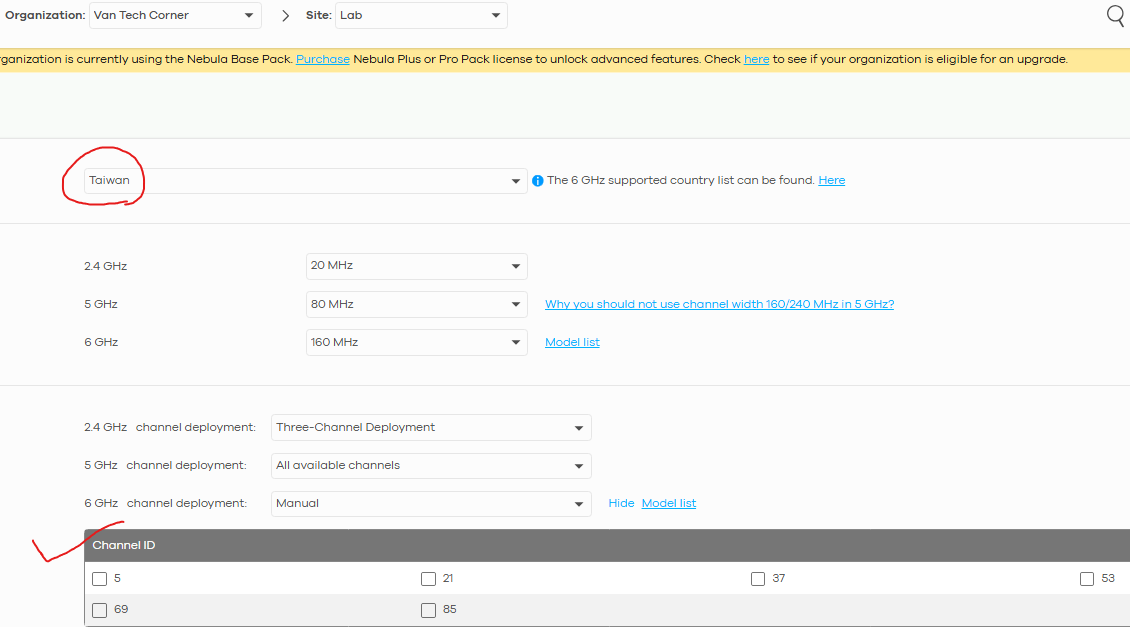
We apologize for any confusion this may have caused.
Regarding your observation that the local GUI shows the 6 GHz radio status as OFF: this is because the radio will only activate when the country setting corresponds to a regulatory domain that supports 6 GHz on SCR devices. Only then will Nebula push the correct configuration to the device and fully enable the feature.
Therefore, we recommend setting the country to a supported region and testing again to confirm that your clients can access the 6 GHz band.
Zyxel Tina
0 -
Hi Tina,
Thank you very much for the information. Finally, I can see 6GHz radio works on Nebula & Router local management IP. Unfortunately, WiFi status on my PC shows 5GHz only (Intel BE200, Windows 11).
Can you advise? Thank you.
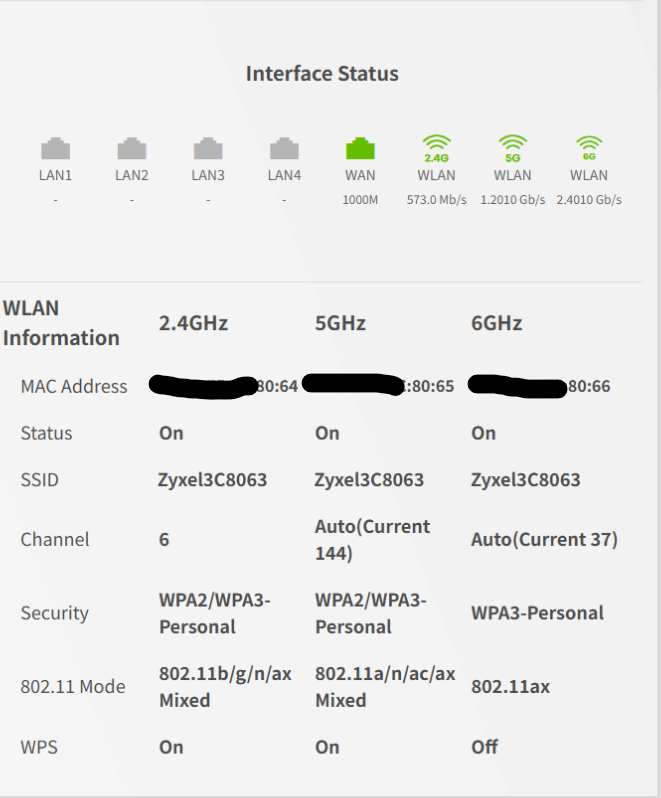
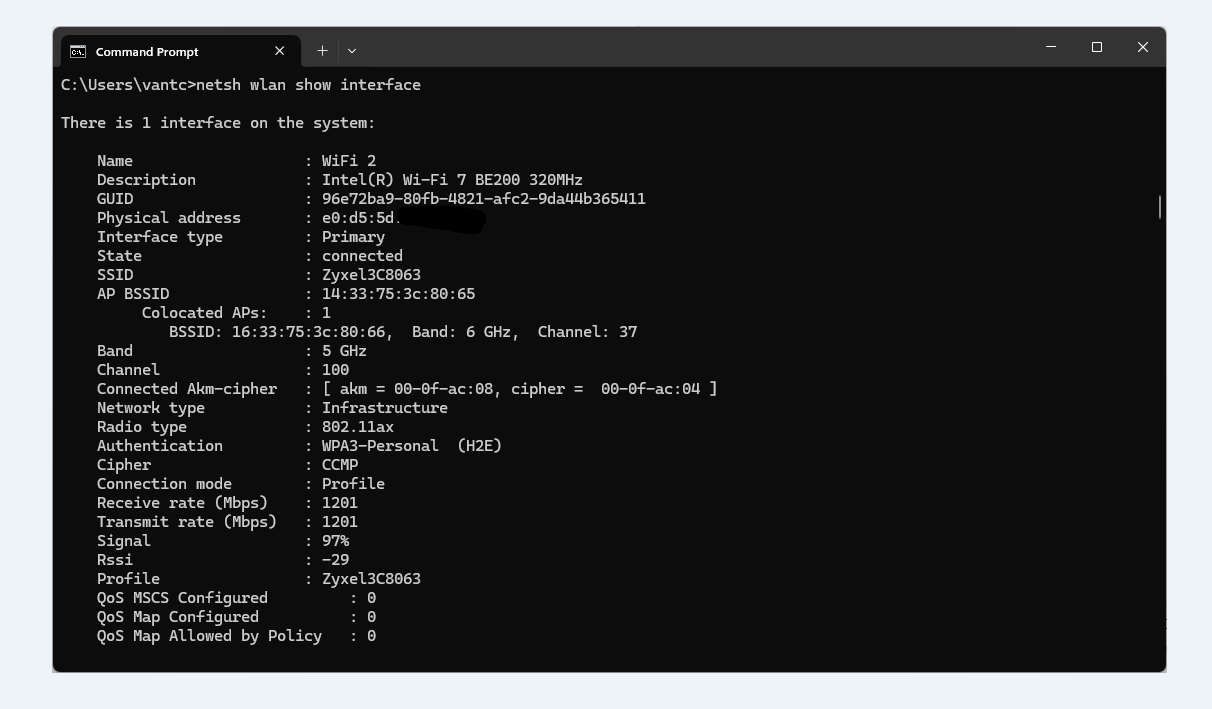
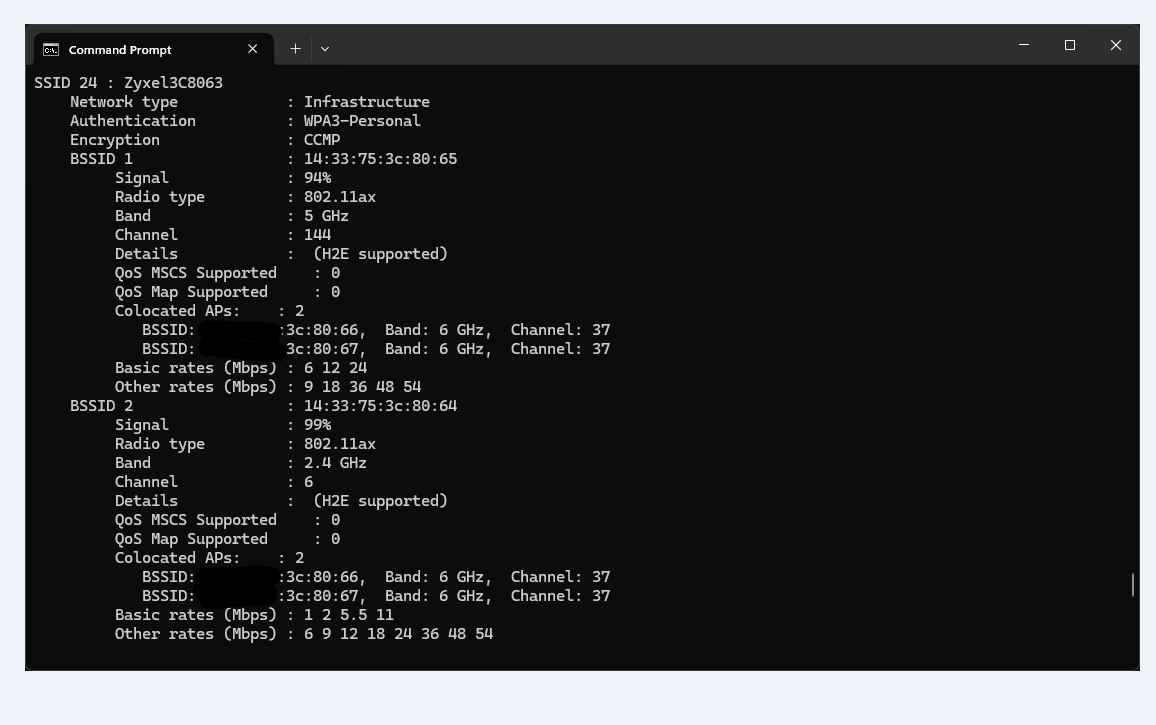
When scanning the SSID, I can see collocated AP on 6GHz, but Windows 11 only connects in 5GHz.
(There are 2 colocated AP since I created another AP, only broadcasting it 6GHz, but also not visible).
 0
0 -
Hi @vantc,
It appears your SCR50AXE has 6GHz enabled, but to understand why your PC isn't using it, could you please first confirm if your wireless adapter/driver has been updated to the latest version?
Zyxel Tina
0 -
Hi Tina,
Yes, my driver is up-to-date. Please see more detail below:
C:\Users\vantc>netsh wlan show driver
Interface name: WiFi 2
Driver                    : Intel(R) Wi-Fi 7 BE200 320MHz

Vendor                    : Intel Corporation

Provider                  : Intel

Date                      : 9/9/2025

Version                   : 23.170.0.1

INF file                  : oem126.inf

Type                      : Native Wi-Fi Driver

Radio types supported     : 802.11b 802.11g 802.11n 802.11a 802.11ac 802.11ax 802.11be
And the log:
C:\Users\vantc>netsh wlan show interface
There is 1 interface on the system:
Name                   : WiFi 2

Description            : Intel(R) Wi-Fi 7 BE200 320MHz

GUID                   : 96e72ba9-80fb-4821-afc2-9da44b365411

Physical address       : e0:d5:5d:04:1f:0a

Interface type         : Primary

State                  : connected

SSID                   : Zyxel3C8063

AP BSSID               : 14:33:75:3c:80:65

     Colocated APs:    : 2

        BSSID: 16:33:75:3c:80:66,  Band: 6 GHz,  Channel: 37

        BSSID: 16:33:75:3c:80:67,  Band: 6 GHz,  Channel: 37

Band                   : 5 GHz

Channel                : 144

Connected Akm-cipher   : [ akm = 00-0f-ac:08, cipher =  00-0f-ac:04 ]

Network type           : Infrastructure

Radio type             : 802.11ax

Authentication         : WPA3-Personal  (H2E)

Cipher                 : CCMP

Connection mode        : Profile

Receive rate (Mbps)    : 1201

Transmit rate (Mbps)   : 1201

Signal                 : 99%

Rssi                   : -31

Profile                : Zyxel3C8063

QoS MSCS Configured         : 0

QoS Map Configured          : 0

QoS Map Allowed by Policy   : 0
0 -
Hi @vantc,
From the information you provided, we can see that the SSID supports 6GHz capability. After conducting the same tests on our end with the following configuration, our client (Intel BE200 on Windows 11 Pro) successfully detected and connected to the SCR50AXE's broadcasted SSIDs:
Test Configuration:
- SSID1: All bands enabled (2.4GHz/5GHz/6GHz)
- LAB_6GHz: 6GHz band only
- Radio Settings: Taiwan region, 160MHz channel width, 2.4GHz & 5GHz channels on default deployment, 6GHz channel specifically set to Channel 37
Interface name: Wi-Fi
Driver                    : Intel(R) Wi-Fi 7 BE200 320MHz
Vendor                    : Intel Corporation
Provider                  : Intel
Date                      : 9/9/2025
Version                   : 23.170.0.1
INF file                  : oem98.inf
Type                      : Native Wi-Fi Driver
Radio types supported     : 802.11b 802.11g 802.11n 802.11a 802.11ac 802.11ax 802.11be
(When connected to SSID1)
There is 1 interface on the system:
Name                   : Wi-Fi
Description            : Intel(R) Wi-Fi 7 BE200 320MHz
GUID                   : fb69ef54-1cf8-492e-9e87-15a4c58a11d4
Physical address       : e0:8f:4c:95:bc:a8
Interface type         : Primary
State                  : connected
SSID                   : SSID1
AP BSSID               : f6:4d:5c:3d:2c:c0
Colocated APs:    : 2
BSSID: f4:4d:5c:3d:2c:be,  Band: 2.4 GHz,  Channel: 6
BSSID: f4:4d:5c:3d:2c:bf,  Band: 5 GHz,  Channel: 36
Band                   : 6 GHz
Channel                : 37
Network type           : Infrastructure
Radio type             : 802.11ax
Authentication         : WPA3-Personal  (H2E)
Cipher                 : CCMP
Connection mode        : Profile
Receive rate (Mbps)    : 2162
Transmit rate (Mbps)   : 1922
Signal                 : 99%
Profile                : SSID1
QoS MSCS Configured         : 0
QoS Map Configured          : 0
QoS Map Allowed by Policy   : 0
Hosted network status  : Not available
(When connected to LAB_6GHz)
There is 1 interface on the system:
Name                   : Wi-Fi
Description            : Intel(R) Wi-Fi 7 BE200 320MHz
GUID                   : fb69ef54-1cf8-492e-9e87-15a4c58a11d4
Physical address       : e0:8f:4c:95:bc:a8
Interface type         : Primary
State                  : connected
SSID                   : LAB_6GHz
AP BSSID               : f6:4d:5c:3d:2c:c1
Colocated APs:    : 2
BSSID: f4:4d:5c:3d:2c:be,  Band: 2.4 GHz,  Channel: 6
BSSID: f4:4d:5c:3d:2c:bf,  Band: 5 GHz,  Channel: 36
Band                   : 6 GHz
Channel                : 37
Network type           : Infrastructure
Radio type             : 802.11ax
Authentication         : WPA3-Personal  (H2E)
Cipher                 : CCMP
Connection mode        : Profile
Receive rate (Mbps)    : 2402
Transmit rate (Mbps)   : 1838
Signal                 : 99%
Profile                : LAB_6GHz
QoS MSCS Configured         : 0
QoS Map Configured          : 0
QoS Map Allowed by Policy   : 0
Hosted network status  : Not available
Regarding your information (logs and screenshots) and our tests, these confirm that the SCR50AXE's 6GHz WiFi functionality is broadcasting and working as expected.
If this issue is consistent and isolated to your Intel BE200 on your computer, you may need to reach out to Intel or the computer manufacturer for assistance.
Zyxel Tina
0 -
Hi Tina,
Thank you for your dedicated support.
I used a WiFi 7 router to connect to the SCR 50AXE's 6GHz SSID (in AP client mode) and it was successful. This confirm 6GHz is working on the SCR 50AXE.
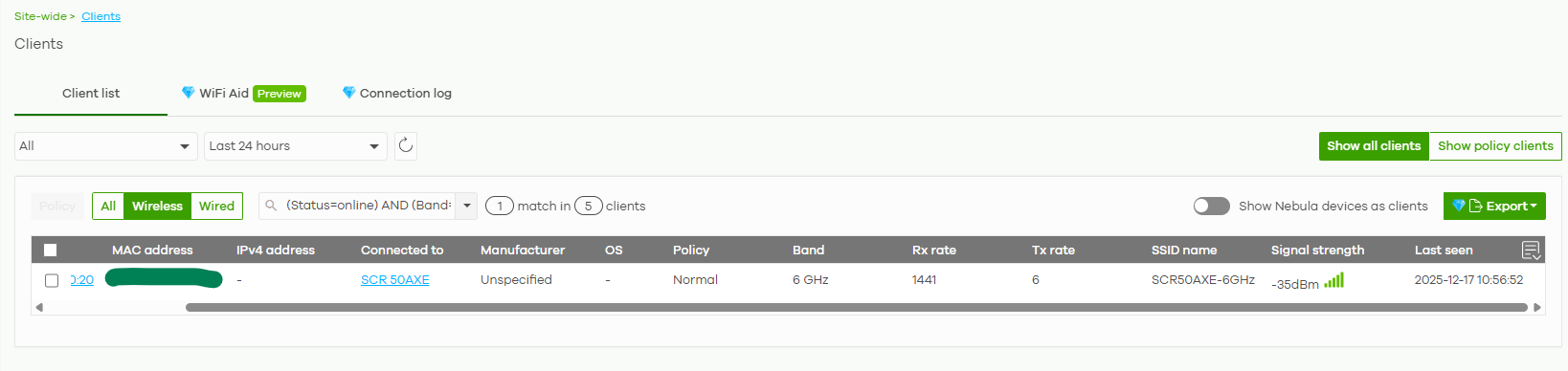
In this case, I the issue is with either the Intel BE200 or Windows 11 setting. I will investigate this further.
I will mark this as resolved. Thank you
0
Categories
- All Categories
- 442 Beta Program
- 3K Nebula
- 222 Nebula Ideas
- 129 Nebula Status and Incidents
- 6.5K Security
- 619 USG FLEX H Series
- 348 Security Ideas
- 1.7K Switch
- 84 Switch Ideas
- 1.4K Wireless
- 53 Wireless Ideas
- 7K Consumer Product
- 298 Service & License
- 485 News and Release
- 92 Security Advisories
- 31 Education Center
- 10 [Campaign] Zyxel Network Detective
- 4.8K FAQ
- 34 Documents
- 88 About Community
- 105 Security Highlight


