NWA90AX-PRO: Cannot access local management configuration wizard



 Freshman Member
I have a NWA90AX-PRO AP and I do NOT want to set up a Nebula account just to configure the thing. I only have 1 AP and have absolutely no need or desire to "centrally" configure it. That would make sense if I was a business managing multiple APs across many locations, but for a simple, single home AP, there's absolutely no need for it.
I bought the AP new off of Amazon (seller was listed as Zyxel).
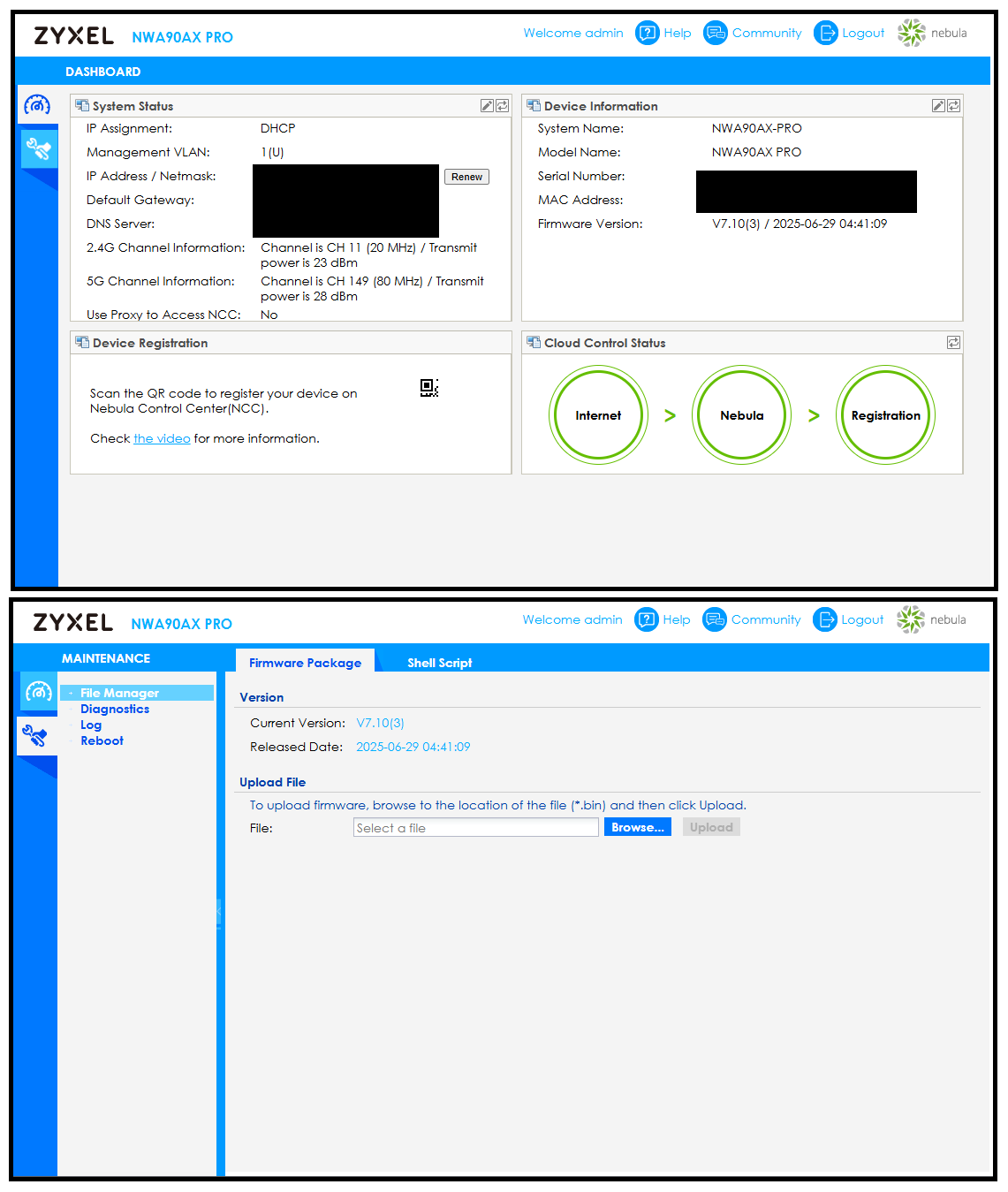
The user guide says that when I login to the AP, it should immediately open the configuration wizard, but that does NOT happen. Instead, the initial dashboard shows that the AP is already registered in Nebula and refuses to give me ANY local configuration options:
Further, when I click the video link under the "Device Registration" section, I get an error message:
This video is unavailable
Error code: 152 - 4
I found another video online which shows how to do a local configuration of the AP, in which they were able to get the wizard to appear. In an attempt to "force" it to the configuration wizard, I copied the URL for that page (although I changed the IP to the one assigned by my router), but even that will not get it to open. Instead, it just takes me back to the AP login page and makes me login again, which puts me right back where I started.
I updated the firmware from the version it shipped with to the one listed above, then did a pinhole reset of the AP, but the wizard will still not open, and this is seriously irritating me. How do I get this thing OUT of Nebula so I can configure it locally? This is NOT giving me a good first impression of Zyxel products…. 🤬🤬
Accepted Solution
-
Hi @xunil76,
Thank you for your feedback—my intent was to highlight a quick self-service option you could use immediately, but let me provide the other methods for independently restoring an AP to a standalone state without Nebula involvement:
- First, disconnect the AP from the internet.
- Then, press and hold the reset button for more than 5 seconds until the LEDs flash, triggering a factory reset. Alternatively, download the free ZON Utility from our website. With the AP powered on but offline, use the utility to detect and factory reset it.
- Finally, access the local GUI (default IP: 192.168.1.2) and select Standalone Mode. This disables NCC discovery, so the device won't reconnect to Nebula even after going online.
In this case, the AP will return to factory state for standalone management. Note that these methods do not change the device's registration status in Nebula—it stays linked to the previous organization until we remove it from the backend.
Apart from scanning the QR code on the device sticker via Nebula mobile app to remove the device from NCC, if users need a complete removal from the original Nebula account for full ownership transfer, they must provide proof of purchase (e.g., invoice/receipt) along with the device serial number and MAC address. We'll verify and handle the backend removal promptly.
Hope this clears things up!
Zyxel Tina
0





 Zyxel Employee
All Replies
-
Hi @xunil76,
Welcome to the Zyxel Community!
For devices purchased directly from the official Zyxel Store, we can confirm they will not be pre-registered. However, if the device was not purchased from this link, we recommend checking with the original seller regarding its registration status.
To help us further clarify this issue, could you please first confirm with the seller whether the device you received was brand new?
Zyxel Tina
0 -
This AP was purchased from Amazon brand new, the seller was….Zyxel.
0 -
Best guest is it was a return but was said to not have been used or opened which clearly was a lie.
There really needs to be a way to deregister the device when you have the device in your hands should this happen. It would also help if on a reset you say default configure local only because what if the management VLAN not had been untag when it downloads the config from nebula?
Hope you get this resolved.
I think I said this before but the way I would do the deregister is first a reset that puts the device in local mode deregister option then the UI loads and should normally see not registered if new but if used you click on a link from the UI to load a page which you need to enter a code then nebula will connect to the device under a connection by nebula with a pop up box do you want to deregister.
1 -
Exactly, thank you!
I don't understand why they want to make it so difficult to self-remedy issues like this. I mean, this specific scenario probably doesn't happen very often, but when it does, it doesn't make any sense to force the user to jump through a bunch of hoops to resolve it. Even if a factory reset doesn't automatically remove the device from Nebula, there should at least be the option baked into the firmware settings to do so.
And yeah @Zyxel_Tina, even though I didn't buy it directly from the Zyxel site, I did purchase it through the Zyxel store on Amazon, so I expect to get the same service on it as if I had purchased directly from the Zyxel website. I can certainly provide proof of purchase if necessary.
0 -
The only reason I can think of that makes sense why there is no deregister option thats easy might be if in the event a AP is stolen then the AP is useless to anyone when setup with nebula?
Nebula does give you the option to remove the device from nebula who set it up with nebula but if they forget when selling it on then you have to prove and jump through hoops that you are the new owner.
0 -
Yeah, I had thought about that, but the solution to that is simple enough (at least in theory).
If someone tries to remove it from Nebula, the admin who has that AP in their Nebula account gets a notification showing the IP address where that removal request came from. They can then either approve the removal (such as in the scenario I'm in, where they no longer own the AP) which frees it up for the new owner, or they now have at least a little information that could possibly help track down the person who has it now (in the event the AP was stolen).
Either way, making the AP unusable after a theft doesn't actually prevent the theft…all it does is increases the proliferation of e-waste when the thief realizes it's worthless and they throw it away. It also doesn't prevent them from being able to use the device with something like OpenWRT or some other 3rd-party firmware, provided the model is supported (this model is, BTW…and I'm considering it if I can't get resolution to this problem).
At least with the method above, there could potentially be a chance to catch the thief with help from law enforcement…at least more of a chance than there is the way things work now…
0 -
Well, good news to report: Zyxel customer service was able to get this AP removed from the Nebula account that it was in previously, so I am now able to access the configuration wizard and have it up and running.
Just a bit ago, I was comparing the stickers on the AP and the box, and I didn't notice it before, but someone had written the default username/password (admin/1234) very lightly in pencil on the side of the box…so this was definitely not a new AP, but someone else's return. 🤬🤬🤬🤬
Now it looks like I get to contact Amazon to see about getting a partial refund since they sold me a used AP as new, and charged me the new price for it…
0 -
Hi @xunil76,
Glad to hear that you got help remove the device from the previous Nebula account, and can now access the configuration wizard to get your AP up and running. While it's difficult for us to guarantee the exact condition of every device purchased through third-party channels, we have designed several options for users to independently restore devices to their initial state or transfer them to their own Nebula organization.
For others who might encounter the same issue, here's how to fully transfer ownership of your Zyxel device and remove it from Nebula Control Center management by yourself:
- Scan the QR Code on the Device Sticker: Use the Nebula mobile app to scan the QR code on your device's sticker. This will initiate the ownership transfer to your account.
- Remove the Device from Nebula: Please refer to this FAQ.
If you have concerns about the condition of a product you've received, we recommend contacting the original seller or retailer, as they are best positioned to address issues related to product condition, returns, or exchanges.
For product functionality issues or device registration problems that cannot be resolved through the retailer, please feel free to reach out to us here in the Zyxel Community. We'll do our best to provide the support you need.
Zyxel Tina
1 -
@Zyxel_Tina you mentioned in this reply that there are "several options" for independently restoring devices to their original state, but you only provided 1 example, which involves setting up a Nebula account, importing the AP into it, then removing it from Nebula.
It would be much more helpful if you were to provide those "other" methods as well, especially if at least one of those methods does not involve having to set up a Nebula account, as that was pretty much the whole point of this to begin with. There was literally no option I could find in the AP settings directly to remove it while it was still associated with the other person's Nebula account.
0 -
I am in the same situation with my AP I have had from new.
It's a NWA50AP PRO
I have used it locally for over a year, and it's been great.
I accidently added it to my nebula account.I removed it from my organisation and that went fine and it rebooted back to standalone mode and I logged in with the default password 1234 etc, it is now in standalone mode, but say's connected to Nebula and the other 2 config tabs are missing on the left hand side.
Apparently I have to fix it with some files (script) to get the configuration pages on my now standalone price, but can't.
Can anyone help me?0



 Guru Member
Categories
- All Categories
- 442 Beta Program
- 3.1K Nebula
- 242 Nebula Ideas
- 6.8K Security
- 771 USG FLEX H Series
- 386 Security Ideas
- 1.8K Switch
- 87 Switch Ideas
- 1.5K Wireless
- 58 Wireless Ideas
- 7.2K Consumer Product
- 324 Service & License
- 526 News and Release
- 100 Security Advisories
- 31 Education Center
- 10 [Campaign] Zyxel Network Detective
- 5.3K FAQ
- 34 Documents
- 91 About Community
- 121 Security Highlight


