[USG Flex H] - Cannot use Policy Control between devices in the same Zone
All Replies
-
I will check it and keep you posted.
Zyxel Melen1 -
Hi @Zyxel_Melen ,
Yes, this is the MAIN Wifi, on this AP is connected all the PCs/Phone and also the printer.
Over this I've created a VLAN Interface and a Bridge over this VLAN:

On this I've created this Policy rule:

But seems not work, the hint is 0 and from a Wifi PC I can ping and browse the printer (as mentioned before the PC and the printer are in the same AP).
Also I use an external 2.5Gbit switch, in which
- Port 1 is the Firewall uplink
- Port 2 is the AP uplink
The configuration of the switch is that the VLAN 10 is Tagged on port 2 and port 1. The switch uses only VLAN as bridged mode (switching level); in this case the switch ack as "paper pusher", take a tagged packet on port 2 are redirect on port 1.
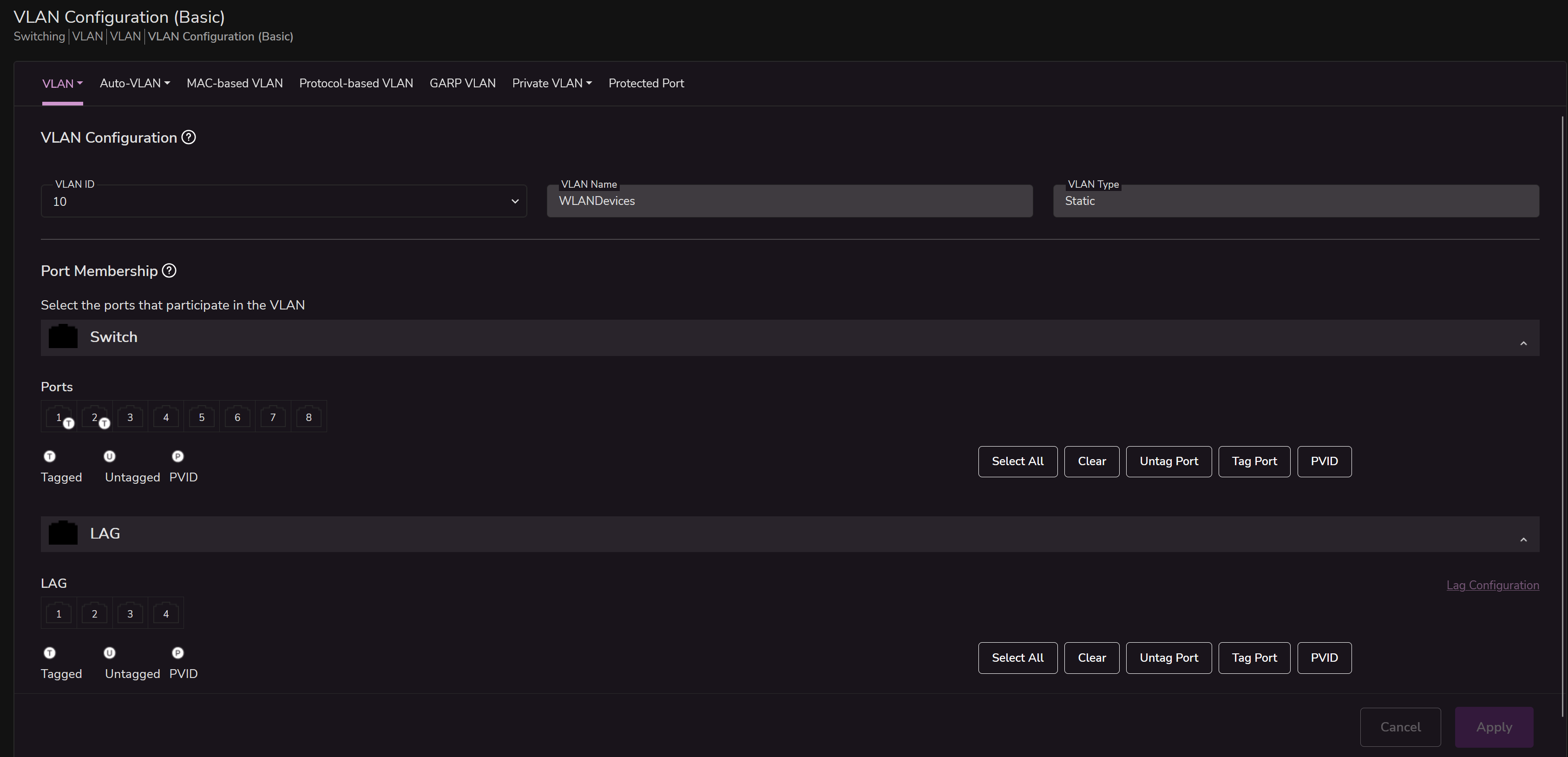
So in this case, when the switch receive the VLAN 10 on port 2, send the tag on port 1.
Thank you
0 -
I've tried to "eliminate" the external switch, attaching the AP directly into the P2 port of firewall.
Never in this case the Policy rule works, 0 hits and my PC continue to "see" the printer.
0 -
You need proxy ARP support on the FLEX H to do what you want.
0 -
OK and how I can enable the proxy ARP support on the FLEX H?
With this?
vrf main interface ethernet test network-stack ipv4 arp-proxy trueThe difference, in my case is
interface bridge WLANBridge.Is this corrent? Can I delete the bridge and leave only the VLAN?
Thank you
0 -
As said option does not seem to work yet on FLEX H you also don't need to use a Bridge.
On non H models you can set interface to general to get the proxy ARP
1 -
Hi @Zyxel_Melen ,
can you release a private firmware with a working Proxy ARP function?
My FW is the 200HP.
Thank you
0 -
Hi @Maverick87
Please hold on. I think this issue is less related with the firewall since the PC and the printer are connected to the same AP and same SSID. In this case, AP will directly forward the traffic to each other because it can find these clients on its client/station list. It don't need to pass to the firewall since they are in the same IP subnet. The communication doesn't need routing, just only forwarding.
However, you mentioned that the Intra-BSS traffic blocking function is not working; this is strange, AP should block the communication. Could you help to take a screenshot for the station info or collect a diagnostic file? So I can check the config and the station info.
Zyxel Melen0 -
Hi @Zyxel_Melen ,
sure. Tell me what you need specifically and what I should do.
Anyway, if I use fing on my phone, that is also connected to the same WLAN of the printer, fing found only:
- 10.1 (Firewall)
- 10.X (local ip of the Phone)
- 10.250 (the printer)In the WLAN is also present another Phone and the MacBook.
If I use the fing app on my Macbook, I found only:
- 10.1 (firewall)
- 10.x (local IP of the MacBook)
- 10.250 (the printer)So seems the intra-BSS block works, but only for some devices.
If from the Macbook I try to ping the phone, the ping don't success.
If I disable the intra-BSS blocking, the ping from the MacBook to the phone, success, and also the fing app is able to see the new device.So there is somethings with the printer (the only one that "ignore" the intra-BSS block).
Anyway this, not help with the primarily problem, how block "same VLAN" packets?
Thank you
0 -
The reason you might be finding the printer with Intra-BSS traffic blocking could be that this is done by network discovery packets are not ARP or unicast such that there are likely UDP (multicast/broadcast) which Intra-BSS traffic blocking my not block but when you ping that is unicast plus ARP at the AP level does not send to other connected clients on the same SSID with Intra-BSS traffic blocking.
0





 Zyxel Employee


 Master Member




 Guru Member
Categories
- All Categories
- 442 Beta Program
- 3.1K Nebula
- 241 Nebula Ideas
- 6.8K Security
- 759 USG FLEX H Series
- 380 Security Ideas
- 1.8K Switch
- 87 Switch Ideas
- 1.5K Wireless
- 58 Wireless Ideas
- 7.2K Consumer Product
- 321 Service & License
- 520 News and Release
- 100 Security Advisories
- 31 Education Center
- 10 [Campaign] Zyxel Network Detective
- 5.3K FAQ
- 34 Documents
- 90 About Community
- 119 Security Highlight


