XMG1915-10E Wake on LAN

 Freshman Member
I 've problems with 2x XMG1915-10E switch related to wake on lan to connected clients - at least on the 2.5 Gbit port. Because clients on a via sfp+ port connected XGS1210-12 switch can be waked up.
In the manual I didn't find a solution. Could it be the speed auto-negotiation or green ethernet? But I changed this setting with no succsess.
Any hints are wellcome.
Regards.
Accepted Solution
-
Hi @LPSt,
Issues with Wake on LAN can sometimes be related to compatibility or interaction between the switch port and the client's network interface card (NIC). Generally, the link would speed down to 10 M/F after the PC enters sleep mode.
If the NIC supports WoL, try adjusting the following settings on the client device:
- Open the Control Panel.
- Go to Network and Internet > Network and Sharing Center.
- On the left side of the window, click on Change adapter settings.
- Right-click on the network adapter you want to configure (e.g., Ethernet or Wi-Fi) and select Properties.
- In the new window, click the Configure button.
- Click the Advanced tab to see the list of properties.
- Select the WOL & Shutdown Link Speed option.
- From the "Value" dropdown, select the ‘100 Mbps First’ or ‘Not Speed Down’ option.
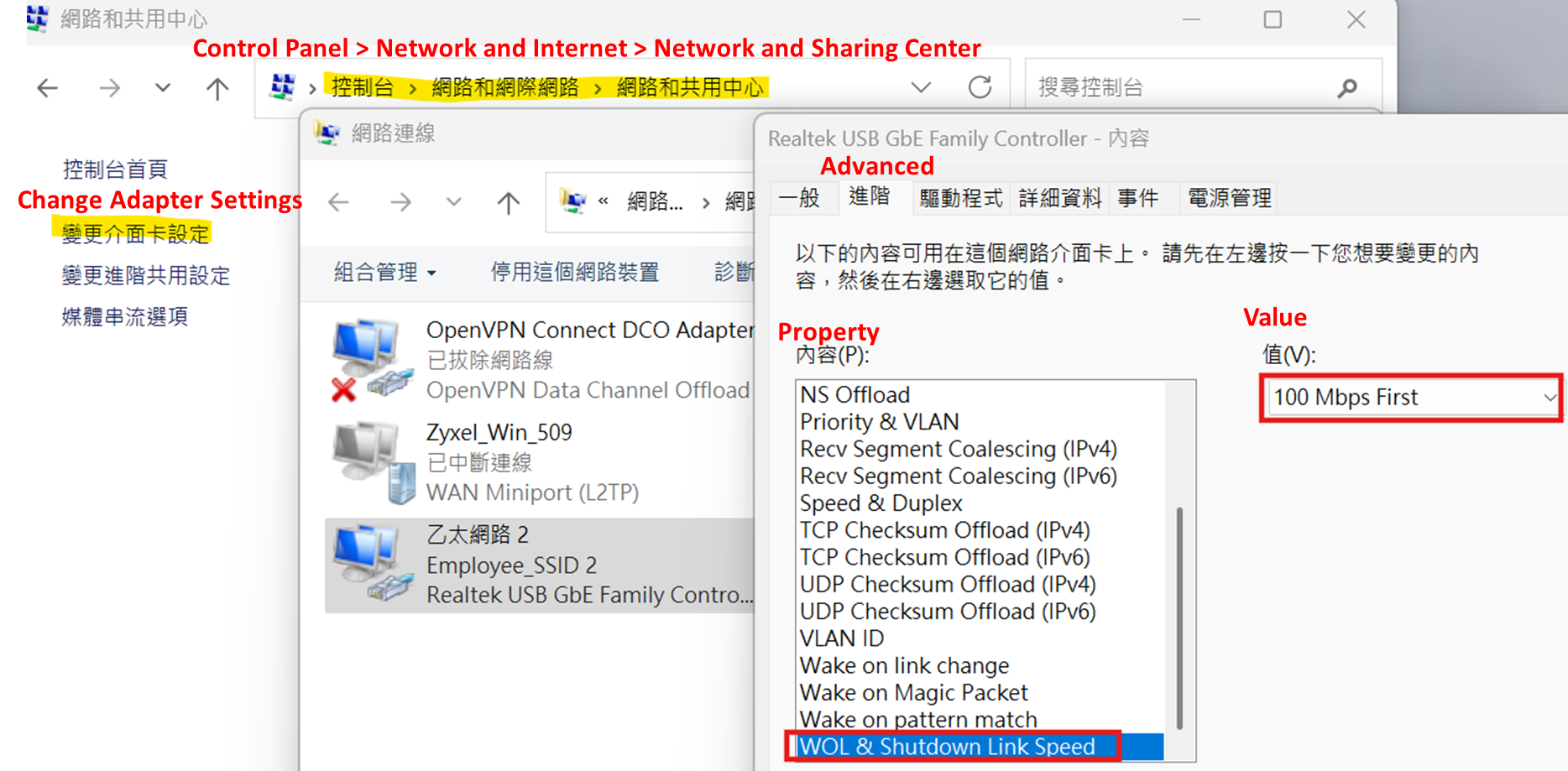
Also, please ensure:
- The ‘Wake on Magic Packet’ property is set to enabled.
- The client's network adapter driver uses the latest version.
Zyxel Tina
0

 Zyxel Employee



All Replies
-
Hi @LPSt,
Issues with Wake on LAN can sometimes be related to compatibility or interaction between the switch port and the client's network interface card (NIC). Generally, the link would speed down to 10 M/F after the PC enters sleep mode.
If the NIC supports WoL, try adjusting the following settings on the client device:
- Open the Control Panel.
- Go to Network and Internet > Network and Sharing Center.
- On the left side of the window, click on Change adapter settings.
- Right-click on the network adapter you want to configure (e.g., Ethernet or Wi-Fi) and select Properties.
- In the new window, click the Configure button.
- Click the Advanced tab to see the list of properties.
- Select the WOL & Shutdown Link Speed option.
- From the "Value" dropdown, select the ‘100 Mbps First’ or ‘Not Speed Down’ option.
Also, please ensure:
- The ‘Wake on Magic Packet’ property is set to enabled.
- The client's network adapter driver uses the latest version.
Zyxel Tina
0 -
Hello Tina,
thanks for your help. But I think it's not on the client side a problem.
Because as I mentioned - when I connect the same client with the same cables to another switch (e.g. XGS1210-12) the client can be waked up.
Yesterday I figured out, that my 2x XMG1915-10E are not on the latest firmware.
So I want to investigate more time to trial that on an newer firmware.
I think - there was a changing related to the green ethernet/EEE capability - if I'm not sure about.
I only need time 😉.
Best Regards.
0 -
Hi, did you find a solution for the XMG1915-10E to work with wake on lan?
I have a nas, connected to the router I have wol functioning, if I connect it to the zxel switch no more.
I'm trying everything but with no success..
0 -
Hi, did you find a way ti make wol working?
I have a XMG1915-10E with the same problem. A nas can be started only in not connected to thi switch.
I'm trying everything.
tnx
0 -
Hi @elbrus77,
Welcome to Zyxel Community!
The XMG1915-10E switch is a multi-gigabit device whose ports only support 100 Mbps, 1 Gbps, and 2.5 Gbps speeds. Therefore, it does not support 10 Mbps. In addition, when your NAS is in sleep mode and tries to connect at 10 Mbps, it won't establish a proper link.
As mentioned in the previous reply, you should configure the WOL speed on your NAS to use either "100 Mbps First" or "Not Speed Down" to match the switch’s supported speeds.
Zyxel Tina
0 -
Hello,
I would like to wake up a debian trixie based pc with an i225-v network controller behind the XMG1915-10E. It works fine with an XMG-108 switch, but I guess with the XMG1915-10E I am running in the 10 Mbps issue. Does someone know how to configure the network on debian trixie in such a way, that the WOL speed remains at 100 Mbps or higher?
Thanks a lot for your help,Bernd
0 -
Hello,
I also have an issue with WOL with the XMG1915-10E. Using the Zyxel XMG-108, which also has 8 100/1000/2500 Mbps, WOL with a linux client (debian trixie) with intel i215-v network interface works. However, when switching to the XMG1915-10E WOL stops working. Since both switches support 100/1000/2500 Mbps on der 8 RJ45 ports, there must be something wrong in the configuration of the XMG1915-10E. Does anyone know how to solve this?
Thanks a lot, regards, Bernd0 -
Hi @Bernd67
What's the link speed when the debian sleep? Could you check it via the switch?
Zyxel Melen0 -
Hello Melen,
when the Debian system is in WOL mode the link/act led on the XMG108 for the connected link is amber, meaning 100/1000 Mbps. On the Motherboard the speed led is off and activity blinking, meaning 100/10 Mbps. If it is true that the XMG108 supports only 100/1000/2500 Mbps this would mean it must be 100 Mbps.With using the XMG1915-10E the led of the connected link is off, and also on the motherboard, there is no link activity…
This means, either the XMG108 inofficially does support 10 Mbps, or the XMG1915-10E might be wrong configured, or has another issue…
Thanks a lot for you help,
best regards,
Bernd0 -
date sheet shows
100M/1G/2.5G Ethernet (RJ-45)
The problem may just be that this is a Smart Managed Switch vs Unmanaged and as such stops WoL from working
I'm not clued up on how WoL works so there might be settings you have to change like ARP Learning or maybe you need to set a Static ARP or Static MAC Forwarding
0






 Guru Member



Categories
- All Categories
- 442 Beta Program
- 3K Nebula
- 222 Nebula Ideas
- 129 Nebula Status and Incidents
- 6.5K Security
- 619 USG FLEX H Series
- 349 Security Ideas
- 1.7K Switch
- 84 Switch Ideas
- 1.4K Wireless
- 53 Wireless Ideas
- 7K Consumer Product
- 298 Service & License
- 485 News and Release
- 92 Security Advisories
- 31 Education Center
- 10 [Campaign] Zyxel Network Detective
- 4.8K FAQ
- 34 Documents
- 88 About Community
- 105 Security Highlight


