Design a reliable wireless bridge among two buildings

 Guru Member



A customer is considering to deliver network connectivity on a different building from the main office, which already use NWA5123-AC as managed AP for delivering wireless connection to inner and guests devices.
Using copper or fiber connection between buildings currently is not an option, and it's really unlikely than this might change.
My current idea is to add a couple of APs for create a "wireless bridge-only" configuration on both sides, buildings have direct line of sight. Older Zyxel APs had a specific configuration for wireless bridge, now AFAIK seems that mostly is a WDS config with a root one (main office side) and client one (on the other building).
Vehicular traffic (lorries, cars, cranes and earth moving equipent) is a day-to-day occurrence, guessed installation height should be in the ballpark of 5-6 meters for reduced interference from this traffic.
On main office side, a root AP using outdoor device like WAX655E or NWA55AXE, probably mounted on a rotating/orientable bracket/support for most effective orientation of the device; due to wall specs (thermal insulation on the outside) any hint is greatly appreciated for a correct fixing for avoid problems and hiccups.
On the other side of the tunnel, inside the walls, a repeater AP like NWA50AX pro as a "client", but oriented in suitable way for align as best as possible for signal strength; distance should be roughly 60-70 meters. The "client building is made in prefabricated concrete, with some steel-reinforced concrete elements for increased building strenght (region is considered seismic risk).
IMVHO a 5ghz connection between devices, while not impossible, could be more heavily impacted by mist, rain, vehicular traffic, while delivering probably the biggest transfer rate capability (but with bigger inconsistency from lower to higher performances"; however a 2.4ghz connect would have far bigger range, but much more exposed to interference from other 2.4ghz networks (which have a really narrow channel list).
I'not expeting a 160mhz channel width, but I d' hope to at least 80mhz.
Any suggestion is really appreciated, and there will be no use of Nebula for these devices.
At this time, this is a mandatory condition from the customer.
Accepted Solution
-
Hi @mMontana,
Thank you for sharing your detailed considerations.
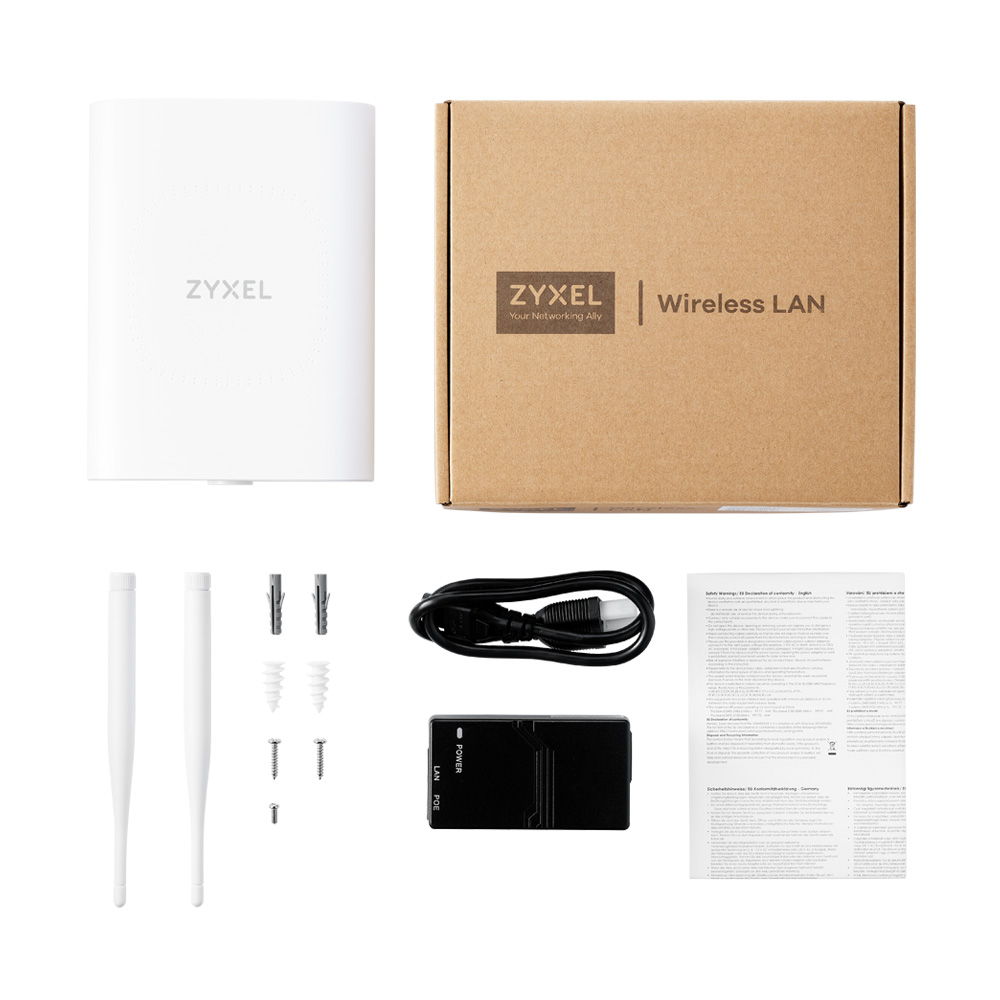
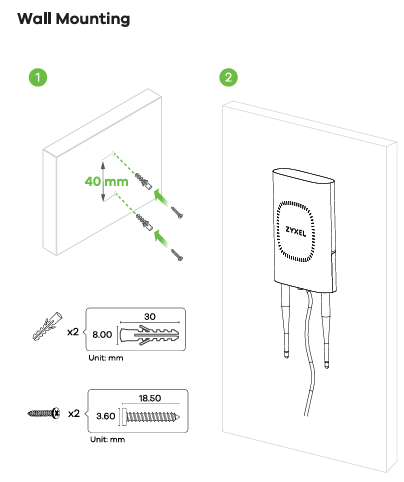
Regarding your question about mounting accessories for the NWA55AXE, please refer to this post where Zyxel_Barry has already addressed it:
No additional accessories are required for wall installation. The NWA55AXE includes wall-mount screws in the box, so you can directly fix it to the wall and hang the AP.
For pole mounting, Zyxel does not provide dedicated hose clamps. These depend on your pole's diameter and are typically sourced locally.
In short: wall-mounting is supported out of the box, and pole-mounting only needs general-purpose hose clamps—no Zyxel-specific accessory code is required.
Zyxel Tina
0

 Zyxel Employee

All Replies
-
Hi @mMontana,
Designing a reliable wireless bridge between two buildings with direct line of sight is a common and effective solution when wired connections aren't feasible. Your proposed setup using Zyxel outdoor APs is a good starting point.
Here's a guide to help you configure a robust wireless bridge:
Supported Devices for Wireless Bridge:
- For the main office side (Root AP), the WAX655E and NWA55AXE are both excellent choices as they support wireless bridge functionality and are designed for outdoor use.
- It's important to note that the NWA50AX Pro, which you considered for the client side, does not support wireless bridge functionality. You would need a different model for the repeater AP. Refer to Zyxel's device function table to confirm compatibility.
Wireless Bridge Configuration (Nebula Cloud Managed):
- Ensure both APs are added to the same Nebula site and have the latest firmware.
- Initially, connect both APs to your main network.
- In Nebula, navigate to
Configure > Access points > AP & port settings > General settingand enable "Smart mesh." - On each NWA55AXE's AP information page (
Device > Access points), enable "Wireless bridge." - Once configured and updated, you can move the Repeater AP to its desired wireless location. It will automatically establish a mesh link. The Repeater AP's LAN port will provide the internet connection for your solar controller.
Wireless Bridge Configuration (Standalone Mode using WDS):
- Designate one compatible AP as the "Root AP" and the other as the "Repeater AP."
- Connect both APs to a switch and assign them static IP addresses (
CONFIGURATION > Network > IP Setting). - Create a WDS Profile on both APs under
CONFIGURATION > Object > WDS Profile > WDS. The WDS SSID and Pre-Shared Key must be identical. - On the Root AP, go to
CONFIGURATION > Wireless > AP Management > WLAN Setting, set "Radio 1 OP Mode" to "Root AP," and select your WDS profile. - On the Repeater AP, set "Radio 1 OP Mode" to "Repeater," and select the same WDS profile.
- After initial setup, remove the Ethernet cable from the Repeater AP and place it at the remote building.
Frequency Band Considerations (5GHz vs. 2.4GHz):
- While 2.4GHz offers greater range, it is more susceptible to interference. 5GHz provides higher throughput and is generally more suitable for wireless bridging due to less interference, especially in busy environments.
- For a distance of 60-70 meters with direct line of sight, 5GHz should perform well and offer better speeds. You can specifically configure the wireless bridge to use only the 5GHz band if desired.
Installation Height and Mounting:
- A height of 4.5-5 meters is reasonable to reduce interference from vehicular traffic.
- For optimal performance and signal propagation, ceiling mounting is generally recommended for APs, but wall mounting is also acceptable. For outdoor APs, proper alignment is crucial.
- For the WAX655E, it is a PoE outdoor AP with an RJ45 PoE uplink, so you won't need additional PoE injectors.
To further assist you, please provide the following information:
- Specific model you intend to use for the Repeater AP (since NWA50AX Pro is not suitable for wireless bridging).
- A simple network topology map of your current setup and the proposed bridge.
- Confirmation of whether you plan to manage these APs via Nebula Cloud or in Standalone mode.
If you opt for Nebula Cloud management, please enable Zyxel Support Access via
Help > Support Requestin the Nebula console. This will allow our support team to directly view your cloud environment configuration, significantly shortening troubleshooting time.This AI response aims to provide initial troubleshooting steps and identify information needed for further diagnosis. Feel free to share additional details based on the suggestions above — this will help community members offer more targeted assistance.
If you have feedback or idea about this AI assistant, share them in Community Feedback.0 -
This AI-Slop answer is quite useless to me.
Also…
This has been stated.
It's important to note that the NWA50AX Pro, which you considered for the client side, does not support wireless bridge functionality. You would need a different model for the repeater AP. Refer to Zyxel's device function table to confirm compatibility.
According to the device management, I have these option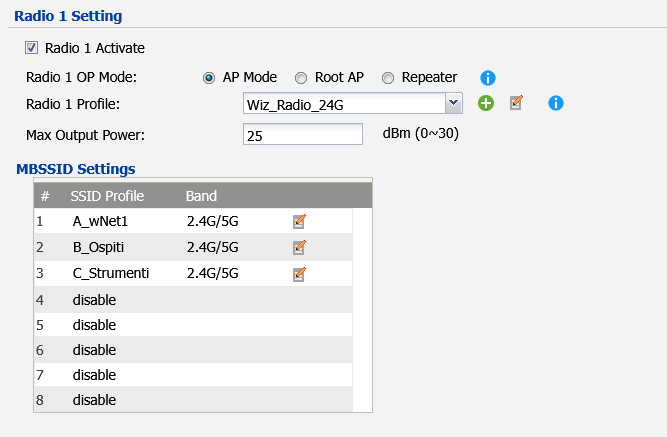
Page 129 of the user manual
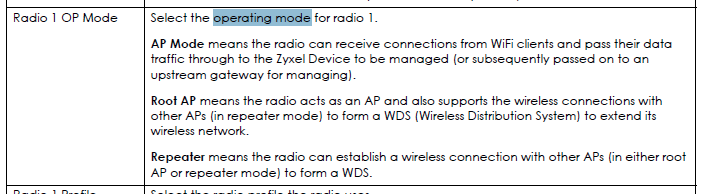
Page 152 of the user manual

Therefore this AP should connect to the other one.
Also: this AI answer does not actually provide any alternative suggestion for the client AP.
Last but not least: how does the part "Nebula" matter with a mandatory forbade from the customer to use Nebula?
This automated answers are useless
0 -
Hi @mMontana,
Here's a recommended topology sketch for standalone mode APs:
Main Office [Root WAX655E ] ---- (60-70m)WDS ---- Remote Building [Repeater WAX655E] —LAN— [PoE Switch] — [NWA50AX Pro]
Use wall-mounting to deploy two outdoor WAX655E APs on both sides, ensuring optimal LOS orientation. In the remote building, connect the WAX655E's LAN port to a PoE switch for power and downstream connectivity. From the PoE switch, connect one NWA50AX Pro indoor AP (max 2 hops total) for client/end-device wireless coverage.
For WDS setup instruction, please refer to:
This WDS setup should deliver stable connectivity, even through prefabricated concrete with steel reinforcement.
Zyxel Tina
0 -
Hi @Zyxel_Tina, thanks for your suggestion.
I can understand that a "both side external AP" could lead to a better performances.
Currently there are no 2.5gbe-capable switches, so mostly of the possible performances of WAX655E could be wasted due to lacking of capable-enough uplink.
Also, WAX655E, while being far more weather resistant (IP67 compared to IP55), has 6 antenna connectors, that could be degraded by sun and weather, and lead to detachment in long time, allowing water to short the N-connectors.Last but not least, as radio capabilities (I am aware that WAX655E has 2x2 + 4x4 radio interfaces), there's any advantage compared to NWA55AXE?
0 -
Hi @mMontana,
You’re correct that if the environment does not have any 2.5 GbE-capable switches, the throughput of WAX655E will be limited. However, the benefit of WAX655E is not only about maximum speed, but also about RF capacity and link stability.
Compared with NWA55AXE, which is positioned for small business / SOHO scenarios, WAX655E has several hardware advantages:
- 5 GHz 4x4:4 radio (vs 2x2:2 on NWA55AXE) – This provides better airtime efficiency and lower retry rates, especially when multiple clients are active or when the RF environment is challenging.
- External N-type antenna – It gives more RF flexibility for outdoor and point-to-point scenarios.
- IP67 outdoor rating – WAX655E is designed for continuous outdoor use in harsher environments, while NWA55AXE (IP55) is more suitable for outdoor locations with some protection (e.g. under eaves or sheltered areas).
In summary, if you plan full outdoor deployments, higher client density, or a future upgrade to 2.5 GbE devices, WAX655E provides more RF headroom and long-term robustness for a WDS network design.
Zyxel Tina
0 -
@Zyxel_Tina thanks for your answer, but I'm sorry that part of my concerns were disregarded.
The N-Type connectors are capped, but that's a plastic cap. How many years will that cap last exposed to sun, wind, cold, bad weather? IMVHO as a long term robustness the exposed connectors are not an answer, while providing increased flexibility. Unfortunately the Zyxel website is not that easy to browse for accessories, and the current only option for that kind of connector seems ANT2105… Which is useless to my case (omnidirectional antenna…)
IP67 is dust-tight and water-tight for 30min immersion in 1mt. Current design installation is considered 5-6mt from ground, 14m of elevation from sea level. Is not that far from a river, but if a 6mt water level flooding will reach that AP i think that network gear should not be the most critical part at that time of life…
At Zyxel Store MSRP your solution is 8.5x times pricier than NWA55AXE solution.
For having
-more wired transport capacity (which would be unused)
-increased installation flexibility (but with 3 times oxidable or breakable connectors)
-increased wireless transport capacity (which still not required)
-better Ingress Protection (but unless IP55 is a generous evaluation for NWA55AXE, should be fit for being on a wall)With the MSRP of one WAX655E customer could buy two sets of NWA55AXE (which means 4 aps), having two spares for any fault and still saving hefty money.
With no critical necessity for bandwidth, I don't think that makes any financial sense your proposal.Which is the code for optional mounting accessories for NWA55AXE?
0 -
Hi @mMontana,
Thank you for sharing your detailed considerations.
Regarding your question about mounting accessories for the NWA55AXE, please refer to this post where Zyxel_Barry has already addressed it:
No additional accessories are required for wall installation. The NWA55AXE includes wall-mount screws in the box, so you can directly fix it to the wall and hang the AP.
For pole mounting, Zyxel does not provide dedicated hose clamps. These depend on your pole's diameter and are typically sourced locally.
In short: wall-mounting is supported out of the box, and pole-mounting only needs general-purpose hose clamps—no Zyxel-specific accessory code is required.
Zyxel Tina
0




Categories
- All Categories
- 442 Beta Program
- 3K Nebula
- 222 Nebula Ideas
- 129 Nebula Status and Incidents
- 6.5K Security
- 619 USG FLEX H Series
- 349 Security Ideas
- 1.7K Switch
- 84 Switch Ideas
- 1.4K Wireless
- 53 Wireless Ideas
- 7K Consumer Product
- 298 Service & License
- 486 News and Release
- 92 Security Advisories
- 31 Education Center
- 10 [Campaign] Zyxel Network Detective
- 4.8K FAQ
- 34 Documents
- 88 About Community
- 105 Security Highlight


