A small thing, but very irritating - USG FLEX 200H

 Freshman Member

When the device configuration backup is set, after each device update to a higher version, the same with 1.37, the last backup files before the update are deleted and suddenly files from several months earlier appear that were not visible in the window before the update, e.g. from September 2025.
Accepted Solution
-
Hi @HUBERT_KASPRZAK,
Thank you for your feedback!
Regarding your question, please allow me to clarify, your configuration files are not deleted, but hidden. This behavior is due to the Dual Partition design of the fierwalls.
- How Update Works: When you upgrade from version A to B, the device installs the new firmware onto the Standby Partition and then switches to it.
- Partition Isolation: By default, the Web GUI only displays configuration files stored in the current Running Partition. The backups you created on the previous version are still safely stored in the Standby one.
How to access your files: If you need to retrieve those files, you may follow PeterUK’s advice and refer to the article. By using the CLI command, the GUI will temporarily reveal the files in the Standby Partition, allowing you to download or manage them.
Hope this helps :)
Zyxel Tina
0

 Zyxel Employee



All Replies
-
Hi @HUBERTKASPRZAK,
We understand you're experiencing an issue with configuration backup files being unexpectedly deleted and replaced with older versions after a firmware update on your USG FLEX 200H. This can indeed be very irritating.
Here's some information and steps that might help clarify and address this:
Firmware 1.35 and Backup Rotation: Firmware version 1.35 introduced a "Backup Rotation" feature designed to manage auto-backup files more efficiently. This allows you to set a custom maximum number of auto-backup files, and when the limit is reached, the oldest file is automatically replaced with the newest one.
- Important Limitations: This rotation only works if the total file count stays under 65. If you already have 60 files and set a rotation limit of 10, it will create files up to 65 but stop at file 66, even if your rotation limit isn't reached. At 65 files, backup rotation does not delete older files. Also, if the total file size exceeds 200 MB, auto-backups will stop.
- Best Practices: To fully benefit from this, set a realistic rotation limit (e.g., 10-20 files) and periodically review your file manager to ensure you don’t exceed the 65-file cap or the 200 MB total size limit.
Configuration Rollback on Firmware Upgrade Failure: The uOS firmware version 1.30 introduced an automatic configuration rollback feature. If a new firmware configuration fails to apply, the device will revert to the last known working state with the previous firmware and configuration. While this is intended to prevent an inconsistent state, it might explain why older configurations could become active if a new configuration is deemed incompatible.
To help us investigate this issue more thoroughly, please provide the following information:
- Firmware Version: The exact firmware version your USG FLEX 200H was running before and after the update to version 1.37.
- Backup Settings: Details of your configuration backup settings (e.g., auto-backup interval, backup rotation limit if configured, number of backup files allowed).
- Screenshots: Screenshots of the File Manager displaying the backup files before and after the update.
- Network Topology: A brief description or diagram of your network setup.
- Nebula Support Access: If your device is managed by Nebula, please enable Zyxel Support Access via
Help > Support Requestin the Nebula console. This allows our team to view your cloud environment configuration directly and can significantly speed up troubleshooting. Please also provide your Organization and Site name.
This AI response aims to provide initial troubleshooting steps and identify information needed for further diagnosis. Feel free to share additional details based on the suggestions above — this will help community members offer more targeted assistance.
If you have feedback or idea about this AI assistant, share them in Community Feedback.0 -
Unfortunately, I can't take before and after screenshots. Maybe next time with the new version. My backups are set to weekly. Rotation is 50. After the update, should the system show current backups from before the update? The system is currently deleting them, which may be why it's showing the old ones?
0 -
do you see?
Configuration (Standby Partition)
as you can download the startup-config.conf that was the last config when the firmware updates to the Standby slot to then become the running slot.
Do the following if not showing
How to display the standby firmware partition on GUI? — Zyxel Community
0 -
Hi @HUBERTKASPRZAK,
To better assist you and investigate further, could you please confirm where you performed the backup config and saw the issue, via local GUI or Nebula?
Zyxel Tina
0 -
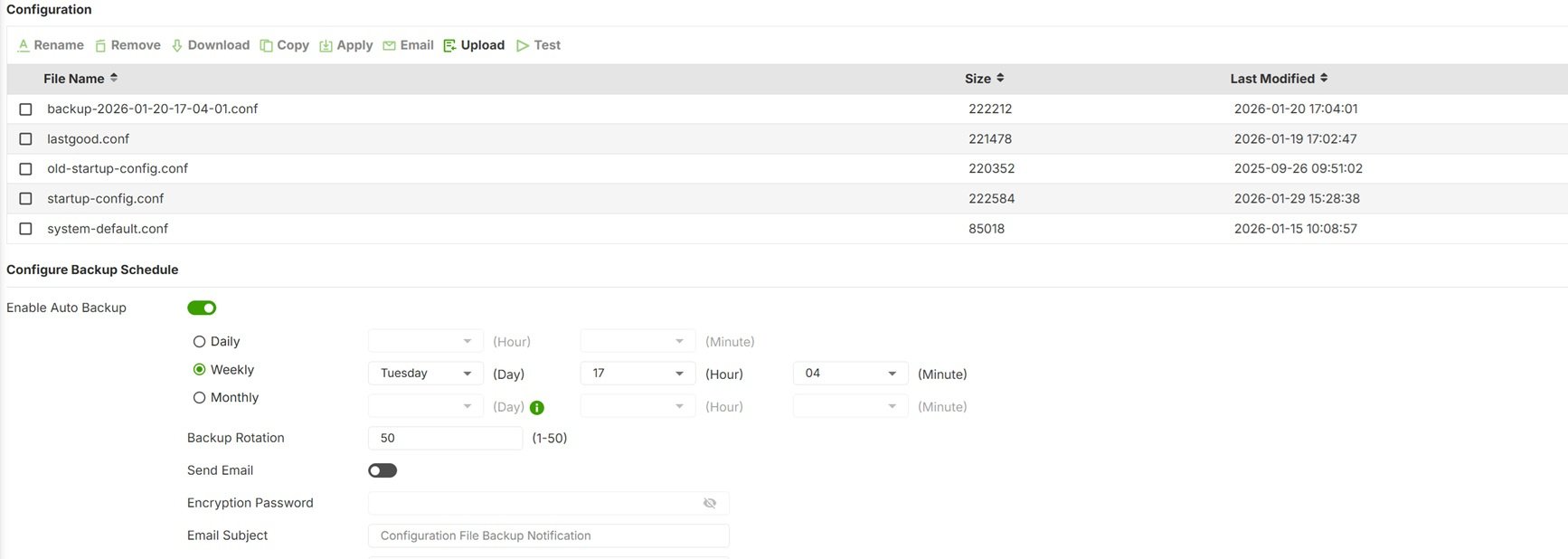
Before updating, please note the last backup on 20/01/2026
 0
0 -
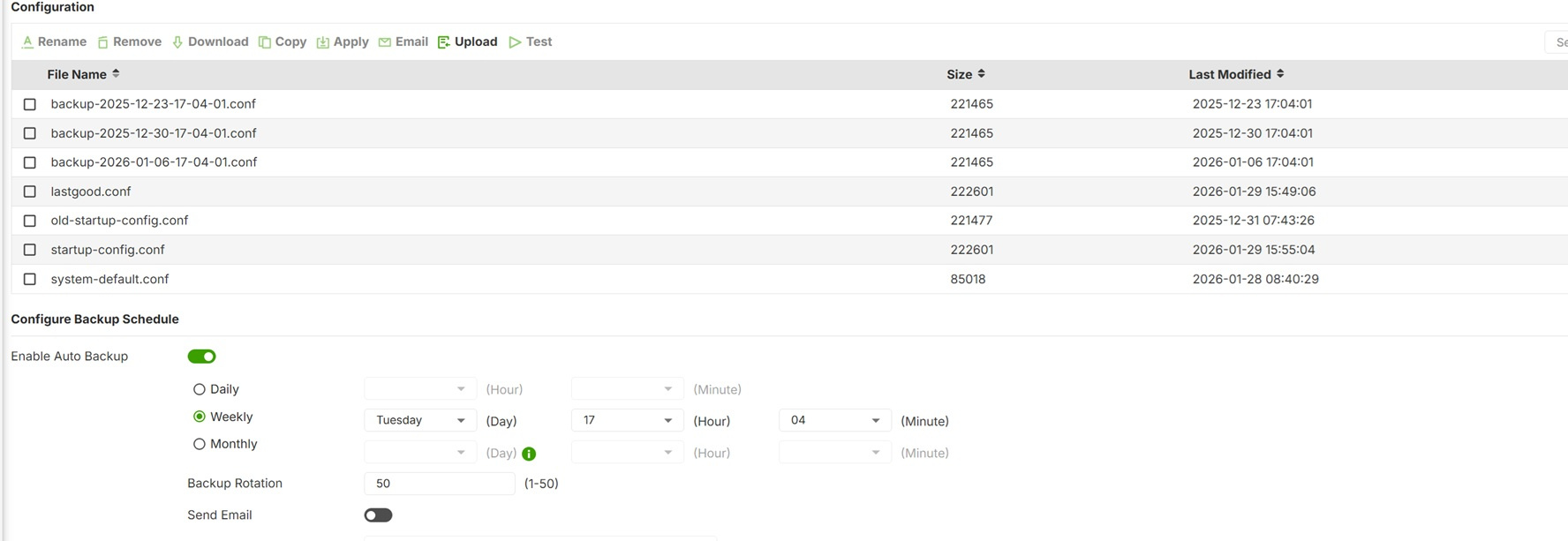
- After updating, the last backup disappears and some old versions appear instead
 0
0 -
Hi @HUBERT_KASPRZAK,
Thank you for your feedback!
Regarding your question, please allow me to clarify, your configuration files are not deleted, but hidden. This behavior is due to the Dual Partition design of the fierwalls.
- How Update Works: When you upgrade from version A to B, the device installs the new firmware onto the Standby Partition and then switches to it.
- Partition Isolation: By default, the Web GUI only displays configuration files stored in the current Running Partition. The backups you created on the previous version are still safely stored in the Standby one.
How to access your files: If you need to retrieve those files, you may follow PeterUK’s advice and refer to the article. By using the CLI command, the GUI will temporarily reveal the files in the Standby Partition, allowing you to download or manage them.
Hope this helps :)
Zyxel Tina
0




 Guru Member



Categories
- All Categories
- 442 Beta Program
- 3K Nebula
- 222 Nebula Ideas
- 129 Nebula Status and Incidents
- 6.5K Security
- 619 USG FLEX H Series
- 349 Security Ideas
- 1.7K Switch
- 84 Switch Ideas
- 1.4K Wireless
- 53 Wireless Ideas
- 7K Consumer Product
- 298 Service & License
- 485 News and Release
- 92 Security Advisories
- 31 Education Center
- 10 [Campaign] Zyxel Network Detective
- 4.8K FAQ
- 34 Documents
- 88 About Community
- 105 Security Highlight


