1.37 uOS - DHCP reservation and client list NOT working

 Guru Member



Hello everyone,
on a site I decided to assign 192.168.0.250 to a switch but it became unreachable.
So I gave it the x.x.x.253 IP and now I can see it:
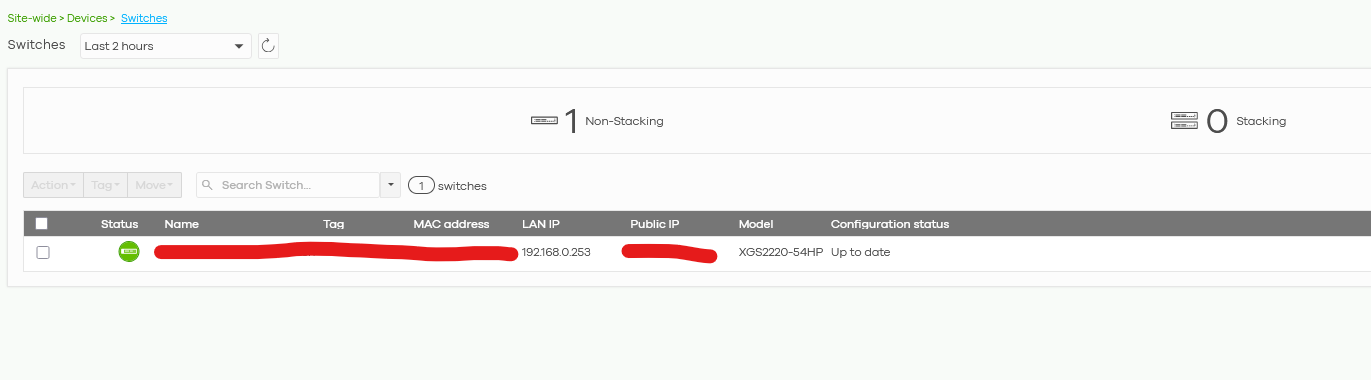
The problem is that the firewall does NOT show me the fact that x.x.x.250 was already taken using the On-Premise UI:
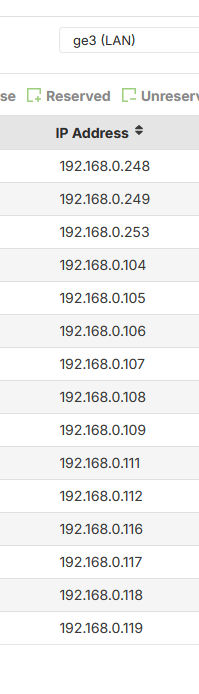
So I verified it via Nebula and there I see something using x.x.x.250 IP:
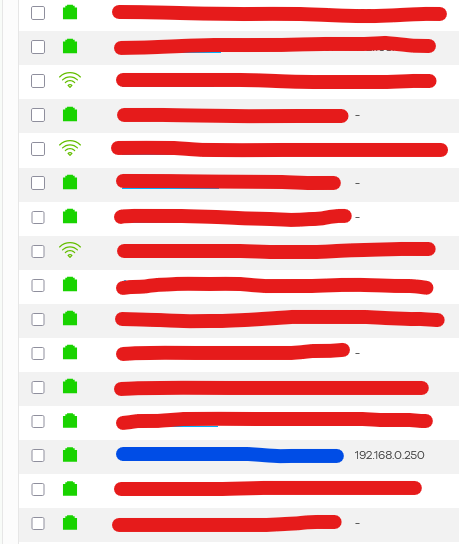
The other problem is the fact that from On-Premise interface, if I set the firewall to reserve 192.168.0.250 to a specific MAC Address it has to assign that IP to that MAC Address also if another MAC Address decides to use a static IP.
Otherwise the Reservation is NOT working.
Anyway this situation is strange also because Nebula and On-Premise UI are not giving me the same information about Clients' list
All Replies
-
Hi @GiuseppeR,
We understand you're experiencing issues with DHCP reservation and client list discrepancies between your USG FLEX H Series firewall's on-premise UI and Nebula, particularly with IP address 192.168.0.250.
Here's some guidance to help you troubleshoot:
DHCP Reservation Management:
- In the local GUI, you can add existing DHCP IPs to the reserved list by navigating to
Network Status > DHCP Table > Current DHCP List, selecting the desired client, and clicking "Reserved". - On Nebula, static DHCP clients can be created directly from the interface page by going to
Site-wide > Configure > Firewall > Port & Interface. - If you set a DHCP reservation for a specific MAC address, the firewall should assign that IP to the MAC address. If another MAC address tries to use a static IP that conflicts with a reservation, the reservation should take precedence. This ensures consistent IP assignment.
- In local GUI, the DHCP table is separate and created from the DHCP Table page, whereas in Nebula, it's directly on the interface page.
- In the local GUI, you can add existing DHCP IPs to the reserved list by navigating to
Client List Discrepancy:
- The USG FLEX H Series supports both Nebula Cloud Management and local on-premise control, and a structured configuration sync mechanism is implemented to prevent conflicts.
- To see a full client list in the local GUI, ensure 'Device Insight' is enabled. You can do this by navigating to
System > Advanced > Additional Features. Once enabled, you will see all connected devices under this section. - On Nebula, you can check online clients by navigating to
Site-wide > Clients. This feature has been supported since firmware version V1.32, so ensure your device is updated. - Discrepancies can occur if settings are changed in both Nebula and the local GUI simultaneously. Zyxel recommends avoiding this to prevent setting conflicts, as the final state will always ensure consistency.
To help us further investigate this issue, please provide the following information:
- Device Model and Firmware Version: Confirm the exact model of your USG FLEX H Series firewall and its current firmware version (e.g., USG FLEX 100H, uOS 1.37).
- Network Topology: A diagram or description of your network setup, including how the switch and other devices are connected to the firewall.
Screenshots: If possible, provide screenshots of:
- The DHCP reservation settings in your on-premise UI for the problematic IP (192.168.0.250).
- The client list in the on-premise UI showing the missing device.
- The client list in Nebula showing the device at 192.168.0.250.
Zyxel Support Access: Please enable Zyxel Support Access in your Nebula console by going to
Help > Support Request. This will allow our team to view your cloud environment configuration directly, which significantly shortens troubleshooting time. Please also provide your Organization or Site name.
This AI response aims to provide initial troubleshooting steps and identify information needed for further diagnosis. Feel free to share additional details based on the suggestions above — this will help community members offer more targeted assistance.
If you have feedback or idea about this AI assistant, share them in Community Feedback.0 -
Its possible the MAC table has not updated correctly I too have seen a case of this happen but its not something that happen a lot.
What you can do is packet capture and trigger the switch to do DHCP set it static 192.168.0.250 then try to ping it from the USG then set to DHCP wait about 5 minutes then change the packet capture what you might find is the MAC destination is wrong due to some other device was on that IP but not any more. In fact I think what happens is the DHCP discover works but renew fails.
I can't seem to find a MAC clear cmd but a reboot does fix it.
0 -
I understand the workaround, but if I say to firewall to make a reservation for a specific MAC Address I expect that this happens without issues.
I expect also that the firewall sees every IP inside its network (DHCP and static…), like an IP scanner can do that for free.
0 -
Yes its a issue that needs to be fixed I was just having you get more info on the problem.
0 -
Hi @GiuseppeR
Let me share my point of view on this case.
What you checked is the DHCP table, which only records the DHCP clients. To see the clients with static IP on local GUI, my current method is to enable the device insight function in system > advanced > Additional feature and check in Network status > Device Insight.
To prevent the client uses static IP after you set the static DHCP table, we normally use IP Source Guard on the switch. This method will prevent this client to access your network, also ensure the correct client to get the DHCP IP address. (The client will send ARP packet to ensure there's no device using this IP address.)
Please note that the firewall is a layer 3 device, it can only prevent the illegal client to access the Internet and routing. But it can't prevent the layer 2 access.
Zyxel Melen0 -
Hi @Zyxel_Melen
I read your POV.
So I checked "Device Insight" and I see that something is using 192.168.0.250:

So I went to check all those IPs ordering them by Online Status, as you can see this image should group everything that is active and inside my network (like a free IP Scanner should show me….) but the reality is NOT like what the H series shows me:
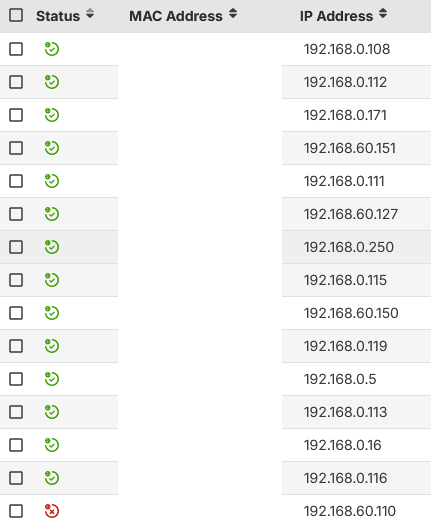
Comparing also to my list of reservation:
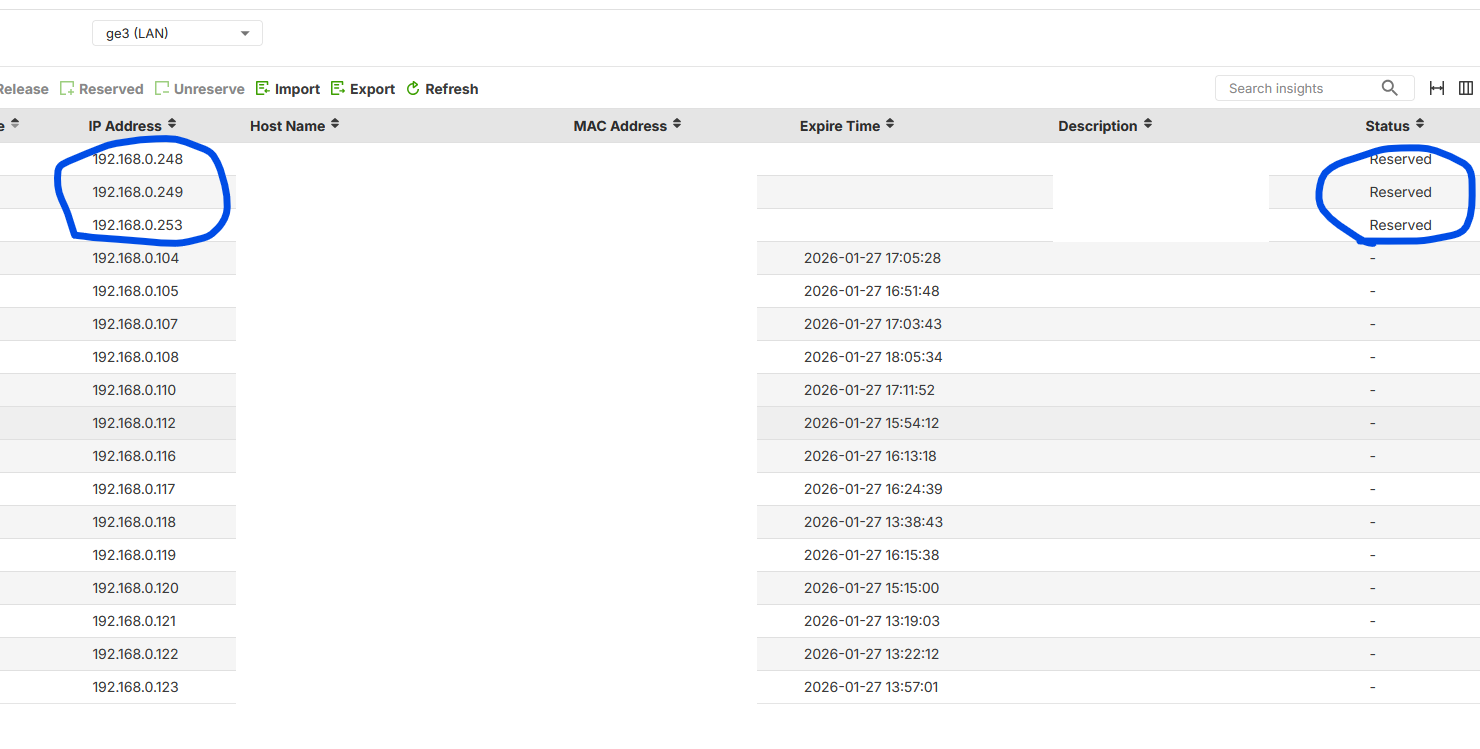
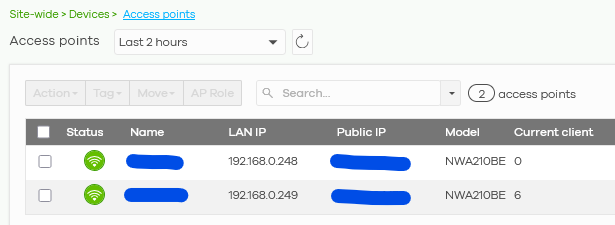
I read the "Device Insight" list and I miss at least 3x Zyxel devices that are online and active inside my network.
To be exact 2x APs:
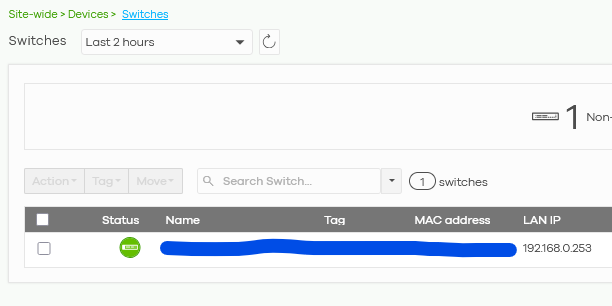
And 1 switch:
Then I went to check IP Source Guard:
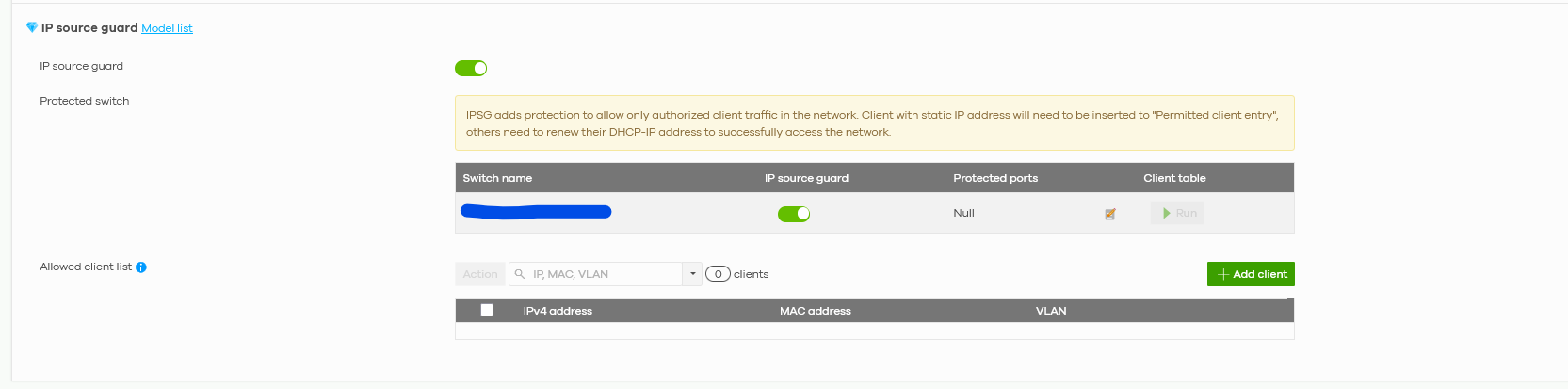
And the Nebula requires me that I have to select witch port I have to protect:
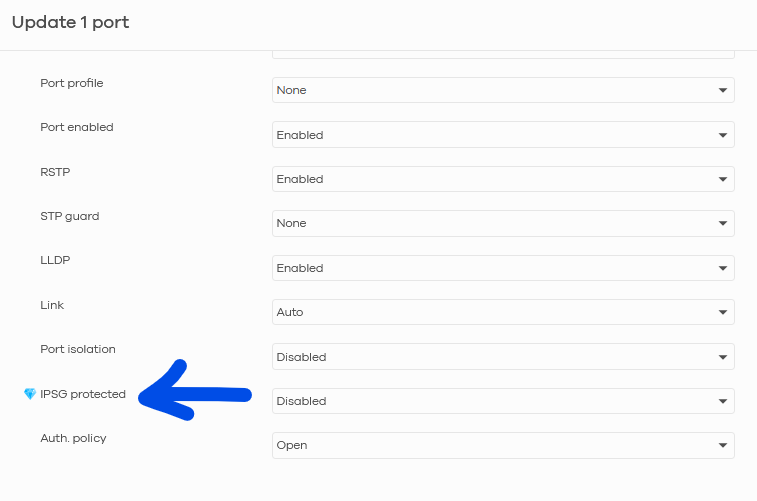
And then manually (!) insert each value one by one:
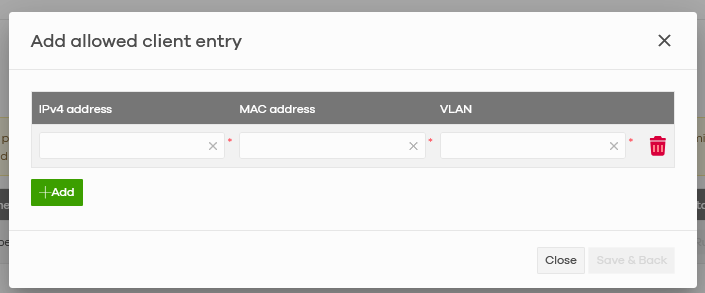
Considering that IP Source Guard is NOT always available (e.g. you install Zyxel firewall in a network managed by old switches) the firewall remains the ONLY platform where to declare a reservation for IPs.
So if anything inside a network asks for 192.168.0.250 and this address is reserved for another MAC Address the firewall should assign that IP to the MAC Address that I declare the "owner" of that IP not to a random one.
Considering the fact that the DHCP Server is on the firewall, it should be mandatory that the firewall controls everything inside the network like the conflict above.
Please consider that @Zyxel_Barry is confirming my idea:
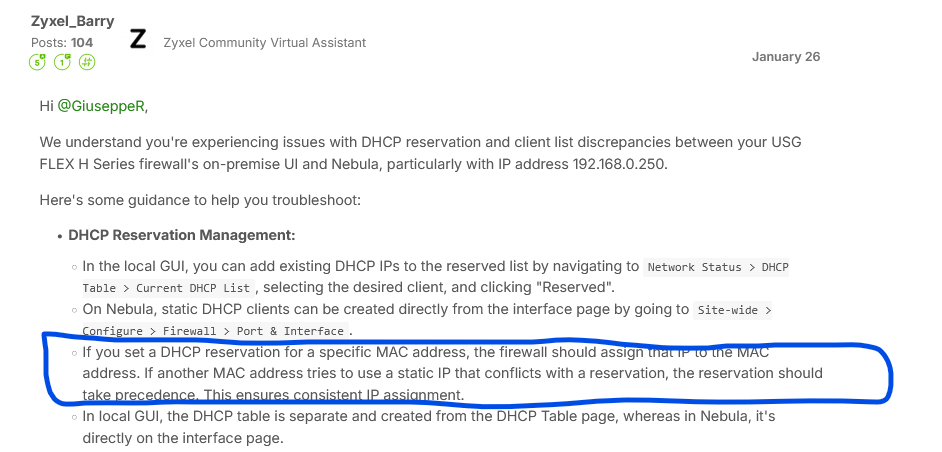
Otherwise I could have critical violations and/or I have to spend huge amount of time armoring everything inside the network, not all the Clients have that amount of budget to be spent on these high end appliances.
A part from this, I think that the DHCP table:
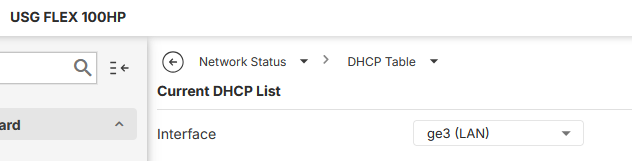
should show the complete IP list considering the reserved ones (like the screenshot above) and the static request ones, maybe higlighting them with a specific term in Status column:
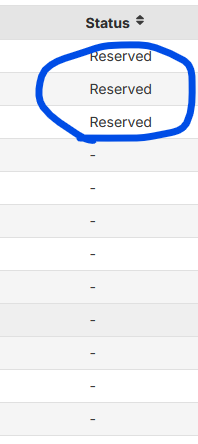
For example showing "Reserved" and "Static" to make a clear difference with the IPs obtained via DHCP.
This way could solve the same issue higlighted also by @PeterUK.
0

 Zyxel Community Virtual Assistant






Categories
- All Categories
- 442 Beta Program
- 3K Nebula
- 222 Nebula Ideas
- 129 Nebula Status and Incidents
- 6.5K Security
- 619 USG FLEX H Series
- 349 Security Ideas
- 1.7K Switch
- 84 Switch Ideas
- 1.4K Wireless
- 53 Wireless Ideas
- 7K Consumer Product
- 298 Service & License
- 485 News and Release
- 92 Security Advisories
- 31 Education Center
- 10 [Campaign] Zyxel Network Detective
- 4.8K FAQ
- 34 Documents
- 88 About Community
- 105 Security Highlight


