Nebula 19.30 - Misalignment in firewall traffic statistics

 Guru Member



Hello everyone,
after the update 19.30 I see an issue regarding traffic widgets for firewall.
If you look into this:
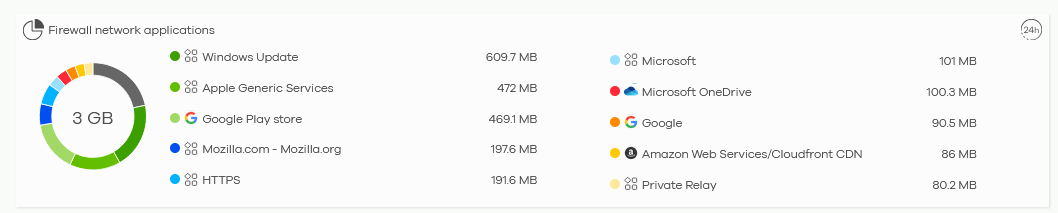
You miss almost 22 gigs of traffic:
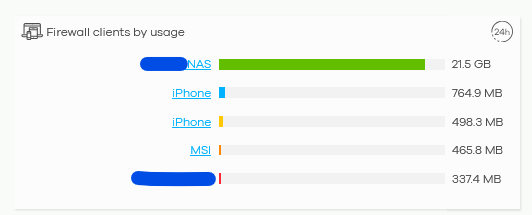
Those 21.5 gigs are related to a backup done by a NAS.
If the Nebula is unable to recognize a specific APP I expect to see that traffic listed as "Unknown". Here we have no trace.
All Replies
-
Hi @GiuseppeR,
It appears you're observing a discrepancy in firewall traffic statistics within Nebula after the 19.30 update, specifically regarding a large volume of NAS backup traffic not being accounted for in the "Firewall network applications" widget, even though it appears in "Firewall clients by usage". This suggests the traffic might not be categorized or recognized as an application by the firewall's DPI engine.
Here are some initial steps and information that would be helpful for troubleshooting:
- Review Firewall Security Policies: Ensure there are no specific firewall rules that might be bypassing application control or logging for this NAS traffic. Sometimes, traffic matching an "Allow" rule without application patrol specified might not be deep-packet inspected for application identification.
Check SecuReporter for Detailed Logs: While the Nebula dashboard provides an overview, SecuReporter often offers more granular detail.
- Navigate to
Site-wide > Configure > Site Settings > Reportingand ensureSecuReporteris enabled. - Access SecuReporter via the hyperlink in Site Settings and check
Search > Logs & Activityfor traffic logs related to the NAS. This might reveal if the traffic is being logged but not categorized, or if it's falling under an unexpected category. - Also ensure that
Traffic LogandInterface Statisticsare enabled underConfiguration > Mgmt. & Analytics > SecuReporter > Categories > Networkto ensure comprehensive logging.
- Navigate to
Verify Nebula Application Visibility: The "Firewall network applications" widget relies on the firewall's ability to identify applications. If the NAS backup traffic uses a less common or proprietary protocol, or if it's encrypted and not identifiable through typical DPI signatures, it might not appear as a distinct application.
To further investigate this issue, please provide the following:
- Device Model and Firmware Version: The exact model of your Zyxel firewall and its current firmware version.
- Screenshots: If possible, screenshots of the relevant firewall rules related to the NAS.
- Enable Zyxel Support Access: Please enable Zyxel Support Access for your organization via
Help > Support Requestin your Nebula console. This will allow our support team to directly view your cloud environment configuration, which can significantly shorten troubleshooting time. Please also provide the Organization Name and Site Name.
This AI response aims to provide initial troubleshooting steps and identify information needed for further diagnosis. Feel free to share additional details based on the suggestions above — this will help community members offer more targeted assistance.
If you have feedback or idea about this AI assistant, share them in Community Feedback.0 -
Please consider that on other sites (with H series…) I see "Unknown" category:

That "Unknown" category is the traffic made via HyperBackup by Synology, like it should be seen in the widget above
0 -
Hi @GiuseppeR,
To help us narrow the issue down, could you please confirm if the affected site's client NAS is a Synology model? Also, what protocol is the backup job using?
If the issue still persists and can be seen on the widgets (before the data rolls off), please enable Zyxel Support Access and share the org/site name with us.
Zyxel Tina
0 -
Hi @Zyxel_Tina
yes it is still there, the Synology NAS uses HyperBackup as protocol to have a backup managing deduplication.
As you can see here:
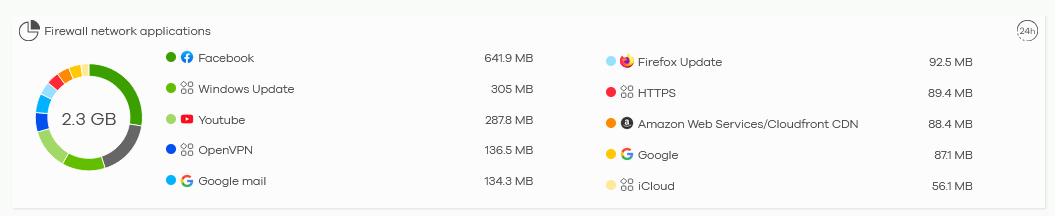
There is no trace about this backup:
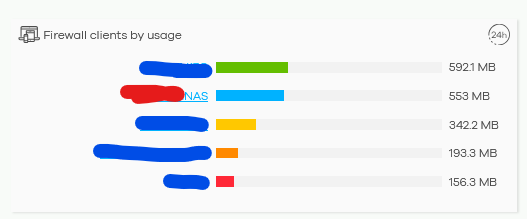
As you can check I lost trace about those 553 MB amount of traffic via firewall, so it could be possible to have lost something else too. This is an issue if you would like to avoid data exfiltration, for example.
You have a PM with unmasked infos.
0 -
Hi @GiuseppeR,
Thank you for enabling Zyxel Support Access.
Please allow me to clarify the traffic reporting:
Firewall Network Applications (WAN traffic only):This section tracks only WAN/outbound traffic. As shown in the image, our firewall recognizes Synology-related flows here.

If NAS traffic doesn't appear, it may be:
- Intranet (LAN-to-LAN) traffic, which isn't counted.
- Unidentified due to different services/protocols without matching signatures.
Firewall Clients by Usage (Total traffic):This shows total usage = intranet (LAN-to-LAN) + internet (WAN). That's why totals differ from Applications traffic calculation.
Regarding your concern about data exfiltration, we would need your help to capture packets on the affected Buran site firewall for further investigation (if you're willing). This will allow us to analyze the services/protocols/IPs involved and verify if it's:
- Matching a signature but not counted, or
- Outside signature scope (hence other categories or missing).
We appreciate your understanding and cooperation!
Zyxel Tina
0

 Zyxel Community Virtual Assistant





Categories
- All Categories
- 442 Beta Program
- 3K Nebula
- 222 Nebula Ideas
- 129 Nebula Status and Incidents
- 6.5K Security
- 619 USG FLEX H Series
- 349 Security Ideas
- 1.7K Switch
- 84 Switch Ideas
- 1.4K Wireless
- 53 Wireless Ideas
- 7K Consumer Product
- 298 Service & License
- 486 News and Release
- 92 Security Advisories
- 31 Education Center
- 10 [Campaign] Zyxel Network Detective
- 4.8K FAQ
- 34 Documents
- 88 About Community
- 105 Security Highlight


