1.37 uOS - error DNS rule myrouter.local

 Guru Member



Hello everyone,
I moved a firewall from a test site to a production site, I updated it to 1.37
So I went to check its DNS rule and I see:
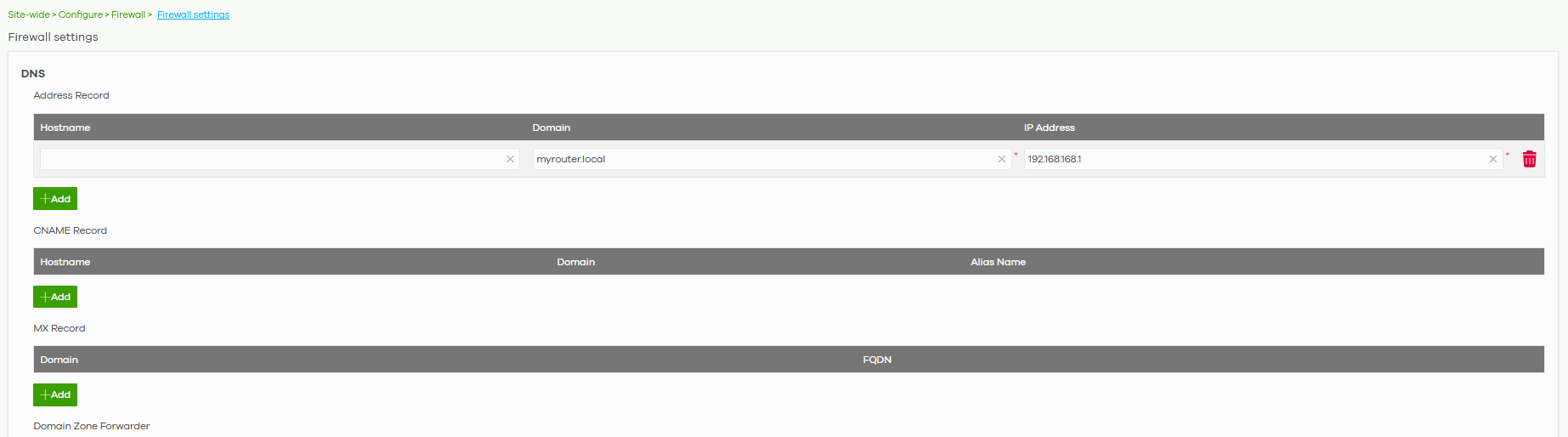
This is the default internal subnet, while the firewall has different LANs:
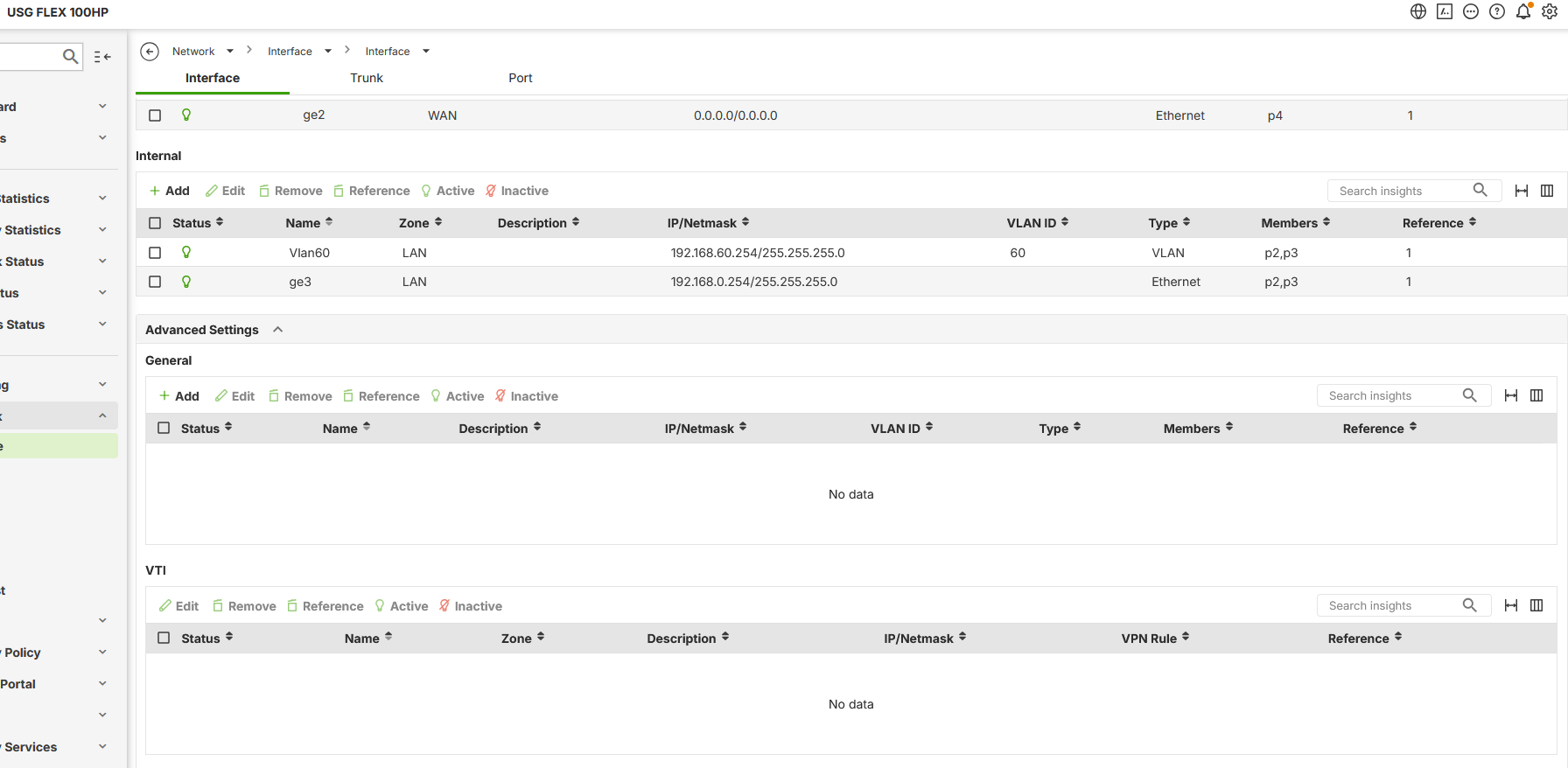
Why Nebula still thinks that the firewall is reachable on 192.168.168.1 ?
All Replies
-
Hi @GiuseppeR,
The issue you're encountering with the DNS rule showing
myrouter.localresolving to192.168.168.1after moving your USG FLEX H Series firewall to a new site and updating it to uOS 1.37 is likely related to how Nebula assigns default subnets and handles initial configurations.Here's a step-by-step guide to address this:
- Understand the Default Subnet: For USG FLEX H Series firewalls, Nebula VPN typically starts assigning subnets from
192.168.168.0/24. The IP192.168.168.1is the default gateway for this subnet, often used during initial setup or when the firewall is onboarded to Nebula. - Verify Nebula Status: First, ensure your firewall has proper cloud connectivity. You can check the Nebula status on the local GUI by navigating to
Maintenance > Diagnostics > Network Tool > Nebula Status. This will indicate if there are any connectivity issues between your firewall and NCC. - Check DNS Resolution within the Firewall: You can use the CLI command
cmd diagnostics nslookup domain-name-or-ip myrouter.localto see how the firewall itself resolves this domain. - Modify DNS Records in Nebula: If the
myrouter.localentry is causing issues and is not reflecting your current LAN configuration, you should be able to modify or remove this DNS record within the Nebula interface. Navigate toSite-wide > Configure > Firewall > Firewall settingsto manage DNS Address Records. You would typically add an Address Record here if you want to resolve a specific hostname to an IP address within your network. - Re-evaluate LAN Interface Configuration: Double-check your LAN interface configurations in Nebula (
Site-wide > Configure > Firewall > Interface) to ensure they correctly reflect your production site's IP addressing scheme and are not conflicting with the192.168.168.xrange if it's not intended for your LANs.
To help us further investigate and provide a more tailored solution, please provide the following information:
- Nebula Organization and Site Name: This will allow Zyxel support to access your cloud environment for direct troubleshooting.
- Enable Zyxel Support Access: Please enable Zyxel Support Access via
Help > Support Requestin your Nebula console. This authorizes the Zyxel support team to directly view your cloud environment configuration, significantly shortening troubleshooting time. - Screenshots: If possible, provide additional screenshots of your current DNS settings in Nebula, specifically showing any default or system-generated entries.
- Network Topology Map: A simple diagram of your network setup, including how the firewall is connected and the IP subnets in use.
This AI response aims to provide initial troubleshooting steps and identify information needed for further diagnosis. Feel free to share additional details based on the suggestions above — this will help community members offer more targeted assistance.
If you have feedback or idea about this AI assistant, share them in Community Feedback.0 - Understand the Default Subnet: For USG FLEX H Series firewalls, Nebula VPN typically starts assigning subnets from
-
It can be changed it is not auto linked to update its just a normal entry.
0 -
Hi @GiuseppeR
I checked on local GUI, the A record also does not auto update when changing Lan1/ge3 interface IP. I'm discussing with our team, and I will update you once I got further info.
Zyxel Melen0

 Zyxel Community Virtual Assistant






Categories
- All Categories
- 442 Beta Program
- 3K Nebula
- 222 Nebula Ideas
- 129 Nebula Status and Incidents
- 6.5K Security
- 619 USG FLEX H Series
- 349 Security Ideas
- 1.7K Switch
- 84 Switch Ideas
- 1.4K Wireless
- 53 Wireless Ideas
- 7K Consumer Product
- 298 Service & License
- 485 News and Release
- 92 Security Advisories
- 31 Education Center
- 10 [Campaign] Zyxel Network Detective
- 4.8K FAQ
- 34 Documents
- 88 About Community
- 105 Security Highlight


