NWA1123-ACv2 blinking leds Green and Orange

 Freshman Member
Hi, my device is continuing having the green led and orange light led blinking.
It's mounted in my roof so not easily accessible; it is powered with PoE ethernet cable,
I've tried several time to unplug/replug the cable from the router but unsuccessfully.
It is not reachable through its IT address assigned by the router and the wifi network it was used to manage is not shown anymore in my house.
What else I can do?
Thanks,
Paolo Rovatti
Accepted Solution
-
Hi @Pablodecuba,
Welcome to the Zyxel Community!
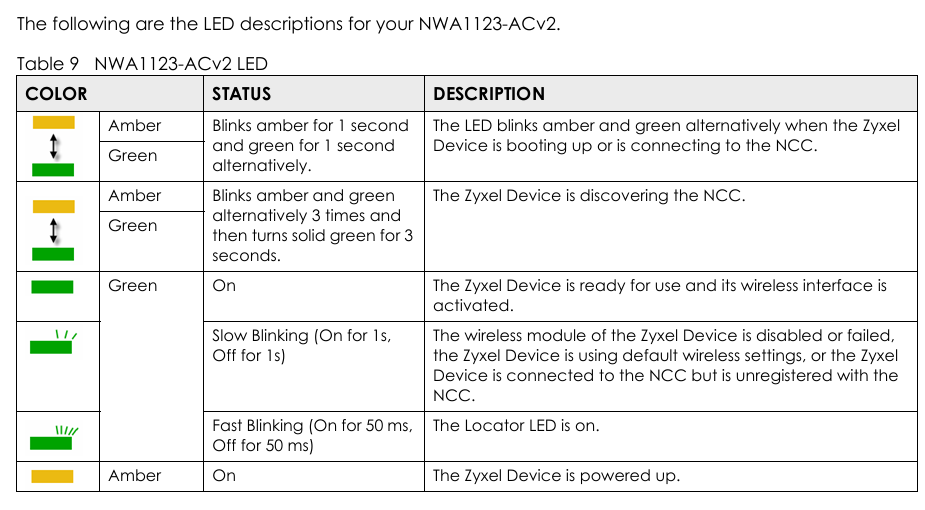
Regarding the correct LED behavior, please refer to the screenshot below. If you are encountering the first LED pattern (amber and green blinking for 1 second alternately), please check whether the AP is connecting to NCC. If it is not, the device may be stuck in the boot process, in which case you may need to contact your local support for RMA assistance (if applicable).
Please note that the NWA1123-ACv2 has reached to its End-of-Life (EoL) status, which means our support for this model is now limited. For better performance and ongoing support, we recommend considering our current AP offerings here: Wireless | Zyxel Networks
Zyxel Tina
0

 Zyxel Employee



All Replies
-
Hi @Pablodecuba,
I understand you're experiencing an issue with your NWA1123-ACv2, where the green and orange LEDs are blinking, the device is unreachable by its IP address, and the Wi-Fi network is no longer broadcasting. This indicates a potential issue with the device's boot process, network connectivity, or cloud management status.
Here are some steps you can take to troubleshoot the problem:
Understand the LED Status:
- If the LED blinks amber for 1 second and green for 1 second alternately, the device is booting up or trying to connect to Nebula Control Center (NCC).
- If the LED blinks amber and green alternately three times and then turns solid green for 3 seconds, the device is discovering NCC.
- If the green LED is slow blinking (On for 1 second, Off for 1 second), the wireless module may be disabled or failed, the device is using default wireless settings, or the device is connected to NCC but not registered.
Perform a Hard Reset: Since the device is not easily accessible, a physical reset might be challenging, but it's often a crucial step. A hard reset can sometimes resolve boot loop issues or restore default settings if the device is stuck. If you can safely access the device, press and hold the reset button for at least 10 seconds.
Check Network Connectivity:
- Even though you've unplugged/replugged the cable, verify the integrity of the PoE Ethernet cable. A faulty cable can cause intermittent connectivity or prevent the device from getting proper power and data.
- Ensure the PoE source (router or PoE switch) is functioning correctly and providing adequate power.
To help us further diagnose the issue, please provide the following information:
- Specific LED blinking pattern: Can you describe the exact blinking pattern of the green and orange LEDs (e.g., speed, sequence)? This can give us a better understanding of the device's state.
- Firmware Version: If you know the last known firmware version of your NWA1123-ACv2.
- Network Topology: A simple diagram or description of how your NWA1123-ACv2 is connected to your router and other network devices.
- Nebula Status (if applicable): Were you managing this NWA1123-ACv2 through Zyxel Nebula Cloud? If so, please try to enable Zyxel Support Access via
Help > Support Requestin the Nebula console and provide your Organization or Site name. This will allow our support team to view your cloud environment configuration directly.
This AI response aims to provide initial troubleshooting steps and identify information needed for further diagnosis. Feel free to share additional details based on the suggestions above — this will help community members offer more targeted assistance.
If you have feedback or idea about this AI assistant, share them in Community Feedback.0 -
Hi @Pablodecuba,
Welcome to the Zyxel Community!
Regarding the correct LED behavior, please refer to the screenshot below. If you are encountering the first LED pattern (amber and green blinking for 1 second alternately), please check whether the AP is connecting to NCC. If it is not, the device may be stuck in the boot process, in which case you may need to contact your local support for RMA assistance (if applicable).
Please note that the NWA1123-ACv2 has reached to its End-of-Life (EoL) status, which means our support for this model is now limited. For better performance and ongoing support, we recommend considering our current AP offerings here: Wireless | Zyxel Networks
Zyxel Tina
0




Categories
- All Categories
- 442 Beta Program
- 3K Nebula
- 222 Nebula Ideas
- 129 Nebula Status and Incidents
- 6.5K Security
- 619 USG FLEX H Series
- 349 Security Ideas
- 1.7K Switch
- 84 Switch Ideas
- 1.4K Wireless
- 53 Wireless Ideas
- 7K Consumer Product
- 298 Service & License
- 485 News and Release
- 92 Security Advisories
- 31 Education Center
- 10 [Campaign] Zyxel Network Detective
- 4.8K FAQ
- 34 Documents
- 88 About Community
- 105 Security Highlight


