Nebula L2TP Remote Access VPN - certaines IPs non accessibles

 Freshman Member


Bonjour,
J'ai un LAN en 192.168.1.0/24.
J'avais un VPN pour l'accès distant qui fonctionnait parfaitement bien.
J'ai dû réinitialiser mon Zyxel USG Flex 100 et le reprovisionner sur Nebula.
J'ai reconfiguré les VPN exactement de la même façon mais certaines IPs sont maintenant inaccessible.
Par exemple :
- 192.168.1.2 - Parfaitement accessible depuis LAN et depuis VPN
- 192.168.1.9 - Parfaitement accessible depuis LAN mais non depuis le VPN
De plus, en scannant le réseau 192.168.1.0/24 depuis le VPN, seulement quelques IPs répondent sur toutes les machines connectées.
J'ai essayé avec aucune règle de sécurité côté pare-feu ou côté hôtes, aucune configuration ni routage particuliers…
J'ai essayé depuis des machines qui n'ont jamais été connectées au LAN pour éviter un soucis du cache ARP.
J'ai l'impression d'un mauvais comportement du pare-feu.
Quoi d'autre pourrait expliquer la situation ?
En espérant que vous pourrez m'aider.
All Replies
-
Hi @gedis,
I understand you're encountering an issue with certain IPs being inaccessible via L2TP Remote Access VPN on your Zyxel USG Flex 100 after a factory reset and reprovisioning on Nebula, even though the VPN worked previously. This can indeed be frustrating when basic connectivity is affected.
Here are some steps and considerations to help diagnose and resolve the problem:
Review VPN Configuration in Nebula: Since you reprovisioned your USG Flex 100 on Nebula, double-check all L2TP VPN settings within the Nebula Control Center. Even if you reconfigured them "exactly the same way," a minor oversight or a change in Nebula's handling of certain parameters after a reset could be the cause. Pay close attention to:
- Local Policy: Ensure the "Local policy" for your L2TP VPN connection covers the entire LAN subnet (192.168.1.0/24) that you intend for VPN clients to access. If it's too restrictive, some IPs might be unreachable.
- VPN Client IP Pool: Verify that the IP address pool assigned to VPN clients does not conflict with your LAN subnet or any other active subnets. While you mentioned trying machines that haven't connected to the LAN, a subnet conflict could still cause routing issues for specific IPs.
- Firewall Rules: Even if you've "tried with no security rules," it's crucial to explicitly confirm that firewall rules permit traffic from the VPN zone to your LAN zone for all necessary services and IP addresses. Ensure that there isn't an implicit deny rule blocking some traffic. If an implicit security policy works for L2TP remote clients but not for IPSec remote clients, it might indicate an issue with enabling IPSec VPN to use VPN in the site-to-site VPN page.
- NAT Traversal (NAT-T): If your USG Flex 100 is behind another NAT device (e.g., an ISP router), ensure NAT Traversal is correctly configured. Incorrect NAT-T can lead to connection issues.
- Pre-Shared Key: Verify the L2TP VPN Pre-Shared Key. You can modify it in Nebula under
Configure > Firewall > Remote access VPN > L2TP VPN server.
Firmware Version: Check the firmware version on your USG Flex 100. Sometimes, firmware updates can introduce changes in VPN behavior or require specific configurations. Some users have reported issues with L2TP VPN after certain firmware updates, sometimes requiring adjustments to the "local policy" of Phase 2 IPSec L2TP VPN.
ARP Cache: While you've already considered ARP cache issues, it's worth noting that if the Zyxel firewall's IPSec VPN does not support proxy ARP for the VPN client's IP address to the LAN, it can cause accessibility problems within the same subnet. One suggested workaround has been to change the IP pool for VPN clients to a different subnet than the LAN.
To assist you further, please provide the following information:
- Device Model and Firmware Version: Please confirm the exact model of your Zyxel USG Flex device and its current firmware version.
- Network Topology Map: A simple diagram showing your network setup, including the USG Flex 100, your LAN (192.168.1.0/24), and how VPN clients connect.
Screenshots of Nebula L2TP VPN Configuration:
Site-wide > Configure > Firewall > Remote access VPN(L2TP VPN server settings).Site-wide > Configure > Firewall > Security policy(any rules related to VPN traffic).
Enable Zyxel Support Access: Go to
Help > Support Requestin your Nebula console and enable Zyxel Support Access. This allows our support team to view your cloud environment configuration directly, which significantly shortens troubleshooting time.- Organization and Site Name: Please provide the name of your Nebula Organization and Site.
This AI response aims to provide initial troubleshooting steps and identify information needed for further diagnosis. Feel free to share additional details based on the suggestions above — this will help community members offer more targeted assistance.
If you have feedback or idea about this AI assistant, share them in Community Feedback.0 -
Hello,
Thank you for your reply.
I checked every point you told me but nothing better.The USG Flex 100 firmware is up to date (V5.40 ABUH.0) and the configuration is up to date too.
I don't have any diagram but the USG Flex has a WAN public IP directly on the interface WAN1.
All the other interfaces are configured for the LAN (192.168.1.0/24) and the VPN (192.168.51.0/24) is accessible via the WAN.Here is the VPN configuration
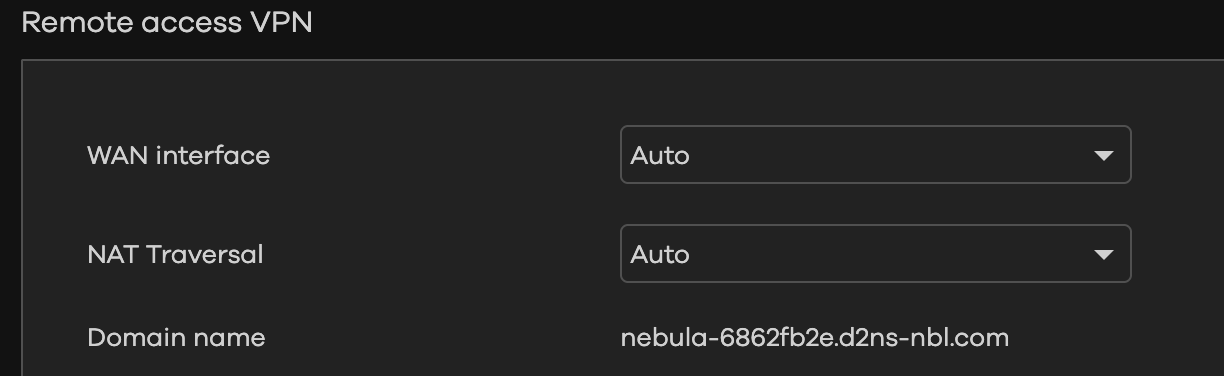
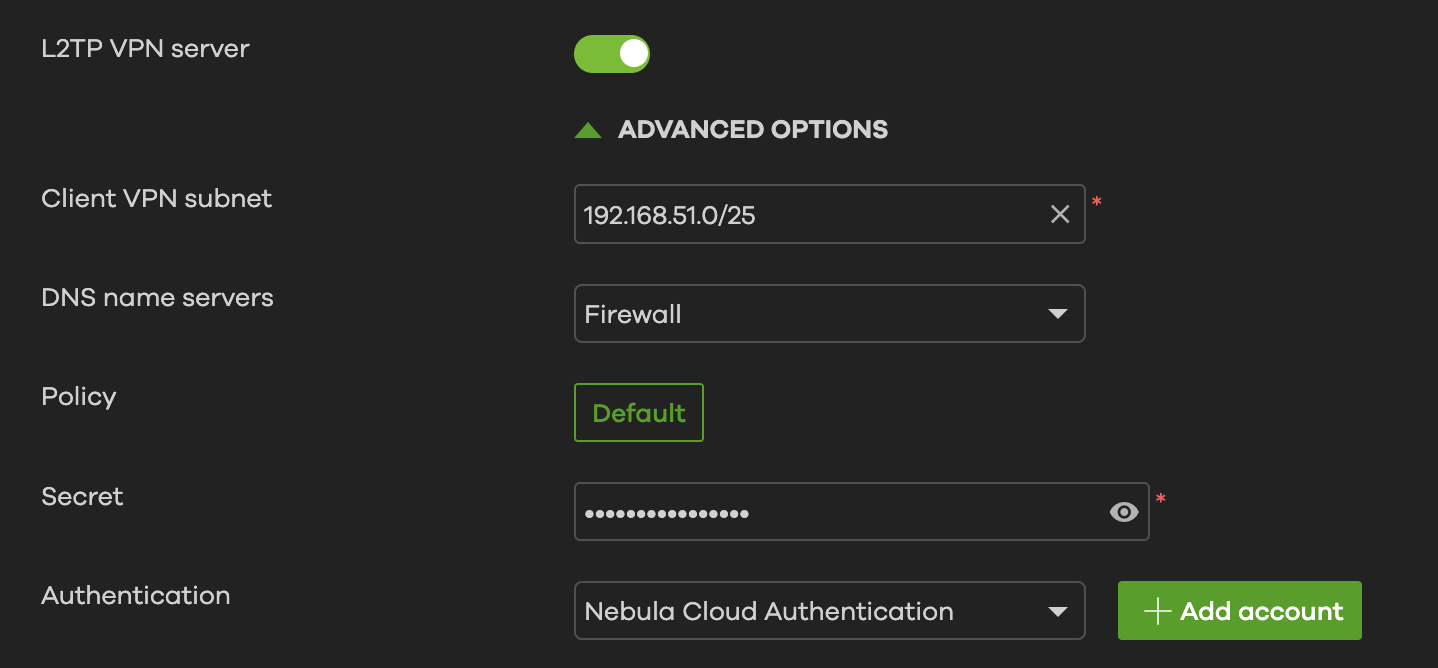
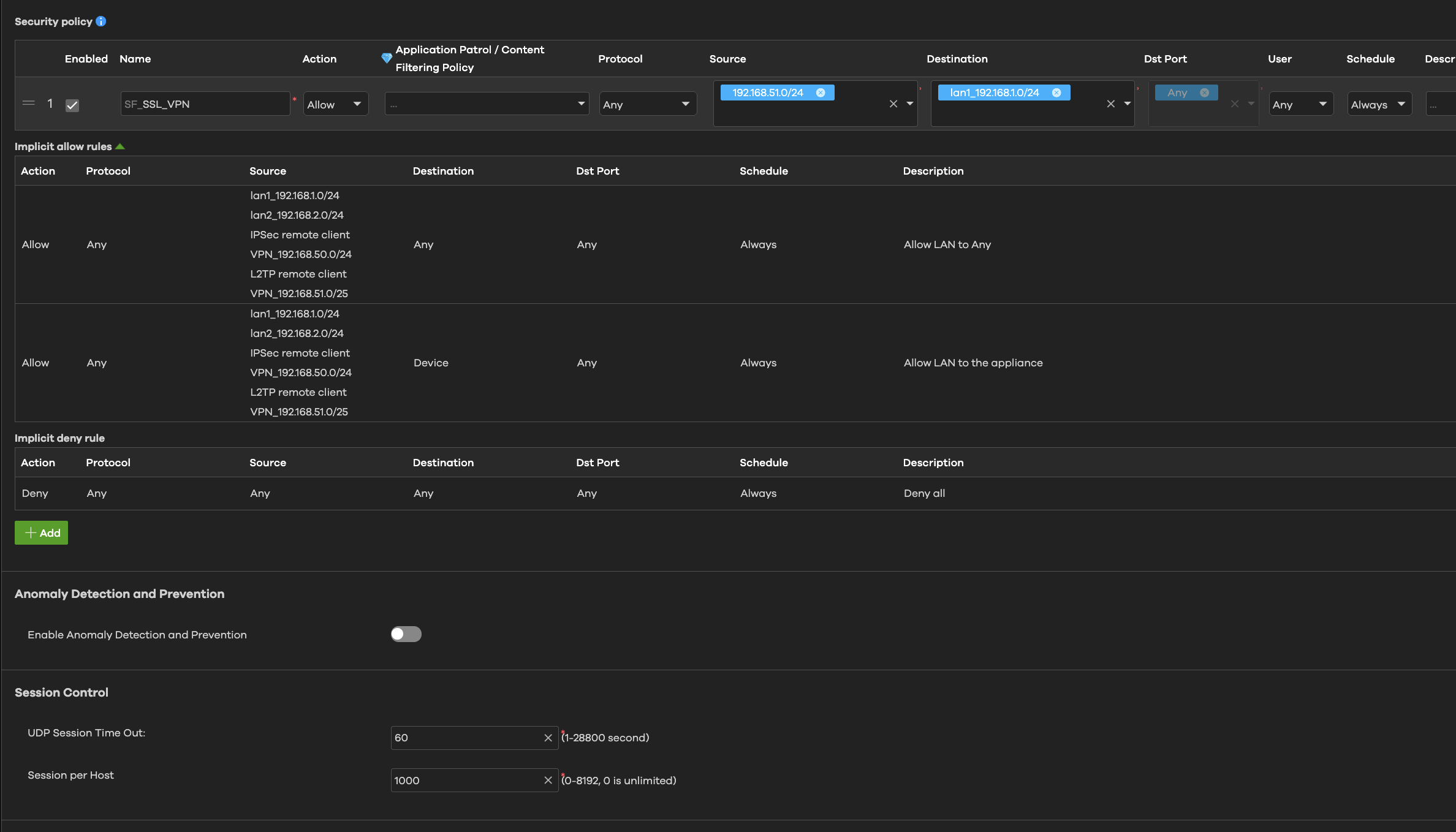
I enabled the support access on the organization LYSI, site La Ravoire.
Best regards,
Nathan
0 -
Hello,
I investigated further and this looks like a routing issue on the USG FLEX 100.
When pinging from the VPN to the LAN (192.168.51.1 → 192.168.1.9) :
- The ICMP PING arrives on the host 192.168.1.9.
- The ICMP RESPONSE is sent to the firewall and then attempts to pass through the WAN.It should be routed to the VPN, not the WAN.
Have you been able to test it?
Best regards,
Nathan0 -
Hi @gedis,
Thank you for your feedback!
To investigate further, could you please provide the startup-config.conf file from your FLEX 100? This will allow us to review the complete device settings.
[ATP/FLEX] How to download configuration file on Firewall Local WEB GUI? — Zyxel Community
Zyxel Tina
0 -
Hello @Zyxel_Tina ,
There is no File Manager on the web interface when the firewall is provisioned on Nebula.
I enabled the Support remote access if you want to figure out by yourself.Access key : 5ab54f24-a088-44e6-ba1b-7ff43e5d0f06
Best regards,
Nathan0 -
Hi @gedis,
Since we couldn't find any information using the key you provided, could you please share your
org/site name with us?
Zyxel Tina
0

 Zyxel Community Virtual Assistant





Categories
- All Categories
- 442 Beta Program
- 3K Nebula
- 222 Nebula Ideas
- 129 Nebula Status and Incidents
- 6.5K Security
- 619 USG FLEX H Series
- 349 Security Ideas
- 1.7K Switch
- 84 Switch Ideas
- 1.4K Wireless
- 53 Wireless Ideas
- 7K Consumer Product
- 298 Service & License
- 485 News and Release
- 92 Security Advisories
- 31 Education Center
- 10 [Campaign] Zyxel Network Detective
- 4.8K FAQ
- 34 Documents
- 88 About Community
- 105 Security Highlight


