How to connect cabled devices to mesh network?

 Freshman Member

Finally, I've accepted that I need to leave my Multy devices behind.
(even though they still do a good job)
I have a network setup that includes a WAN router (no WLAN) and NAS (Synology) in the basement.
A cable leads to a LAN switch on floor 1. The switch connects three devices:
PC, outdoor camera base station, mesh center device (WSQ60).
(side note: in the current configuration, that switch is not really required; the WSQ 60 has enough ports)
Floor 2 has a WLAN mesh device (WSQ60) with 3 cabled devices connected (TV, sat receiver, audio amp).
Floor 3 has a WLAN mesh device (WSQ30) with no cabled devices.
In search of a good replacement configuration, I have now tested a combo of:
- USG Lite 60AX (floor 1, with a switch)
- NWA55AXE (floor 2, with a switch)
- NWA50AX PRO plus a switch (floor 3).
Turned out the USG Lite 60AX creates its own subnet on the WLAN side, so the NAS would be in a different subnet, breaking a good number of connections such as SMB, DLNA.
So I tried to create a small mesh network consisting of the NWA50AX PRO as the main mesh device, connected via cable to the router, and the NWA55AXE. They work well together.
BUT - the LAN port of the NWA55AXE doesn't want to accept any cabled connections. A laptop connected via cable couldn't get an IP address via DHCP (the router is DHCP server).
Why would that be the case?
A side observation: in Nebula, the NWA55AXE is shown with orange color.
What should that tell me?
Thinking a little further: why doesn't the NWA50AX PRO support cabled devices?
The LAN port should be able to act as uplink or downlink.
Where more ports are needed, switches can handle that.
That would IMHO be an ideal, low complexity solution.
All Replies
-
Hi @w8rn8r
This is because the root AP and the repeater AP need to support wireless bridge function. If the root AP doesn't support wireless bridge function, the repeater AP can't forward traffic between the wireless uplink and downlink lan port.
The NWA50AX PRO does not support wireless bridge mode, as it is designed for small business access point deployment rather than point-to-point bridging scenarios. Thank you for sharing your input — I will pass it along to our product team.
Zyxel Melen0 -
Hi @w8rn8r
I suggest to check this function table here:
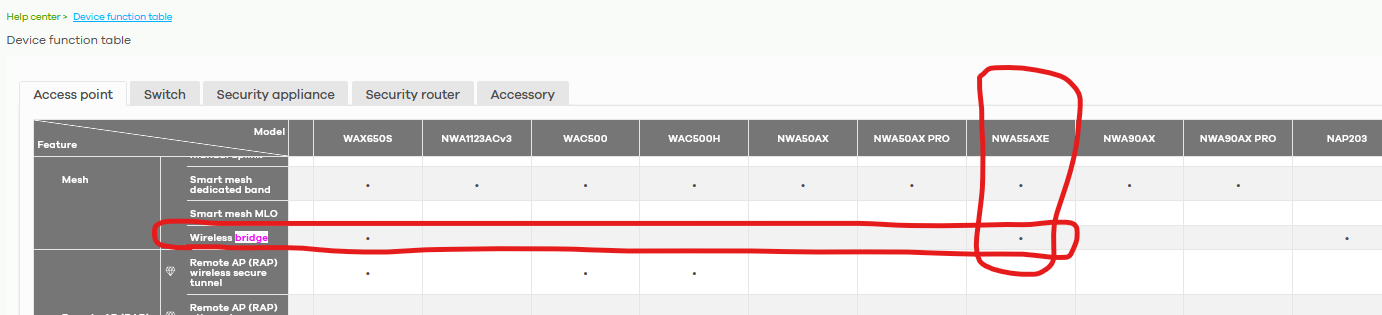
Using NWA55AXE to bridge different LAN segments.
Please consider to check these available options:
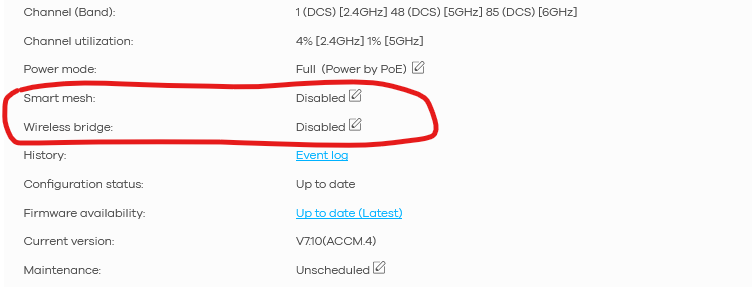
Enabling relevant ones for your setup:
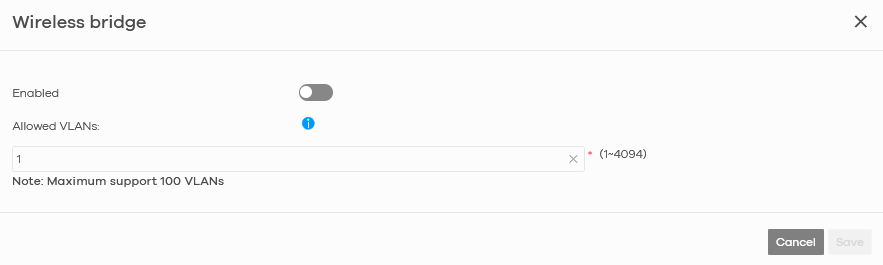
I don't understand this segment:

Lite 60AX is a security router, so for sure it has its own setup: it is NOT an AP.
Lite 60AX could be also the root of the mesh network, so no need to link another AP to initialize the WiFi mesh.
Finally using the trick that @Zyxel_Melen told you, you can use Lite 60AX:
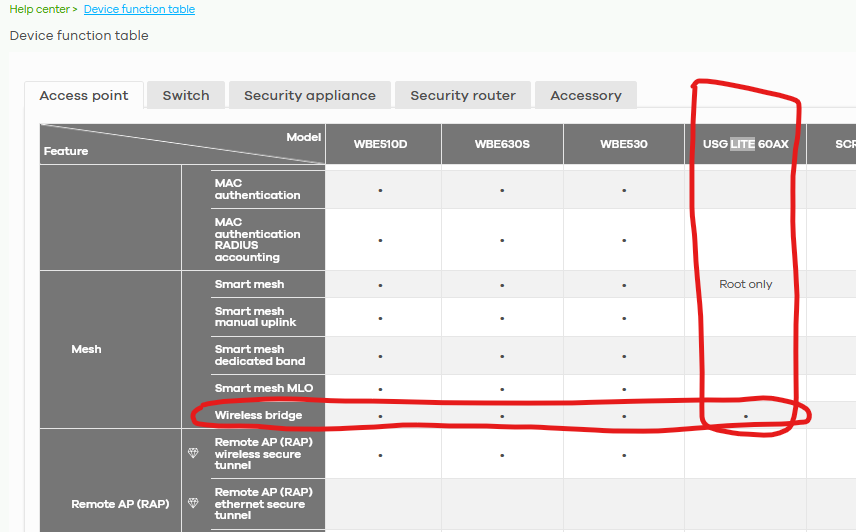
and NWA55AXE to bridge different LAN segments.
0 -
@GiuseppeR, my point is that my entire network needs to be "IP flat", all devices within one and the same subnet, no matter if cabled or wireless.
My current configuration, consisting of a primary WSQ60 plus two more mesh nodes (another WSQ60 and a WSQ30) acts in this way. The primary WSQ60 is in bridge mode, hence the mesh WLAN is in the same subnet with its LAN ports.
The USG Lite 60AX I've tested over the past 3 weeks created a 2nd subnet on the WLAN side - not an option for my network. Bridge mode was enabled, but it seems that what it calls bridge mode isn't the same as it is with the WSQ60.
Side note: the USG Lite 60AX config details made me think that it views bridge mode in connection with IP TV - sounds to me like that bridge mode might be a little different…?
If you tell me that in fact it should work in the same way as the WSQ60, then please help me understand what might have caused my observation - that doesn't show the expected behaviour.
Thanks
Werner0
 Zyxel Employee



 Guru Member

Categories
- All Categories
- 442 Beta Program
- 3K Nebula
- 222 Nebula Ideas
- 129 Nebula Status and Incidents
- 6.5K Security
- 619 USG FLEX H Series
- 349 Security Ideas
- 1.7K Switch
- 84 Switch Ideas
- 1.4K Wireless
- 53 Wireless Ideas
- 7K Consumer Product
- 298 Service & License
- 486 News and Release
- 92 Security Advisories
- 31 Education Center
- 10 [Campaign] Zyxel Network Detective
- 4.8K FAQ
- 34 Documents
- 88 About Community
- 105 Security Highlight


