IKEv2 Connection Not Working to RRAS
All Replies
-
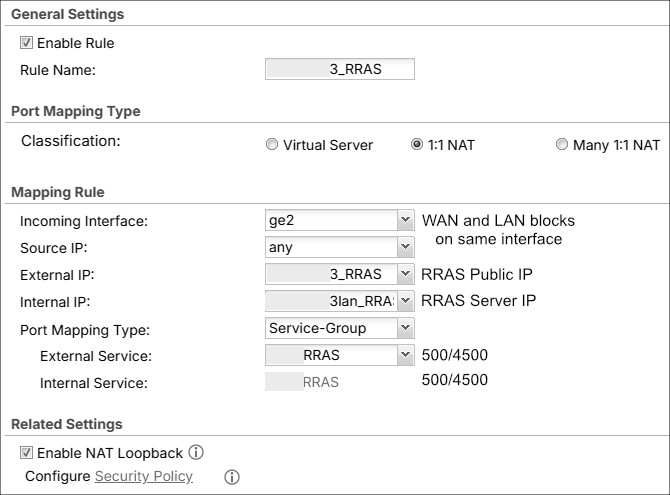
Would you consider to share how 1:1 NAT in your ATP800 is configured?
Feel free to hide any confidential detail.
0 -
What you mean by WAN and LAN on the same interface?
So it looks like I had it wrong about you setting up a Remote Access (Server Role) on the ATP800? and that really your look to have VPN traffic pass through the ATP800 to some other VPN server that a client wants to connect too?
Have you tested without the ATP800 if thats the case?
0 -
@PeterUK We have a fiber EDI which comes into an ONT they provided, which is connected to our ATP800. Even though the WAN and LAN blocks are separate (ie. not contiguous), because of that box they come in on the same interface. Really this is probably a distinction that did not need to be made, but I did so because of how mmontana phrased something.
That is correct. I am not using anything VPN related in the ATP800. The connection is just passing through.
I have not tested this without the ATP800 as we only have one ISP. Suppose I could try setting up a test internally with some other device. Just figured it was easier to confirm with Zyxel whether pass-through is possible or not. That I still don't know, nor about fragmentation.
0 -
For the Windows Server "temporary replacement" any "known" linux/BSD/other IPSec device "known" working would be fine, with another "known working" IPSec configuration as client.
I'd consider to add these object to your service group:

these images comes from a 5.42 firmware device, I'm not sure that they are available on your ATP800.
Are you sure you need enabled "Nat Loopback"? Do you need to reach your IPSec server from other network segments?
Last but not least: Windows Server has only one network adapter?
0 -
@mMontana I'll try and look into another IPSec device. For the time being I added ESP and AH to the Service Group. They were already preconfigured by Zyxel in the Service list. I don't know that I really need "Nat Loopback" so I turned it off. Still not getting a connection and the Wireshark output is the same. Two IKE_SA_INIT entries followed by one IKE_AUTH, two Fragmented IP protocols, another IKE_AUTH, and then Destination unreachable. Thanks for the ESP suggestion. I was hoping that was the kicker but alas it was not. As for the server, yes it only has one network adapter.
0 -
Question
As for the server, yes it only has one network adapter.
Is this a supported environment config for Windows RRAS+IPSec?0 -
@mMontana From what I gathered it is supported and should work to have RRAS behind a firewall, as opposed to on the edge. This is based on this article as well as others. However, I cannot say if Microsoft deems it supported or not. I have yet to run across a MS page that says it.
As a side note, I enabled IKEv2 Fragmentation on Windows Server per this article and then restarted the server. The fragmentation messages in Wireshark have disappeared, however, the client still cannot connect to the VPN.
0 -
This morning a user tried to use the other IPSEC VPN (configured in the ATP) and it wouldn't work properly. That is, the VPN connected fine (Dynamic Tunnel [RA_Wiz:RA_Wiz:0x053d9265] built successfully) but traffic is not being passed and/or processed. Looking at the VPN Monitor shows an Up Time of 4870 secs (81 mins), Inbound 1984 bytes, and Outbound 0 bytes. The Inbound bytes value has not changed in at least 15 minutes.
I disabled all the changes that I had made for RRAS (NAT, SNAT, and Policy Route) and the situation remains the same. Added a new Policy Route to monitor and alert on traffic coming from the device I'm testing with, but there is nothing logged. This IPSEC VPN had been working prior. Unfortunately, I cannot tell when it stopped working because there are only a couple of people using it. Most are using the SSLVPN, which we are trying to replace.
Does anyone have any ideas why this might be happening? Or some other way to test it? I decided to post this here because it seems related. The old IPSEC was working prior to RRAS but I don't know how much prior. Thanks for your time everyone!
As an update on the actual ticket, I have been busy with other things and haven't done much with testing a Linux-based IPSEC VPN.
0 -
Have you removed the the NAT 1:1 rule?
Also go the monitor >traffic Statistics > session monitor > select view all sessions click search the click clear all
0

 Guru Member




 Ally Member





Categories
- All Categories
- 442 Beta Program
- 3K Nebula
- 222 Nebula Ideas
- 129 Nebula Status and Incidents
- 6.5K Security
- 619 USG FLEX H Series
- 349 Security Ideas
- 1.7K Switch
- 84 Switch Ideas
- 1.4K Wireless
- 53 Wireless Ideas
- 7K Consumer Product
- 298 Service & License
- 486 News and Release
- 92 Security Advisories
- 31 Education Center
- 10 [Campaign] Zyxel Network Detective
- 4.8K FAQ
- 34 Documents
- 88 About Community
- 105 Security Highlight


