ntermittent WiFi clients unable to obtain IP / no Layer 2 connectivity – NWA130BE (Nebula)



 Freshman Member
We are experiencing an issue within our wireless network where client devices intermittently fail to connect to the network.
Environment:
- AP Model: Zyxel NWA130BE
- Switch Model: Zyxel XMG1930-30HP (We do have other HP switches as part of the LAN network)
- Management: Zyxel Nebula Control Center
- Firmware:
- AP: V7.30(ACIL.3)
- Switch: V4.80(ACAS.4)
Symptoms:
- Clients connect to SSID but show “Connected, no internet”
- Devices receive 169.254.x.x addresses
- Issue occurs across multiple APs
- Wired connections function normally
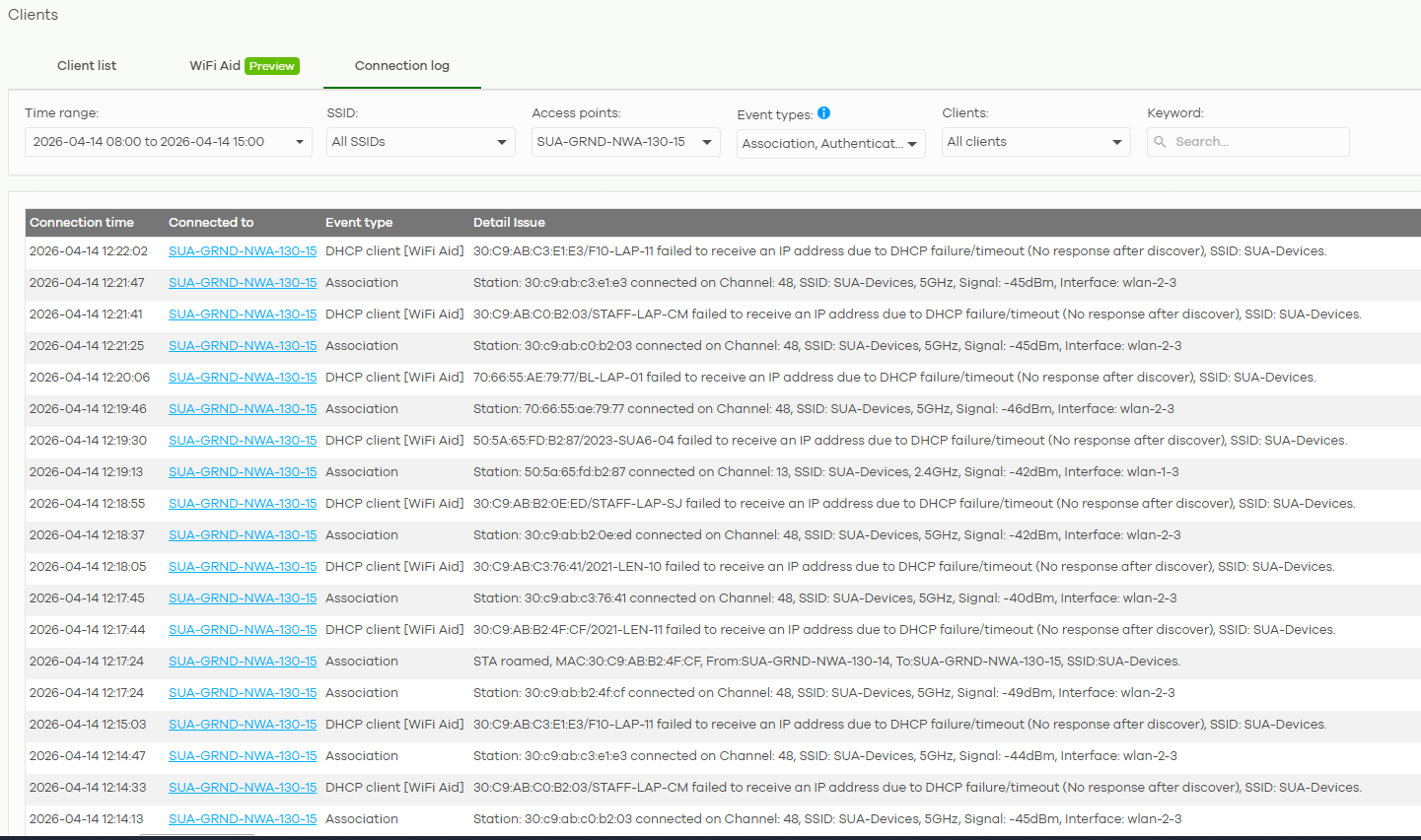
- In the nebula portal Its states" xx failed to receive an IP address due to DHCP failure/timeout…"
Troubleshooting performed:
- DHCP scope checked (83% free)
- DHCP services restarted
- Lease time reduced
- Static IP assigned → still no connectivity
- Tested across multiple APs
- Verified RF/channel utilisation (low usage)
- Confirmed no DHCP snooping configured
- Packet capture performed
Packet Capture Findings:
- DHCP Discover and Request observed
- No DHCP Offer received by client
- Repeated ARP requests:
- “Who has 10.x.x.x”
- No ARP replies received
Key Finding:
Even with static IP configuration:
- Clients cannot communicate with gateway
- ARP resolution fails
I believe this indicates:
Layer 2 return traffic is not reaching wireless clients
Impact:
- Intermittent loss of connectivity for student/staff devices
- Affects multiple APs and locations
Request:
Please advise if this is:
- A known issue with firmware V7.30(ACIL.3)
- Related to AP bridging/forwarding behaviour in Nebula mode
And recommend:
- Firmware version to downgrade to (if applicable)
- Any known fixes or patches
Many thanks in advance 😀
All Replies
-
Hi @SWalker
Could you help to enable Zyxel support access and share your organization's name so we can help to check this issue?
Zyxel Melen0 -
Hi Melen,
Thank you for your reply.
I have enabled Zyxel support as requested. Organisation name is Staffordshire University Academy.
Kind regards
Sean
0 -
Hi @Zyxel_Melen
Thank you for your reply. I have tagged you this time, just in case my message didn't send an alert.
I have enabled Zyxel support as requested. Organisation name is Staffordshire University Academy.
Many thanks for your time looking into this.
Kind regards
Sean
0 -
Hi @SWalker
I was attempting to help to update a date code firmware for your issue. Since the new patch is released, could you help to arrange the firmware upgrade schedule?
You may reference the release note below "Bug fix item 4":
Zyxel Melen0 -
Hi @Zyxel_Melen
I applied the V7.30 (ACIL.4) firmware update but unfortunately still no luck. I am noticing it seems to be affecting only a few Access Points. If you still have Admin access to our portal an example AP is
SUA-GRND-NWA-130-15 if you were wanting to check the logs.
Kind regards
Sean
0 -
Hi @SWalker
Thanks for your update.
Is it possible for you to share:
- The issue timestamp.
- The MAC address of the issue clients.
These information will help us to further investigate this issue. Thanks!
Zyxel Melen0 -
Hi Melen,
The best example would be all day on 14-04-2026 for Access Point SUA-GRND-NWA-130-15. The list on that date will show all clients failing to connect to the AP. Approximately 80 clients.
Alternatively, 16-04-2026 between 12:40 and 13:40 after the update to firmware V7.30 (ACIL.4). with a few test clients:
F4:B3:01:A9:94:99
F4:B3:01:AC:EE:69
A0:E7:0B:A7:66:29
F4:B3:01:AD:22:F8
Since then, I have had the AP disconnected so clients were connecting to a different AP. But the issue does occur across multiple APs.
Hope this helps
Sean
0 -
Hi @SWalker
After checking, we noticed that the AP SUA-GRND-NWA-130-15 was offline on April 14.
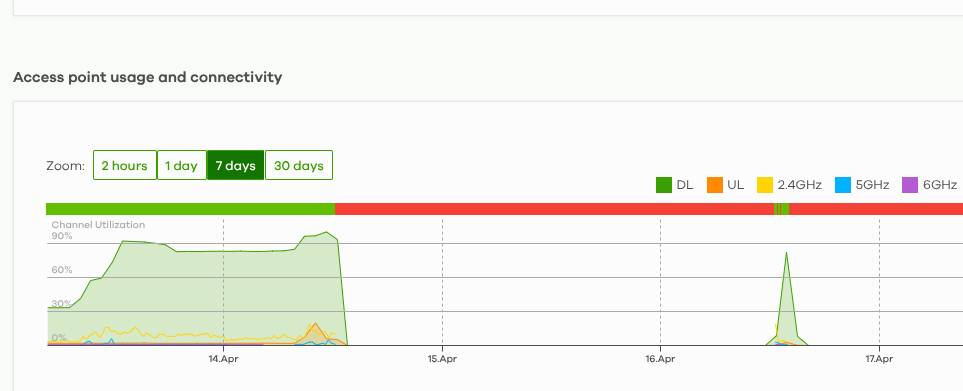
The client's issue could be related with this issue. Please check the uplink connection is stable.
Additionally, we also noticed that there has other APs have the offline issue. It is recommended to check the uplink.
Zyxel Melen0 -
Hi @Zyxel_Melen
Apologies, I shouldn't have stated 'all day' for the 14th April. If you check the access point SUA-GRND-NWA-15 between 8:00 and 12:30, it should give you the readings. I disconnected the AP at approximately 12:22, but it was on during the morning. I have attached a screenshot to help, but I'm sure you will be able to see the full connection log.
The other APs that are currently offline have not been connected to a switch yet.
Many thanks for your continued support.
Sean
0 -
Hi @SWalker
Thanks for the update. We did the further check and found the issue could related with the DHCP pool was full. The clients couldn't get DHCP IP since DHCP pool is full, DHCP server can't provide any IP addresses. And seems like the IP address will be released after reaches the lease time.
Since your network is like education center, it is recommended to adjust the DHCP lease time first. I think 30 minutes is good for education center. If the DHCP pool is still full after applying this adjustment for a while, you will need to enlarge the subnet of this VLAN/interface and DHCP pool size.
Hope this helps.
Zyxel Melen0





 Zyxel Employee
Categories
- All Categories
- 442 Beta Program
- 3.1K Nebula
- 243 Nebula Ideas
- 6.8K Security
- 783 USG FLEX H Series
- 389 Security Ideas
- 1.8K Switch
- 87 Switch Ideas
- 1.5K Wireless
- 58 Wireless Ideas
- 7.2K Consumer Product
- 325 Service & License
- 527 News and Release
- 101 Security Advisories
- 31 Education Center
- 10 [Campaign] Zyxel Network Detective
- 5.3K FAQ
- 34 Documents
- 91 About Community
- 122 Security Highlight