GS1920-24HPv2 fan speed / temperatures


 Freshman Member
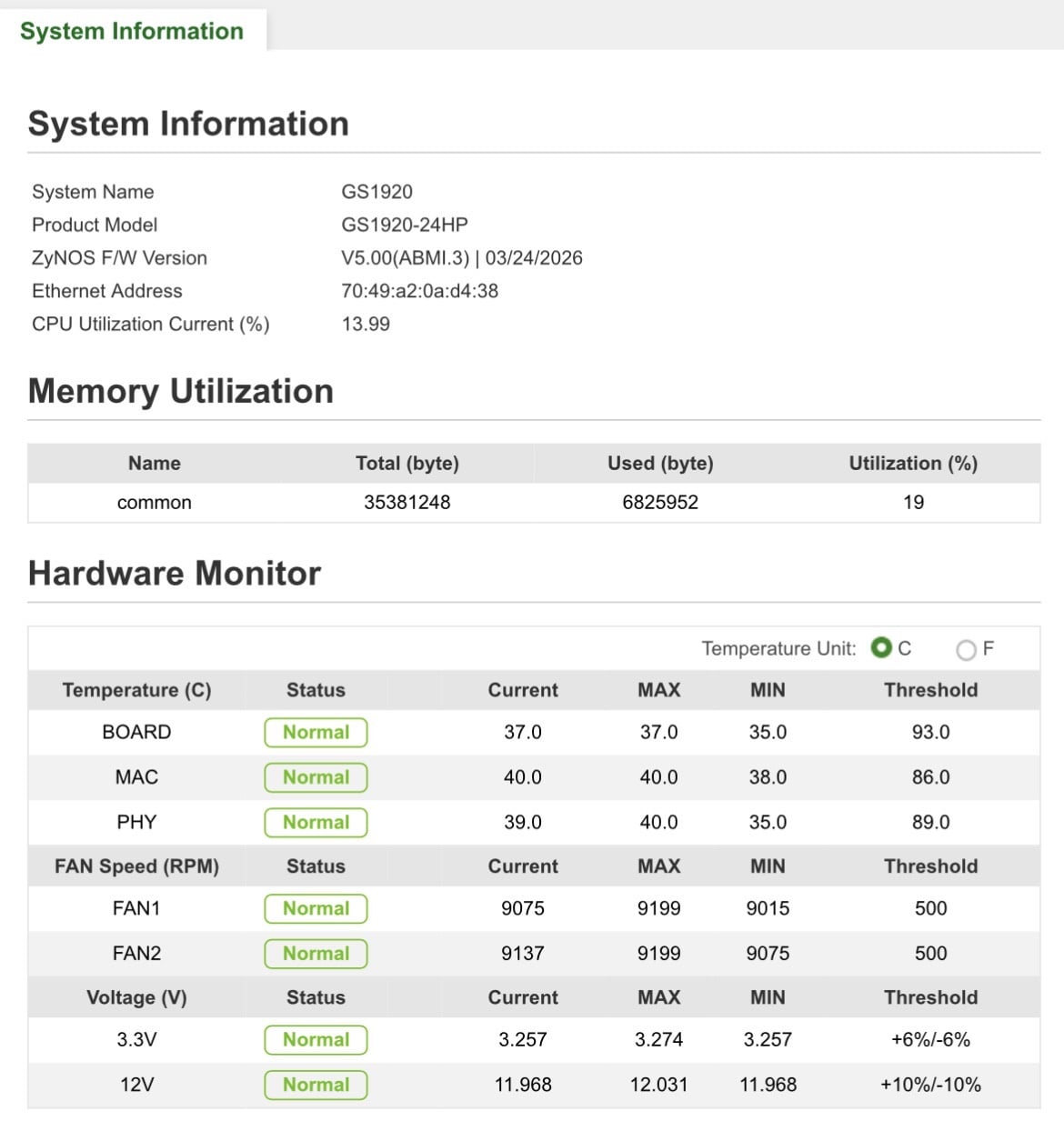
Is it normal for the fans to be running at full speed with temperatures near or just below 40°C? I understood that the v2 included smart fan control and, whilst the temps aren’t very low, the fans are very loud. I’ve tried updating to the most recent firmware and multiple reboots but the fans continue to startup and run at 9000rpm continuously without ever seeming to ramp down. Is there a fan speed vs temp curve you could share? Thanks for any advice.
All Replies
-
Welcome to the Zyxel Community!
To help identify why the fans are staying at full speed, please check the following first:
- SFP module usage: Are you using any SFP modules in the combo ports? Some third-party or long-range SFP transceivers may generate additional heat, which could affect the switch’s fan behavior even if the reported board temperatures appear normal.
- PoE power draw: Please check the PoE Status page. Even if the temperatures are low, high total PoE power consumption near the 375 W budget may cause the fans to ramp up proactively to dissipate the heat generated by the power supply.
To narrow down the issue, could you please share:
- Whether any SFP/SFP+ modules are currently plugged in? If so, what are their models?
- The current total PoE power consumption shown in the PoE Status page.
If possible, please also provide the Tech Support file via private message by clicking my profile > Message, so we can investigate further more efficiently.
Zyxel Tina
1 -
Hi Zyxel_Tina,
Thanks for the reply, in answer to your questions no, there were no SFP modules installed and the total Poe draw was around 16-18W, so minimal. Having read about the potential for a link between high fan speed and SFP module usage I moved three links that were using the combo rj-45 ports 25-27 into 22-24 instead and on reboot the fans dropped to a far more reasonable level around 3000rpm - is this an intentional response to using these rj-45 ports, or a firmware foible?!
Unfortunately, however, under 24hrs later both fans reported an error and the status readout shows they have completely stopped - both failed at the same time and haven’t restarted despite several reboots and a reset to to factory defaults - I’ve raised a ticket for this, awaiting a response from the support team. I’ve provided remote access authorisation, but happy to share the diagnostics with you directly too - I’ll try to send that over shortly.0 -
Based on the issue you encountered, we recommend proceeding with an RMA for this device.
Please refer to the following article for instructions on how to submit an RMA request.
Zyxel Tina
0





 Zyxel Employee
Categories
- All Categories
- 442 Beta Program
- 3.1K Nebula
- 243 Nebula Ideas
- 6.8K Security
- 783 USG FLEX H Series
- 389 Security Ideas
- 1.8K Switch
- 87 Switch Ideas
- 1.5K Wireless
- 58 Wireless Ideas
- 7.2K Consumer Product
- 325 Service & License
- 527 News and Release
- 101 Security Advisories
- 31 Education Center
- 10 [Campaign] Zyxel Network Detective
- 5.3K FAQ
- 34 Documents
- 91 About Community
- 122 Security Highlight


