Twonky Server auto (re)mounts shares



 Freshman Member
Device: NAS520, firmware Version521AASZ5C0 (latest)
I manually updated the firmware with 521AASZ5C0.bin (from the repo), that overwrote the same firmware version on the NAS.
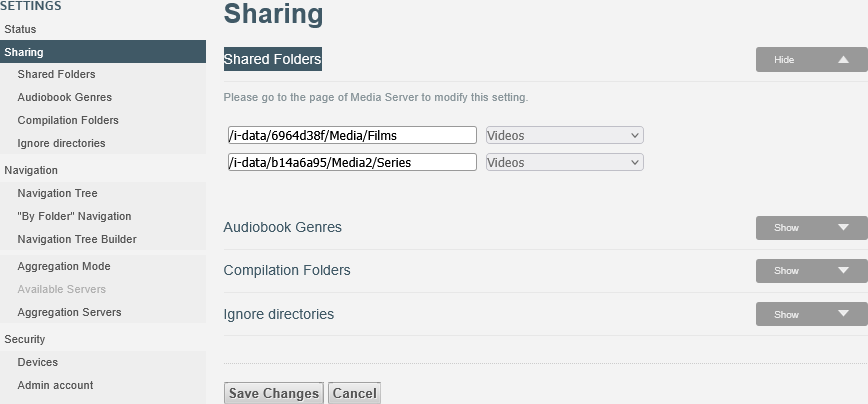
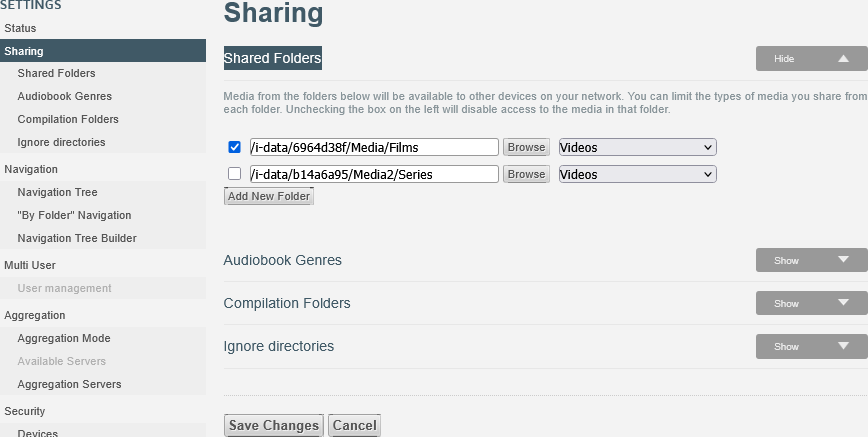
Since then Twonky Server has some quirks. For example, [1] the checkbox that used to appear before sharing has disappeared, and [2] Twonky makes every shared folder available ('Control Panel > Shared Folders > [Select Folder] > Shared Folder For Publishing > Publish to Media Server'). It is not possible anymore to turn it on or off (or override it) manually.
Question: how can this be fixed, so shares available to the Media Server (Twonky Server) can be manually enabled or disabled in Twonky Server.
Screenshot TS (current):
Screenshot TS (old, the way it should be):
I've edited the .ini file at
[code]/i-data/b14a6a95/.media/twonkymedia/twonkyserver.ini[/code]
[code]CSV list of all shares, prepended by the type (A,M,P,V) and a '+' or '-' sign to flag enabled or disabled shares
#contentdir=+V|/i-data/6964d38f/Media,+V|/i-data/b14a6a95/Media2/Series
contentdir=+V|/i-data/6964d38f/Media/Films
[/code]
and even made the file read-only (00400), restarting Twonky Server seems to work, the share Media2 is not available but a few minutes it is automatically made available again and the .ini (read-only [!]) is overwritten. After a reboot of the device the file permissions are reset to 00644.
There is an “intermediate step” somewhere that writes to or saves the available shares, and when the device is restarted, it restores these values to the saved ones and overwrites the corresponding line in the .ini file.
[code]contentdir=+V|/i-data/6964d38f/Media/Films, ,+V|/i-data/b14a6a95/Media2/Series[/code]
All Replies
-
and the .ini (read-only [!]) is overwritten.
For configuration files read-only in most cases doesn't work. The reason is that for safety reasons a new configuration file is created, and when that succeeded the old one is deleted and the new one is renamed. This way a crash can't leave you with a malformed config.
To face that, you should make the underlying directory read-only.
0




 Guru Member
Categories
- All Categories
- 442 Beta Program
- 3.1K Nebula
- 243 Nebula Ideas
- 6.8K Security
- 783 USG FLEX H Series
- 389 Security Ideas
- 1.8K Switch
- 87 Switch Ideas
- 1.5K Wireless
- 58 Wireless Ideas
- 7.2K Consumer Product
- 325 Service & License
- 527 News and Release
- 101 Security Advisories
- 31 Education Center
- 10 [Campaign] Zyxel Network Detective
- 5.3K FAQ
- 34 Documents
- 91 About Community
- 122 Security Highlight