Nebula - topology





 Ally Member
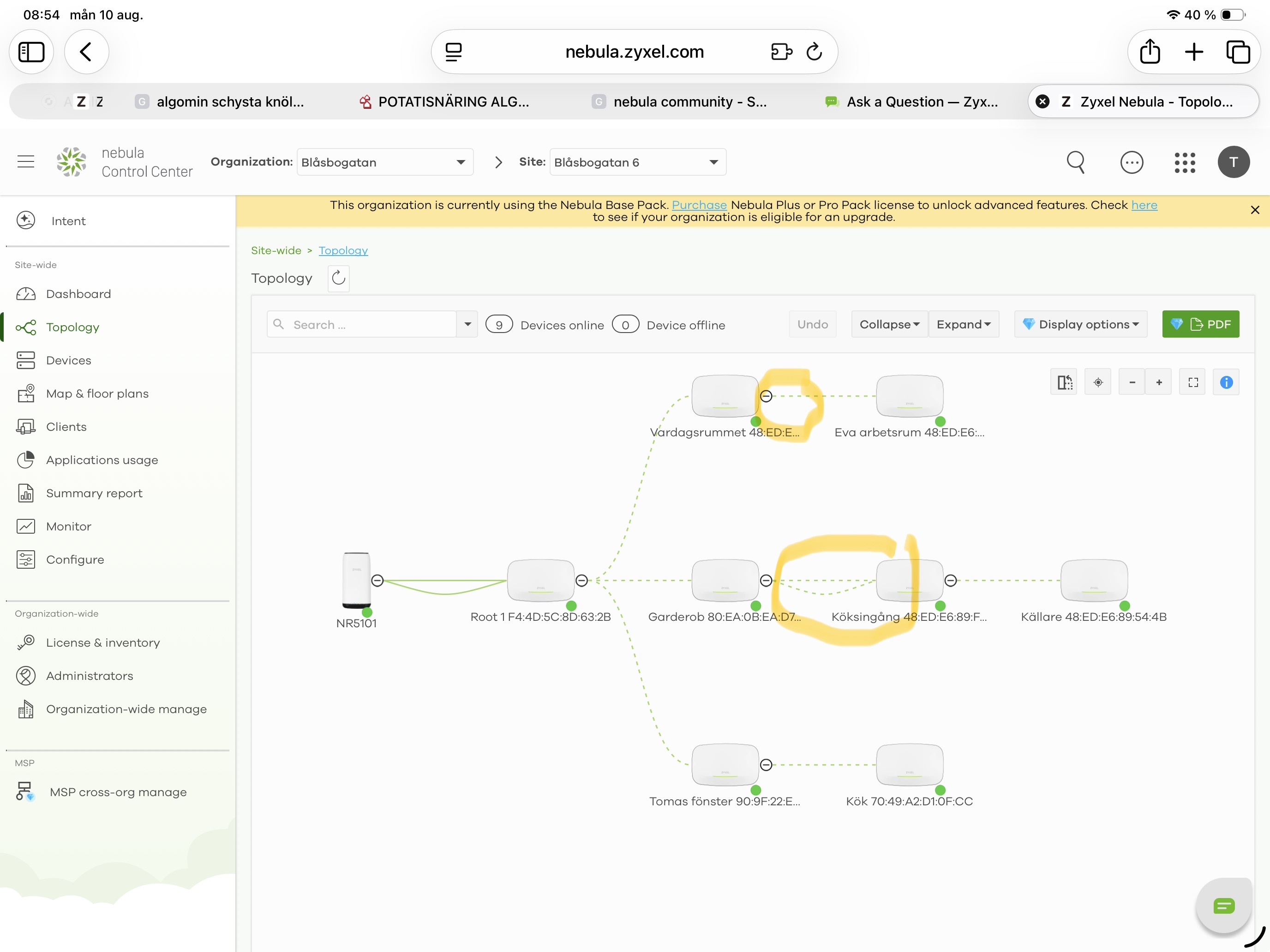
I have seen under the topology tab in Nebula two functions which I don’t know the mening of.
The minus sign after the ap - which can be switch to a plus sign
The straight line and also a curved line between two of the ap - but only these The others are only connected with straight line
see what I have circled.
can you please explain the function of these two or were I can read more
All Replies
-
Hi @saltet,
Regarding the "−/+" icon: This is a collapse/expand toggle for that branch of the topology tree. Clicking it lets you collapse a section of APs to simplify the view when the topology gets complex, and clicking "+" expands it back out. It's purely a display feature.
Regarding the straight line + curved line between two specific APs: We're still looking into this behavior and will follow up once we have more information.
Thanks for your patience!
Zyxel Tina
0 -
Thanks for the answer on my first question.
Looking forward to hear the answer on the second question.0 -
Hi @saltet,
Sorry for the late reply!
Regarding the two lines between those two APs, our team has resolved the issue and the fix has been deployed to Nebula. Please verify on your end and confirm that everything is now functioning as expected. Feel free to let us know if there are any further issues.
Zyxel Tina
0





 Zyxel Employee
Categories
- All Categories
- 442 Beta Program
- 3.1K Nebula
- 243 Nebula Ideas
- 6.8K Security
- 783 USG FLEX H Series
- 389 Security Ideas
- 1.8K Switch
- 87 Switch Ideas
- 1.5K Wireless
- 58 Wireless Ideas
- 7.2K Consumer Product
- 325 Service & License
- 527 News and Release
- 101 Security Advisories
- 31 Education Center
- 10 [Campaign] Zyxel Network Detective
- 5.3K FAQ
- 34 Documents
- 91 About Community
- 122 Security Highlight


