[NWA130BE] - NTP sync delayed

 Master Member



Hello,
I've an NWA130BE that use an internal NTP server.
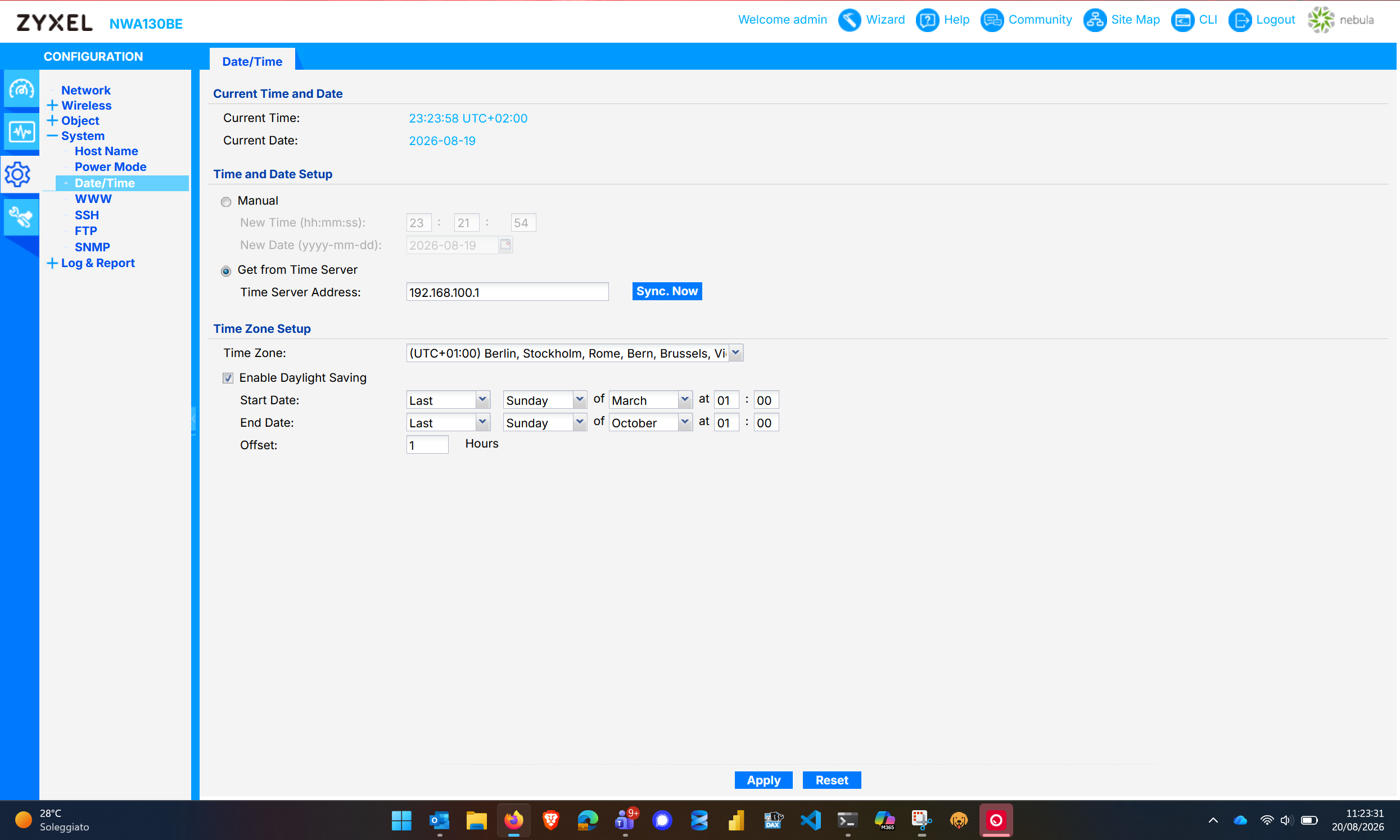
As per image, the current datetime is 20/08 @ 11:23AM instead the AP have 19/08 @ 23:23.
The uptime is more or less 3hrs
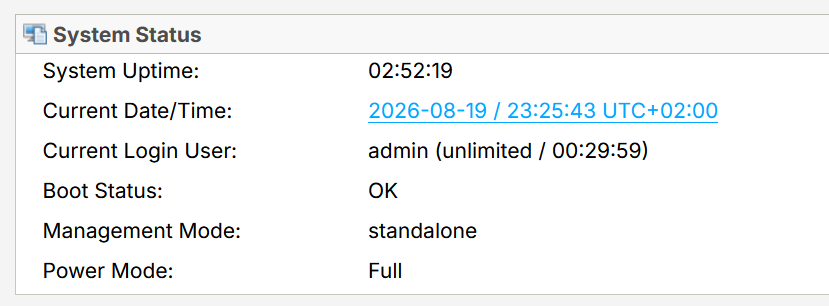
This is the System log after power up the AP:
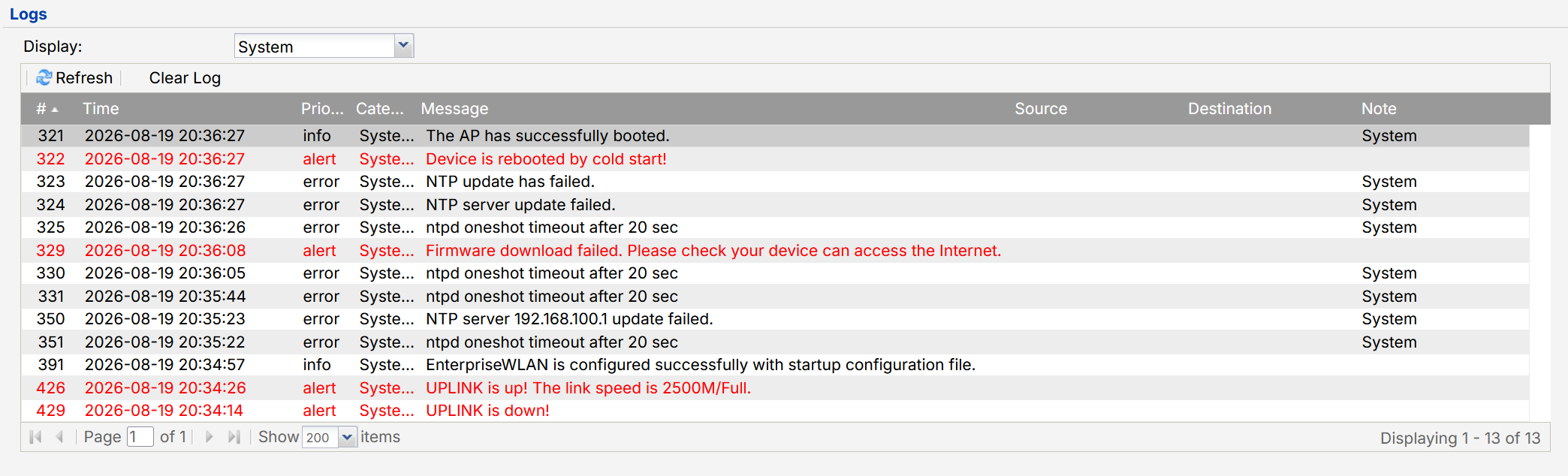
My network goes down in the night, and wake up on morning.
The problem is that the AP finishes booting before 192.168.100.1 is available, so NTP effectively fails to sync. The problem is that there don't seem to be any retries for the next 3 hours.
I've collected the information, if you would I'll send on PM.
Thank you
Accepted Solution
-
Hi @Maverick87 ,
Thank you for the detailed background and screenshots. They helped us better understand the behavior you observed.
When this issue was previously reported, we reviewed the implementation against our internal specifications and found that the continuous NTP retry behavior on a standalone AP did not match the intended design. A correction was therefore made so that the NTP behavior now follows the specification defined for each running mode.
The key point is that Standalone mode and Cloud-managed mode intentionally use different NTP retry mechanisms because their operational requirements are different.- Standalone AP
When an NTP synchronization cycle is triggered, the AP queries the configured NTP servers in sequence: Custom NTP Server → Public Server 1 → Public Server 2 → Public Server 3. If all servers fail during that synchronization cycle, the AP stops retrying and waits until the next scheduled NTP synchronization, which occurs approximately six hours later.
This behavior is intentional because a standalone AP can operate independently as a Layer 2 device and does not require continuous communication with a cloud management platform. In some standalone deployments, the AP may also be installed in a closed or isolated network where Internet access or external NTP services are intentionally unavailable. Continuously retrying NTP in such environments would provide little benefit while generating unnecessary traffic and repeated failure logs.- Cloud-Managed AP
A cloud-managed AP uses the same NTP server fallback sequence and scheduled synchronization interval. However, if synchronization fails, it continues retrying until the system time is successfully synchronized.
This difference is intentional because accurate system time is more critical in cloud-managed operation. Cloud connectivity, event timestamps, monitoring data, logging, and other cloud-related functions depend on the AP maintaining accurate time. Therefore, the device uses a more persistent retry mechanism to restore time synchronization as soon as possible.In summary, the different retry behaviors are not simply an implementation difference; they reflect the different operational requirements of the two running modes:
- Standalone mode: prioritizes independent operation and avoids unnecessary retries in environments where NTP connectivity may not be available.
- Cloud-managed mode: prioritizes timely recovery of time synchronization because cloud management and telemetry rely more heavily on accurate system time.
The continuous retry behavior previously observed in Standalone mode was therefore considered unintended behavior and was corrected to align with the designed specification.
That said, we understand that the previous behavior provided faster recovery when the NTP server became reachable again. We have recorded your feedback as a feature request for internal evaluation. If there are any changes to this behavior in the future, they will be announced through the Wireless News & Releases page.Zyxel_Judy
0 - Standalone AP

 Zyxel Employee



All Replies
-
This is when the AP start syncronization:
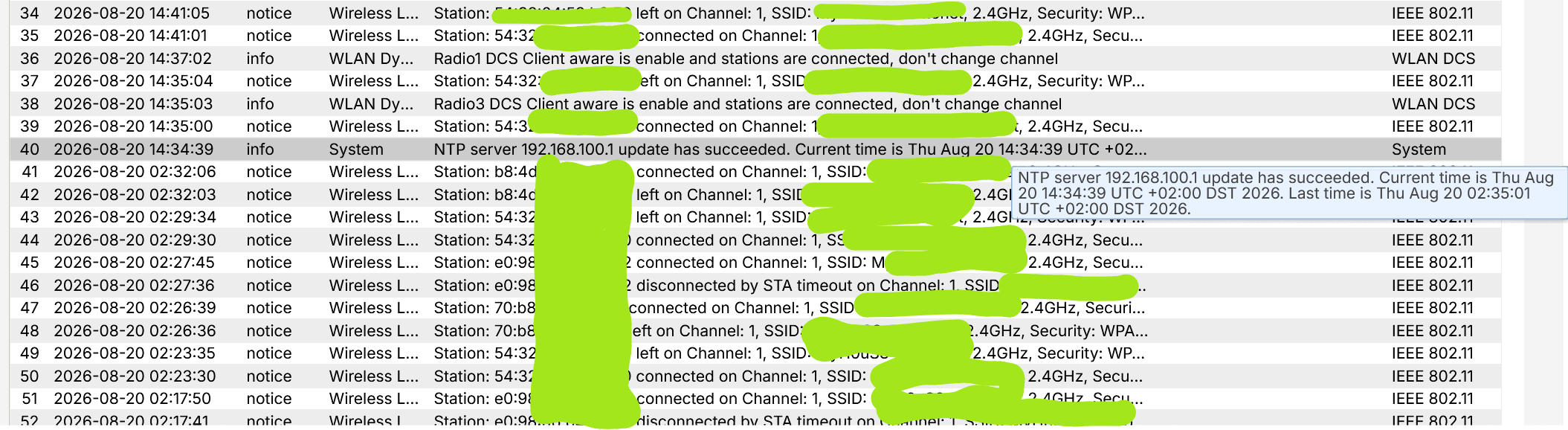
As you can see the system as "started" at 19/08 20:36 (8:36PM) and the sync was successfully completed at 20/08 02:35AM, so 6 hours after the system start-up.
So, if the NTP don't sync at first time, the system wait 6 hours to retry to sync.
I've collected the logs, as before if you would the log, ask me :)0 -
I blocked the NTP powered off the AP then on it kept time so either you power off your AP longer over night that time does not keep or you changed the time set back to NTP that not up yet for time to be wrong? or maybe the battery in your AP is not good to keep time moving when off?
0 -
Hi Peter,
No, I don't think so.192.168.100.1 is the firewall interface that also acts as an NTP server.
Probably, since when I shut down the infrastructure at night, I turn off everything (including the AP and firewall), the AP finishes booting before the firewall can distribute the precise time.
So the AP probably uses a default time (it's exactly the last time in UTC format — I've shutdown my network on 19/08 10:35PM UTC+2 Rome/Europe, in UTC 8:35PM) when it can't find the NTP server.
The problem is that the firewall then goes up and running, providing the correct time, but the AP doesn't resynchronize.0 -
Hi @Maverick87 ,
You experienced a 6-hour delay in NTP synchronization after the initial sync attempt failed. This is because on Standalone AP mode, if the device fails its initial NTP synchronization, it automatically retries every 6 hours — which explains the gap you observed between boot-up and the successful sync.
Since your setup relies on the firewall as the internal NTP server, and both devices power on together, the AP may boot faster and miss the NTP server on its first attempt. As a workaround, we'd recommend using a well-known public NTP server, so the AP has a reliable time source available even if the local firewall isn't fully up yet.
Zyxel_Judy
0 -
Hi @Zyxel_Judy,
I figured it was the 6-hour problem. What I don't understand is why a 6-hour timeout is used.
Isn't it possible to poll with a shorter time, and possibly increase it if it fails?0 -
Hi @Maverick87 ,
We'll raise this as a feature request to shorten the NTP sync retry interval or use another mechanism to sync the time of Standalone AP.
In the meantime, if you'd prefer not to rely on a public NTP server, a workaround is to wait until the firewall has fully booted up, then go to the AP's GUI's CONFIGURATION > System > Date/Time and click the "Sync Now" button to manually trigger the time sync.
Zyxel_Judy
0 -
Hi @Zyxel_Judy,
sorry but I understand the problem; an idea was already floated some time ago to exclude public IP addresses when setting up a local NTP.
But I didn't think that:- The retry would be every 6 hours;
- If the local NTP fails/times out, I don't know if NTP switches to public IP addresses.
In any case, it seems fairly normal to me (because it works that way on various Windows/Linux clients/servers) for shorter retries to occur, and normally, progressive retries are performed (1 min/2 min/5 min/10 min/30 min/1 hr/2 hrs, etc.).
The problem with correcting the 6 hours isn't a new feature; it's actually a bug and should be fixed.Also, I know how to resync the date/time, but obviously it is very inconvenient to do so.
0 -
Hi @Maverick87 ,
Could you share the reason you need accurate time on the Standalone AP — is it mainly for log viewing purposes?
To clarify: the 6-hour retry interval after an initial NTP sync failure at boot-up is our current spec, not a bug.
There's currently no roadmap to change this behavior; however, we'll continue to monitor feedback from other Standalone AP users in similar environments.
If you'd like the AP to sync NTP more frequently, you could consider adding it to the Nebula Control Center — in that mode, the AP will keep retrying NTP sync until it succeeds.
Zyxel_Judy
0 -
Hi @Zyxel_Judy,
sorry, but what response is it? For you it's normal that a device could not get the date/time, and the only plausible retry is only 6 hours later? If I set an internal NTP service, is because all devices are at the same clock standard.
It's for log but also for debug (know when a device are connected or disconnected), and is not normal to change the NTP on a public server or change from standalone to Nebula controlled only because, if the NTP not response, you arbitrary set a retry after 6 hours.
Sorry, but this is a bug, also because if I put an external NTP Service and the AP don't have internet at the time of sync, the next sync are 6 hrs later, also if I use an external NTP Service?
Before an internal NTP was used correctly, more frequent retries were performed.
The 6-hour problem arose now, after the change was requested to take the internal NTP.
Furthermore, there still appears to be no backup NTP if the internal one isn't responding.0 -
It does seem odd that Standalone behaviour is different to Nebula when it come to NTP retry and what to do on fail. Could the reason be not spam requests? but 6 hours does seem a long time to have to wait….that to me looks to be intended after sync succuss but then why are FLEX H doing sync every 65 seconds like time checking is more important on a USG then AP or switch?
1

 Guru Member



Categories
- All Categories
- 442 Beta Program
- 3.1K Nebula
- 237 Nebula Ideas
- 6.8K Security
- 746 USG FLEX H Series
- 377 Security Ideas
- 1.8K Switch
- 87 Switch Ideas
- 1.5K Wireless
- 58 Wireless Ideas
- 7.2K Consumer Product
- 319 Service & License
- 512 News and Release
- 99 Security Advisories
- 31 Education Center
- 10 [Campaign] Zyxel Network Detective
- 5.3K FAQ
- 34 Documents
- 90 About Community
- 119 Security Highlight


