[NWA130BE] - NTP sync delayed
All Replies
-
Thank you Peter
Anyway, I've opened a new idea:
0 -
Hi @Maverick87 ,
Thank you for the detailed explanation — that helps clarify the severity of this request. Accurate time for connect/disconnect logging and debugging is a valid and common use case.
To clarify our earlier reply: we're not disputing that this behavior needs improvement. Asking about your use case was meant to help us prioritize and frame this internally, not to downplay the impact.
We agree the current 6-hour fixed retry, without a shorter retry, isn't ideal. We do have backup NTP sources configured (time.apple.com → time.cloudflare.com → time.windows.com), but in your scenario, since the firewall hasn't finished booting and there's no internet access yet, these backup sources aren't reachable either — so they don't help in this case.
To sum up, we've already submitted your request, along with the scenario and reasoning, to our internal team for further discussion. In the meantime, if you'd like to keep your current setup, you can click the "Sync Now" button to manually trigger the time sync.
Zyxel_Judy
0 -
Hi @Zyxel_Judy,
Sorry if I wasn't able to explain myself clearly.
Thank you so much for submitting the new bugfix request already.And please, if you have any news about the fixing, tell me and keep me updated so I can maybe get the weekly update and try the new release.
Also, it appears this is actually a bug in the newly released feature.
For this reason, it shouldn't be resubmitted as a new feature for a vote, but rather simply fixed.Thank you
0 -
Hi @Maverick87 ,
For a standalone AP, Internet or NTP connectivity may not always be available. Based on this consideration, the current design uses a longer retry interval after an NTP synchronization failure. At this time, no change to the current retry behavior is planned.
We understand your concern regarding accurate system time for log review and troubleshooting, and we've noted the proposed fixed-interval and variable-interval retry mechanisms as feedback for future consideration.
By the way, we'd like to clarify: the option to use an internal NTP server on the network is not new to 7.40 — it's a feature that's been available for a while, and you had used it before as well. And the 6-hour retry behavior after a failed sync isn't a behavior tied to the 7.40 release specifically.
Zyxel_Judy
0 -
Hi @Zyxel_Judy,
Yes, I know, the problem I reported a while ago was that if a local NTP wasn't available at the time of the request, the AP would no longer retry the local one, but would retry information from a public NTP (effectively ignoring the manually entered NTP).
So, in the past, I opened a ticket because the AP wouldn't retry the local one. That said, when this problem arose, retries to public NTPs were more frequent (I think every 10/20 seconds).
And here some screenshot:
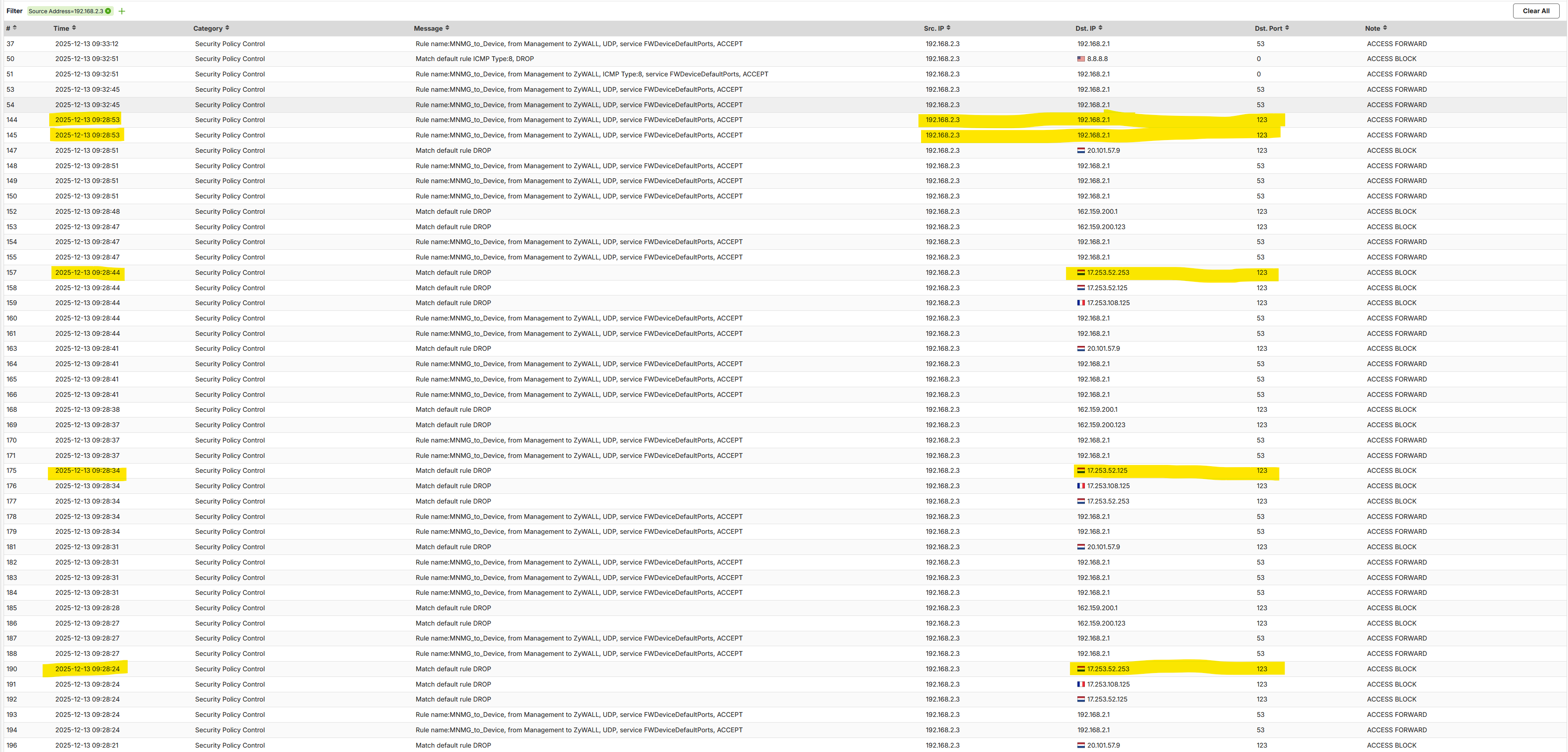
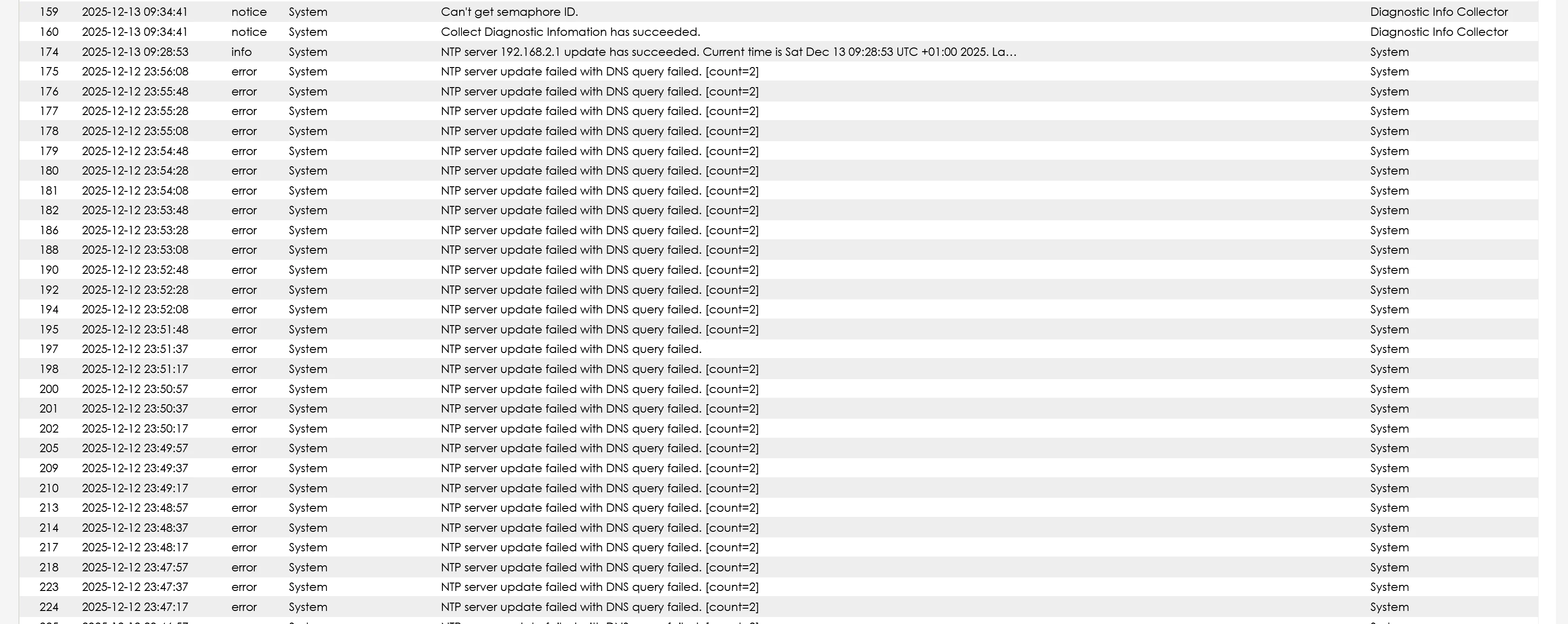
As you can see, the retry on public NTP server was around 10/20 seconds, also with different public server.
At the time, my request was to retry not only the public NTPs, but also the local NTP manually entered in the field (since after the first retry, it was ignored).
Now, this behavior has been fixed; the NTP used is exclusively the one entered in the form, but at the same time, the retry time in the event of a failure has been deliberately increased (there was never any mention of retry problems).
This is why I'm reporting it as a bug today and as something that should be fixed as soon as possible (I repeat, with the old firmware the retries were much closer together).
Thank you
0 -
Hi @Maverick87 ,
Thank you for the detailed background and screenshots. They helped us better understand the behavior you observed.
When this issue was previously reported, we reviewed the implementation against our internal specifications and found that the continuous NTP retry behavior on a standalone AP did not match the intended design. A correction was therefore made so that the NTP behavior now follows the specification defined for each running mode.
The key point is that Standalone mode and Cloud-managed mode intentionally use different NTP retry mechanisms because their operational requirements are different.- Standalone AP
When an NTP synchronization cycle is triggered, the AP queries the configured NTP servers in sequence: Custom NTP Server → Public Server 1 → Public Server 2 → Public Server 3. If all servers fail during that synchronization cycle, the AP stops retrying and waits until the next scheduled NTP synchronization, which occurs approximately six hours later.
This behavior is intentional because a standalone AP can operate independently as a Layer 2 device and does not require continuous communication with a cloud management platform. In some standalone deployments, the AP may also be installed in a closed or isolated network where Internet access or external NTP services are intentionally unavailable. Continuously retrying NTP in such environments would provide little benefit while generating unnecessary traffic and repeated failure logs.- Cloud-Managed AP
A cloud-managed AP uses the same NTP server fallback sequence and scheduled synchronization interval. However, if synchronization fails, it continues retrying until the system time is successfully synchronized.
This difference is intentional because accurate system time is more critical in cloud-managed operation. Cloud connectivity, event timestamps, monitoring data, logging, and other cloud-related functions depend on the AP maintaining accurate time. Therefore, the device uses a more persistent retry mechanism to restore time synchronization as soon as possible.In summary, the different retry behaviors are not simply an implementation difference; they reflect the different operational requirements of the two running modes:
- Standalone mode: prioritizes independent operation and avoids unnecessary retries in environments where NTP connectivity may not be available.
- Cloud-managed mode: prioritizes timely recovery of time synchronization because cloud management and telemetry rely more heavily on accurate system time.
The continuous retry behavior previously observed in Standalone mode was therefore considered unintended behavior and was corrected to align with the designed specification.
That said, we understand that the previous behavior provided faster recovery when the NTP server became reachable again. We have recorded your feedback as a feature request for internal evaluation. If there are any changes to this behavior in the future, they will be announced through the Wireless News & Releases page.Zyxel_Judy
0 - Standalone AP
-
Hi @Zyxel_Judy,
I understand your approach, but it's conceptually incorrect that an NTP can be synchronized every 6 hours if the mode is standalone.
In that case, the user is asked how often to retry (using an appropriate box in the form), or a flag is added to enable/disable NTP synchronization.
Do you want to synchronize the NTP?- Yes, enable the flag, specify the server, and enter the retry interval in seconds (or set a low retry interval).
- No, I'm in a closed or isolated environment, so the NTP isn't synchronized at all.
Keep in mind that running an NTP query, aside from log errors if it fails, doesn't require much resource usage.
In these cases, you need to be flexible, and you can't assume that standalone = isolated environment. I'm not in an isolated environment, and I preferred standalone mode because I'm not interested in syncing/managing the device in the cloud, but that doesn't mean a feature can be executed every 6 hours.Thank you
0 -
Hi @Zyxel_Judy i think that this clause
this difference is intentional because accurate system time is more critical in cloud-managed operation.
does not stand.
In standalone management of APs, NTP delivers not only time adjustment, but also date adjustment. I am aware of a internal battery into security products to keep date and time neverthless of power outage, I don't know if the same component is inside on APs.Date matters into WPA2 and WPA3 cypher algoritms
Time matters for schedules that also a "not good enough for SNMP" APs like NWA50AX Pro and NWA130BE have.A predictable and reliable NTP behaviour should is equally critical for both management options, because the schedule options from the management are reliable as much as time and date the AP can retrieve and apply.
1 -
Thank you so much for the detailed explanation @mMontana
0 -
Hi @mMontana ,
Thank you for sharing your perspective and for raising the scenario around scheduling features.
Our previous reply was meant to explain the current behavior and the design reasoning behind it — not to dismiss the concern. We agree that reliable date/time matters for schedule-based features on standalone APs, and we've recorded this as part of the feedback for internal evaluation, alongside @Maverick87's request.
One point of clarification: we don't believe date affects the WPA2 or WPA3 cipher algorithms themselves — encryption in both relies on session keys and per-packet counters/nonces, not on the system's date.
Zyxel_Judy
0





 Master Member




 Zyxel Employee



 Guru Member
Categories
- All Categories
- 442 Beta Program
- 3.1K Nebula
- 243 Nebula Ideas
- 6.8K Security
- 784 USG FLEX H Series
- 391 Security Ideas
- 1.8K Switch
- 88 Switch Ideas
- 1.5K Wireless
- 58 Wireless Ideas
- 7.3K Consumer Product
- 325 Service & License
- 528 News and Release
- 102 Security Advisories
- 31 Education Center
- 10 [Campaign] Zyxel Network Detective
- 5.4K FAQ
- 34 Documents
- 91 About Community
- 122 Security Highlight


