Feature Request: Assign and Change Port Profiles via Nebula Mobile App



 Freshman Member
Hi Zyxel Team,
we are using Zyxel Nebula Cloud as well as the Nebula Mobile App to manage our network infrastructure.
One feature we really like in Nebula is the possibility to create Switch Port Profiles and assign them to individual switch ports. This makes it much easier to centrally manage port settings such as VLAN configuration and other port-specific parameters, especially when the same configuration is used on multiple ports.
However, we noticed a limitation when using the Nebula Mobile App.
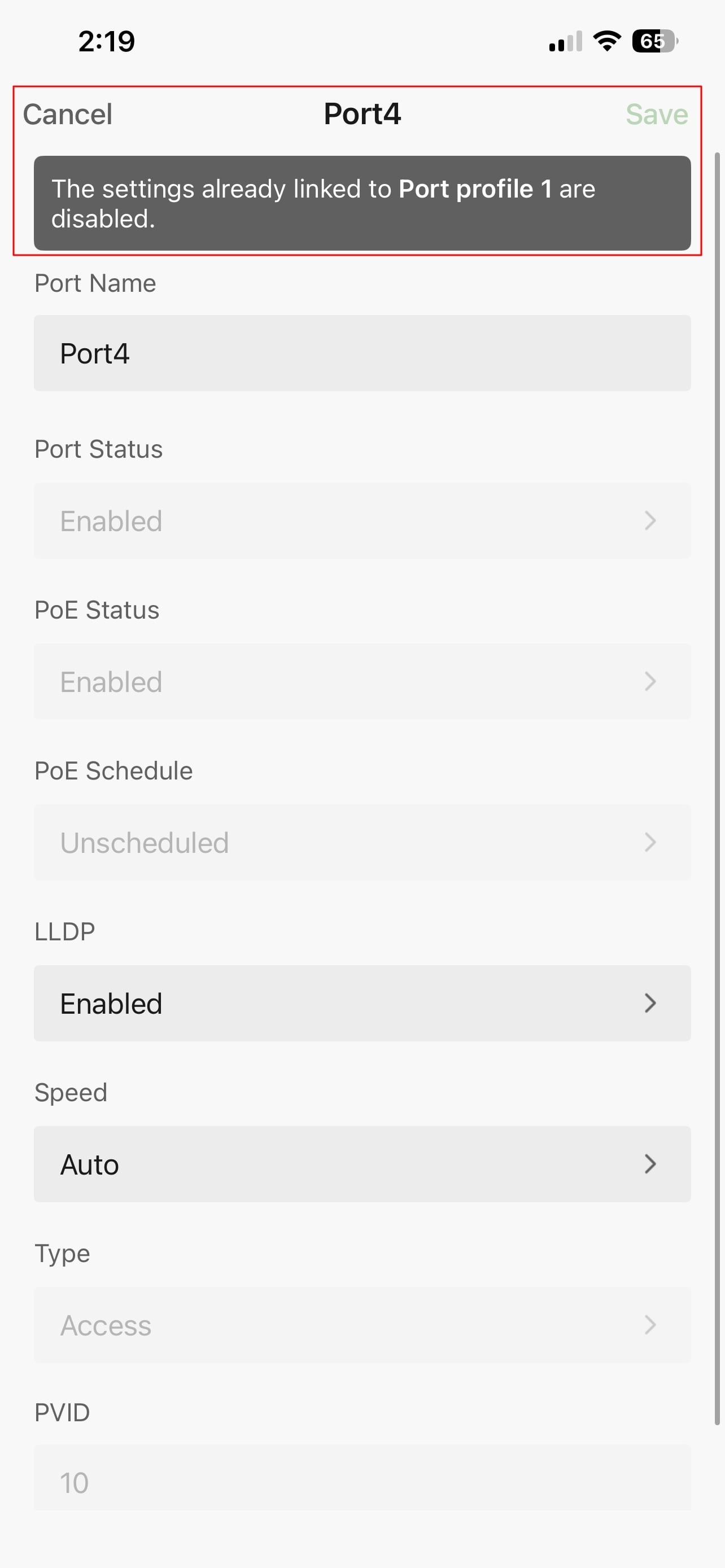
As soon as a switch port is managed through a Port Profile, it is no longer possible to change the Port Profile assigned to that port directly from the mobile app. This also means that, for example, the access/PVID VLAN of such a port cannot easily be changed while working on-site using only a smartphone.
Currently, this requires opening the full Nebula web interface instead.
It would therefore be very useful if the Nebula Mobile App could provide the option to:
- View the currently assigned Port Profile of a switch port
- Change or assign an existing Port Profile to a port
- Remove a Port Profile from a port if necessary
- Ideally, quickly change the port configuration/VLAN directly from the app where appropriate
This would significantly improve the usefulness of the Nebula Mobile App for technicians working on-site.
A typical scenario is that we are physically working at a switch, connecting or moving devices between ports, and need to quickly assign the correct predefined Port Profile. Having to open the full web interface for this relatively simple task makes the mobile app much less useful for switch configuration.
Since the Port Profile functionality itself is already available and works very well in Nebula, adding the ability to assign these profiles through the mobile app would be a very helpful improvement.
Would it be possible to add this functionality to a future version of the Nebula Mobile App?
Best regards
Stefan
Comments
-
Hi @demine ,
To better understand your feature request, could you clarify the following:
View the currently assigned Port Profile of a switch port
Do you mean something like clicking on a port and seeing which profile is applied to it, looks like this? Or is there something else you have in mind?
Ideally, quickly change the port configuration/VLAN directly from the app where appropriate
Do you mean that even when a port already has a Port Profile applied, you'd still like the ability to directly change its configuration/VLAN from the app?
Zyxel_Judy
0 -
Good morning,
yes, exactly. As shown in the screenshots, no port settings can be changed in the app once a port profile is active. The corresponding options are blocked by the assigned port profile.
As a result, when using port profiles in Nebula, it is currently no longer possible to manage VLAN settings or change the VLAN assignment of a port directly through the Nebula app.
Especially for changes while on the go, it would be very helpful if port profiles could also be selected and assigned to ports directly within the app.
Best regards,
Stefan0 -
Hi @demine ,
Thank you for your confirmation. We'll evaluate these requests, and if implemented, we'll announce it in the Switch News & Release section.
Zyxel_Judy
0





 Zyxel Employee
Categories
- All Categories
- 442 Beta Program
- 3.1K Nebula
- 242 Nebula Ideas
- 6.8K Security
- 777 USG FLEX H Series
- 387 Security Ideas
- 1.8K Switch
- 87 Switch Ideas
- 1.5K Wireless
- 58 Wireless Ideas
- 7.2K Consumer Product
- 324 Service & License
- 526 News and Release
- 101 Security Advisories
- 31 Education Center
- 10 [Campaign] Zyxel Network Detective
- 5.3K FAQ
- 34 Documents
- 91 About Community
- 121 Security Highlight


