cloud dns filter keeps blocking a site, doenst matter what i do on the PC or Firewall




 Freshman Member
Dieser Server konnte nicht nachweisen, dass es sich bei ihm um ast-systec.com handelt. Das Sicherheitszertifikat stammt von dnsft.cloud.zyxel.com. Dies kann auf eine Fehlkonfiguration zurückzuführen sein oder auf einen Angreifer, der Ihre Verbindung abfängt.
Accepted Solution
-
ok, update. apparently the site adds www in front of it after i typed it without it,(that was not really visible in the firewall logs) so add a * before the URL now did the trick. So i guess the firmware did resolve it.
0
All Replies
-
V1.38(ABZI.0)

Lastest Firmware
Disabled Rep, DNS and URL - makes no difference.
Added to allow list - no difference
flushed DNS on PC, tried different PC - no difference
flushed cache on FW/CMD - no difference
IP exception - no difference
With all them disabled - the block wont even show up in the Rep Filter Stats0 -
Hi @AMI
Did you flush DNS after change firewall setting? PC might cache the DNS resolution, which is direct to the firewall. Windows please use "ipconfig /flushdns"
Zyxel Melen0 -
All and everything, even a new pc that never accessed the site. ALSO i just noticed, on the FW itself, it shows 1.38 as latest firmware, but that is obviously not correct as its 1.39. So i try manual update now (Check now button does not show that there is a newer firmware)
noting that it actually sits on autoupdate but it did not do it!0 -
It looks like the Firmware Type is set to "Stable" under Nebula > Site-Wide > Firmware Management. This means the firmware won't update automatically if the current firmware version is stable version (1.38 currently), and it's also why manually clicking "Upgrade Now" isn't returning any available update.
We'd recommend changing the Firmware Type to "Latest" and running "Upgrade Now" again, so the firewall can update to the latest firmware version.
Zyxel_Judy
0 -
-
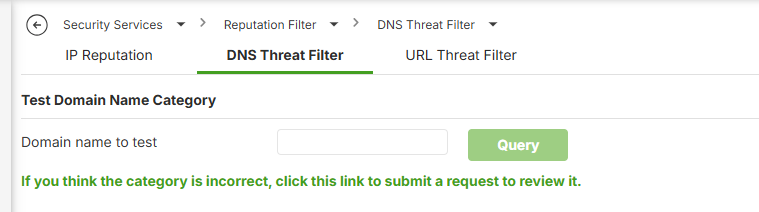
If you've already added the URL to the Allow List (Security Services > Reputation Filter > DNS Threat Filter) but are still unable to access the site, please download and share the diagnostic file so we can take a closer look.
Zyxel_Judy
0 -
see update
0 -
ok, update. apparently the site adds www in front of it after i typed it without it,(that was not really visible in the firewall logs) so add a * before the URL now did the trick. So i guess the firmware did resolve it.
0




 Zyxel Employee




Categories
- All Categories
- 442 Beta Program
- 3.1K Nebula
- 243 Nebula Ideas
- 6.8K Security
- 783 USG FLEX H Series
- 389 Security Ideas
- 1.8K Switch
- 87 Switch Ideas
- 1.5K Wireless
- 58 Wireless Ideas
- 7.2K Consumer Product
- 325 Service & License
- 527 News and Release
- 101 Security Advisories
- 31 Education Center
- 10 [Campaign] Zyxel Network Detective
- 5.3K FAQ
- 34 Documents
- 91 About Community
- 122 Security Highlight


