WAN connection issues after firmware update on USG lite-60AX



 Freshman Member
Hi all,
After an update to the latest firmware (V2.40 ACIP.0) the device seemed to have difficult reconnecting to WAN (required second reboot to re-establish connection) router is connected directly to ONT using Vlan 10 hasnt had this issue with previous updates.
This is also possible an issue with the ONT or cabling but would like to check if anyone else has had any similar issues.
All Replies
-
Hi @LukeArchbold ,
Thank you for reporting this issue.
At this point, we cannot yet determine whether the issue is caused by the firmware, the ONT, or the network cabling. The following checks should help narrow down the cause:
- WAN connection type: Under VLAN 10, is your WAN mode set to DHCP, Static IP, or PPPoE?
- Power-cycle both devices: Please restart the ONT and the router together. Some ONTs retain the previous session state, which can prevent a quick reconnection.
- Allow ONT negotiation time: Sometimes the ONT takes longer to respond or has not fully synced after a reboot, which can delay the WAN connection. Please wait 3–5 minutes after powering on the ONT before checking the connection status.
- Inspect cabling: Please re-seat or replace the Ethernet cable between the ONT and the router.
- Verify WAN VLAN settings: Please re-check the WAN VLAN configuration to confirm that VLAN 10 is still present after the update and that tagging is configured correctly.
If the issue occurs again, please provide us with the following details so we can assist you further:
- A simple network topology diagram.
- Enable Zyxel Support Access by following the FAQ below, and share your Organization and Site name with us:Nebula how to turn on zyxel support access
- If possible, when the issue occurs, please collect the diagnostic file according to this FAQ and send it to us via private message: How to collect diagnostic file on Security router USG LITE 60AX Local WEB GUI?
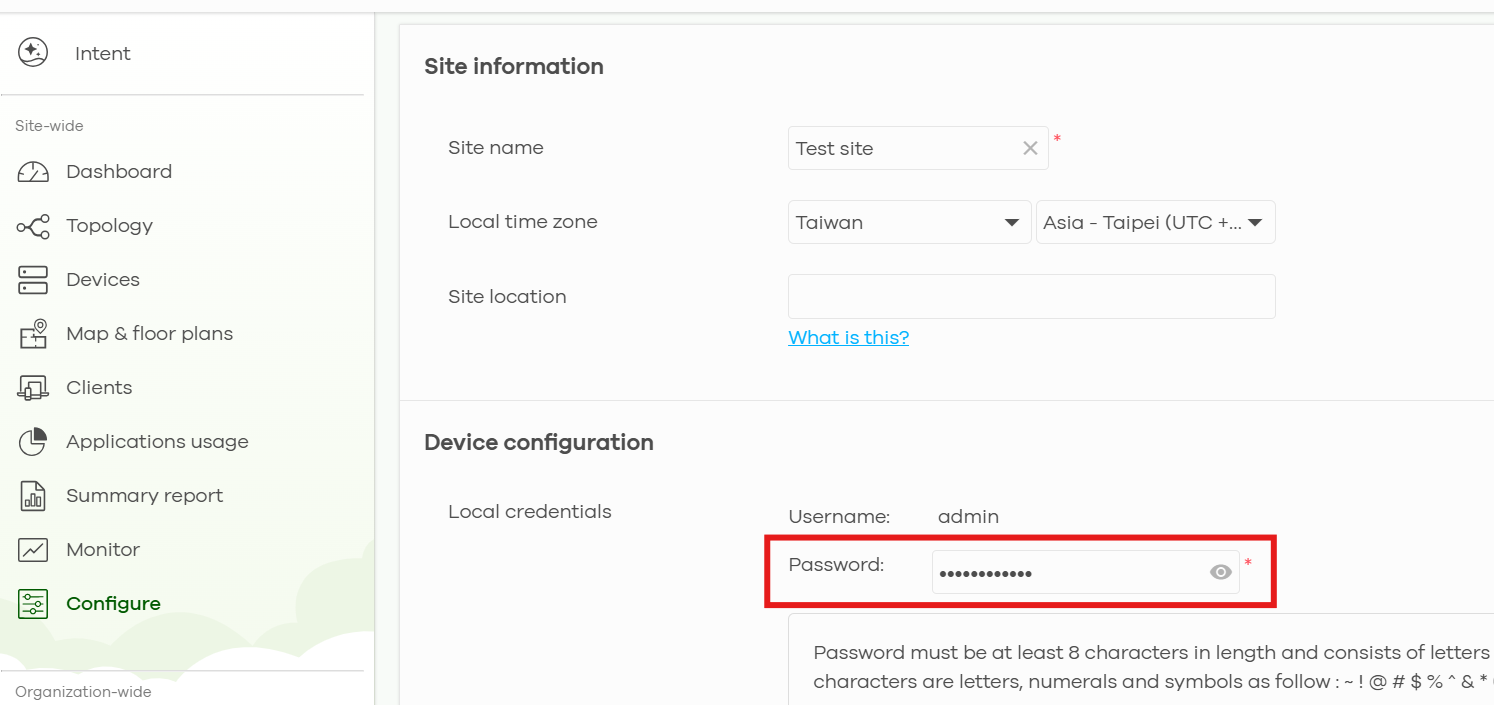
The local Web GUI "admin" account password can be found under Site-wide > Configure > Site settings.
 0
0


 Zyxel Employee
Categories
- All Categories
- 442 Beta Program
- 3.1K Nebula
- 243 Nebula Ideas
- 6.8K Security
- 783 USG FLEX H Series
- 389 Security Ideas
- 1.8K Switch
- 87 Switch Ideas
- 1.5K Wireless
- 58 Wireless Ideas
- 7.2K Consumer Product
- 325 Service & License
- 527 News and Release
- 101 Security Advisories
- 31 Education Center
- 10 [Campaign] Zyxel Network Detective
- 5.3K FAQ
- 34 Documents
- 91 About Community
- 122 Security Highlight


