Nebula - Content of the change notification




 Freshman Member
Hi,
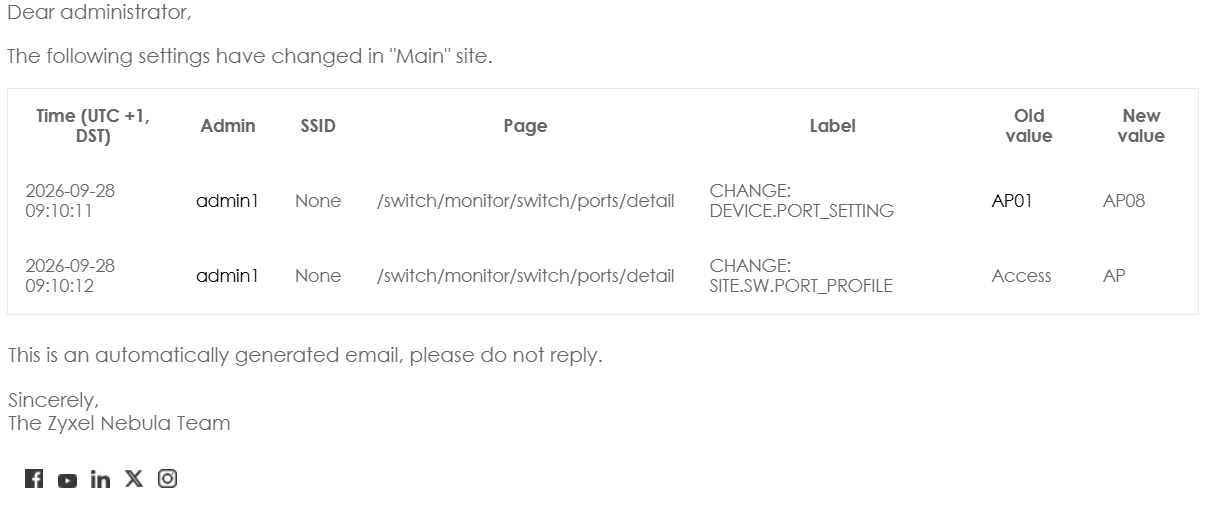
When I make a configuration change in Nebula, I receive an email notification with the details of the change (see picture below). This email contains the old and new values, as well as some useful details, but it does not indicate which device and port were changed. It would be very useful if the notification included the device name and port number. Without this information, the email is not very useful. Is there any option to include this information?
Thanks!
All Replies
-
Hi @nubira,
Thank you for your feedback.
Currently, the content of the configuration change notification email cannot be customized.
In Site-wide > Configure > Alert settings, you can only enable or disable this alert and set the recipients.
Thank you for sharing your feature request with us. We have forwarded your feedback as a feature request for future consideration. You can view and contribute to this idea in the following section:
Include device name and port number in Nebula configuration change email notifications
Thank you for using Zyxel products and service.
0 -
Hi @nubira,
This feature request has been shared with the responsible team. To assist them in evaluating and refining this requirement, could you please help clarify your actions at the following timestamps:
- What changes were made at 2026-09-28 09:10:11? (e.g., editing a port name or description)
- What changes were made at 2026-09-28 09:10:12? (e.g., changing the applied port profile)
Thank you for providing the additional information and for your continued support of Zyxel.
0


 Zyxel Employee
Categories
- All Categories
- 442 Beta Program
- 3.1K Nebula
- 242 Nebula Ideas
- 6.8K Security
- 777 USG FLEX H Series
- 387 Security Ideas
- 1.8K Switch
- 87 Switch Ideas
- 1.5K Wireless
- 58 Wireless Ideas
- 7.2K Consumer Product
- 324 Service & License
- 526 News and Release
- 101 Security Advisories
- 31 Education Center
- 10 [Campaign] Zyxel Network Detective
- 5.3K FAQ
- 34 Documents
- 91 About Community
- 121 Security Highlight


