Block unknown MAC address


 Freshman Member
I have added the MAC addresses of the only devices I want to allow to connect to my SSID and set them to Policy = Allow. The expectation is that only these devices will be allowed to connect but that is not the case. Any device can connect and will be assigned Policy = Normal. How do I set an SSID to reject all unknown MAC addresses?
All Replies
-
Hi @t0m,
Welcome to the Zyxel Community!
To help us better understand your use case and recommend a suitable solution, could you please share more details, such as your AP model, firmware version, and network topology?
In the meantime, based on your description, if you are referring to a Zyxel AP managed by Nebula, please note that the Allow policy in the Client list does not restrict network access. It is typically used to bypass captive portal authentication, while Normal means that no special policy is applied; therefore, clients can still connect to and access the network as usual.
To allow only specific devices to connect, you can configure MAC-based Authentication under Site-wide > Configure > Access points > SSID advanced settings. You can then use Nebula Cloud Authentication Server (NCAS) and register the authorized MAC addresses under Site-wide > Configure > Nebula Cloud Authentication Server in the Cloud Authentication database.
*Please note that this feature depends on the AP model. You can check compatibility under Help > Device Function Table in NCC.
Additionally, modern mobile devices and laptops often use randomized MAC addresses by default. If your allowed devices have this feature enabled, they may generate a new MAC address and lose connectivity. You will need to disable "Private Address" or "Randomized MAC" on each client device for their connection to the SSID.
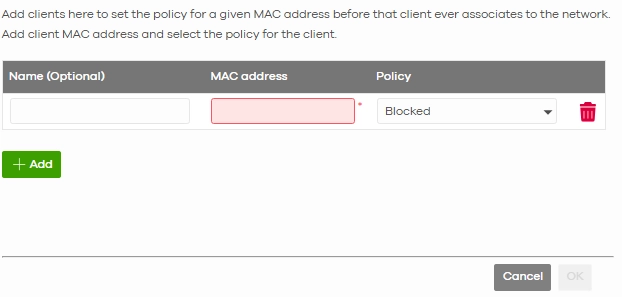
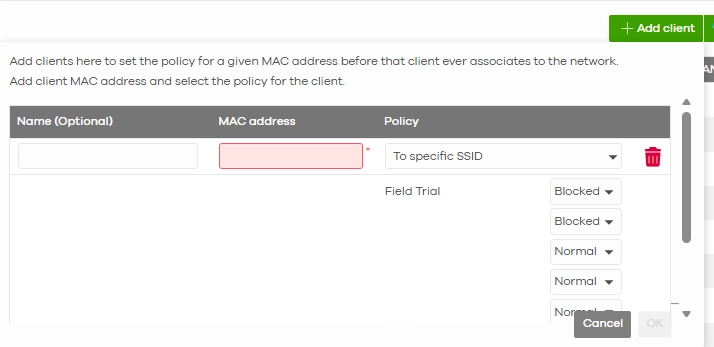
If your AP does not support MAC-based Authentication, you can still set known clients to Blocked in the Client list, either globally or for a specific SSID.
If the above options do not resolve your problem, please provide the details as requested. Thank you!
Zyxel Tina
0 -
We have NWA50BE access points which apparently don't support Nebula Cloud Authentication Server (the option is greyed out). How to we implement MAC address filtering?
0 -
Hi @t0m,
As the NWA50BE does not support the MAC-based auth feature, we suggest the following:
- Do not use an Open SSID
Set the security to WPA2-Personal or WPA3-Personal (WPA2/WPA3 mixed if you still have older devices), with a strong passphrase. Only devices that know the password will be able to join, and clients that are already connected without the new password will be disconnected. - Block the unknown MAC clients you have already identified (mentioned in the previous message)
In the Client list page, select the unknown client and add a policy rule set to Block. You can apply it to all SSIDs or only to a specific SSID.
Feel free to let us know if you need further assistance.
Zyxel Tina
0 - Do not use an Open SSID





 Zyxel Employee
Categories
- All Categories
- 442 Beta Program
- 3.1K Nebula
- 243 Nebula Ideas
- 6.8K Security
- 783 USG FLEX H Series
- 389 Security Ideas
- 1.8K Switch
- 87 Switch Ideas
- 1.5K Wireless
- 58 Wireless Ideas
- 7.2K Consumer Product
- 325 Service & License
- 527 News and Release
- 101 Security Advisories
- 31 Education Center
- 10 [Campaign] Zyxel Network Detective
- 5.3K FAQ
- 34 Documents
- 91 About Community
- 122 Security Highlight


