[NWA130BE] Since 7.20, iPhone 16 toggles between WiFi and Celluar
All Replies
-
Yes, but only occasionally. While it was happening multiple times a day before, it is reduced to a few times a week and therefore more difficult to spot and but I was able to capture some traces which I are not with Zyxel to being analysed.
0 -
TL;DR
On July 4, I captured the complete failure simultaneously on all radios of all my four NWA130BE access points and collected the corresponding diagnostics from the affected AP while the issue was still active.
Zyxel confirmed that the iPhone had already authenticated, associated and started Layer 3 communication. Their later switch MAC-table hypothesis does not explain this incident, because connectivity recovered by changing from the 6 GHz to the 5 GHz association link of the same physical AP. The Ethernet switch port did not change.
My analysis shows:
- severe AP-to-iPhone retransmissions on 6 GHz despite good signal,
- repeated AP-internal MLO/MLD/link-STA lookup errors,
- PMF SA Query timeouts and peer deletion,
- and controlled single-AP failures specifically when 6 GHz was used as the MLO association link.
6 GHz without MLO worked, 802.11ax without MLO worked, and MLO with 5 GHz as the association link worked.
Before rebooting the affected AP, 20/20 controlled 6 GHz MLO attempts failed. After reboot, 7/7 succeeded.
There is still no fix, but the evidence now points strongly toward a persistent AP-internal MLO peer-state, key-management or Wi-Fi driver problem rather than weak signal, a general iPhone compatibility issue, physical roaming or the external switch.
A detailed status update, as there is still no solution:
On July 4, I was finally able to capture the complete failure while it was active.
I started a simultaneous radiotap capture on all radio interfaces of all four NWA130BE access points. After approximately 30 seconds, while the failure was still present, I started diagnostic collection on the AP directly next to the iPhone.
Approximately ten seconds after diagnostic collection started, connectivity recovered. The radiotap capture continued until diagnostic collection was completed.
I therefore have both:
- a simultaneous four-AP wireless capture covering the failed and recovered states,
- and the corresponding diagnostic file from the affected AP.
Both files were provided to Zyxel.
Zyxel’s current interpretation
After reviewing the July 4 capture, Zyxel confirmed that the iPhone did not simply fail during basic Wi-Fi authentication or association.
Zyxel observed:
- protected wireless data frames,
- DHCP Request traffic,
- ARP traffic,
- and IPv6 Router Solicitation / Neighbor Solicitation packets from the iPhone.
Zyxel therefore concluded that the wireless link had already been established and that the iPhone had started Layer 3 network validation.
Their initial recommendations were:
- reset Network Settings on the iPhone,
- disable Wi-Fi Assist.
Wi-Fi Assist was already disabled, and resetting the iPhone’s network settings did not resolve the problem.
Zyxel subsequently suggested that the switch MAC address table might not be updated correctly after roaming, causing traffic to be forwarded to the wrong AP.
However, a detailed correlation of the July 4 capture and diagnostic data shows that this cannot explain the complete incident.
What actually happened on July 4
The affected iPhone successfully:
- authenticated on 6 GHz,
- associated with the AP,
- completed the full EAPOL four-way handshake,
- and was marked as connected and authorized.
Immediately afterwards, hostapd and the Wi-Fi driver repeatedly reported inconsistent MLO station state, including:
Partner STA already exist outside of MLlink-STA not found. Check MLO mac address list- failed lookups of the MLD address
- ignored TX status because the link STA was considered no longer associated
This was followed by PMF SA Query timeouts, deletion of the peer entries and a complete reconnect cycle.
Between 09:14 and 09:16 alone, the diagnostic contains:
- 25 completed four-way handshakes
- 25 SA Query timeouts
- 25
Partner STA already exist outside of MLmessages - 150
link-STA not foundmessages - 50 failed MLO STA lookups
- 50 ignored TX-status events because the station was considered not associated
This shows that basic SAE authentication and the EAPOL key handshake were initially successful. The AP’s MLO peer state became inconsistent afterwards.
Severe 6 GHz downlink failure
The radiotap capture also shows a highly directional failure on the 6 GHz link.
For AP-to-iPhone traffic:
- 1,410 out of 4,811 captured downlink data frames had the IEEE 802.11 Retry flag set.
- During several individual one-second intervals, more than 94–98% of the AP-to-iPhone frames were retransmissions.
- Signal strength was still good, approximately -40 to -55 dBm.
The client-to-AP direction remained sufficiently functional for the iPhone to repeatedly authenticate, associate and complete the EAPOL handshake. The AP-to-client direction, however, became severely impaired.
After recovery, the MLO connection was rebuilt using the 5 GHz radio of the same physical AP as the association link.
In the equivalent 5 GHz capture section:
- 502 AP-to-iPhone data frames were captured,
- no frames had the Retry flag set.
This is important for the switch hypothesis:
- The iPhone did not recover by moving to another physical AP.
- The Ethernet switch port did not change.
- It changed from the 6 GHz to the 5 GHz association link of the same NWA130BE.
- During the failure, it was also not possible to ping the management IP of the locally connected AP.
A stale MAC table in the external switch may theoretically cause a separate problem during physical AP-to-AP roaming, but it cannot explain the complete July 4 incident.
Controlled single-AP testing
I subsequently removed physical roaming from the test by enabling the SSID on only one NWA130BE.
With 2.4, 5 and 6 GHz available and an MLO connection using 6 GHz as the association link, I performed 20 controlled connection attempts.
The result was identical in all 20 attempts:
- 6 GHz authentication succeeded.
- Association was accepted.
- The AP transmitted EAPOL M1.
- The iPhone replied with M2.
- No subsequent M3 transmission from the AP was visible in the radiotap capture.
- The handshake timed out.
- The AP disconnected the iPhone with reason code 15.
- The iPhone then connected successfully through 5 GHz.
Results:
- 20/20 successful 6 GHz authentications
- 20/20 accepted associations
- 20/20 received M2 responses
- 0/20 observed M3 transmissions from the AP
- 20/20 handshake timeouts
- 20/20 successful subsequent 5 GHz connections
This demonstrates that physical roaming between two access points is not required to trigger the underlying fault.
Control tests
The following tests were successful:
- 6 GHz only with 802.11be, but without a negotiated MLO connection: 5/5 successful
- 6 GHz using 802.11ax, therefore without MLO: 6/6 successful
- MLO using 5 GHz as the association link: 6/6 successful
The fault therefore does not appear to be a general:
- 6 GHz radio problem
- WPA3 problem
- PMF problem
- weak-signal problem
- iPhone 6 GHz compatibility problem
- physical AP-to-AP roaming problem
It appears to be specifically associated with the path where an MLO connection uses 6 GHz as the association link.
Reboot result
Before rebooting the affected AP:
- 20/20 6 GHz MLO attempts failed
After rebooting the same AP:
- 7/7 6 GHz MLO connections succeeded
DCS selected a different 6 GHz channel after the reboot, so a channel-specific interaction cannot yet be completely excluded.
However, the immediate transition from 20/20 failures to 7/7 successes is consistent with the earlier real-world observation that rebooting the AP clears the problem. It strongly suggests a persistent AP-internal MLO, peer-table, key-management or driver state.
Current conclusion
Two different failure stages have now been captured:
- In the controlled test, the AP receives EAPOL M2 but no subsequent M3 transmission is visible.
- In the July 4 incident, the handshake completes, but the AP subsequently loses consistent mapping between the MLD and its link-STA entries. This leads to severe 6 GHz downlink retransmissions, failed MLO lookups and SA Query timeouts.
I cannot prove that both manifestations have exactly the same root cause.
However, both are restricted to the 6 GHz association-link/MLO path and both are consistent with an AP-internal MLO peer-state, key-management or Wi-Fi driver problem.
I have asked Zyxel to escalate the case to their Wi-Fi driver/MLO engineering team and to provide additional debug logging, specific diagnostic commands or a debug firmware build that can be used while the AP is in the failed state.
There is still no fix, but the available captures and controlled tests now narrow the problem down considerably.
2 -
I seem to have the same problem.
I have an NWA130BE. Various clients are connected, such as an iPhone, an iPad and two Android smartphones. All four devices lose their connection within a day. Strangely enough, the Wi-Fi connection icon is still displayed on the phones, but there is no longer any communication with the NWA130BE.
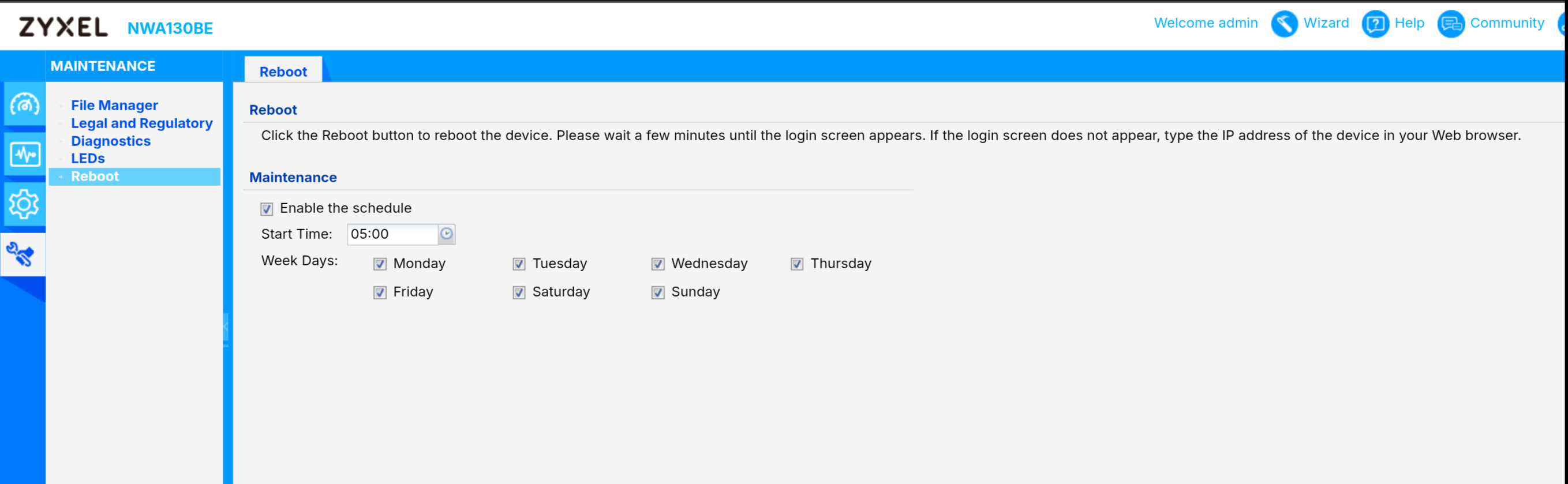
For now, I’m getting by by scheduling a reboot of the NWA130BE every day at 5 am. However, that’s not a good solution and it doesn’t always work reliably.As an experiment, I activated my older Wi-Fi access point (a Fritzbox) and left it running for a few days. This problem didn’t occur with that one. So it must be a problem with the NWA130BE!
Dear Zyxel Support, please fix the bug in the NWA130BE’s firmware.0 -
Still hitting this same issue on my NWA130BE, even on the latest firmware. Rebooting fixes it for me too, but I'm doing it manually whenever I notice the drop, not on a schedule.
@matradix could you share how you configured that? Scheduled reboot in the AP/controller settings, or a script/cron job via SSH? Would love to automate this until there's a proper fix.
@Flachzange Thanks for the detailed writeup, really helped confirm this isn't just me.
0 -
I manage my NWA130BE in standalone mode. This can be configured via the web interface:
 0
0 -
Instead of scheduling a daily reboot, please disable 6 GHz temporarily and observe if this is helping. Based on my analysis this should solve the problem permanently and if confirmed, it will help Zyxel narrowing down the issue.
0 -
I’ve switched off my 6GHz radio and the scheduled reboots, and I’m now testing this for a few days. We’ll see how it goes; I’ll let you know.
0 -
After testing it for a few days, I can confirm that no further problems have occurred since I disabled the 6GHz radio.
I hope this helps Zyxel to identify the fault and that it will be fixed soon – after all, I didn’t buy a tri-band device only to be able to use just two frequency bands. It’s very frustrating!
0 -
That's good to hear. On which Firmware-Version are you?
And if possible, can you do a reverse test by enabling 6 GHz again?0 -
It’s currently running firmware version 7.40. However, it was the same with firmware version 7.30, with all the patches applied. I can’t comment on earlier versions, as I haven’t had the NWA130BE for very long.
Now I’ll carry out the reverse test and switch the 6 GHz radio back on.
0




 Freshman Member

Categories
- All Categories
- 442 Beta Program
- 3.1K Nebula
- 242 Nebula Ideas
- 6.8K Security
- 762 USG FLEX H Series
- 384 Security Ideas
- 1.8K Switch
- 87 Switch Ideas
- 1.5K Wireless
- 58 Wireless Ideas
- 7.2K Consumer Product
- 323 Service & License
- 522 News and Release
- 100 Security Advisories
- 31 Education Center
- 10 [Campaign] Zyxel Network Detective
- 5.3K FAQ
- 34 Documents
- 91 About Community
- 120 Security Highlight


